Digital Acoustics IP7-SS20 Manual de usuario

IP7™-SS20
IP Paging Amplifier
Reference Manual

This page left blank

Table of Contents
Overview ........................................................................................1
Specifications .................................................................................2
IP7-SS20 Layout.............................................................................3
LED Indicators ................................................................................6
LEDs .............................................................................................. 6
LED Status Table ............................................................................. 6
LAN Connector LEDs......................................................................... 6
Connecting Power...........................................................................7
External Power ................................................................................ 7
USB Power...................................................................................... 7
Connecting a Speaker / Transformer..............................................7
SPKR 8Ω+ and SPKR 8Ω- .................................................................. 7
Speaker Configurations..................................................................... 7
25/70V Speaker(s) with optional 25/70V transformer............................ 7
8 Ohm Speaker(s) ........................................................................... 9
Connecting Line Out......................................................................10
Connecting an I2C Bus..................................................................10
Mounting Instructions ..................................................................10
Din Rail Mounting............................................................................10
Surface Mounting............................................................................10
Setting Volume Levels ..................................................................11
Software Configuration.................................................................11
IP Address .....................................................................................11
Options .........................................................................................11
Environmental ..............................................................................12
Troubleshooting............................................................................13
Reset to Factory Defaults .................................................................13
Connecting 1/8” (3.5mm) Audio Plug to the Pluggable connectors..........13
Reducing electrical noise in audio ......................................................13
Viewing tech support info via the USB port .........................................13
Low Level Flashing Utility .................................................................14
Contacting Technical Support .......................................................14
Email support:................................................................................14
Telephone Support:.........................................................................14
Regulatory Notices .......................................................................15
Index............................................................................................16
i

Overview
The Digital Acoustics IP7-SS20 is an IP (Internet Protocol) amplifier
that provide up to 20 watts of audio output. The SS20 is capable of
driving one or more speakers attached to a 25/70V audio distribution
line or an 8 ohm speaker.
Standard features include:
Drive one or more speakers for paging
applications
High quality audio up to 20 watts
Highly scalable and seamless expansion
DIN rail or surface mount
Fixed or DHCP compliant IP assignment
Auto sensing power from 24-32 VAC/VDC
Field upgradeable OS using internal Flash
memory
The IP7-SS20 must be configured using the TalkMaster software
before being used. Please consult the configuration section of the
software manual for details.
1

Specifications
Items Specification
Hardware Protocols TCP, UDP, RTP, ARP, ICMP, IGMP Multicast
Network Interface 10/100 Ethernet (Auto detection, Auto MDIX)
Command protocols Proprietary
Audio Rate 64kbs
Audio Resolution G.711 (8-bit PCM and 16-bit uLaw)
Audio Sample Rate 8 kHz (Voice band)
Audio Frequency 4000 Hz
Internal Amplifier 20 watts @ 8 Ohms
Humidity 10~90%
Power External Power 24-32 VAC/VDC @ 50 watts
nominal
Size 3.85. x 3.59 x 1.37 in
98 mm x 91mm x 35mm
2

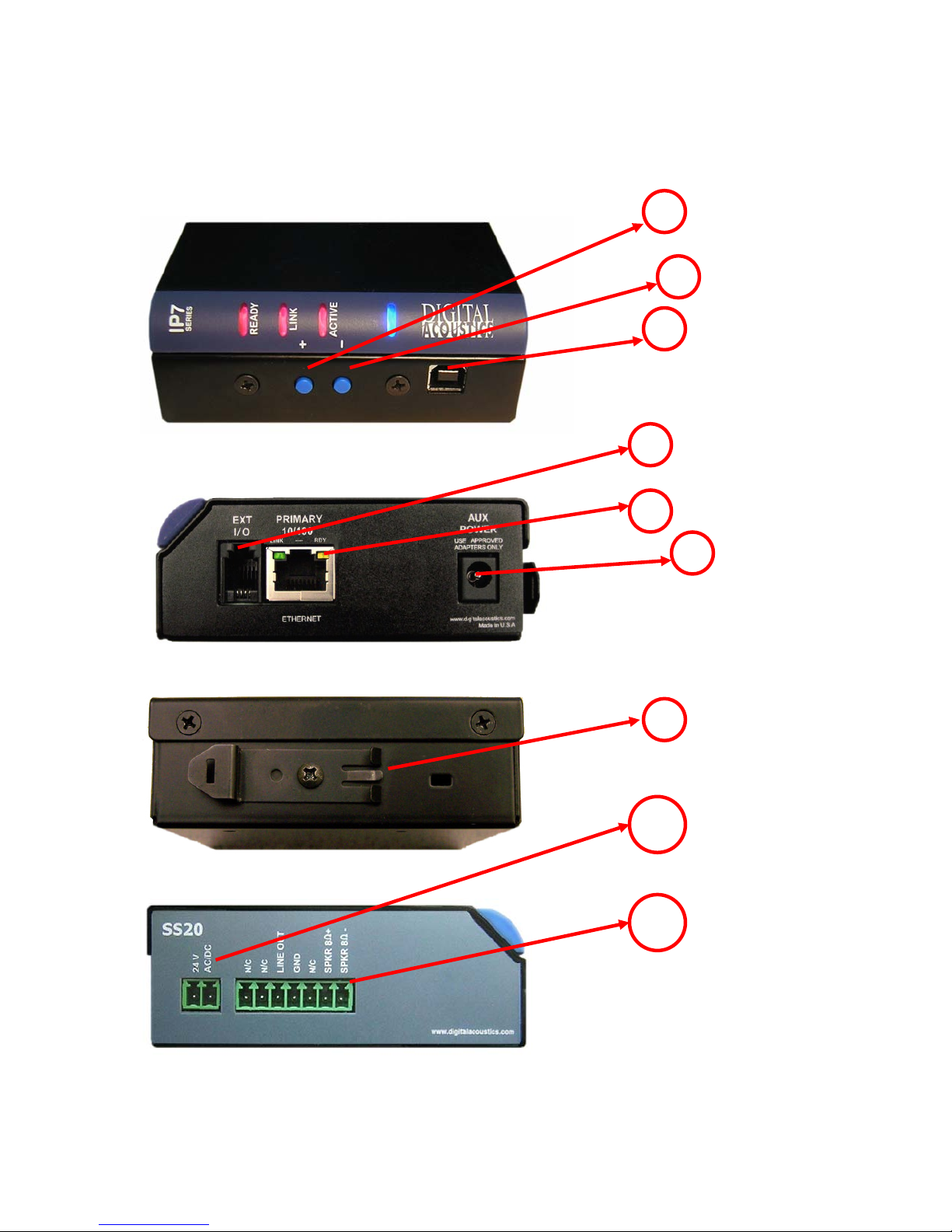
IP7-SS20 Layout
1
2
3
4
5
6
7
J1
J2
3

Connections and Controls
Refer to the preceding pictures.
Connector Connector / Control Notes
1 + Button Volume up button
2 - Button Volume down button
3 USB-B Provides for low level firmware flashing
as well as viewing technical support
information. Will also power the unit for
diagnostic purposes.
4 Ext I/O
I2C expansion bus interface that can be
used for custom applications. Requires
custom firmware from Digital Acoustics
5 Ethernet 10/100
10/100 Ethernet network interface.
Supports auto negotiation and auto-MDIX
6 Aux Power
2.1mm power connector with center tip
positive. 24-32 VAC/VDC
Warning: Connecting power to both the
2.1mm Power jack and the J1-1 and J1-2
power connectors at the same time will
damage the unit
7 DIN Rail Mounting Clip Allows unit to be snapped on to standard
35mm DIN Rail stock
4

There are two sets of pluggable DIN connectors (3.81mm centers) on
the SS20:
SS20 J1 Connector
SS20 J2 Connector
Connector Signal Notes
J1-1
Power +
J1-2 Power -
24 -32 VAC/VDC.
Warning: Connecting power to both the 2.1mm power
jack and the J1-1 and J1-2 power connectors at the
same time will damage the unit
Connector Signal Notes
J2-1 nc No Connection
J2-2 nc No Connection
J2-3 Line Out -10db with a 10k termination. Suitable for driving
headphones. Reference to J2-4
J2-4 GND System Ground
J2-5 nc No Connection
J2-6 SPKR 8Ω+
J2-7 SPKR 8Ω-
Floated differential output. Able to drive an 8 Ohm load
@ 20 watts or a 600 Ohm load
5

LED Indicators
LEDs
There are four LEDs present on the curved bezel on the front of the
product.
The blue LED indicates that the IP7-SS20 has powered up.
The three red LEDs indicate status of the unit.
LED Description
Ready Indicates whether the unit has connected to a Server
Link Indicates whether the unit has a valid network Connection
Active Indicates when audio is being received
LED Status Table
Description Ready Link Activity
Normal operational mode. Unit can
communicate with its Server
On On Off
Playing Audio On On Flashing
Playing Broadcast Audio Fast Flash On Flashing
Attempting to connect to make a
connection or unit has not been
configured
Flashing On
LAN connection is inactive. The RJ45 may
be unplugged
Flashing Off
Unit has been detected by the
Talkmaster Configuration Tool
Fast Flash On
LAN Connector LEDs
On the Ethernet 10/100 RJ-45 connector:
The Green LED tracks to the Ready LED
The Yellow LED tracks to the Link LED
Connecting to an Ethernet Network
The Ethernet 10/100 connector allows the unit to be attached to a
10/100 network.
6

Plug a Cat5 cable into the RJ-45 connector labeled Ethernet
10/100 and connect the other end to a 10/100 switch.
The Ethernet 10/100 connector supports auto “MDIX” and can
be plugged directly into a PC for diagnostic purposes.
Connecting Power
The IP7-SS20 auto senses the power source and voltage.
External Power
The 2.1mm Power Jack (center tip positive) accepts 24-32
VAC/VDC
The J1-1(+) and J1-2(-) connector accepts 24-32 VAC/VDC
DO NOT supply power to both the 2.1mm Power Jack and the
J1-1 and J1-2
USB Power
The USB connector can be used to power up the unit for diagnostics or
low level firmware flashing. Plug a USB cable from a PC into the USB-B
connector. The unit will power up, but will not be able to be used for
audio operations.
Connecting a Speaker / Transformer
SPKR 8Ω+ and SPKR 8Ω-
The Speaker connectors are designed to drive an 8 Ohm load.
Connect J2-6 and J2-7 to the speaker, transformer or amplifier
(polarity independent)
If the IP7-SS20 is connected to an amplifier, set the volume
level on IP7-SS20 to 4 or less
Speaker Configurations
The IP7-SS20 is designed to drive speakers attached to a 25/70V
distribution line (requires optional 25/70V Transformer) or an 8 Ohm.
One or more speakers can be driven by a single IP7-SS20. If more
that one speaker is connected to an IP7-SS20, all speakers will sound
when audio is sent to that SS20.
25/70V Speaker(s) with optional 25/70V transformer
The SS20 can drive one or more 25/70V Speakers or Horns when
equipped with an optional 25/70V transformer. This is the
recommended installation method when driving multiple speakers.
7
Otros manuales para IP7-SS20
1
Tabla de contenidos
Otros manuales de Amplificador de Digital Acoustics

Digital Acoustics
Digital Acoustics IP7-SS20 Manual de usuario

Digital Acoustics
Digital Acoustics IP7-SE8 Manual de usuario

Digital Acoustics
Digital Acoustics IP7-SS40 Manual de usuario

Digital Acoustics
Digital Acoustics IP7-FD Manual de usuario

Digital Acoustics
Digital Acoustics IP7-SE8 Manual de usuario