
Digi-Pas DWL-1900XY Manual de usuario

Digi-Pas®
USER MANUAL
2-Axis Vertical Precision Digital Level
Model: DWL-1900XY
www.digipas.com version 1.11
Note: Contents in this instruction manual are continuously updated, please check Digi-Pas website for the latest version.
Caution
Device is operable on vertical positions only

Digi-Pas®
© 2022 Digipas Technologies Inc. All Rights Reserved.
www.digipas.com
DWL-1900XY Instruction Manual
INTELLECTUAL PROPERTY
This manual contains propriety information, which is protected by copyrights. All rights are
reserved. No part of this manual may be photocopied, reproduced, redistributed or trans-
lated to another language without the prior written consent of Digipas Technologies Inc.
The information in this manual was correct at the time of printing, stored in CD or upload-
ed in the Company website. However, Digipas Technologies Inc. will continue to improve
products and reserves the rights to change specication and maintenance procedures at
any time without prior notice.
Digi-Pas ®Products were manufactured under ISO9001 & ISO14001 standards, tested to
comply by the followings certication bodies:
Cert : SG00/0050 Cert : SG04/00450 Cert : SG08/50066

Digi-Pas®
© 2022 Digipas Technologies Inc. All Rights Reserved.
www.digipas.com
DWL-1900XY Instruction Manual
CONTENTS
1. DEVICE OVERVIEW .................................................................................................................... 1
1.1. Technical Specication..................................................................................................... 1
1.2. Device Overview ............................................................................................................... 2
1.3. LED Display Overview ........................................................................................................ 2
1.4. List of items...........................................................................................................................3
2. OPERATION PROCEDURE ..........................................................................................................3
2.1. Switching Axis reading........................................................................................................3
2.2. Absolute Level mode .........................................................................................................3
2.3. Alternate zero mode ..........................................................................................................4
2.4. Turn Bluetooth on/off .........................................................................................................4
2.5. Calibration Mode................................................................................................................5
3. QUESTION AND ANSWER ...........................................................................................................7
4. WARRANTY
4.1. Limitation of Liability............................................................................................................8
5. FCC STATEMENTS. .......................................................................................................................8

Digi-Pas®
© 2022 Digipas Technologies Inc. All Rights Reserved.
www.digipas.com
DWL-1900XY Instruction Manual
1
1. DEVICE OVERVIEW
1.1. Technical Specication
Measuring Range 90.000° ~ ±5.000° (Dual-Axis)
Resolution 0.0002”/ft. or 5-second or 0.001°
Accuracy ±0.0004”/ft. or ±0.002° from 90° ~ 0.5°
±0.004° at other angles
Repeatability 0.0002”/ft. or 5-second
Measurement Speed ≤ 5 Sec.
Display Type LED
Power Supply*2 x AA 1.5V Batteries / USB
Connectivity Bluetooth (≤50 feet range)
Material PC ABS / Zinc Alloy with Magnet
Operating Temperature 10°F ~ 120°F or -10°C ~ +50°C
(Calibrated for the entire temperature range)
Storage Temperature -20°C to +60°C
Dimension (mm) 149 x 51 x 40
Nett Weight (Approximate) 500 gram
Table 1. Technical specication
Notes:
-Product specication and appearance are subject to change for product improvement without prior notice.
-*Alternative power can be obtained from External USB Power Source.
-Product performance to specication complies with accredited Calibration & Test Providers in USA, Japan, UK,
and Germany to conform with NIST, JIS, UKAS & DIN under the International Laboratory Accreditation Cooperation
(ILAC) and American Association for Laboratory Accreditation (A2LA). For more information, please visit “www.
digipas.com”.
Y Axis Positive Y Axis Negative X Axis Positive X Axis Negative
Figure 1. Axis Value of the Machinist Level

Digi-Pas®
© 2022 Digipas Technologies Inc. All Rights Reserved.
www.digipas.com
DWL-1900XY Instruction Manual
2
1. USB Port for alternate power supply
2. Zinc Alloy with magnet base
3. LED Display
4. ON/OFF button:
- Power On/Off
- Exit from “Absolute Level” mode
5. MODE button:
- Change measurement axis (X or Y)
- Press & Hold to turn on/off Bluetooth.
1. Bluetooth indicator
2. Calibration mode indicator
3. Degree unit indicator
4. Measurement value
5. Absolute Level mode indicator
6. Alt. Zero mode indicator
7. Y Axis direction indicator
8. X Axis direction indicator
Figure 2. Overview of the Machinist Level
6. Alternate Zero button:
- Press for Alternate Zero mode
- Press & hold for Absolute level mode
7. Battery cover screw
8. Battery cover
9. Calibration mode buttons (simultaneous
press)
1.2. Device Overview
1.3. LED Display overview
Figure 3. Machinist level display overview
“Alternate zero” Mode:
Enable user to measure relative angles at a common plane with respect to a reference angle. Set
any angle to 0.000 ° as a reference.

Digi-Pas®
© 2022 Digipas Technologies Inc. All Rights Reserved.
www.digipas.com
DWL-1900XY Instruction Manual
3
1.4. List of Items
Item No. Description Quantity
1 Smart Digital Machinist Level 1 Unit
2Certicate of calibration 1 Set
3 Quick Guide 1 pc
4 Machinist app redemption card 1 pc
5 Magnetic V-Pad 1 pc
Table 1. List of items
2. OPERATION PROCEDURE
Insert 2 pieces of ”AA” batteries into the battery compartment and press ON/OFF button.
Alternatively, insert USB power source to the USB Port to power up the de- vice. Take note
that the device performance might be affected when a poorly regulated USB power
source is used.
Please ensure batteries are inserted incorrect polarity direction for a device to work.
2.1. Switching Axis reading
To change display reading value from X to Y axis or vice versa, press “MODE” button, the
green arrow-head signs on left/right screen indicate X-axis measurement while top & bot-
tom arrow-head signs indicate Y-axis measurement.
ab
Figure 4. (a) Y Axis measurement direction, (b) X Axis measurement direction
2.2. Absolute Level mode
To operate in “Absolute Level” mode, press & hold “ALTERNATE ZERO” button
for ≥ 2 seconds, ABS icon (on top-left corner) & number “1” show up on LED display.

Digi-Pas®
© 2022 Digipas Technologies Inc. All Rights Reserved.
www.digipas.com
DWL-1900XY Instruction Manual
4
2.3. Alternate Zero mode
To operate in “Alternate Zero” mode, place device on the surface to be measured &
press “ALTERNATE ZERO” button, “ALT” icon show up on LED display and measurement
value should indicate 0.
To exit Alternate Zero mode, press “ALTERNATE ZERO” button once, ALT icon turns off.
Figure 5. Device display in Alternate zero mode
2.4. Turn Device Bluetooth on/off
To turn Bluetooth on/off user needs to press & hold “MODE” button until “BT” icon turns
off.
Figure 6. Bluetooth logo turn off on LED Display
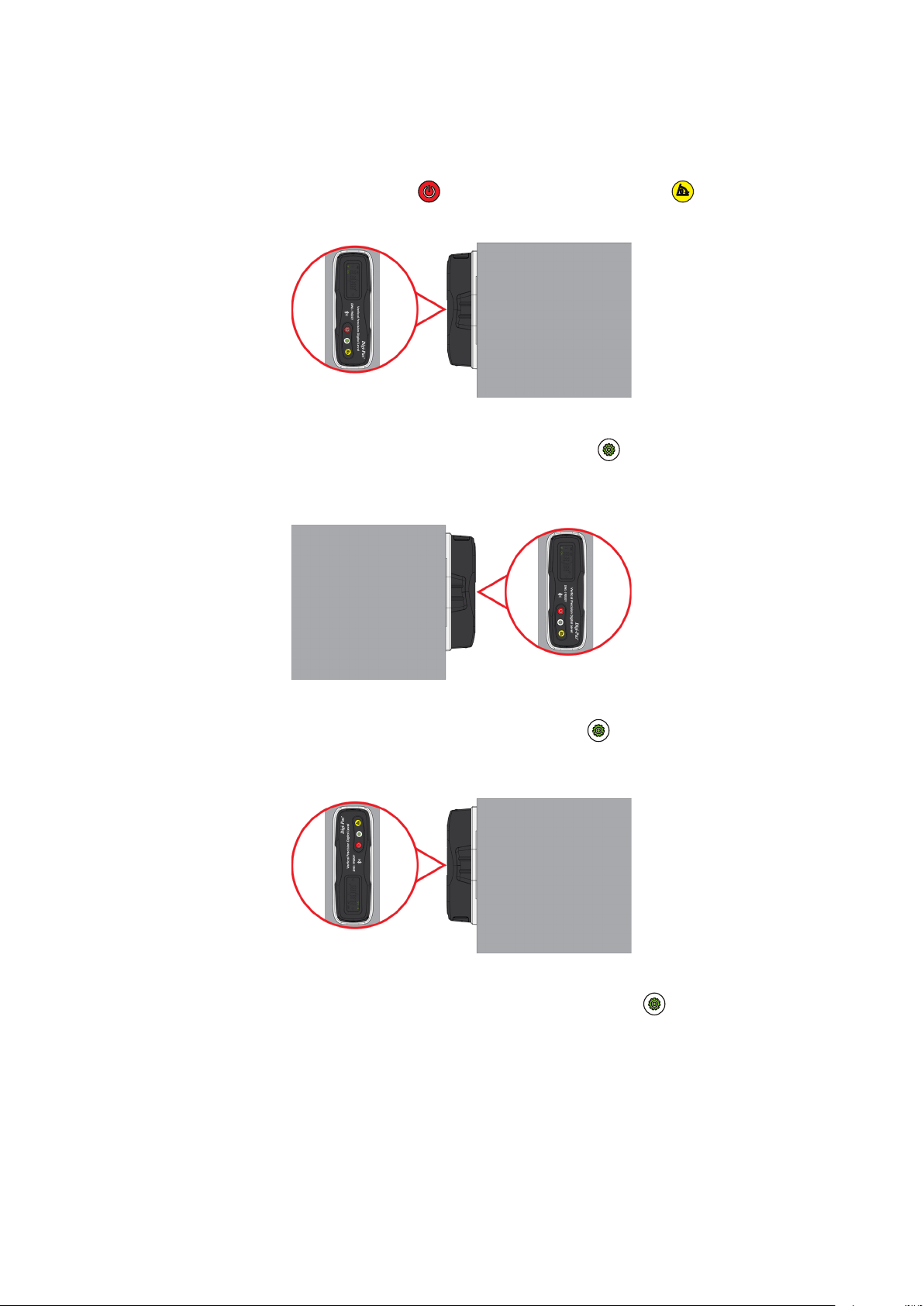
Place the device on the surface to be measured. Press
“MODE” button to start the measurement and wait
until countdown number reaches zero.
Please ensure the contact surfaces of the device and
measuring plane are clean and free from dust particles.
Next, the screen displays “2” turn the device 180° press
(reverse direction) and press “MODE” button to start
the measurement and wait until countdown reaches
zero.
Once completed step 1& 2, “ABS icon” on top left cor-
ner of display lights up to indicate that the device is in
Absolute Level mode.
To exit ABS Mode press “ON/OFF” button.
Digi-Pas®
© 2022 Digipas Technologies Inc. All Rights Reserved.
www.digipas.com
DWL-1900XY Instruction Manual
5
2.5. Calibration Mode
1. Turn Off device. Next, Press & Hold “ON/OFF” button & then “ALTERNATE ZERO”
button simultaneously, release both buttons when displays ashing “01”.
2. Place the device to position 1 (screen upward). Press “MODE” button once and
wait until countdown reaches “0”, LCD screen displays ashing “02”.
3. Place the device to position 2 (screen upward). Press “MODE” button once again
and wait until countdown reaches “0”, LCD screen displays ashing “03”.
4. Turn the device 180° (screen downward) to position 3. Press “MODE” button once
again and wait until countdown reaches “0”, LCD screen displays ashing “04”.
Figure 7. Position 1
Figure 8. Position 2
Figure 9. Position 3

Digi-Pas®
© 2022 Digipas Technologies Inc. All Rights Reserved.
www.digipas.com
DWL-1900XY Instruction Manual
6
5. Place the device to position 4 (screen downward). Press “MODE” button once
again and wait until countdown reaches “0”. LCD screen automatically switch to
measuring mode once calibration step 4 is completed.
6. Verify your calibration result by comparing the measurement value of current posi-
tion with the device after turning 180° (in reverse position). If displayed measurement
value differs >0.001°, the device has not been calibrated properly (e.g. surface
unevenness due to rough surfaces or dirt, etc.). Please put a device on smooth sur-
faces to re-calibrate again.
Figure 10. Position 4
Calibration tutorial video available on Digipas website, please visit the following link:
https://www.digipas.com/support/video.php

Digi-Pas®
© 2022 Digipas Technologies Inc. All Rights Reserved.
www.digipas.com
DWL-1900XY Instruction Manual
7
3. QUESTION AND ANSWER
Why device display value is not zero when placing on a at surface?
This situation happens when a precision level is placed on a rough, dirty or uneven sur-
face. Precision digital levels are very sensitive to surface unevenness where it is placed.
Ensure that contact surfaces are clean and smooth to get consistent readings.
Digi-Pas®precision digital level has a smart built-in feature that allows users to perform
self-calibration to completely remove any residue offset value and set the device to
its factory accuracy. See video links in www.digipas.com/1900xy-calibration on how
to perform “User-Self Calibration”. An alternative to perform self-calibration steps, users
may choose an easy ‘quick solution’ to simply perform the Absolute Level Setting on
the surface of the object to be measured to remove any residual offset on each meas-
urement to be taken.
1. Why do I get two different readings when placing the device on front facing, and then
replacing it on the reversed facing?
Your precision digital level may have been subjected to extreme physical or tempera-
ture shocks during usage, transportation or storage that affected its accuracy. An
offset value of reading may have been present in the device. Digi-Pas®precision digi-
tal level has a smart built-in feature that allows users to perform self-calibration to com-
pletely remove any residue offset in the device and set the device to its factory accu-
racy. See video links in www.digipas.com/1900xy-calibration how to perform “User-Self
Calibration”. An alternative to perform self-calibration steps, users may choose an
easy ‘quick solution’ to simply perform the Absolute Level Setting on the surface of the
object to be measured to remove any residual off-set on each measurement to be
taken.
2. Digipas Smart Levels App unable to pair with a device. What should I do?
Device battery level might be low, please replace 2 new batteries.
3. Digipas Smart Levels App is unable to nd device. What should I do?
Please ensure device Bluetooth is enabled to establish wireless connection. To enable/
disable Bluetooth connection, press and hold device’s MODE button.
Tabla de contenidos
Otros manuales de Nivel láser de Digi-Pas


