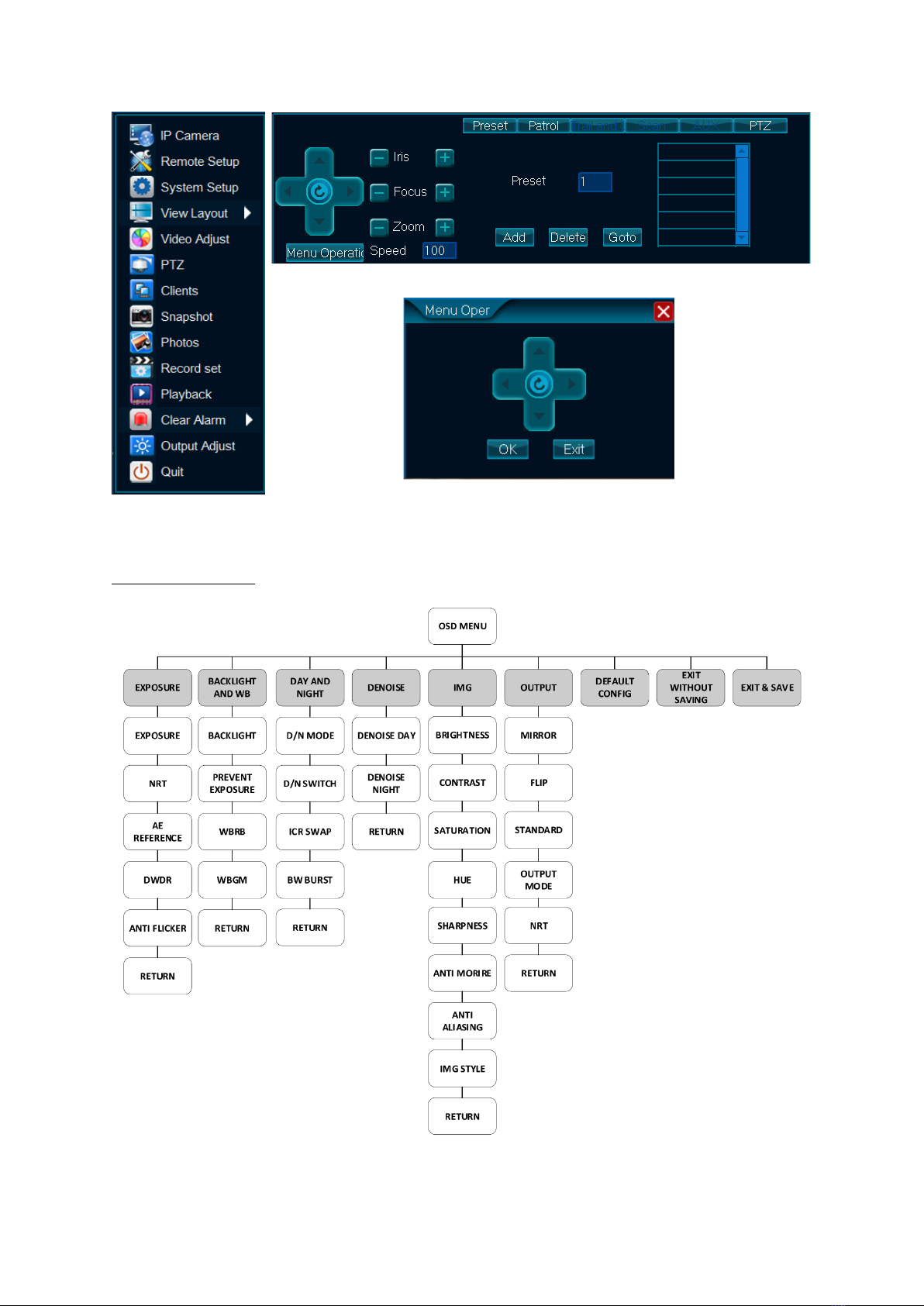
1. EXPOSURE
•EXPOSURE: AUTO,1/60, 1/100, 1/120, 1/500, 1/1k, 1/2k, 1/4k, 1/10k, 1/100k are selectable.
•NRT:NRT is OFF by default.
•AE REFERENCE: You can set the AE REFERENCE from 0 to 100.
•DWDR: You can set the DWDR value from 0 to 100.
•ANTI FLICKER: You can set the ANTI FLICKER as ON or OFF.
•RETURN: Select RETURN to the previous menu.
2. BACKLIGHT AND WB
•BACKLIGHT:You can configure the BACKLIGHT as OFF or value 1 to 3.
•PREVENT EXPOSURE:You can configure the PREVENT EXPOSURE as OFF or value 1 to 3.
•WBRB: You can set the WBRB value from 0 to 100.
•WBGM:You can set the WBGM value from 0 to 100.
•RETURN: Select RETURN to the previous menu.
3. DAY AND NIGHT
•D/N MODE:You can configure the D/N MODE as AUTO, DAY or NIGHT.
•D/N SWITCH: You can configure the D/N SWITCH value from 10 to 50.
•ICR SAP: You can set the ICR SWAP as ON or OFF.
•BW BURST: You can set the BW BURST as ON or OFF.
•RETURN: Select RETURN to the previous menu.
4. DENOISE
•DNOISE DAY:You can set the DNOISE DAY value from 0 to 5.
•DENOISE NIGHT:You can set the DENOISE NIGHT value from 0 to 5.
•RETURN: Select RETURN to the previous menu.
5. IMG
•BRIGHTNESS:Adjust BRIGHTNESS value from 0 to 100.
•CONTRAST:Adjust CONTRAST value from 0 to 100.
•SATURATION: Adjust SATURATION value from 0 to 100.
•HUE: Adjust HUE value from 0 to 100.
•SHARPNESS: Adjust SHARPNESS value from 0 to 100.
•ANTI MORIRE: Adjust ANTI MORIRE value from 0 to 100.
•ANTI ALIASING: Adjust ANTI ALIASING value from 0 to 100.
•IMG STYLE: You can adjust the IMG STYLE with predefined style preset from 1 to 3
•RETURN: Select RETURN to the previous menu
6. OUTPUT
•MIRROR: You can select MIRROR ON or OFF.
•FLIP: You can select FLIP ON or OFF.
•STANDARD: You can set Video STANDARD as NTSC or PAL. If you choose NTSC, Select APPLY
NOW to take effect and RETURN to previous menu. If you choose PAL, Select APPLY NOW to
take effect and RETURN to previous menu.
•OUTPUT MODE: You can select the OUTPUT MODE of this camera as AHD, CVI, TVI or CVBS.
When you select any of this mode, Select APPLY NOW to take effect. RETURN to the previous
menu.
•NRT: NRT is OFF by default.
•RETURN: Select RETURN to the previous menu
7. DEFAULT CONFIG
•DEFAULT CONFIG reset the camera to its default values.
8. EXIT WITHOUT SAVING
•EXIT WITHOUT SAVING exit the menu without saving the changes.
9. EXIT & SAVE
•EXIT & SAVE saves all the changes and exit the menu.