
Delta-T Devices DL6 Manual de usuario

User Manual
Soil Moisture
Logger Type DL6
DL6-UM-1.3
Delta-T Devices Ltd

Notices
Copyright
All rights reserved. Under the copyright laws, this manual may not be
copied, in whole or in part, without the written consent of Delta-T Devices
Ltd. Under the law, copying includes translation into another language.
Copyright © 2004 Delta-T Devices Limited
Trademarks
Windows is a registered trademark of Microsoft Corporation.
All other trademarks are acknowledged. Some names referred to are
registered trademarks.
Delta-T Devices Ltd reserves the right to change the designs and
specifications of its products at any time without prior notice.
CE conformity
See page 35
Author
Nick Webb
Versions
User Manual Version: 1.3 Nov 04
It is intended for use with the following:
Windows PC DL6 Control Panel software version 1.50,
Pocket DeltaLINK software version 1.50
DL6 logger serial numbers DL6 03-06 or later.
These latest versions add support for PR2 Profile Probes and the Pocket
PC.
Delta-T Devices Ltd Tel: +44 (0)1638 742922
128 Low Road, Burwell Fax: +44 (0)1638 743155
U.K. www: http://www.delta-t.co.uk

Contents
INTRODUCTION ............................................................4
HARDWARE INSTALLATION .......................................5
SOFTWARE .................................................................11
SPECIFICATIONS .......................................................28
MAINTENANCE, TROUBLESHOOTING, STORAGE .30
WARRANTY AND SERVICE .......................................33
INDEX...........................................................................36
DL6 User Manual v 1.3 Contents
z
3

Introduction
This manual describes how to use the DL6 Soil Moisture Logger.
What it measures
Up to six soil moisture sensors, plus one temperature and one rain gauge
reading can be recorded on 8 channels. Up to 16000 sets of readings can
be stored.
It can read various combinations of soil moisture sensors,
e.g. six ThetaProbe sensors (types ML1,ML2 & ML2x)
or one 6 channel Profile Probe (type PR2 or PR1)
or one 4 channel Profile Probe plus two ML2 sensors.
It can read one 2k thermistor temperature sensor and one tipping bucket
type rain gauge.
What it is used for
It can record soil moisture over a few hours, days or months.
It can signal low or high soil moisture or temperature via an alarm output.
It can be used to monitor the effectiveness of irrigation or rainfall.
A fast logging mode is provided to capture soil moisture changes and soil
wetting fronts following rainfall events.
Advantages
Easy to use PC and Pocket PC software.
Cost effective, optimised to work with Delta-T soil moisture sensors and
designed specifically to help soil moisture monitoring.
Weatherproof socket for PR2 Profile Probe cables simplifies connection.
What’s New?
This version of the DL6 adds support for PR2 Profile Probes and also
includes Pocket PC to simplify programming, inspection and data collection
in the field.
See also: Versions on page 2.
4
z
Introduction DL6 User Manual v 1.3

Hardware Installation
Unpacking
Your should have the following:
Part Sales Code Description
Logger DL6 Soil moisture
Logger with
battery, software,
RS-232 cable and
this manual
DL6 Software DL6-SW1 Windows software
on CD
Serial Cable DL6-RS232 4-way IP67
connector to 9 pin
D connector.
Length 2m.
Your consignment may also have some or all of the following
Mounting Kit DL6-
MKT1
1m stainless steel
post, mounting plate,
bolts, nuts, screws,
cable ties
Spares Kit DL6-SP Includes: fuse,
desiccant, battery
holder, cable glands,
bungs and O rings
Spare
alkaline
batteries
DL6-BAT 6 x AA alkaline cells *
Spare Lithium
batteries
BL6-ELB 6 x AA lithium cells *
* see Batteries on page 30.
DL6 User Manual v 1.3 Hardware Installation
z
5

Flashing LED
Tap the Logger - the LED should flash.
It will not flash or communicate if the battery is low or if a program is not
installed.
Logging Error Sequence Meaning
No No The logger is not logging.
There is no error.
Yes No The logger is logging.
There is no error.
No Yes The logger is not logging.
There is an error.
Yes Yes The logger is logging.
There is an error.
Note: The logger also flashes when it resets.
See: Reset the Logger on page 32.
6
z
Hardware Installation DL6 User Manual v 1.3

DL6 User Manual v 1.3DL6 User Manual v 1.3 Hardware Installation
z
7Hardware Installation
z
7
Layout

Connecting sensors
Warning: If using screw terminals strip 1cm of bare wire - less than this
risks making a poor contact.
Profile Probes
Profile Probe PR2/4 and PR2/6: Use the connector provided.
Do not connect any other sensors to channels 1-4 or 1-6 respectively.
Profile Probe PR1/6: Connect to channel 1, PROFILE and POWER
terminals according to the colours printed beside the terminals. Do not
connect any other soil moisture or voltage sensors to channels 1 to 6.
Profile Probe PR1/4: Connect to channel 1, PROFILE and POWER
terminals according to the colours printed beside the terminals. Connect
additional soil moisture or voltage sensors to channels 5 and 6 if required.
Do not connect other sensors to channels 1 to 4.
8
z
Hardware Installation DL6 User Manual v 1.3

ThetaProbe ML2, ML2x & ML1
Connect up to 6 ML2s to channels 1 to 6 and POWER terminals according
to the colours printed beside the terminals.
The diagram shows one ML2 connected to channel 1.
Other voltage sensors
Connect to channels 1 to 6 and POWER terminals as follows:
IN+ Signal HI
IN- Signal LO (see note *)
/// Braid or screen, if required
V+ Power V+, if required
0V Power 0V, if required
Note*: To avoid ground loops, connect Signal LO to /// if and only if the
sensor output is electrically isolated from both /// and OV.
DL6 User Manual v 1.3 Hardware Installation
z
9
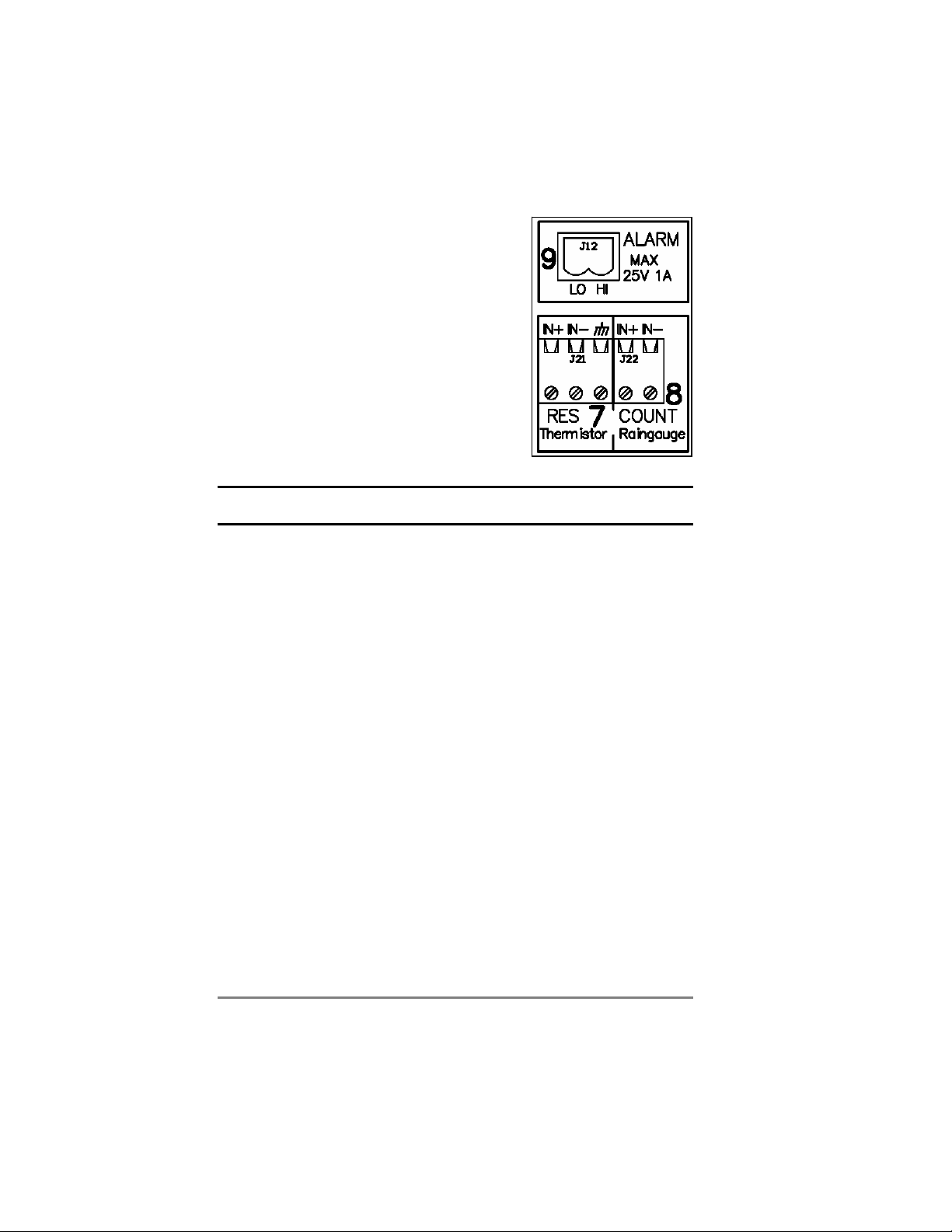
2k thermistor probes (e.g. ST1)
Connect to channel 7 IN+ and IN-. Connect any braid
or screen to the /// terminal if required
Resistance sensor
Connect to channel 7 IN+ and IN-. Connect any braid
or screen to the /// terminal if required.
Rain gauge (e.g. RG2)
Connect to channel 8 IN+ and IN- terminals. Connect
any braid or screen to the /// terminal (channel 7) if
required.
Pulse output sensor
Connect to channel 8 IN+ and IN-. Connect any braid
or screen to the /// terminal (channel 7) if required.
Alarm output
Connect to channel 9 HI and LO
Note: The alarm output switches only when the logger reads an analogue
sensor e.g. soil moisture or temperature.
10
z
DL6 User Manual v 1.3
Otros manuales para DL6
1
Tabla de contenidos
Otros manuales de Registrador de datos de Delta-T Devices


