HD2124 - 7 - V2.5
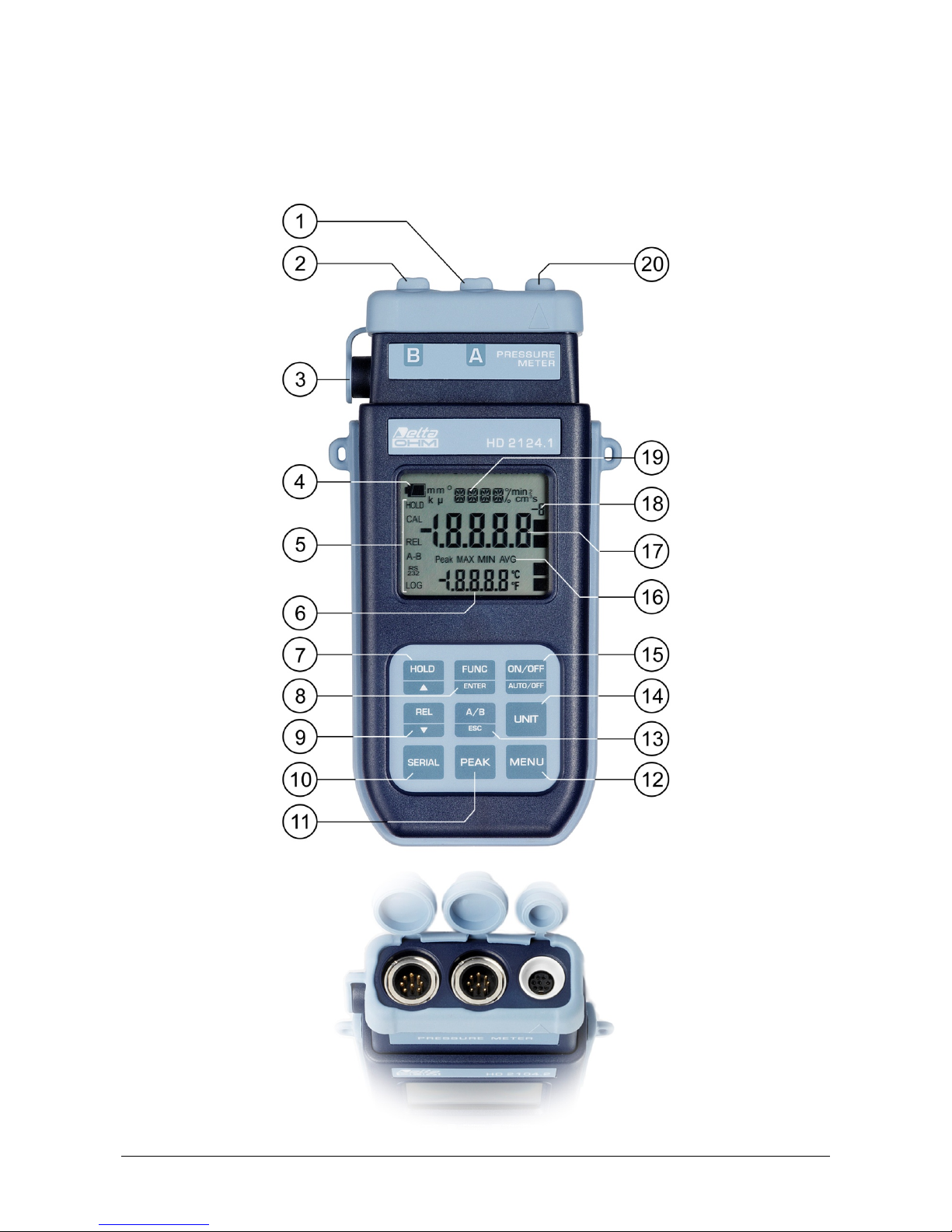
HD2124.2
1. Input A, 8-pole DIN45326 connector. It is possible to connect: the PP471 extension cable for
TP704 and TP705 pressure probes or a Pt100 temperature probe fitted with SICRAM module
or 4-wire Pt100 probe.
2. Input B, 8-pole DIN45326 connector. It is possible to connect: the PP471 extension cable for
TP704 and TP705 pressure probes or a Pt100 temperature probe fitted with SICRAM module
or 4-wire Pt100 probe.
3. External auxiliary power supply connector input.
4. Battery symbol: displays the battery charge level.
5. Functions indicators.
6. Secondary display line.
7. HOLD/key: freezes the measurement during normal operation; in the menu, increases the
current value.
8. FUNC/ENTER key: during normal operation displays the maximum (MAX), the minimum
(MIN) and the average (AVG) of current measurements; in the menu, confirms the current
selection.
9. REL/key: enables the relative measurement (displays the difference between the current
value and the logged value when the key is pressed); in the menu, decreases the current value.
10. SERIAL/ERASE LOG key: starts and ends the data transfer to the serial communication port.
In the menu, clears the data contained in the instrument's memory.
11. LOG/DUMP LOG key: during normal operation, starts and ends the saving of the data in the
internal memory; in the menu, starts the data transfer from the instrument's memory to the PC.
12. Mini-USB type B connector for USB 2.0. For the connection to PC (with cable CP23).
13. PEAK/MENU key: during normal operation, starts and ends the peak measurement. When
pressed together with the FUNC/ENTER key, allows access to the menu. To exit the menu,
press the key again.
14. A/B-ESC key: with two pressure probes connected to the A and B inputs, this displays the A
channel, the B channel and the A-B pressure difference in sequence. The measurement appears
on the main line. With two temperature probes, this displays the B channel or the A-B pressure
difference in the secondary line. In the menu cancels the operation in progress without making
changes.
15. UNIT key: selects the unit of measurement for the pressure.
16. ON-OFF/AUTO-OFF key: turns the instrument on and off; when pressed together with the
HOLD key, disables the automatic turn off.
17. MAX, MIN, AVG and Peak symbols: peak indicates that displayed value is the peak of the
current measurement; MAX, MIN and AVG that the displayed temperature or pressure values
are respectively the minimum, maximum or average value.
18. Main display line.
19. Multiplication factor -3, 3 or 6: the apex, if present, indicates that the displayed measurement
must be divided by 1000 (apex "-3"), multiplied by 1000 (apex "3") or by 1,000,000 (apex "6").
20. Line for symbols and comments.
21. 8-pole MiniDin connector for RS232C. For the connection to PC (with cable HD2110CSNM or
C206) or printer (with cable HD2110CSNM).