Deitz Pharmafill TC3 Manual de usuario

Model TC3 Electronic Counter
Operation Manual

Rev 2022-03-08 Pharmafill Model TC3 User Manual
Deitz Company Inc. TC3 User Manual Page I
CONTENTS
1. General Illustrations...................................................................................pgs II thru XI
2. Safety Reminder.............................................................................................................1
3. Introduction....................................................................................................................2
4. Specifications.................................................................................................................4
5. Installation and Commissioning
5.1. Unpacking ..........................................................................................................5
5.2. Connect Electric, Compressed Air and Blower Air ............................................6
5.3. Systems Check ....................................................................................................8
6. General Information
6.1. Standard Features And Capabilities....................................................................9
7. Controls
7.1. Control Panel Components................................................................................11
7.2. Operator Interface Display Panel (HMI) - Overview........................................13
7.3. Run Mode..........................................................................................................14
7.4. Speed Ajustment................................................................................................16
7.5. Menu 1. Adjust Settings....................................................................................17
7.6. Menu 2. Fill One ...............................................................................................19
7.7. Menu 3. Index One............................................................................................21
7.8. Menu 4. Half-step Index....................................................................................22
7.9. Menu 5. Check Count........................................................................................23
7.10. Menu 6. Technician Only..................................................................................25
7.11. Counting Sensor................................................................................................27
8. Counting and Filling
8.1. Product Guide Adjustments...............................................................................29
8.2. Bottle Gating Cylinder Positioning...................................................................33
8.3. Bottle Sensor Positioning..................................................................................35
8.4. Testing To Establish Parameters.......................................................................36
8.5. First - Use Check Count Mode..........................................................................36
8.6. Second - Use Fill One Mode.............................................................................36
8.7. Last - Use Run Mode.........................................................................................36
8.8. Summary ...........................................................................................................37
9. Breakdown, Cleaning and Buildup
9.1. Breakdown of Remove-To-Clean Contact Parts (Summary)............................38
9.2. Breakdown of Remove-To-Clean Contact Parts (Illustrated)...........................40
9.3. Buildup of Remove-To-Clean Contact Parts (Summary) .................................47
9.4. Clean-In-Place Contact Areas ...........................................................................49
9.5. Cleaning Non-Contact Areas.............................................................................49
9.6. Cleaning Recommendations..............................................................................49
10. Technical Information
10.1. Principle of Operation.......................................................................................51
10.2. Cycle of Operation ............................................................................................52
10.3. Troubleshooting.................................................................................................53
10.4. Index of Technical Notes/Drawings..................................................................55
(Technical Notes/Drawings Begin After Last Page)

Rev 2022-03-08 Pharmafill Model TC3 User Manual
Deitz Company Inc. TC3 User Manual Page II
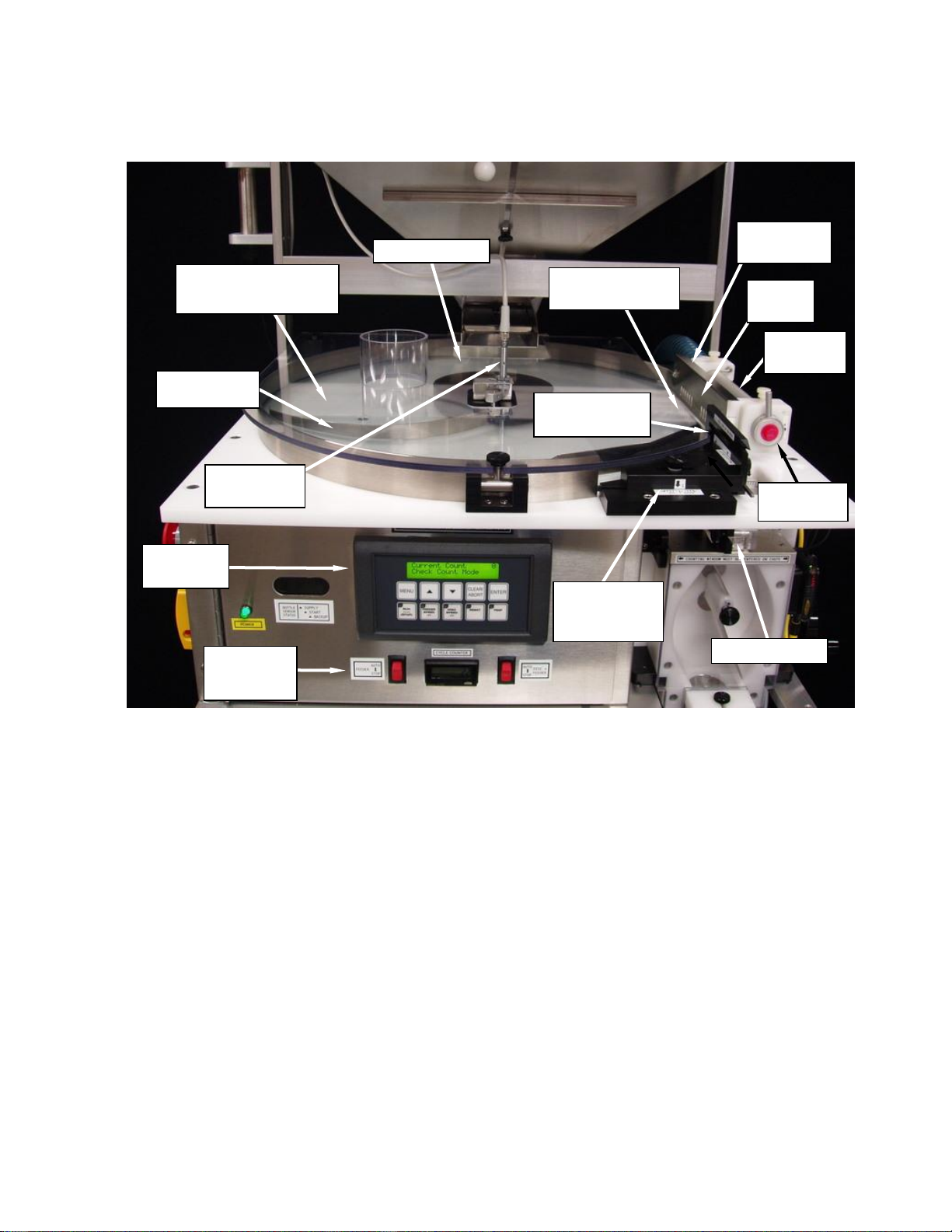
Section 1 - GENERAL ILLUSTRATIONS
1.1 - Front View
CONTROL
PANEL
AUTO-FEED
SENSOR
CABLE
DUST
COVER
HOLDER
PRODUCT
GUIDES
AIR
MANIFOLD
SUPPLY
SENSOR
BACKUP
SENSOR
START
SENSOR
RIM
BAND
RIM
DUST
COVER
GATING CYLINDERS
HOPPER
HOPPER
DOOR
STACK LIGHT
COUNTING
HEAD
Rev 2022-03-08 Pharmafill Model TC3 User Manual
Deitz Company Inc. TC3 User Manual Page III
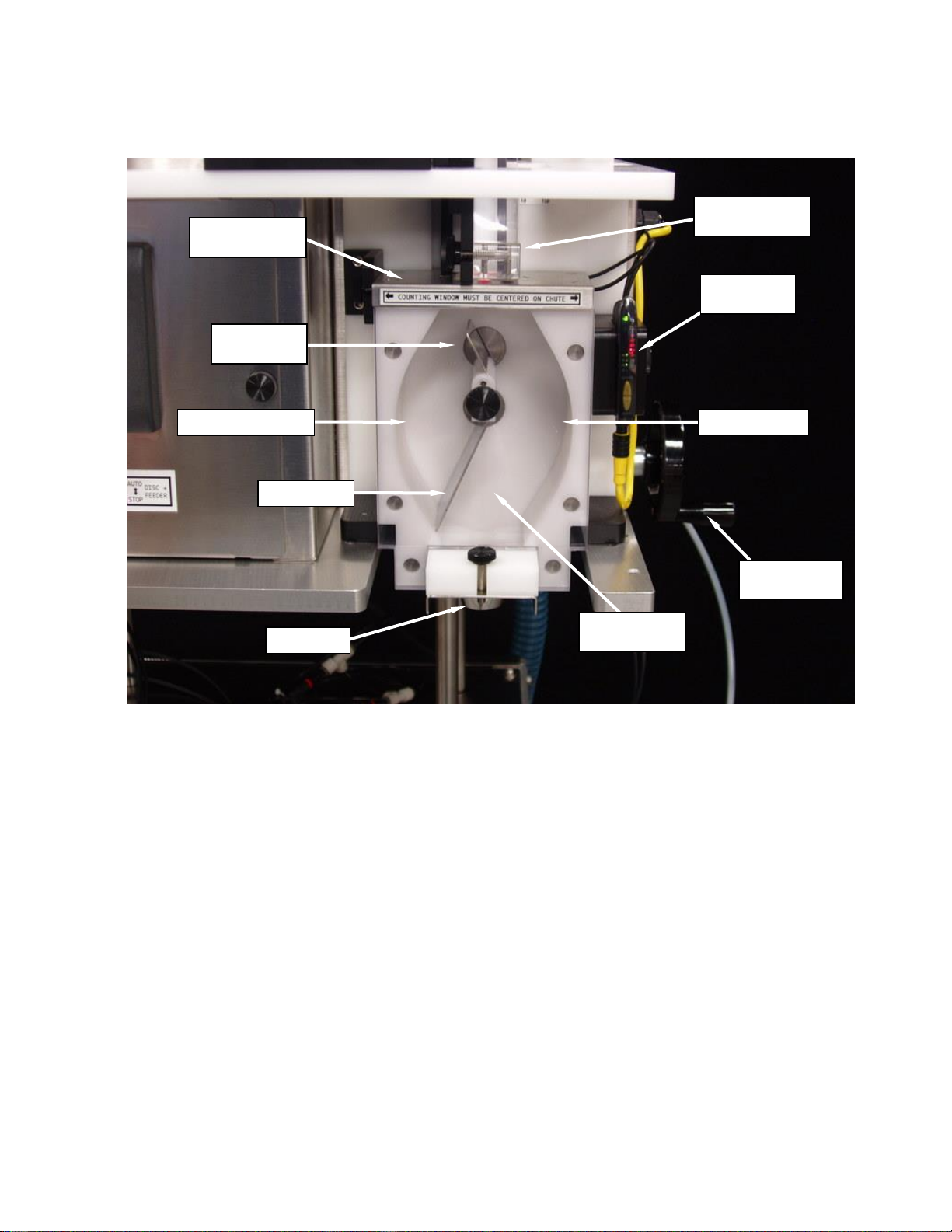
1.2 - Overhead View
PRODUCT GUIDE
(LONG, POINTED)
GLASS DISC
(UNDER CENTER HUB)
AUTO-FEED
SENSOR
AIR
MANIFOLD
ADJUSTABLE
GUIDE
BLOCK
DISPLAY
PANEL
RUN
CONTROL
SWITCHES
S
DEFLECTOR
ARM
FLOW
GUIDE
AIR
NOZZLES
AIR GUIDE
ASSEMBLY
PRODUCT
GUIDE PLATE
GUIDE CHUTE
CENTER HUB
Rev 2022-03-08 Pharmafill Model TC3 User Manual
Deitz Company Inc. TC3 User Manual Page IV
1.3 - Counting Head
CENTERING
WHEEL
TRAP (CLOSED)
DIVIDER
FLAG
GUIDE CHUTE
CLEAR COVER
COUNTING
SENSOR
TRAP (OPEN)
CLEAR HEAD
COVER
FUNNEL
TRAP FLAG
COUNTING
WINDOW

Rev 2022-03-08 Pharmafill Model TC3 User Manual
Deitz Company Inc. TC3 User Manual Page V
1.4 - Power Switches
COMPONENT
FUSES ARE
BEHIND THIS
PANEL
MAIN POWER
DISCONNECT
SWITCH
START BUTTON
EMERGENCY
STOP BUTTON
(TWIST RELEASE)
Rev 2022-03-08 Pharmafill Model TC3 User Manual
Deitz Company Inc. TC3 User Manual Page VI
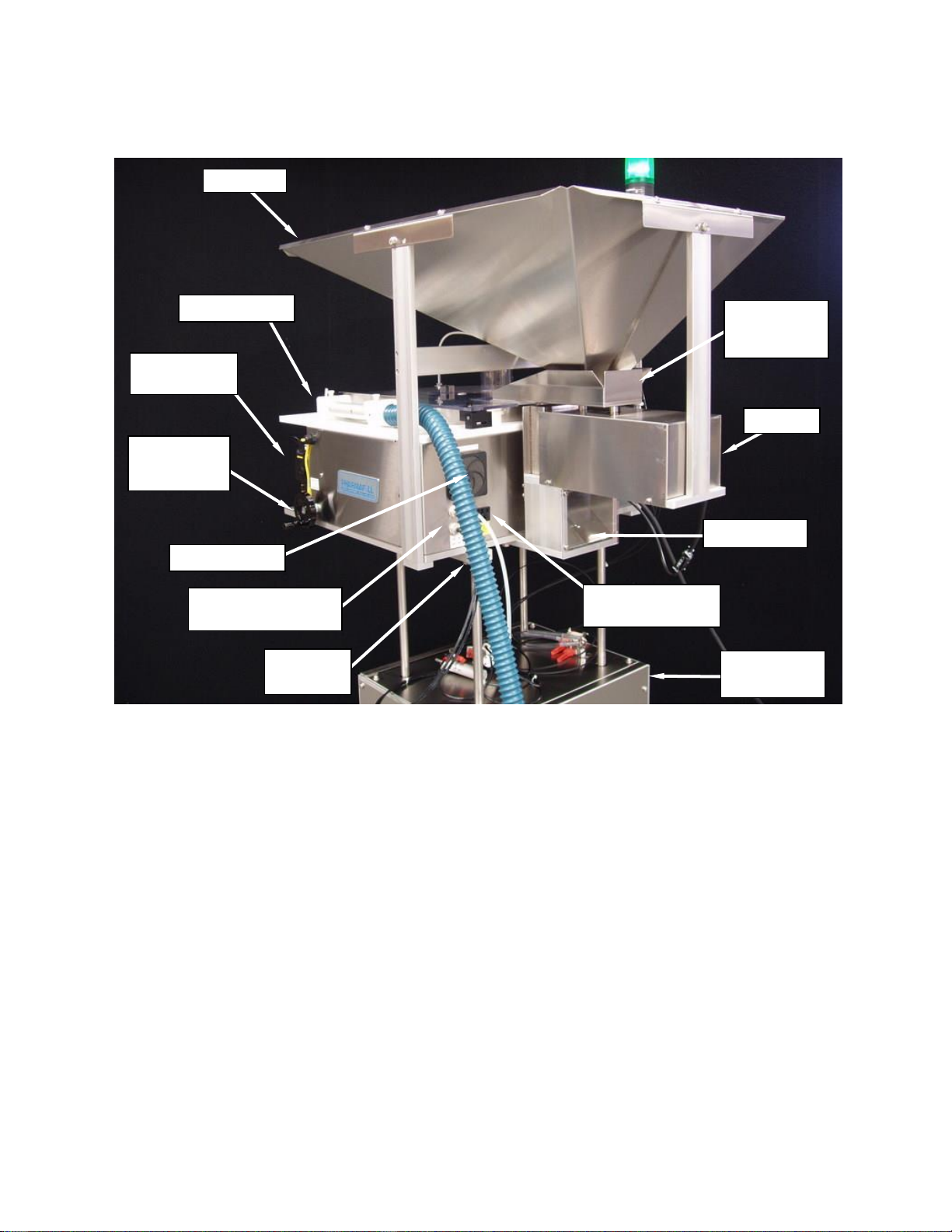
1.5 - Right Side Rear
BLOWER
POWER OUTLET
FEEDER
BLOWER
AIR HOSE
HOPPER
AIR MANIFOLD
HEAD
CENTERING
WHEEL
COUNTING
SENSOR
FEEDER PAN
(SIEVE
INSIDE)
COMPRESSED
AIR CONNECTIONS
CHIP CHUTE
LIFT
PLATFORM
COOLING FAN

Rev 2022-03-08 Pharmafill Model TC3 User Manual
Deitz Company Inc. TC3 User Manual Page VII
1.6 -Left Side Rear
CHIP CHUTE
(CLEAR COVER)
FEEDER
POWER
CORD
MAIN AC IN
POWER
CORD
STACKLIGHT
CABLE
AUTO-FEED
SENSOR
CABLE
FEEDER
SENSOR
FIBER OPTIC
CABLES

Rev 2022-03-08 Pharmafill Model TC3 User Manual
Deitz Company Inc. TC3 User Manual Page VIII
1.7 - Glass Disc, Ring Nut, Washer
1.8 - Clear Rim Cover, Center Hub Knob
GLASS DISC (20”)
DISC SUPPORT RING
(BONDED TO DISC)
CLEAR
PLASTIC
WASHER
RING NUT
CLEAR RIM DUST
COVER
CENTER HUB
KNOB

Rev 2022-03-08 Pharmafill Model TC3 User Manual
Deitz Company Inc. TC3 User Manual Page IX
1.9 - Guide Block Assembly (Left Side)
1.10 - Guide Block Assembly (Right Side)
PRODUCT
GUIDE
GUIDE BLOCK
SHIELD
CLEAR CHUTE
COVER
CHUTE COVER
MOUNTING
BLOCK
PRODUCT
GUIDE PLATE
GUIDE
BLOCK
GUIDE PLATE
GUIDE PLATE
CLAMPING
BLOCK
CLEAR
CHUTE
COVER
FLOW GUIDE
Tabla de contenidos
Otros manuales de Contador de efectivo de Deitz