
DeFelsko PosiTest OTL Manual de usuario

Quick Guide v. 1.0
Oven Temperature Logger

1
Introduction
Introduction
The Posi est OTL Oven Temperature Logger is used to log and
profile the temperature of parts as they move through an oven.
The Posi est OTL records up to 40,000 datasets into 6
independent batches (groups). A Dataset consists of a
measurement from each of the connected K-type thermocouple
sensors. Measurements from up to 6 K-type sensors are recorded
for up to 22 hours at a fixed interval of 2 seconds. A range of
thermocouples are available to match specific application
requirements (see Accessories pg. 8).
Depending on time and temperature requirements, the Posi est
OTL is available in two kits (see Barrier Box and Holders pg. 5)
Record Button
Green Power LED
Power Button
Red Record LED
Channel LEDs
K-ty e
Thermocou le
Ports
(channels)
USB Port Battery
Com artment
Posi est
Posi est OTL
OTL Overview
Overview

2
Quick Start
Quick Start
Basic operating instructions are located on the back panel of the
Posi est OTL.
The Power button is used to power the unit on and the Record
button is used to start/stop logging. 6 Channel EDs indicate the
status of the connected thermocouples, Batch status, and battery
state.
Power button
- Press once to power the unit on.
- Press and hold for 5 seconds to power the unit off.
- While powered on, press and hold the power button to
display the remaining battery power on the 6 Channel EDs.
Record button
- Press and hold for 2 seconds to start recording datasets.
K-type thermocouple ports
- Used to connect K-type thermocouple sensors (be sure to
observe correct polarity).
USB port
- Used to download stored batches/profiles.
Battery compartment
- Uses two (2) AAA batteries (included)
1. Connect the desired number of thermocouple sensors to the
Posi est OTL thermocouple ports. If using fewer than 6
sensors, each sensor can be connected to any available port.
Be sure to observe the K-type connector polarity when
connecting each sensor: never attempt to use force when
connecting a sensor.
2. Attach each sensor to the part being measured.
3. Press the Power button to power on the Posi est OTL and
wait for the green Power LED to stay illuminated. The Channel
LEDs will flash for several seconds while the Posi est OTL is
initializing.

3
After initialization, the Posi est OTL will monitor all
thermocouple sensors connected to the ports. The green
Channel EDs will indicate the status of each port:
lLED Off: no thermocouple connected or open/damaged
thermocouple
lLED On: thermocouple is connected and status is good
4. Press and hold the Record button for 2 seconds to begin
recording datasets. One of the green Channel EDs will flash,
indicating the current batch number. The red ED beside the
Record button will remain lit indicating a recording is in
progress. A dataset is recorded every 2 seconds in one of 6
batches. The channel EDs will turn off after 5 minutes while
recording to preserve battery power. Tap the power or record
button to view.
5. Place the Posi est OTL in the Holder/Holder X within
the Barrier Box (see pg. 5) and ensure correct routing of the
sensor cables. Close the Barrier Box and secure the cover.
6. Attach the Barrier Box to a suitable hanger and send it
through the oven.
7. Remove the Posi est OTL from the Barrier Box as soon as
possible after the Posi est OTL exits the oven. Press and
hold the Record button for 2 seconds to stop recording
datasets. The red ED next to the Record button will turn off
when recording has stopped.
Memory Management
Memory Management
The Posi est OTL records up to 40,000 datasets into 6
independent batches (groups). A new batch is created each time
the Record Button is pressed for 2 seconds to begin recording
datasets. One of the 6 Channel EDs will flash, indicating the
current batch number. If all six batches are already populated,
stored measurements must be deleted to save new datasets.
The Barrier Box and Holder/Holder X will be HOT.
CAUTION:
8. Use the supplied USB cable to connect the Posi est OTL to
a Windows PC or Mac to download the datasets (see
“Accessing Stored Measurement Data”, pg. 4).

Accessing Stored Measurement Data
Accessing Stored Measurement Data
When connected via the USB Port to a Windows PC or Mac, the
Posi est OTL automatically powers on.
PosiSoft Desktop - Powerful desktop software (PC/Mac) for
downloading, viewing, printing and storing measurement data.
Add batch annotations, label individual channels, set threshold
temperatures and compare datasets to reference batches.
Includes a customizable, templated PDF Report Generator. For
documentation on how to use the Posi est OTL with PosiSoft
Desktop, consult Help menu within PosiSoft Desktop.
For more information on our PosiSoft Desktop Solution, see:
www.defelsko.com/posisoft
4
Delete Stored Datasets
To delete A stored datasets from the Posi est OTL memory,
press and hold the Power and Record buttons until the green
Channel EDs complete their cycle and turn off.

5
Barrier Box & Holders
Barrier Box & Holders
When recording, the Posi est OTL mounts to the Posi est OTL
Holder (Holder X is included with Posi est OTL XT Kit), which
sits inside the Posi est OTL Barrier Box. These Holders work
with the Barrier Box to allow safe operating temperature ranges.
The Posi est OTL can withstand various combinations of oven
temperature and time according to the charts on page 6.
wo Kits Available:
Posi est OTL Kit- Standard Kit includes the Holder
Posi est OTL XT Kit - XT Kit includes the the Holder X with
phase change material (Heatsink).
Remove the Posi est OTL from the Barrier Box
immediately after use.
NOTE:
Barrier Box
Holder
PosiTest OTL
Insulating Material
The Posi est OTL should not exceed its
maximum operating temperature of 70°C (158 °F).
WARNING:

6
hermal ime at
hermal ime at
emperature Characteristics
emperature Characteristics
The chart and table below represent the combined heat tolerances
of the Posi est OTL Kits, Barrier Box and choice of
Holder/Holder X .
Posi est O L
(OT KIT) Posi est O L X
(OT KITXT)
150
° C
(302
° F)
90 minutes 300 minutes
200
° C
(392
° F)
65 minutes 200 minutes
250
° C
(482
° F)
50 minutes 140 minutes
300
° C
(572
° F)
not recommended 100 minutes
Posi est OTL Kit Posi est OTL XT Kit

7
The Posi est OTL Barrier Box is constructed of stainless steel
and contains NO silicone components. No maintenance should be
required to maintain optimum performance. As a result of use, the
fiberglass insulation cloth may become discolored. This is normal
and will not affect performance.
The Posi est OTL Holder X (included with Posi est OTL XT
Kit) contains a phase change material. This material has a melting
temperature of 58°C (136°F). When exposed to higher
temperatures, the heatsink material will absorb thermal energy
until fully melted. The phase change material is specifically
engineered to melt and become a liquid during normal use.
Do not reuse the Heatsink until the phase
change material has returned to a solid state. To accelerate
solidifying of the phase change material, the Heatsink can be
placed in a refrigerator or freezer.
Care must be exercised to not puncture the Heatsink. If the
Heatsink enclosure is damaged, DO NO USE. Replacement
Holders are available.
IMPORTANT:
Calibration
The Posi est OTL and each thermocouple sensor are shipped with
a Certificate of Calibration showing traceability to a national
standard. For organizations with re-certification requirements, the
Posi est OTL may be returned at regular intervals for calibration.
DeFelsko recommends that customers establish their instrument
calibration intervals based upon their own experience and work
environment. Based on our product knowledge, data, and customer
feedback; a one-year calibration interval from the date the
instrument is put into service is a typical starting point.
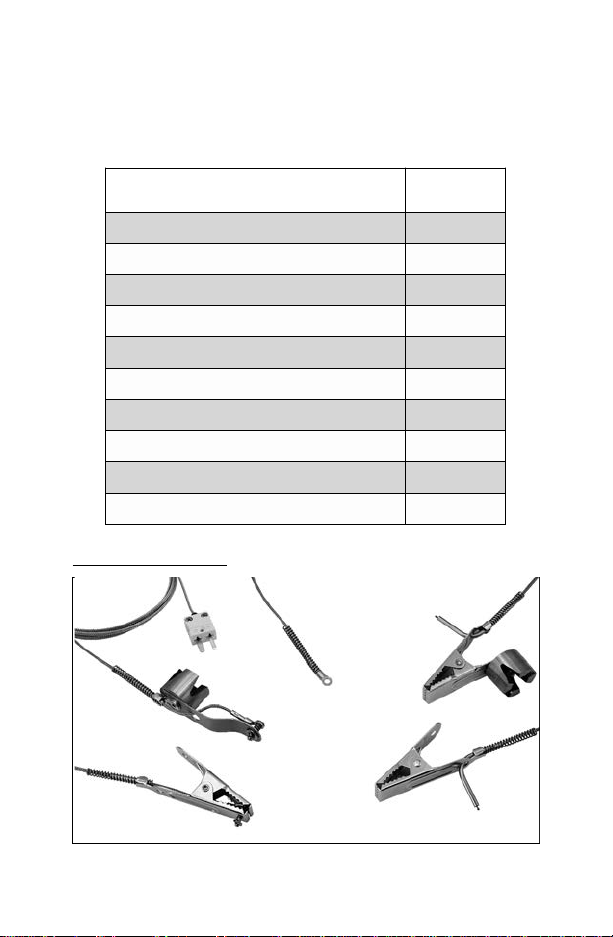
8
Accessories
A variety of sensors are available for the Posi est OTL to match
specific application requirements. Sensors are not included with the
Posi est OTL and must be purchased separately.
For a complete list of accessories and specifications see:
www.defelsko.com/otl
Clamp Air
Sensor
Magnetic Air
Sensor
Washer Sensor
Magnetic Surface
Sensor
Clamp Surface
Sensor
hermocouple
emperature Sensors Order Code
Spring Clamp Surface Probe:
1.8m (6’)
PRBOT CS6
Spring Clamp Surface Probe: 3.6m (12’) PRBOT CS12
Spring Clamp Air Probe:
1.8m (6’)
PRBOT CA6
Spring Clamp Air Probe: 3.6m (12’) PRBOT CA12
Magnetic Surface Probe:
1.8m (6’)
PRBOT MS6
Magnetic Surface Probe: 3.6m (12’) PRBOT MS12
Magnetic Air Probe:
1.8m (6’)
PRBOT MA6
Magnetic Air Probe: 3.6m (12’) PRBOT MA12
Washer Surface Probe:
1.8m (6’)
PRBOT W6
Washer Surface Probe: 3.6m (12’) PRBOT W12

9
Weight includes the PosiTest OTL, Holder, and Barrier Box.
Holder XT increases weight to 11 kg (25 lbs.)
Size: 22.68 x 27.76 x 14.80 cm Weight: 9 kg
(8.93” x 10.93” x 5.83”) (20 lbs.)
Power Source: 2 AAA batteries
Battery Life: 30 hours (recording time)
Interface: USB
Barrier Box: Stainless steel, NO silicone components
Posi est OTL Specifications
Channels 6 K-type non-grounded thermocouples
hermocouple
Measurement Range -100° to 1000° C (-148° to 1832° F)
Logger Operating
emperature Range 0° to 70° C (32° to 158° F)
Logger Accuracy
+
0.5° C (0.9° F)
Resolution 0.1° C (0.1° F)
hermal ime
at emperature
Characteristics
PosiTest OTL +
Holder/Holder XT
+ Barrier
Posi est O L
(OT KIT) Posi est O L X
(OT KITXT)
150
° C
(302
° F)
90 minutes 300 minutes
200
° C
(392
° F)
65 minutes 200 minutes
250
° C
(482
° F)
50 minutes 140 minutes
300
° C
(572
° F)
not recommended 100 minutes
Memory 40,000 Datasets
Each Dataset consists of
up to 6 channels
Sampling Interval 2 seconds (Fixed)
Maximum record time is 22 hours
Tabla de contenidos
Idiomas:
Otros manuales de Registrador de datos de DeFelsko


