Days Strider ST-1 Manual de usuario

ST-1
Instruction Booklet
Issue 1 02/04/2010

Instruction BookletST-1
Issue 1 02/04/2010
TABLE OF CONTENTS
INTRODUCTION
IMPORTANT PRECAUTIONS
SAFETY INFORMATION ON ELECTROMAGNETIC
INTERFERENCE (EMI)
CHARGING THE BATTERIES
DISASSEMBLING YOUR SCOOTER
TROUBLESHOOTING
CAUTION
SPECIFICATION
----------------------------------------------------------1
------------------------------------------2
--------------3
-------------------------------------------------5
-----------------------------------------9
--------------------------------10
--------------------------------------------------12
-----------------------------------------------------------------13
--------------------------------------------------------14

Instruction BookletST-1
Issue 1 02/04/2010
If you have any question, you can contact :
or your local dealer:
INTRODUCTION
Thank you and congratulation on purchasing your new Days Healthcare Ltd. Mobility
Scooter.
We pride ourselves on providing safe and comfortable products. Our goal is to ensure
your complete satisfaction. We sincerely hope you enjoy your Days Healthcare Ltd.
Mobility Scooter.
Please read and observe all warning and instruction provided in Instruction Booklet before
you operate with various convenient function of this scooter. Also, please retain this booklet
for future reference.
1

Instruction BookletST-1
Issue 1 02/04/2010
IMPORTANT PRECAUTIONS
2
•Only one person at a time could ride a Days Healthcare Ltd. Mobility Scooter.
•Maximum load is 115 kg / 250 lbs.
•Turn key off before getting on or off your scooter.
•Always drive carefully with your feet on the scooter and be aware of others in your area.
•Always use pedestrian crossing wherever possible. Take extreme care when crossing
roads.
•Do not drive on slopes exceeding 8 degrees, and take extreme care when turning on
slopes.
•Do not use full power when turning a sharp corner.
•Do not drive scooter unless seat and tiller are locked and secured in driving position.
•Do not use scooter if rear anti-tip wheels are damaged or removed.
•Take extra care and drive in low speeds when backing up, riding downhill, riding over
uneven surface, or kerb climbing.
•Scooter may not operate well in high humidity.
•Never put your scooter in neutral when stopping on slopes.
•Follow all traffic laws when you ride in vicinity of public roads.
•Our recommendations may occasionally differ from those of your Therapeutic Adviser
or Physician, as they have a better understanding of your abilities. Where this is the
case, you must follow their professional advice, as they have your detailed medical
history.
•Do not use your scooter when your driving ability is impaired by medication.
•Under no circumstances should the scooters top speed be increased.
•Please make sure that the seat and all moving parts are secure before mounting
the scooter.
•Do not carry heavy objects on scooter.
•Do not hang bags on folding backrest.
•Do not use scooter on stairs or escalator.

Instruction BookletST-1
Issue 1 02/04/2010
3
SAFETY INFORMATION ON
ELECTROMAGNETIC INTERFERENCE (EMI)
CAUTION : It is very important that you read this information regarding the possible
effects of Electromagnetic Interference on your motorized scooter.
Powered wheelchairs and motorized scooters may be susceptible to electromagnetic
interference (EMI), which is interfering electromagnetic energy (EM) emitted from sources
such a radio stations, TV stations, amateur radio (HAM) transmitters, two-way radios,
and cellular phones. The interference (from radio wave sources) can cause the motorized
scooter to release its brakes, move by itself, or move in unintended directions. It can also
permanently damage the motorized scooter control system. The intensity of the interfering
EM energy can be measured in volts per meter (V/m). Each motorized scooter can resist
EMI up to certain intensity. This is called its "immunity level." The higher the immunity
level, the greater the protection. At this time, current technology is capable of achieving
at least a 20 V/m immunity level, which would provide useful protection from the more
common sources of radiated EMI. This immunity level of this motorized scooter model
is 20 V/m.
There are a number of sources of relatively intense electromagnetic fields in the everyday
environment. Some of these sources are obvious and easy to avoid. Others are not apparent
and exposure is unavoidable. However, we believe that by following the warnings listed
below, your risk to EMI will be minimized.
1.Hand-held portable transceivers (transmitters-receivers) with the antenna mounted
directly on the transmitting unit. Examples include: citizens band (CB) radios, "walkie
talkie," security, fire, and police transceivers, cellular telephones, and other personal
communication devices;
2.Medium-range mobile transceivers, such as those used in police cars, fire trucks,
ambulances, and taxis. These usually have the antenna mounted on the outside of the
vehicle; and
3.Long-range transmitters and transceivers such as commercial broadcast transmitters
(radio and TV broadcast antenna towers) and amateur (HAM) radios.
The sources of radiated EMI can be broadly classified into three types :
Some cellular telephones and similar devices transmit signals while they
are ON, even when not being used.
Other types of hand-held devices, such as cordless phones, laptop
computers, AM/FM radios, TV sets, CD players, and cassette players,
and small appliances, such as electric shavers and hair dryers, so far
as we know, are not likely to cause EMI problems to your motorized
scooter.

Instruction BookletST-1
Issue 1 02/04/2010
There is no easy way to evaluate their effect on the overall immunity
of the motorized scooter.
4
Motorized Scooter Electromagnetic Interference :
Because EM energy rapidly becomes more intense as one move closer to the transmitting
antenna (source), the EM fields from hand-held radio wave sources (transceivers) are of
special concern. It is possible to unintentionally bring high levels of EM energy very close
to the motorized scooter control system while using these devices. This can affect motorized
scooter movement and braking. Therefore, the warnings listed below are recommended to
prevent possible interference with the control system of the motorized scooter.
Warnings :
Electromagnetic interference (EMI) from sources such as radio and TV stations, amateur
radio (HAM) transmitters, two-way radios, and cellular phones can affect motorized scooters.
Following the warnings listed below should reduce the chance of unintended brake release
or motorized scooter movement which could result in serious injury.
1.Do not operate hand-held transceivers (transmitters-receivers), such as citizens band
(CB) radios, or turn ON personal communication devices, such as cellular phones, while
the motorized scooter is turned ON;
2.Be aware of nearby transmitters, such as radio or TV stations, and try to avoid coming
close to them;
3.If unintended movement or brake release occurs, turn the motorized scooter OFF as
soon as it is safe;
4.Be aware that adding accessories or components, or modifying the motorized scooter,
may make it more susceptible to EMI; and
Important Information :
1.20 volts per meter (V/m) is a generally achievable and useful immunity level against
EMI (as of May 1994). The higher the level, the greater the protection.
2.The immunity level of this product is 20 V/m.
5.Report all incidents of unintended movement or brake release to the distributor listed
on the inside front cover of this manual. Note whether there is a source of EMI nearby.

Instruction BookletST-1
Issue 1 02/04/2010
Figure 2 - ST-1 Top Control Panel Figure 3 - ST-1 Back View
IDENTIFICATION OF PARTS
5
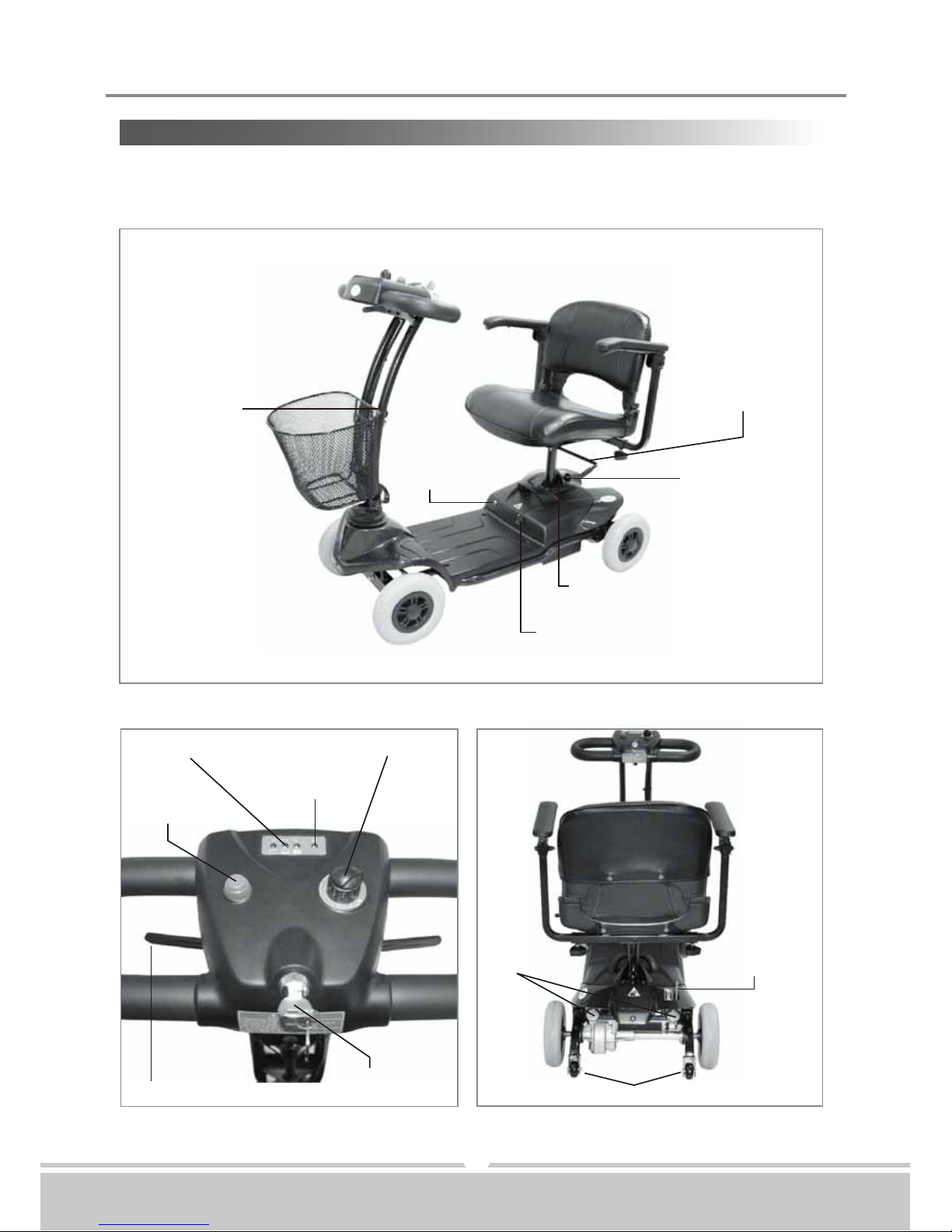
Before attempting to drive this scooter on your own, it is important that you familiarize
yourself with the controls, and how to operate them.
Figure 1 - ST-1 Front View
Tiller Angle
Adjustment
Circuit
Breaker
Seat Rotation
Lever
Release Lever
Battery Pack Pin
Charging Socket
Horn Button
Thumb Lever Main
Key Switch
Battery Gauge
Self-Diagnostic
Warning Light
Speed Dial Knob
Reflectors
Anti-Tip Wheels
Free-Wheeling
Lever

Instruction BookletST-1
Issue 1 02/04/2010
Always ensure that the scooter is switched
off before getting on or off the scooter and
before removing any items of the scooter.
The ON/OFF key switch must only operated,
when in motion, in an emergency. Turning
the scooter OFF whilst driving will bring the
scooter to an abrupt stop.
6
FUNCTION OF PARTS:
Main Key Switch (A)
1.Turn the key to the right - Turn the scooter on
2.Turn the key to the left - Turn the scooter off
Before start driving the scooter, set the speed to low speed by turning
the knob towards turtle image,
Driving in high speed when encounter an up slope, and driving in slow
speed when encounter a down slope.
Releasing the thumb lever engages the automatic brake, but will taxi for
a short buffering distance, please keep safe distance when stop driving
to prevent any danger.
Speed Dial Knob (B)
The image of rabbit means fast or high speed. The image of turtle means slow or low speed.
By turning this knob towards chosen image you can control overall speed of the scooter.
Horn Button (C)
Press horn button once to sound warning tone when necessary.
Battery Gauge (D)
The meter gives an approximation of battery strength. Green indicates a fully charged
battery. Without any Green light means no power required to charge batteries immediately.
Self Diagnostic Warning Light (E)
Flashing light indicates there is a problem within scooter. See page 12 for more information.
Thumb Lever (F) (F1)
Pushing right thumb lever forward moves scooter forward. Pushing left thumb lever forward
will move scooter backward. (This configuration can be reversed if required by local
authorized dealer.) While in use this lever is also your accelerator. The further you depress
the thumb lever, the faster you will go. (NOTE: subject to the position of the speed control.)
Releasing the thumb lever engages the automatic brake.
Figure 4
Figure 4
(A)
(F)(F1)
(C) (B)
(D) (E)

Instruction BookletST-1
Issue 1 02/04/2010
7
Tiller Angle Adjustment :
1.Lift up the lever (G) to disengage the pin from hole's position.
2.Simultaneously, adjust the steering fore-aft to most comfortable angle, and ensure pin
is well locked in it's position.
Seat Rotation Adjustment :
1.Lift lever (H) upward to disengage pin.
2.Simultaneously, rotate seat (I) (or lift up to disassemble the seat) to most comfortable
angle, and ensure pin is well locked in it's position.
Figure 6
Figure 6
(H)
Figure 5
Figure 5
(G)
Circuit Breaker :
If scooter's circuit system malfunctions or over loaded, the circuit system will automatic
shut down the power to ensure driver's safety. After power off, by pressing button (J) to
regain power.
Free-Wheeling Lever :
To push scooter for short distances, put it in freewheel mode by pushing forward on free-
wheel lever to N this disables the drive system and brake system. Pull free-wheeling lever
backward to D to re-engage drive and brake system; this takes scooter out of freewheel
mode.
Figure 8
Figure 8
(J1)
Figure 7
Figure 7
(J)

Instruction BookletST-1
Issue 1 02/04/2010
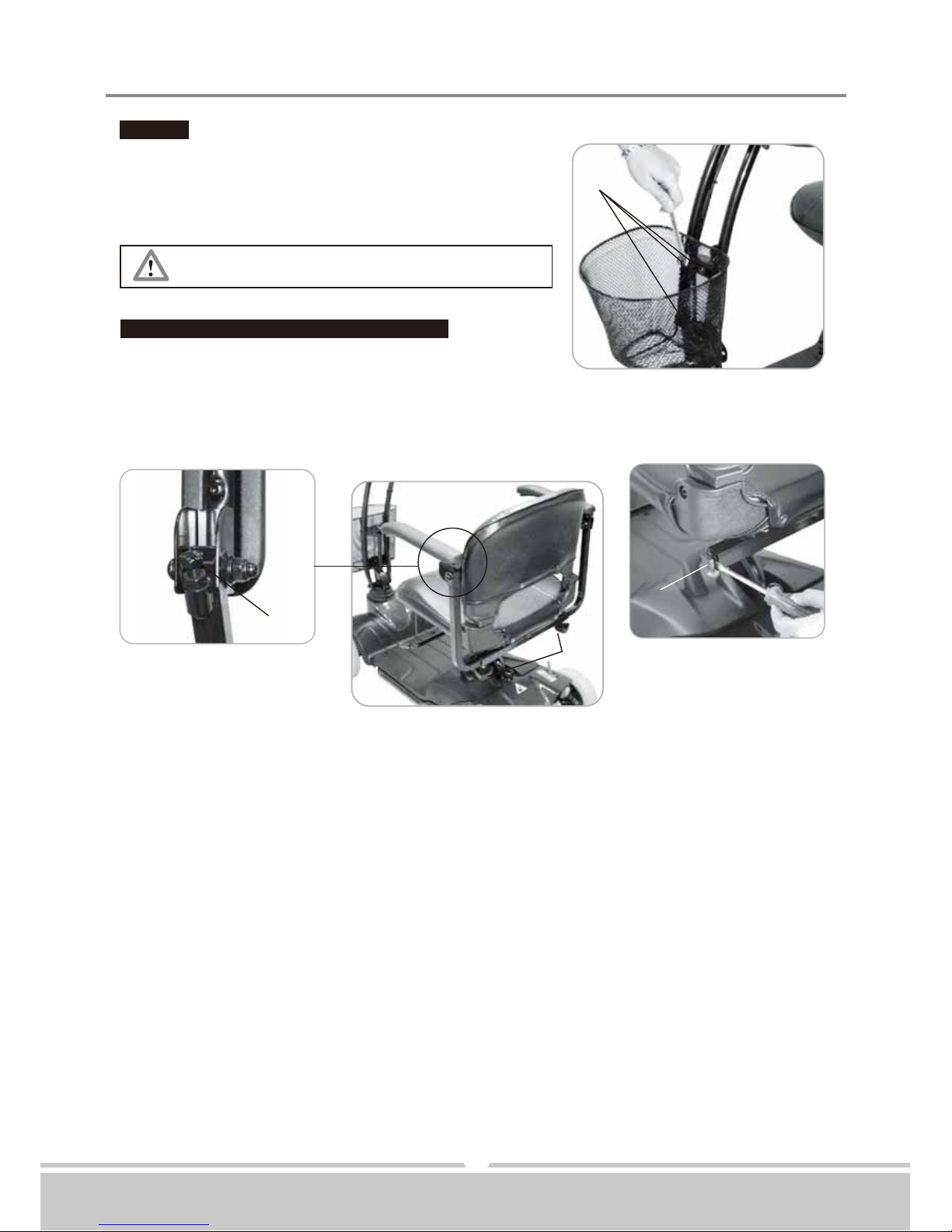
Remove basket by releasing 3 screws (J2)
8
Basket :
Basket assembling and disassembling
By using a spanner to lock 3 screws (J2) in front of
steering.
Armrest assembling and angle adjustment :
1.Remove plugs (J3) at both sides.
2.Assembling armrests.
3.Adjust armrest to most comfortable angle, then lock with knob (J4).
4.Adjust screw's (J5) height, to control armrest's angle.
Figure 10
Figure 10
(J4)
(J3)
(J5)
Figure 9
Figure 9
(J2)
Tabla de contenidos
Otros manuales de Ayuda a la movilidad de Days
Manuales populares de Ayuda a la movilidad de otras marcas

Rhythm Healthcare
Rhythm Healthcare B3800F Manual de usuario

AMF-BRUNS
AMF-BRUNS PROTEKTOR Manual de usuario

Drive DeVilbiss Healthcare
Drive DeVilbiss Healthcare OTTER Manual de usuario

Rhythm Healthcare
Rhythm Healthcare C500U Manual de usuario

Lumex
Lumex RJ4200A Manual de usuario

Rebotec
Rebotec Jumbo Manual de usuario