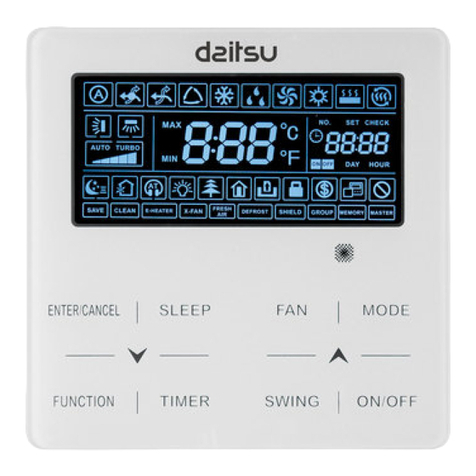
Daitsu SPACE V4 Series Manual de usuario

SPACE V4
WIRED CONTROLLER
Serie
SPACE V4
Edition
R02
Models
V4 AWD 40
V4 AWD 60
V4 AWD 80
V4 AWD 100
USER MANUAL
0(18
%$&.
2.
81/2&.
(PULSACIÓN LARGA)

This manual gives detailed description of the precautions that should be brought to your attention during operation.
In order to ensure correct service of the wired controller please read this manual carefully before using the unit.
For convenience of future reference, keep this manual after reading it.
01
01
02
CONTENTS
02
03
05
05
05
05
07
05
08
08
08
11
13
15
18
19
About the documentation
For the user
1.2
The appearance of the wired controller
Status icons
2.1
2.2
1
2
3
1.1
About the menu structure
To go to the menu structure
To navigate in the menu structure
4.1
4
4.2
4.3
Screen Unlock
Turning ON/OFF controls
Adjusting the temperature
Adjusting space operation mode
5.1
5
5.2
5.3
5.4
Operation Mode
Preset Temperature
Domestic Hot Water(DHW)
Schedule
Options
Child Lock
Service Information
Operation Parameter
For Serviceman
WLAN Setting
6.1
6
6.2
6.3
6.4
6.5
6.8
6.7
6.6
22
7
6.9
18
20
GENERAL SAFETY PRECAUTIONS
A GLANCE OF THE USER INTERFACE
USING HOME PAGES
MENU STRUCTURE
BASIC USAGE
OPERATION
MENU STRUCTURE : OVERVIEW
6.10 21

01
1 GENERAL SAFETY
PRECAUTIONS
1.1 About the documentation
The appliance is not intended for use by persons,
including children, with reduced physical, sensory or
mental capabilities, or lack of experience and
knowledge, unless they have been given supervision
or instruction concerning use of the appliance by a
person responsible for their safety. Children must be
supervised to ensure that they do not play with the
product.
DO NOT rinse the unit. This may cause electric
shocks or fire.
CAUTION
Unit are marked with the following symbol:
This means that electrical and electronic products can
not be mixed with unsorted household waste. Do NOT try
to dismantle the system yourself: the dismantling of the
system, treatment of the refrigerant, of oil and of other
parts must be done by an authorized installer and must
comply with applicable legislation. Units must be treated
at a specialized treatment facility for reuse, recycling and
recovery. By ensuring this product is disposed of
correctly, you will help to prevent potential negative
consequences for the environment and human health.
For more information, contact your installer or local
authority.
Placed in a location away from radiation.
The precautions described in this document cover
very important topics, follow them carefully.
Indicates a situation that results in death or
serious injury.
DANGER
Indicates a situation that could result in
electrocution.
Indicates a situation that could result in burning
because of extreme hot or cold temperatures.
DANGER:
RISK OF ELECTROCUTION
DANGER:
RISK OF BURNING
1.2 For the user
If you are not sure how to operate the unit, contact
your installer.
Indicates a situation that could result in death or
serious injury.
WARNING
CAUTION
Indicates a situation that could result in minor or
moderate injury.
Indicates a situation that could result in
equipment or property damage.
Indicates useful tips or additional information.
INFORMATION
i
NOTE

2.1 The appearance of the wired controller
2 A GLANCE OF THE USER INTERFACE
02
2.2 Status icons
Enter the menu
structure from
the home page
Navigate the
cursor on the
display/navigate
in the menu
structure/adjust
the settings
Come back to
the up level
Turn on or off the
space operation
mode or DHW
mode turn on or
off the function
in the menu
structure
Long press for
unlocking /locking
the controller
Go to the next step when programming a
schedule in the menu structure/ confirm
a selection/enter a submenu in the menu
structure
At the next scheduled action,
the desired temp. will decrease.
the desired temp.
will not change.
the desired temp.
will decrease.
the desired temp.
will increase.
ECO mode
is activated
Holiday away
/home
is activated
7
Silent mode
is activated
Tank heater is activated
The solar energy is activated
Fan coil
The floor heating
Water flow desired temp.
Radiator
Fan coil Radiator The floor heating
The compressor is activated
Turn off
Turn on
OFF
Heat mode
Cool mode
Auto mode
Timer icon
Lock icon
Outdoor ambient temp.
WiFi icon
The disinfect
function is activated
Domestic hot water
ON
DHW tank temp.
Error or protection icon
OFF
ON
Weekly schedule icon
Domestic hot water
Prevent
freezing mode
is activated
Defrost mode
is activated
Smart grid icon
FREE
Smart grid
Free electricity
VALLEY PEAK
The pumpi is activated
Valley electricity Peak electricity
Additional heat source
Electric pipe heat source
Room desired temp.

03
You can use the home pages to read out and change settings that are meant for daily usage. What you can see and do on
the home pages is described where applicable. Depending on the system layout, the following home pages may be possible:
the system layout 2
NOTE
All the pictures in the manual are used to explain, the actual pages in the screen may have some difference.
home page2 :
If the WATER FLOW TEMP. is set NON and ROOM TEMP. is set YES(See ''FOR SERVICEMAN'' > ''TEMP.
TYPE SETTING'' on ''Installation and owner's manual (V4 space indoor unit)''). The system has the function including
floor heating and domestic hot water, home page 2 will appear:
The wired controller should be installed in the floor heating room to check the room temperature.
NOTE
SV1
FFHL1FHL2.F..HLn
UI
Room desired temperature (ROOM )
Water flow desired temperature (MAIN)
DHW tank actual temperature (TANK) DHW=domestic hot water
home page1 :
If the WATER FLOW TEMP. is set YES and ROOM TEMP. is set NON.(See ''FOR SERVICEMAN'' > ''TEMP.
TYPE SETTING'' in ''Installation and owner's manual (V4 indoor unit)''). The system has the function including floor
heating and domestic water, home page 1 will appear:
the system layout 1
SV1
UI
FHL1FHL2...FHLn
Water flow desired temperature
Room desired temperature
3 USING HOME PAGES
When you turn on the wired controller, the system will enter the language selection page, You can choose your preferred
language, then press OK to enter the home pages. If you don't press OK in 60 seconds, the system will enter in the
currently selected language.

04
home page3:
If the DHW MODE is set NON (See ''FOR SERVICEMAN'' > ''DHW MODE SETTING '' in ''Installation and owner's
manual (V4 space indoor unit)'', and if ''WATER FLOW TEMP.'' is set YES, ''ROOM TEMP.'' is set YES,
(See ''FOR SERVICEMAN'' > ''TEMP. TYPE SETTING '' in ''Installation and owner's manual (V4 space indoor unit)'').
There will be main page and additional page. The system has the function including floor heating and space
heating for fan coil, home page 3 will appear:
SV2
UI
FHL1FHL2...FHLn
FCU1FCU2...FCUn
the system layout 3
Main page
Addition page
home page4 :
SV2
UI
FHL1FHL2...FHLn
FCU1FCU2...FCUn
SV1
the system layout 4
If the ROOM THERMOSTAT is set DOUBLE ZONE or DOUBLE ZONE is set YES. There will be main page and addition
page. The system has the function including floor cooling, space cooling for fan coil and domestic hot water, home page 4
will appear:
Main page
Addition page
2
2
RT1
RT2
RT=Room thermostat
Zone 1 water flow desired temperature
Zone 2 room desired temperature
Zone 1 water flow
desired temperature
DHW tank
real temperature
Zone 2 water flow desired temperature

05
4.1 About the menu structure
4 MENU STRUCTURE
You can use the menu structure to read out and
configure settings that are NOT meant for daily usage.
What you can see and do in the menu structure is
described where applicable. For an overview of the
menu structure, see " 7 Menu structure: Overview".
4.2 To go to the menu structure
From a home page, press ''MENU''.
Result: The menu structure appear:
4.3 To navigate in the menu
structure
Use''▼''、 ''▲'' to scroll.
5.1 Screen Unlock
5 BASIC USAGE
If the icon is on the screen, the controller is locked.
The following page is displayed:
Press any key, the icon will flash. Long press the
''UNLOCK'' key. The icon will disappear, the interface
can be controlled.
The interface will be locked if there is no handing for a
long time(about 120 seconds:it can be set by the
interface, see ''6.7 SERVICE INFORMATION''.)
If the inerface is unlocked, long press "unlock", the
interface will be locked.
UNLOCK UNLOCK
5.2 Turning ON/OFF controls
Use the interface to turn on or off the unit for space
heating or cooling.
The ON/OFF of the unit can be controlled by the
interface if the ROOM TEHERMOSTAT is NON.(see
''ROOM THERMOSTAT SETTING'' in ''Installation
and owner's manual (V4 space indoor unit)'')
Press ''◄''、 ''▲'' on home page, the black cursor will
appear:
Long press
UNLOCK
Long press
UNLOCK
1 ) When the cursor is on the temperature of space
operation mode side (Including heat mode , cool
mode and auto mode ), press ''ON/OFF'' key to
turn on/off space heating or cooling .
A
◄
◄
◄
ENTER
OK
MENU
OPERATION MODE
PRESET TEMPERATURE
DOMESTIC HOT WATER(DHW)
SCHEDULE
OPTIONS
CHILD LOCK
ENTER
OK
MENU
SERVICE INFORMATION
OPERATION PARAMRTER
FOR SERVICEMAN
WLAN SETTING

06
Use the room thermostat to turn on or off the unit for space
heating or cooling.
① The room thermostat is not SET NON(see ''ROOM
THERMOSTAT SETTING'' in ''Installation and owner's manual
(V4 space indoor unit)''). The unit for space heating or
cooling is turned on or off by the room thermostat,press
ON/OFF on the interface, the following page will display:
Turning on or off cooling/
heating mode is controlled by
the room thermostat.
Please turn on or off cooling/
heating mode by the room
thermostat.
OK
CONFIRM
② The room thermostat is SET DOUBLE ZONE(see ''ROOM
THERMOSTAT SETTING'' in ''Installation and owner's manual
(V4 space indoor unit)''). The room thermostat for fan coil is
turned off, the room thermostat for the floor heating is turned
on, and the unit is running, but the display is OFF. The following
page is displayed:
ON/OFF ON/OFF
ON/OFF ON/OFF
OFF
OFF
2
ON/OFF ON/OFF
OFF
ON/OFF ON/OFF
ON/OFF ON/OFF
2
OFF
OFF
If the TEMP. TYPE is set ROOM TEMP. ,
then following pages will display:
If the DHW TYPE is set NON, then following
pages will display:

07
2)When the cursor is on the temperature of DHW
mode. Press ''ON/OFF'' key to turn on/off the DHW
mode.
If the space operation mode is ON, then following pages
will display:
Use the interface to turn on or off the unit for DHW.Press
''
►
''、''▼''on home page, the black cursor will appear: 5.3 Adjusting the temperature
Press ''
◄
''、 ''▲'' on home page, the black cursor will
appear:
If the cursor is on the temperature, use the ''◄''、
''
►
'' to select and use ''▼''、 ''▲'' to adjust the
temperature.
ON/OFF ON/OFF
ON/OFF ON/OFF
OFF
2
If the space operation mode is OFF, then following pages
will display:

08
5.4 Adjusting space operation mode
Adjusting space operation mode by interface
Go to ''MENU'' > ''OPERATION MODE'' . Press"OK",
the following page will appear:
There are three modes to be selected including
HEAT, COOL and AUTO mode. Use the ''
◄
'',''
►
''
to scroll, press ”OK” to select.
Even you don’t press OK button and exit the page by
pressing BACK button, the mode would still be
effective if the cursor had been moved to the
operation mode.
If there is only HEAT(COOL) mode, the following page
will appear:
The operation mode can not be changed.
If you
select… Then the space operation mode is…
Always heating mode
HEAT
Always cooling mode
COOL
AUTO
Automatically changed by the software
based on the outdoor temperature (and
depending on installer settings of the
indoor temperature), and takes monthly
restrictions into account.
Note: Automatic changeover is only
possible under certain conditions.
See the ''FOR SERVICEMAN''> ''AUTO
MODE SETTING'' in "Installation and
owner's manual (V4 space indoor
unit)".
A
Adjust space operation mode by the room thermostat
, see ''ROOM THERMOSTAT'' on "Installation and
owner's manual (V4 space indoor unit)".
Go to ''MENU''>''OPERATION MODE'', if you press
any key to select or adjust, the page will appear:
6.1 Operation Mode
6 OPERATION
See "5.4 Adjusting space operation mode"
6.2 Preset Temperature
PRESET TEMPERATUER has PRESET TEMP.\
WEATHER TEMP. SET\ECO MODE 3 items.
6.2.1 PRESET TEMP.
PRESET TEMP. function is used to set different
temperature on different time when the heat mode or
cool mode is on.
PRESET TEMP. =PRESET TEMPERATUER
The PRESET TEMP. function will be off in these
conditions.
1 ) AUTO mode is running.
2) TIMER or WEEKLY SCHEDULE is running.
Go to ''MENU'' > ''PRESTE TEMPERATURE''
>''PRESET TEMP''. Press ''OK''.
The following page will appear:
Operation mode setting:
OPERATION MODE
COOL AUTO
A
HEAT
CONFIRM
O K O K
Operation mode can only be set
heat mode:
OPERATION MODE
HEAT
CONFIRM
O K
Cool/heat mode is controlled by
the room thermostat.
Please adjust the operation mode
by the room thermostat.
CONFIRM
15
Operation mode can only be set
cool mode:
OPERATION MODE
CONFIRM
O K
COOL
Este manual sirve para los siguientes modelos
4
Tabla de contenidos
Otros manuales de Controladores de Daitsu