
Cytron RFBEE-433MHZ Manual de usuario


ROBOT . HEAD to TOE
Product User’s Manual – RFBee-433MHz
1. INTRODUCTION
This wireless UART module is a new-generation multi-channel embedded wireless data
transmission module. Its wireless working frequency band is 433.4-473.0 MHz, multiple
channels can be set, with the stepping of 400KHz, and there are 100 channels in total. The
maximum transmitting power of module is 100mW(20dBm), the receiving sensitivity is
-117dBm at baud rate of 5000bps in the air, and the communication distance is 500m in open
space.
The module is encapsulated with stamp hole, can adopt patch welding. There is a PCB
antenna pedestal ANT1 on the module, and user can use external antenna of 434 MHz
frequency band through coaxial cable; there is also an antenna solder pad ANT2 on the
module, and it is convenient for user to solder spring antenna. User could select one of these
antennas according to use requirements.
There is MCU on the module, and program is needed to utilize the module. In transparent
transmission mode, the module act like normal receiving and sending serial port data, so it is
convenient to use. The module adopts multiple serial port transparent transmission modes,
and user could select them by AT command according to user's requirements. The average
working current of three modes FU1, FU2 and FU3 in idle state is 80µa, 3.5mA an 22mA
respectively, and the maximum working current is 100mA (in transmitting state).
Features:
●Long-distance wireless transmission (500m in open space/baud rate 5,000bps in the
air)
●Working frequency range (433.4-473.0MHz, up to 100 communication channels)
●Maximum 100mW (20dBm) transmitting power (8 sets of power can be set)
●Three working modes, adapting to different application situations
●Built-in MCU, performing communication with external device through serial port
●The number of bytes transmitted unlimited to one time
Created by Cytron Technologies Sdn. Bhd. – All Rights Reserved 3

ROBOT . HEAD to TOE
Product User’s Manual – RFBee-433MHz
Specification
●Working frequency: 433.4MHz to 473.0MHz
●Supply voltage: 3.3V
●Communication distance: 500m in the open space
●Serial baud rate: 1.2Kbps to 115.2Kbps (default 9.6Kbps)
●Receiving sensitivity: -117dBm to -100dBm
●Transmit power: -1dBm to 20dBm
●Interface protocol: UART/TTL, Half Duplex
●Operating temperature: -40℃ to +85℃
●Dimensions: 24.5 x 32.5 x 8.5 mm
Note: This is a transceiver (Transmitter and Receiver) module, you need 1 pair of this
module for wireless communication.
Note: This wireless module cannot intercommunicate with the 100 meters version (
RFBEE-434MHz ) as both is operating at different frequency, not to forget, it is not
compatible with the low cost RF transmitter and receiver too.
Created by Cytron Technologies Sdn. Bhd. – All Rights Reserved 4

ROBOT . HEAD to TOE
Product User’s Manual – RFBee-433MHz
2. PACKING LIST
Please check the parts and components according to the packing list. If there are any parts
missing, please contact us at [email protected] immediately.
RFBEE-433MHZ come with:
●1 x RFBEE-433MHZ board.
●1 x Spring antenna.
●1 x Xbee breakout board.
Created by Cytron Technologies Sdn. Bhd. – All Rights Reserved 5

ROBOT . HEAD to TOE
Product User’s Manual – RFBee-433MHz
3. PRODUCT SPECIFICATION
Electrical Characteristics
MODE
FU1
FU2
FU3
Remark
Idle current
3.6mA
80uA
16mA
Average value
Transmission time
delay
15-25ms
500ms
4-80ms
Sending one byte
Loopback test time
delay 1
31ms
Serial port baudrate 9600,
sending 1 byte
Loopback test time
delay 2
31ms
Serial port baudrate 9600,
sending 10 byte
*Loop test time delay means the duration from the time of, after conducting short circuit on TX and RX pins of one module
and sending serial port data to the other module,starting to send serial port data to the other module to the time that the
returned data appear at TX pin of the other module.
Created by Cytron Technologies Sdn. Bhd. – All Rights Reserved 6


ROBOT . HEAD to TOE
Product User’s Manual – RFBee-433MHz
5. BOARD LAYOUT
Label
Function
A
Pinout with Xbee standard
B
Antenna pad
C
Spring antenna
D
Mode slide switch
Pinout with Xbee standard
RFBee pinout follows standard Xbee pinout.
Antenna pad
User may need to solder spring antenna to this pad.
Spring antenna
User may need to solder spring antenna to ‘Antenna’ pad.
Mode slide switch
RFBee have 2 working modes which are ‘transparent’ and ‘AT command’ mode.
Created by Cytron Technologies Sdn. Bhd. – All Rights Reserved 8

ROBOT . HEAD to TOE
Product User’s Manual – RFBee-433MHz
RFBEE PINOUT
PIN
NAME
DESCRIPTION
1
VCC
3.3V supply for RFBEE.
2
DOUT
UART data out.
3
DIN
UART data in.
4
MODE
Parameter setting control pin.
5
NC
Not connected.
6
NC
Not connected.
7
NC
Not connected.
8
NC
Not connected.
9
NC
Not connected.
10
GND
Ground.
11
NC
Not connected.
12
NC
Not connected.
13
NC
Not connected.
14
NC
Not connected.
15
NC
Not connected.
16
NC
Not connected.
17
NC
Not connected.
18
NC
Not connected.
19
NC
Not connected.
20
NC
Not connected.
Created by Cytron Technologies Sdn. Bhd. – All Rights Reserved 9
ROBOT . HEAD to TOE
Product User’s Manual – RFBee-433MHz
6. HARDWARE INSTALLATION
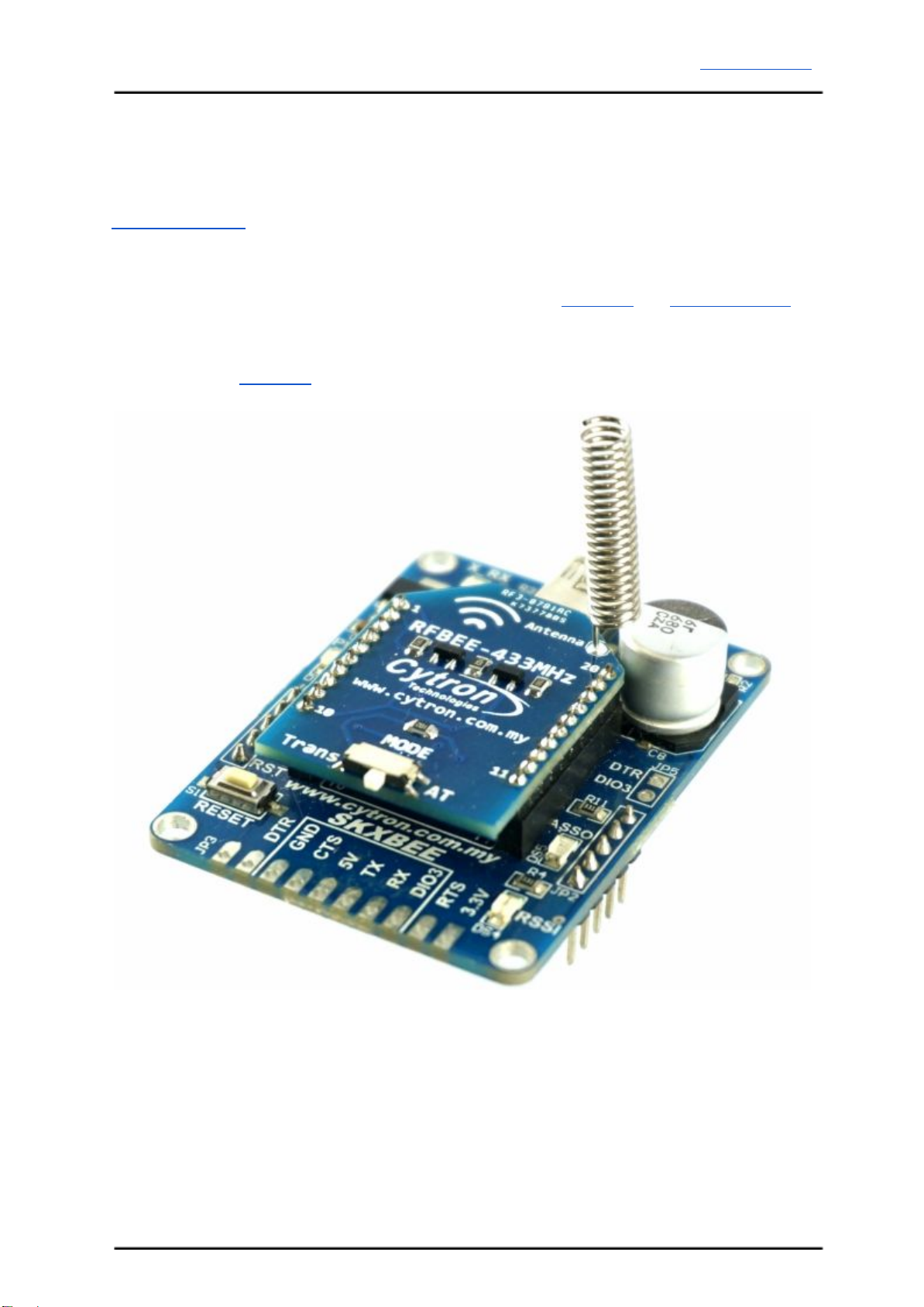
RFBEE is a transceiver (Transmitter and Receiver) module, user will need 1 pair of this
module for wireless communication. This wireless module cannot intercommunicate with the
RFBEE-434MHZ as the frequency is not the same, not to forget, it is not compatible with the
low cost RF transmitter and receiver too.
Since RFBEE have a standard XBee pinout, user can utilize SKXBEE and SHIELD-XBEE.
Below are examples of hardware interface/connection.
6.1 RFBEE with SKXBEE
Created by Cytron Technologies Sdn. Bhd. – All Rights Reserved 10
Tabla de contenidos
Otros manuales de Unidad de control de Cytron


Manuales populares de Unidad de control de otras marcas

Festo
Festo Compact Performance CP-FB6-E Manual de lista de piezas

Elo TouchSystems
Elo TouchSystems DMS-SA19P-EXTME Manual de usuario

JS Automation
JS Automation MPC3034A Manual de usuario

JAUDT
JAUDT SW GII 6406 Series Guía rápida

Spektrum
Spektrum Air Module System Manual de usuario

BOC Edwards
BOC Edwards Q Series Manual de usuario


