Crypto ReDi 100 Manual de usuario

ReDi 100 User Manual
V. Ipirou 45, 15125 Marousi, Τel: 210-8098700, Fax: 210-6122512
Site: www.crypto.gr, Email: crypto@crypto.gr
1
SD DVB-T
MPEG-4 RECEIVER
ReDi 100
User Manual

ReDi 100 User Manual
V. Ipirou 45, 15125 Marousi, Τel: 210-8098700, Fax: 210-6122512
Site: www.crypto.gr, Email: crypto@crypto.gr
2
1. SAFETY INFORMATION
This sheet lists important safety information that will help to assure proper use of the product.
Please read them carefully before operation of your product.
TO REDUCE THE RISK OF FIRE AND ELECTRIC SHOCK, DO NOT EXPOSE THIS UNIT
TO RAIN OR MOISTURE.
1. To prevent electric shock do not attempt opening or removing the covers of the device. The
device uses AC220~240V and you may be expose to dangerous voltage.
2. To clean the device always unplug the product from the wall outlet. Do not use liquid
cleaners or aerosol cleaners. Use a dry cloth for cleaning.
3. You will notice that the product has slots and openings. These are used for ventilation to
ensure reliable operation and to protect it from overheating. The openings should never be
blocked by other devices. This product should not be placed in an installation, unless proper
ventilation is provided. Do not put anything above the product because you will block the
ventilation openings causing the device to overheat.
4.The product should be situated away from heat sources such as radiators, heat registers,
stoves, or other products (including amplifiers) that produce heat.
Service
Do not attempt to service this product yourself, as opening or removing covers may expose
you to dangerous voltage or other hazards. Refer all servicing to qualified service personnel.

ReDi 100 User Manual
V. Ipirou 45, 15125 Marousi, Τel: 210-8098700, Fax: 210-6122512
Site: www.crypto.gr, Email: crypto@crypto.gr
3
2. CONTENTS
1. SAFETY INFORMATION
2. CONTENTS
3. INTRODUCTION
3.1 About ReDi 100
3.1.1
Front panel
3.1.2 Rear panel
3.2 Remote
control
4. SYSTEM CONNECTION
4.1 General
4.2 Connection to the TV and video recorder
4.3 Connecting a HiFi System
5. GETTING STARTED
5.1 Welcome
5.2 Installation
6. OPERATION
6.1 Changing channels
6.2 Access the Electronic Program Guide (EPG)
7. EDIT CHANNEL
7.1 Edit Channel menu
7.2 TV Channel list
7.3 Radio Channel list
7.4 Delete All
8. SYSTEM SETUP
8.1 System setup menu
8.2 Language
8.3 TV System
8.4 Local Time Setting
8.5 Timer Setting
8.6 Parental Lock
8.7 OSD Setting
8.8 Favorite

ReDi 100 User Manual
V. Ipirou 45, 15125 Marousi, Τel: 210-8098700, Fax: 210-6122512
Site: www.crypto.gr, Email: crypto@crypto.gr
4
9. TOOLS
9.1 Tools main menu
9.2 Receiver Information
9.3 Load Factory Default
9.4 Software Upgrade
9.5 Remove USB device safely
10. GAMES
10.1 Games
11. REC & MEDIA
11.1 REC main menu
11.2 Media+
11.3 Record Manager
11.4 DVR HDD Information
11.5 HDD Format
11.6 DVR Configuration
11.7 Jump
12. TIMESHIFT/RECORD
12.1 Times Shift
12.2 Personal Video Recording (PVR)
13. TROUBLESHOOTING
14. SPECIFICATIONS

ReDi 100 User Manual
V. Ipirou 45, 15125 Marousi, Τel: 210-8098700, Fax: 210-6122512
Site: www.crypto.gr, Email: crypto@crypto.gr
5
3. INTRODUCTION
3.1 About ReDi 100
3.1.1 Front panel
1. Remote sensor
2. Channel up/ Down
3. Display
4. Standby button
3.1.2 Rear panel
1. TV aerial for an external TV antenna
2. USB port
3. TV Scart for connection to the TV
4. Down Mix Audio 2 Channel L/R
5. Composite Video
6. AC Mains
7. RF Loop through for an external device
8. AUX Scart for connection to a VCR or a satellite receiver
9. Coaxial Digital Audio

ReDi 100 User Manual
V. Ipirou 45, 15125 Marousi, Τel: 210-8098700, Fax: 210-6122512
Site: www.crypto.gr, Email: crypto@crypto.gr
6
3.2 Remote control
1. STANDBY (switch the device on and standby)
2. INFO (Press for current channel information/ Operation guide )
3. PLAY
4. Previous/Next
5. PAUSE (Pause/Activate time shift function)
6. Menu (Open and close the menu screen)
7. Cursor/CH+, -/VOL+,-
(Cursor: Navigation buttons used to navigate menu's items)
(CH+/-: Channel Up and Down)
(VOL+/-: Volume Up and Down)
8. OK button (Confirm a selection within a menu)
9. RECORD (Record the TV program)
10. Numeric entry (Enter numeric values and select the channel directly by entering it's
number)
11. USB (Enter File Manager)
12. MEDIA (Enter Recorder menu)
13. TTX (Open interactive service)
14. TIMER (Timer wake-up)
15. DTV/VCR (Switch between TV and external input through AUX scart)
16. SUBTITLE (On/Off Subtitle)
17. Search backward /forward
18. EXIT (Exit from menu)

ReDi 100 User Manual
V. Ipirou 45, 15125 Marousi, Τel: 210-8098700, Fax: 210-6122512
Site: www.crypto.gr, Email: crypto@crypto.gr
7
19. STOP (Stop program playback or recording)
20. EPG (Open up Electronic Program Guide Menu)
21. BACK (Switch to previous channel)
22. TV/RADIO (Switch between TV and Radio)
23. AUDIO (Select audio mode and audio track)
24. MUTE (Turn off/on the volume)
25. FAV (Open the Favorite list)
26. RED/GREEN/YELLOW/BLUE Buttons
(For interactive function/Submenu functions buttons)

ReDi 100 User Manual
V. Ipirou 45, 15125 Marousi, Τel: 210-8098700, Fax: 210-6122512
Site: www.crypto.gr, Email: crypto@crypto.gr
8
4. SYSTEM & TV CONNECTION
4.1 General
There are many different types of TV and other equipment that you can connect to the device.
In this manual you will see some of the most common ways to connect your equipment.
4.2 Connection to the TV and video recorder
4.3 Connecting a HiFi system
1. Antenna
2. RF cable
3. Scart cable
4. Red
5. White
6. Yellow
7. Scart cable
8. Coaxial cable

ReDi 100 User Manual
V. Ipirou 45, 15125 Marousi, Τel: 210-8098700, Fax: 210-6122512
Site: www.crypto.gr, Email: crypto@crypto.gr
9
5. GETTING STARTED
5.1 Welcome Srceen
If you use ReDi 100 for the first time, the "Welcome" menu appears.
Press cursor button to setup the Region, Language, Display Mode and Aspect Mode.
Highlight "OK" and press the "OK" button to start channel search.
5.2 Installation
1. Press the "MENU" button to enter main menu.
2. Press "UP"or " DOWN " button to highlight "Installation", press "RIGHT" button to enter to
the Installation menu.
3. Press "UP" or "DOWN" cursor button to highlight the desired item and press "OK" button to
enter the sub-menu .
4. Press "EXIT" button to exit.
5.2.1 Channel Auto Scan
1. Select the "Auto Scan", press "OK" button to enter the Auto Scan menu.
2. Press the cursor button to set "FTA Only",(select NO for free to air and pay per view
channels and YES for all free to air channels only ), then press "Search" and press the "OK"
button to start auto scan.

ReDi 100 User Manual
V. Ipirou 45, 15125 Marousi, Τel: 210-8098700, Fax: 210-6122512
Site: www.crypto.gr, Email: crypto@crypto.gr
10
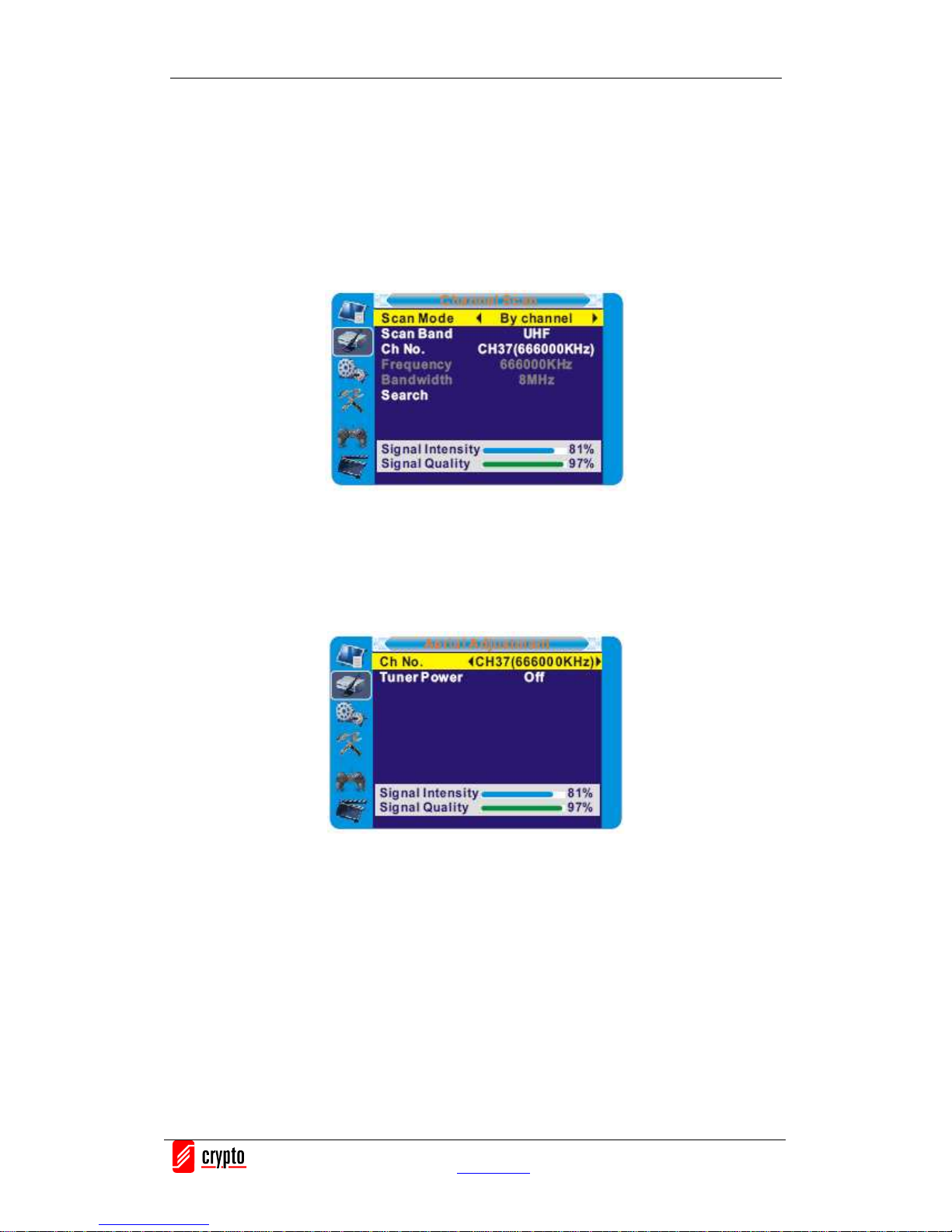
5.2.2 Channel Scan
1. Select "Channel Scan", press the "OK" button to enter the Channel Scan menu.
2. Press cursor button to set Scan mode, Scan Band, Channel No., Frequency and Bandwidth,
then highlight "Search", press "OK" button to start channel scan .
Channel Scan mode:
-By channel
-By frequency
5.2.3 Aerial Adjustment
1. Select the "Tuner Power", press"OK" to enter the Aerial Adjustment.
2. Press the cursor button to set the desired setting. When "Tuner Power" is selected "On", the
STB will provide 5V power to the antenna. It will not provide anything when"Off" is
selected.
5.2.4 LCN
If LCN(Logical Channel Number) Select function is activated, you can't change the original
number of TV channels by scanning .
You can activate/deactivate the LCN function by setting the "LCN Mode" to on/off.
Tabla de contenidos
Otros manuales de Receptor de Crypto