
Crow CS-47 Link Manual de usuario


i
CopyrightCrow Engineering Ltd. 2008
The copyright of this document is owned by Crow Engineering Ltd., its agents and/or
professional advisors. No part of parts hereof may be reproduced, distributed,
republished, displayed, broadcast, hyperlinked or transmitted in any manner or by any
means or stored in an information retrieval system without the prior written permission of
Crow Engineering Ltd. or the copyright owner provided that permission is granted to
download and print the materials in this document for personal, non-commercial use only
provided you do not modify the materials and that you retain all copyright and other
proprietary notices contained in the materials. This permission terminates automatically if
you breach any of these terms or conditions. Upon termination, you will immediately
destroy any downloaded and printed materials.
Trademarks
The trade marks, service marks, and logos (the "Trade Marks") used and displayed in this
document are registered and unregistered Trade Marks of Crow Engineering Ltd. and
others. Nothing in this document should be construed as granting, by implication,
estoppel, or otherwise, any license or right to use any Trade Mark displayed in this
document, without the written permission of Crow Engineering Ltd. or other Trade Mark
owners. The name of Crow Engineering Ltd. or the Crow Engineering Ltd. logo may not
be used in any way, including in advertising or publicity pertaining to distribution of
materials in this document, without prior written permission.
Disclaimer
The information in this manual was accurate and reliable at the time of its release.
However, we reserve the right to change the specifications of the product described in
this manual without notice at any time.
Print Version 02
SEPTEMBER 2010
ȱ
ȱ

i
Contents
INTRODUCTION ...................................................................................................................... 1
PRODUCT DESCRIPTION ....................................................................................... 1
FEATURES .......................................................................................................... 1
HOW TO CONTACT US.......................................................................................... 1
INSTALLATION PRE-REQUISITES........................................................................................... 2
SOFTWARE AND HARDWARE PRE-REQUISITES.......................................................... 2
Cellular Account (GSM Service Provider) ................................................................. 2
TCP / IP ..................................................................................................................... 2
Computer Requirements ........................................................................................... 2
Operating System Requirements .............................................................................. 2
INSTALLING THE SOFTWARE ................................................................................................. 3
DOWNLOADING THE CS-47 GSM LINK CONFIGURATION SOFTWARE ........................... 3
INSTALLING THE CS-47 GSM LINK CONFIGURATION SOFTWARE ................................ 5
PHYSICAL LAYOUT.................................................................................................................. 6
INSTALLING THE HARDWARE UNIT ....................................................................................... 8
CONFIGURING THE CS-47 LINK UNIT .................................................................................... 9
PRE-REQUISITES................................................................................................. 9
LOADING THE SOFTWARE CONFIGURATION PROGRAM ............................................... 9
CONFIGURING THE UNIT LOCALLY........................................................................ 10
CONFIGURING THE UNIT REMOTELY ..................................................................... 11
Pre-requisites........................................................................................................... 11
Configuring the TCP/IP Parameters........................................................................ 14
Saving an Event List File ......................................................................................... 17
Loading an Event List File ....................................................................................... 17
Configuring the Contact IDs .................................................................................... 17
SMS Configuration................................................................................................... 19
REMOTE ACCESS CONFIGURATION ...................................................................................... 21
ENABLING PASSWORD CONTROL.......................................................................... 23
ENABLING PASSWORD AND PHONE NUMBER CONTROL ............................................ 23
FAST SMS CONFIGURATION................................................................................ 24
TECHNICAL SPECIFICATIONS ............................................................................... 25

1
CHAPTER 1.
Introduction
!"#$%&'()&'*"#+ȱ"#ȱ,(-*#$ȱ'./ȱ!0Ȭ12ȱ304ȱ)*#56ȱȱ
Product Description
7./ȱ!0Ȭ12ȱ8*#5ȱ*+ȱ&ȱ304ȱ&99Ȭ"#ȱ:"9/:ȱ";/%&'*#$ȱ"#ȱ&ȱ</))()&%ȱ;."#/ȱ#/'="%5ȱ
'.&'ȱ<"##/<'+ȱ'"ȱ'./ȱ>(##/%ȱ,(+ȱ	ȱ<&#ȱ?(#<'*"#ȱ&+ȱ&ȱ9*&)/%ȱ"%ȱ,&<5(;ȱ9*&)/%ȱ'"ȱ'./ȱ
@07AȱB@(,)*<ȱ0=*'<./9ȱ7/)/;."#/ȱA/'="%5Cȱ"#/ȱ&)%/&9-ȱ*#+'&))/9ȱ*#ȱ'./ȱ>(##/%ȱ
<"#'%")ȱ;&#/)6ȱ
7./ȱ%/&+"#ȱ'.*+ȱ+-+'/:ȱ*+ȱ+"ȱ;";()&%ȱ*+ȱ,/<&(+/ȱ=./#ȱ&#ȱ/D/#'ȱ"%ȱ&)&%:ȱ"<<(%+ȱ'./ȱ
(#*'ȱ<&#ȱ%/;"%'ȱ'"ȱ&ȱ</#'%&)ȱ+'&'*"#ȱ	ȱ+/#9ȱ&#ȱ040ȱ:/++&$/ȱ'"ȱ&ȱ</))()&%ȱ;."#/6ȱ
7./ȱ?"))"=*#$ȱ%/;"%'*#$ȱ:/9*&ȱ<&#ȱ,/ȱ(+/9ȱ+*:()'&#/"(+)-Eȱ
Transport Mode Format
GPRS TCP/IP
GSM CID
GSM SMS
Features
!"##ȱ$%$&'ȱ($)*('+&,ȱȬȱ?"%ȱ&))ȱ>(##/%ȱ!6@6ȱ/D/#'+6ȱ
-"#'+)#$ȱ.*(/0'1ȱ2ȱ345675Fȱ!GHȱ	ȱ040ȱ%/;"%'*#$ȱ?"%:&'+6ȱ
>/;"%'*#$ȱ(;ȱ'"ȱ1ȱ+(,+<%*,/%ȱ;."#/+ȱ+&ȱ47869-9ȱ?"%:&'6ȱ
:$)*('+&,ȱ")ȱ'*ȱ;ȱ75ȱ<==($11$1ȱ+&ȱ345675ȱȱ.*(/0'ȱ
>9-6>5:9ȱ?*//"&+?0'+*&ȱȬȱD*&ȱ304ȱI(&9ȱJ	ȱKLLȱMȱNOLLȱ4PQȱ"%ȱORLȱMȱNKLLȱ
4PQȱ:"9/:ȱ,&+/9ȱ"#ȱ!*#'/%*"#ȱ7!ST*ȱ/#$*#/6ȱ
@0?A")ȱB0''$(CȱȬȱ%/<.&%$/&,)/ȱ)/&9ȱ&<*9ȱ,&''/%-NUȱVMN6TȱW.6ȱ
30/)$(ȱ0#0(/1ȱȬȱ'%*$$/%/9ȱ*?ȱ<"D/%ȱ*+ȱ";/#/9ȱ"%ȱ'./ȱ(#*'ȱ*+ȱ'/&%+ȱ?%":ȱ'./ȱ=&))6ȱ
5(*,(0//+&,ȱ'D$ȱ"&+'ȱȬȱ(+*#$ȱ&ȱ@!ȱD*&ȱX0Jȱ@"%'ȱ	ȱD*&ȱ3@>06ȱ
3E*ȱ*)$(0'+&,ȱ/*=$1ȱ2ȱ@0?A")ȱ*(ȱ5(+/0(CȱB7!@MG@ȱ"#)-Cȱȱ
9-9ȱ?*//0&=1ȱ.(*/ȱ0ȱ/*B+#$ȱ.$0'"($ȱ.*(ȱ($/*'$ȱ?*&'(*#ȱ
:$/*'$ȱ?*&'(*#ȱ.(*/ȱ0&*'D$(ȱ49;Fȱ#+&Aȱ.$0'"($ȱȱȱ
How to Contact Us
0//ȱ,&<5ȱ<"D/%ȱ?"%ȱ9/'&*)+6ȱ

2
Installation Pre-Requisites
Software and Hardware Pre-Requisites
7./+/ȱ&%/ȱ'./ȱ;%/Ȭ%/Y(*+*'/+ȱ?"%ȱ*#+'&))*#$ȱ'./ȱ!0Ȭ12ȱ<"#?*$(%&'*"#ȱ;%"$%&:Eȱȱ
Z"(ȱ:(+'ȱ.&D/ȱ&#ȱ";/#ȱ</))()&%ȱ&<<"(#'ȱ
0G4ȱ<&%9ȱ:(+'ȱ,/ȱ(#)"<5/9ȱ	ȱ&<'*D&'/9ȱ?"%ȱ3@>0ȱ9&'&ȱ+/%D*</+ȱ
Cellular Account (GSM Service Provider)
Z"(ȱ#//9ȱ'"ȱ";/#ȱ&ȱ</))()&%ȱ&<<"(#'ȱ=*'.ȱ-"(%ȱ</))()&%ȱ+/%D*</ȱ;%"D*9/%ȱ'"Eȱ
[#&,)/ȱ'./ȱ</))()&%ȱ$&'/=&-ȱ:"9()/ȱ"#ȱ-"(%ȱ(#*'ȱ
H*+&,)/ȱ!&))ȱ\&*'*#$ȱB%/<"::/#9/9Cȱ
H*+&,)/ȱ&))ȱ%"&:*#$ȱ?/&'(%/+ȱB%/<"::/#9/9Cȱ
]#ȱ";/#*#$ȱ'./ȱ&<<"(#'ȱ-"(ȱ+."()9ȱ%/</*D/ȱ&Eȱ
!/))()&%ȱ;."#/ȱ#(:,/%ȱ
304M3@>0ȱ0G4ȱ<&%9ȱ
SIM Card
\./#ȱ"%9/%*#$ȱ'./ȱ304M3@>0ȱ0G4ȱ<&%9Fȱ,/ȱ+(%/ȱ'"ȱ+;/<*?-ȱ'"ȱ'./ȱ</))()&%ȱ+/%D*</ȱ
;%"D*9/%ȱ'.&'ȱ'./ȱ0G4ȱ<&%9ȱ4X07ȱ,/ȱ&<'*D&'/9ȱ?"%ȱ3@>0ȱ9&'&ȱ+/%D*</+ȱB(#)"<5/9C6ȱG#ȱ
+":/ȱ)"<&'*"#+ȱ-"(ȱ:*$.'ȱ%/</*D/ȱ&ȱ;&++="%9ȱ?"%ȱ'.*+Fȱ	ȱ;"++*,)-ȱ/D/#ȱ&ȱ9*??/%/#'ȱ
#(:,/%6ȱ
TCP / IP
^"%ȱ7!@MG@ȱ<"##/<'*"#ȱ-"(ȱ#//9Eȱ
<5GȱH<??$11ȱ5*+&'ȱG0/$IȱȬȱW@Aȱ*+ȱ'./ȱ#&:/ȱ"?ȱ&ȱ3@>0ȱ&<</++ȱ;"*#'6ȱG'ȱ*9/#'*?*/+ȱ
&#ȱ/_'/%#&)ȱ#/'="%5ȱ&<</++*,)/ȱ?%":ȱ&ȱ'/%:*#&)6ȱW#ȱW@Aȱ.&+ȱ+/D/%&)ȱ&''%*,('/+ȱ
&++"<*&'/9ȱ=*'.ȱ*'ȱ'.&'ȱ9/?*#/ȱ."=ȱ-"(ȱ<&#ȱ&<</++ȱ'./ȱ/_'/%#&)ȱ#/'="%5ȱ&'ȱ'.&'ȱ;"*#'6ȱȱ
0;/&5ȱ'"ȱ-"(%ȱ)"<&)ȱ+/%D*</ȱ;%"D*9/%ȱ'"ȱ$/'ȱ'./ȱW7Aȱ"?ȱ-"(%ȱ#/'="%5ȱ
75ȱ0==($11ȱȬȱ"?ȱ'&%$/'ȱ%/</*D/%ȱ
Computer Requirements
W#-ȱ)&'/%ȱ:"9/)ȱ<":;('/%ȱ"%ȱ)&;'";ȱ=*'.ȱ&#ȱ&D&*)&,)/ȱX0Jȱ;"%'ȱ
Operating System Requirements
\*#9"=+ȱ`@ȱFȱVG07WȱFȱ\*#9"=+ȱ2ȱ
ȱ
3
CHAPTER 2.
Installing the Software
7./ȱ+"?'=&%/ȱ:(+'ȱ,/ȱ9"=#)"&9/9ȱ?%":ȱ'./ȱ<%"=ȱ=/,+*'/6ȱG'ȱ*+ȱ&++(:/9ȱ'.&'ȱ'.*+ȱ*+ȱ
'./ȱ?*%+'ȱ'*:/ȱ-"(ȱ&%/ȱ(+*#$ȱ'./ȱ+*'/6ȱG?ȱ#"'Fȱ;)/&+/ȱ+5*;ȱ&#-ȱ*%%/)/D&#'ȱ+'/;+ȱ)*+'/9ȱ
,/)"=6ȱ
IMPORTANT NOTE
In order to download files from the Crow website you must get a valid
user name and password from your local Crow representative or directly
from Crow support.
Downloading the CS-47 GSM Link Configuration Software
To download the CS-47 GSM link configuration software:
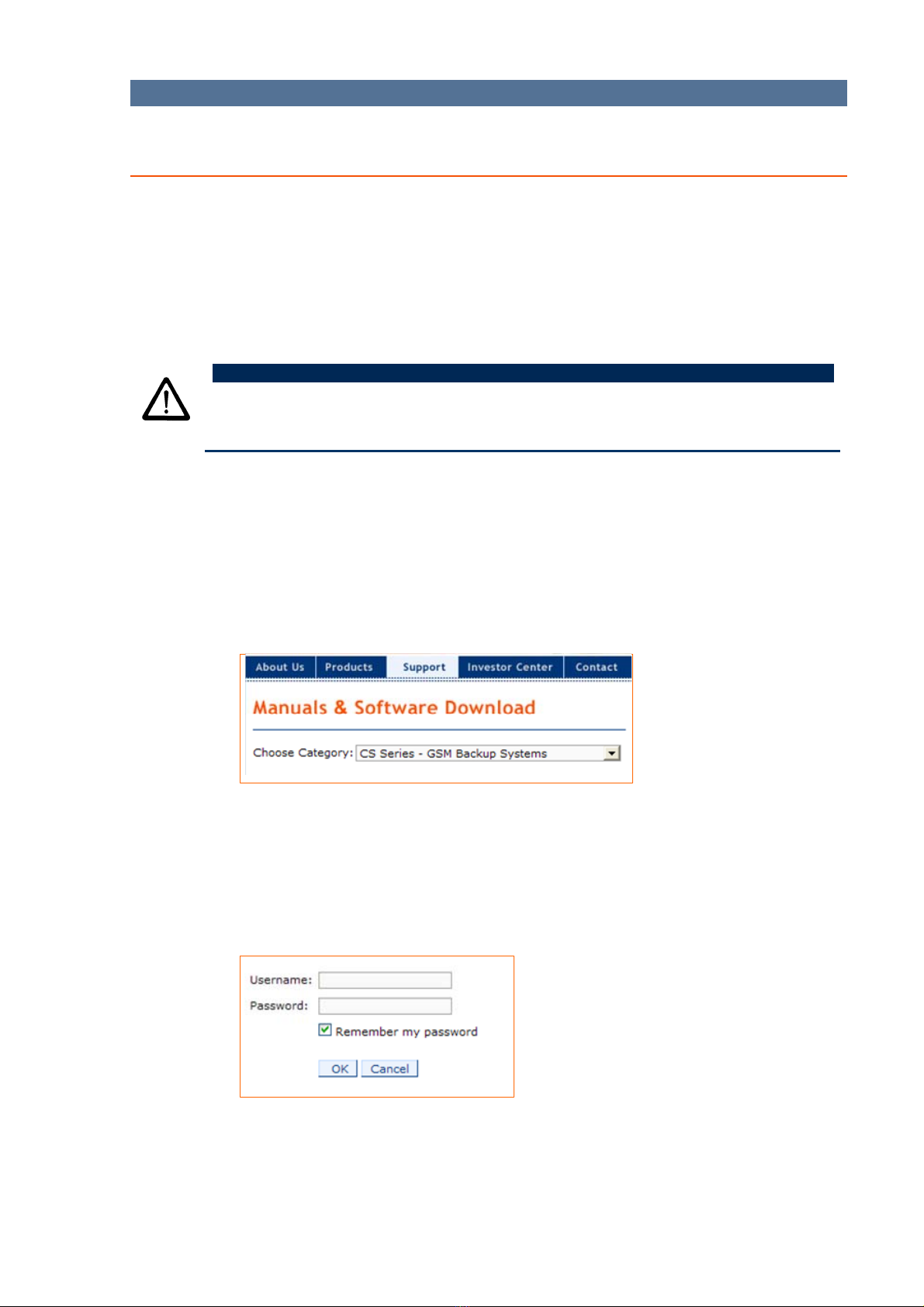
N6ȱ];/#ȱ'./ȱ?"))"=*#$ȱ)*#5ȱ*#ȱ-"(%ȱ,%"=+/%Eȱȱ
ȱ
http://www.thecrowgroup.com/support-download.asp
U6ȱ0/)/<'ȱ'./ȱ<&'/$"%-ȱ49ȱ9$(+$1ȱ2ȱ>9-ȱ@0?A")ȱ9C1'$/16ȱ
T6ȱ0/)/<'ȱ49Ȭ;FȱJ+&Aȱ54ȱ<))#+?0'+*&ȱQ*;ȱ?*)/6
16ȱ0/)/<'ȱ'./ȱ:$/$/B$(ȱ/Cȱ)011E*(=ȱ<./<5,"_ȱ*?ȱ-"(ȱ=&#'ȱ\*#9"=+ȱ'"ȱ
%/:/:,/%ȱ-"(%ȱ(+/%ȱ#&:/ȱ	ȱ;&++="%96ȱ
R6ȱ[#'/%ȱ'./ȱ(+/%ȱ#&:/ȱ	ȱ;&++="%9ȱ-"(ȱ%/</*D/9ȱ?%":ȱ-"(%ȱ)"<&)ȱ!%"=ȱ
%/;%/+/#'&'*D/ȱ"%ȱ9*%/<')-ȱ?%":ȱ!%"=ȱ+(;;"%'6ȱ
ȱ
7./ȱ?*%+'ȱ'*:/ȱ-"(ȱ9"=#)"&9ȱ+"?'=&%/ȱ?%":ȱ'./ȱ+*'/ȱ*'ȱ:&-ȱ,/ȱ&('":&'*<&))-ȱ
+&D/9ȱ"#ȱ-"(%ȱ9/+5'";ȱ*#ȱQ*;;/9ȱ?"%:&'6ȱX+(&))-Fȱ=./#ȱ-"(ȱ<)*<5ȱ'./ȱKLȱ
,(''"#ȱ&?'/%ȱ/#'/%*#$ȱ-"(%ȱ(+/%ȱ#&:/ȱ	ȱ;&++="%9ȱ'./ȱ:/++&$/ȱ+."=#ȱ,/)"=ȱ
*+ȱ9*+;)&-/96ȱ

CS-47 GSM Link - Configuration Guide Chapter 2 - Installing the Software
4
S6ȱ!)*<5ȱ'./ȱKLȱ,(''"#6ȱ
ȱ
ȱ
26ȱ\./#ȱ'./ȱ&,"D/ȱ:/++&$/ȱ*+ȱ+."=#Fȱ<)*<5ȱ'./ȱȱ,(''"#6ȱ
O6ȱ0&D/ȱ'./ȱ?*)/ȱ"#ȱ-"(%ȱ9/+5'";6ȱ
ȱ
ȱ
ȱ
7./ȱ49Ȭ;Fȱ#+&AȱQ*;ȱ?*)/ȱ*+ȱ;)&</9ȱ"#ȱ-"(%ȱ9/+5'";6ȱ
ȱ
!)*<5*#$ȱ'./ȱȱ,(''"#ȱ";/#+ȱ'./ȱ9"=#)"&9/9ȱQ*;ȱ?*)/6ȱ7.*+ȱ*+ȱ
9/+<%*,/9ȱ*#ȱ9/'&*)ȱ*#ȱ'./ȱ+/<'*"#ȱ,/)"=6ȱ

CS-47 GSM Link - Configuration Guide Chapter 2 - Installing the Software
5
Installing the CS-47 GSM link Configuration Software
To install the CS-47 GSM link configuration software:
N6ȱ\./#ȱ'./ȱ+"?'=&%/ȱ*+ȱ9"=#)"&9/9Fȱ<)*<5ȱ'./ȱȱ,(''"#ȱ'"ȱ";/#ȱ'./ȱ
Q*;;/9ȱ?*)/6ȱZ"(ȱ<&#ȱ&)+"ȱ9"(,)/Ȭ<)*<5ȱ'./ȱ?*)/6ȱ
ȱ
ȱ
ȱ
Z"(ȱ%/Y(*%/ȱQ*;ȱ+"?'=&%/ȱ'"ȱ";/#ȱ'./ȱQ*;;/9ȱ?*)/6ȱ
U6ȱ^%":ȱ*#+*9/ȱ'./ȱQ*;ȱ?")9/%Fȱ9"(,)/Ȭ<)*<5ȱ'./ȱ9$'")M$N$ȱ?*)/6ȱ
ȱ
ȱ
T6ȱ!)*<5ȱ'./ȱȱ,(''"#ȱ	ȱ'./ȱ?"))"=ȱ'./ȱ"#Ȭ+<%//#ȱ;%":;'+ȱ'"ȱ*#+'&))ȱ'./ȱ
+"?'=&%/6ȱ
ȱ
\./#ȱ'./ȱ+"?'=&%/ȱ*+ȱ+(<</++?())-ȱ*#+'&))/9ȱ'./ȱ49Ȭ;Fȱ4*&.+,"(0'+*&ȱ*<"#ȱ*+ȱ
;)&</9ȱ"#ȱ'./ȱ9/+5'";Fȱ
ȱ
ȱ

6
CHAPTER 3.
Physical Layout
BATTERY
CONNECTOR
BUS
CONNECTOR
INPUT 1&2
GND
OUTPUT 1&2
GSM SERVICE
LED
FAIL LED
BUS LED
NET LED
STATUS LEDS
CINTERION
TC63i GSM
MODEM
SIM
HOLDER
TAMPER
SWITCH
GSM
ANTENNA
POS
NEG
CLK
DATA
BUS
CONNECTOR
POWER LED
CONFIG
PORT 1
PROGRAM
CONNECTOR
BATTERY
12V / 1.3Ah

CS-47 GSM Link - Configuration Guide Chapter 3 - Physical Layout
7
Table 1: Component Description
Component Description
Status LEDs
NET: Turns green when there is communication with the
TCP/IPserver.
BUS: Blinks yellow when the bus is communicationg with
the control panel.
FAIL: Blinks or solid red on network error. For example, a
problem with the SIM card or GSM network , open tamper
Power LED Turns red when power is applied to the unit.
Modem LED Blinks yellow when the GSM service is connected.
SIM Card Holder SIM card used for the GSM modem.
Antenna Cellular phone antenna connector.
Tamper Switch Activates alarm if cover is removed.
Program
Connector
Connector for connecting the inputs and outputs.
CONFIG PORT Serial port that connects to a PC or laptop.
Battery
Connector
Backup rechargeable battery 12 V/1.3 Ah lead acid.
Bus Connector For communication with the control panel.
Power LED Red when power good.
GSM Modem Siemens TC63 based GSM modem
GSM Service LED Blinks yellow when GSM service is connected.
Output 1&2
Gnd
Terminal Block
Input 1&2
ȱ
ȱ
ȱ
ȱ
ȱ
ȱ
ȱ
ȱ
ȱ
ȱ
ȱ
ȱ
ȱ
ȱ
ȱ
ȱ
ȱ
ȱ
Otros manuales para CS-47 Link
1
Tabla de contenidos
Manuales populares de Módem de otras marcas


US Robotics
US Robotics 3453C Manual de usuario

MaxTech
MaxTech Plug & Play Internal Voice/FAX/Data/SVD... Manual de usuario

Zte
Zte MF823 Manual de usuario

Four-Faith
Four-Faith F1403 Manual de usuario

Sierra Wireless
Sierra Wireless AIRLINK MP595W Manual de usuario

Gemtek
Gemtek WiMAX WIXFBR-103 Manual de usuario