
cowin E8 Manual de usuario

COWIN E8
ANC Wireless Headphones
Owner’s Guide
Bedienungsanleitung
Guía del usuario
Notice d’utilisation
Manuale di istruzioni

IMP O R TANT SAFETY INSTRUCTIONS
Please read and keep all safety and use instructions.
WARNINGS/CAUTIONS
• Do NOT use the headphones at a high volume for any extended period.
– To avoid hearing damage, use your headphones at a comfortable, moderate volume level.
– Turn the volume down on your device before placing the headphones in/on your ears, then turn the volume up gradually until you
reach a comfortable listening level.
• Do NOT use your headphones while driving for phone calls or any other purpose.
• Do NOT use the headphones with noise cancelling on at any time the inability to hear surrounding sounds may present a danger to
yourself or others, e.g., while riding a bicycle or walking in or near traffic, a construction site or railroad, etc.
– Remove the headphones, or use the headphones with noise cancelling off and adjust your volume, to ensure you can hear
surrounding sounds, including alarms and warning signals.
– Be aware of how sounds that you rely on as reminders or warnings may vary in character when using the headphones.
• Do NOT use the headphones if they emit any loud unusual noise. If this happens, turn the headphones off and contact COWIN
customer service.
• Remove headphones immediately if you experience a warming sensation or loss of audio.
• Do NOT use mobile phone adapters to connect headphones to airplane seat jacks, as this could result in injury or property damage
due to overheating.
• Do NOT use the headphones as aviation communication headsets except in case of emergency.
– No incoming audio will be heard with a discharged or improperly installed battery. This could result in the potential of missed
communications while piloting an aircraft.
– Extremely loud ambient noise levels common to many propeller-driven aircraft may impair your ability to receive incoming audio
communications, particularly during takeoff and climb out.
– The headphones are not engineered for noise conditions, altitude, temperature or other environmental conditions common in
non-commercial aircraft, resulting in possible interference to critical communications.
• To reduce the risk of fire or electrical shock, do NOT expose this product to rain, liquids or moisture.
• Do NOT make unauthorized alterations to this product.
• Use this product only with an agency approved power supply which meets local regulatory requirements (e.g., UL, CSA, VDE, CCC).
• Do NOT expose products containing batteries to excessive heat (e.g. from storage in direct sunlight, fire or the like).
Contains small parts which may be a choking hazard. Not suitable for children under age 3.
This product contains magnetic material. Consult your physician on whether this might affect your implantable medical
device.
ENGLISH 2

NOTE: This equipment has been tested and found to comply with the limits for a Class B digital device, pursuant to Part 15 of the FCC
Rules. These limits are designed to provide reasonable protection against harmful interference in a residential installation. This
equipment generates, uses, and can radiate radio frequency energy and, if not installed and used in accordance with the instructions,
may cause harmful interference to radio communications. However, there is no guarantee that interference will not occur in a particular
installation. If this equipment does cause harmful interference to radio or television reception, which can be determined by turning the
equipment off and on, the user is encouraged to try to correct the interference by one or more of the following measures:
• Reorient or relocate the receiving antenna.
• Increase the separation between the equipment and receiver.
• Connect the equipment into an outlet on a circuit different from that to which the receiver is connected.
• Consult the dealer or an experienced radio/TV technician for help.
COWIN Corporation hereby declares that this product is in compliance with the essential requirements and other relevant
provisions of Directive 2014/53/EU and all other applicable EU directive requirements.
For Europe:
Frequency band of operaon 2400 to 2483.5 MHz:
Bluetooth: Maximum transmit power less than 20 dBm EIRP.
Bluetooth Low Energy: Maximum power spectral density less than 10 dBm/MHz EIRP.
Changes or modifications not expressly approved by COWIN Corporation could void the user’s authority to operate this equipment.
This device complies with part 15 of the FCC Rules and with Industry Canada license-exempt RSS standard(s). Operation is subject to
the following two conditions: (1) This device may not cause harmful interference, and (2) this device must accept any interference
received, including interference that may cause undesired operation
This device complies with FCC and Industry Canada radiation exposure limits set forth for general population.
It must not be co-located or operating in conjunction with any other antenna or transmitter.
Meets IMDA Requirements.
CAN ICES-3 (B)/NMB-3(B)
Management Regulation for Low-power Radio-frequency Devices
Article XII
According to “Management Regulation for Low-power Radio-frequency Devices” without permission granted by the NCC, any company,
enterprise, or user is not allowed to change frequency, enhance transmitting power or alter original characteristic as well as
performance to an approved low power radio-frequency devices.
Article XIV
The low power radio-frequency devices shall not influence aircraft security and interfere legal communications; if found, the user shall
cease operating immediately until no interference is achieved. The said legal communications means radio communications operated in
compliance with the Telecommunications Act.
The low power radio-frequency devices must be susceptible with the interference from legal communications or ISM radio wave
radiated devices.
DON’T attempt to remove the rechargeable lithium-ion battery from this product. Contact your local COWIN retailer or other qualified
professional for removal.
ENGLISH 3
REGULATORY INFORMATION
Please dispose of used baeries properly, following local regulaons. Do NOT incinerate.

ENGLISH 4
REGULATORY INFORMATION
This symbol means the product must not be discarded as household waste, and should be delivered to an appropriate
collection facility for recycling. Proper disposal and recycling helps protect natural resources, human health and the
environment. For more information on disposal and recycling of this product, contact your local municipality, disposal
service, or the shop where you bought this product.
Removal of the rechargeable lithium ion battery in this product should be conducted only by a qualified professional.
Please contact COWIN customer service at https://www.cowinaudio.com for further information.
This product is covered under warranty for a period of 18-month free maintenance and 30-day unconditional return policies.
E-mail: [email protected]
Phone: +1 (929) 359-6668 ( Mon-Fri 9:00 a.m. to 5:30 p.m. PST ) Recommend
Website: https://www.cowinaudio.com (Support live chat)
Facebook: https://www.facebook.com/cowinelectronics
Instagram: https://www.instagram.com/cowinaudio
Youtube: https://www.youtube.com/channel/UCQIHuG8eYKa8AFyzOa98RiA
Twitter: https://twitter.com/cowinaudio
If you have any quality problems about the product, please contact COWIN customer service.

ENGLISH 5
CONTENTS
What’s in the Carton
Contents ................................................................................................................................ 6
Headphone Controls
Power on ............................................................................................................................... 7
............................................................................................................................... 7
Headphone functions....................................................................................................... 8
Media playback and volume functions
..............................................................
8
Call functions
...............................................................................................................
8
Noise Cancellation
Noise cancelling modes................................................................................................... 9
Battery Charging
Charge the headphones.................................................................................................. 9
Charging time
..............................................................................................................
9
Status Indicators
Bluetooth® indicator ......................................................................................................... 10
Battery indicator ............................................................................................................... 10
Bluetooth Connections
Connect using the Bluetooth menu on your mobile device
.....................
10
Disconnect a mobile device........................................................................................... 11
Reconnect a mobile device............................................................................................ 11
Connect another mobile device................................................................................... 11
Clear the headphone pairing list.................................................................................. 11
Wired Connections
Connect the audio cable................................................................................................. 12
Care and Maintenance
Store your headphones ................................................................................................... 12
Clean the headphones ..................................................................................................... 12
Warranty
................................................................................................................
12
Troubleshooting
Common solutions ............................................................................................................ 13

ENGLISH 6
WHAT’S IN THE CARTON
Contents
Confirm that the following parts are included:
Note: If any part of your product is damaged, do not use it. Contact your authorized COWIN customer service.
E-mail: [email protected]
Phone: +1 (929) 359-6668 ( Mon-Fri 9:00 a.m. to 5:30 p.m. PST ) Recommend
Website: https://www.cowinaudio.com (Support live chat)
Facebook: https://www.facebook.com/cowinelectronics
Instagram: https://www.instagram.com/cowinaudio
Youtube: https://www.youtube.com/channel/UCQIHuG8eYKa8AFyzOa98RiA
Twitter: https://twitter.com/cowinaudio
COWIN E8
active noise cancelling Bluetooth headphones
Carry case
USB cable 3.5 mm audio cable Airline headphone adapter
3.5mm to 6.5mm audio converter

ENGLISH 7
HEADPHONE CONTROLS
Noise cancellation On / Off switch
Power / Bluetooth / Call control button
Volume up / Skip backward button
Volume down / Skip forward button
USB charging port
Audio jack
Press and hold for five seconds.
You hear the power-on tones.
Tip: Once powered on, the white LED flashes blue and red alternately.
Power on
Power off
Press and hold for three seconds.
You hear the power-off tones.
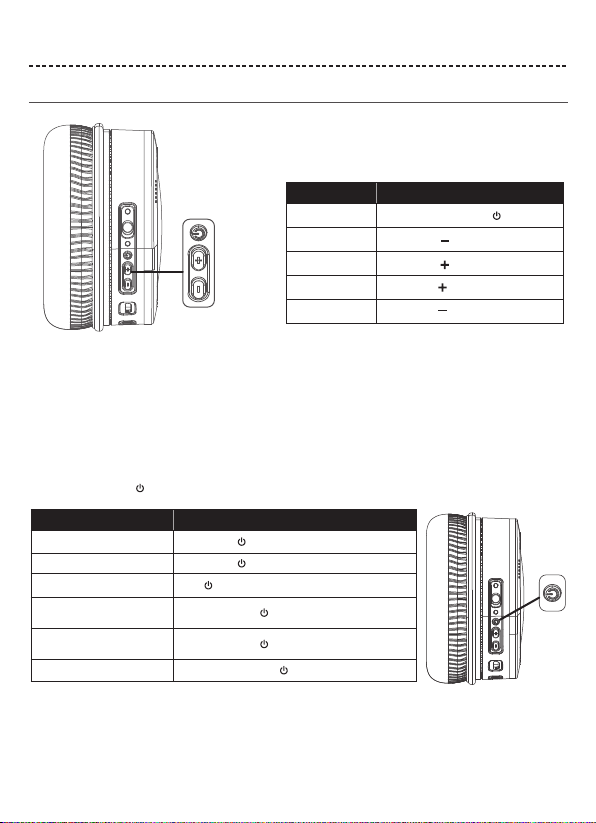
ENGLISH 8
HEADPHONE CONTROLS
Headphone functions
The headphone controls are located on the right earcup.
Media playback and volume functions
Function What to do
Play /Pause Short press the Multi-function button
Skip forward Short press the button
Skip backward Short press the button
Volume up Long press the button
Long press the buttonVolume down
Call functions
The Multi-function button and microphone are located on the back of the right earcup.
Function What to do
Answer a call Short press the button
Short press the buttonEnd a call
Decline an incoming call Press and hold for one 2 seconds
While on a call, press once
While on a call, press and hold for 2 seconds
With two active calls, press and hold for 2 seconds
Answer a second incoming call
and put the current call on hold
Decline a second incoming call
and stay on current call
Switch between two calls

ENGLISH 9
NOISE CANCELLATION
BATTERY CHARGING
Noise cancelling modes
Noise cancellation OFF
Charge the headphones
Charging time
Noise cancellation reduces unwanted noise providing a clearer, more lifelike audio performance. You can choose the noise cancelling
mode based on your listening preferences and environment.
Notes:
• While charging, the battery indicator red. When the battery is fully charged, the battery indicator off.
• The headphones do not work while charging.
Notes:
When only use Bluetooth without noise cancelling, a full charge powers the headphones for up to 20 hours.
When use Bluetooth with noise cancelling mode, a full charge powers the headphones for up to 10 hours.
Allow up to hours to fully charge the headphones.
1. Plug the small end of the USB cable into the micro-USB connector on the left earcup.
2. Plug the other end into a USB wall charger or computer that is powered on.
Noise cancellation ON

ENGLISH 10
STATUS INDICATORS
BLUETOOTH CONNECTIONS
Connection method
You can connect your mobile device with your headphones using Bluetooth wireless technology.
Note: If connected to an Apple device, the device displays the headphone battery level near the upper right corner of the screen.
Solid green Noise cancellation ON
Indicator Light Display
Flashing blue and red alternately
Flashing red
Solid red
Solid blue
Flashing blue slowly
System status
Power on & In pairing mode
Low Battery
Charging in Process
Fully Charged
Paired
Indicator Light Display System status
Note: The devices must be within range (32.8 ft. or 9 m) and powered on.
Tip: Once powered on, the white LED flashes blue and red alternately.
Tip: Once paired, you hear “Paired” and see the indicator flash blue slowly.
Choose “E8” to connect
2. On your mobile device, enable the Bluetooth feature.
Tip: The Bluetooth feature is usually found in the Setting menu.
3. Select your headphones from the device list.
1.Turn on the
headphones
. If connecting for the first time, the headphone will
enter the pairing mode automatically after it is powered on.
E8
Otros manuales para E8
1
Tabla de contenidos
Idiomas:
Otros manuales de Auriculares inalámbricos de cowin


