
Contech CCS Series Manual de usuario

ELECTRONIC WEIGHING SCALE
®
CCS - SERIES
OPERATING MANUAL

CONTENTS
1. Introduction
2. Crane scale sketch
3.
4.
5.
6.
7.
8.
9.
10.
11.
12
.
Installation
Operation of the Scale
Print Option
Bi-directional RS-232 interface
Storage of Weights in Memory
Auto Power Off
Piece Counting Mode
Set Point Facility
Operating in Tare / Zero Mode
Set up Function

INTRODUCTION
We thank you for choosing series weighing scale for your
weighing needs. These scales use some of the latest and most advanced
computing powers to give maximum flexibility and utility to the user.
CCS
Features:
weighing unit gram / kilo gram.
Feather touch membrane keyboard.
Optional Battery backup facility.
Piece counting facility, up to 25 different types.
Storage of weights in memory and printing, up to 100 weights.
Power saving mode.
Bi-directional RS232 interface to interface with computers and printers.
Selectable baud rate.
Set point facility up to 3 limits.
Auto Power off.
Peak Hold facility.
Date and time facility.
Multiple Print options with Sr. no., Date, Time and weight in Horizontal /
Vertical Mode.
Automatic zero tracking.
User selectable Tare/Zero mode option with Net/gross facility for
minimum use.

REAR VIEWREAR VIEW
MODEMODE
HOLD
ENT.
HOLD
TARE
PRN
StableStable
Kg
Power
255
180
FRONT VIEW
C
H
R.H SIDE VIEWR.H SIDE VIEW
CRANE SCALE SKETCH
A
B

INSTALLATION
1. Unpacking:
2. Electrical Requirements:
3. Environmental Requirements:
4. Start Up:
Unpack the balance. Save the packing container for future use.
The balance requires very stable power. It works on 230V AC supply
with PROPER EARTHING. The power outlet used for the balance should not
be shared with any other devices which draws current in inconsistent manner
likeAir Conditioner or Refrigerator etc.
For best results, the balance should be placed on a level surface which
is free from drafts. It should not be exposed to direct sunlight or radiated heat.
Table used for balance should be sturdy and should not transmit vibration from
other equipments and free from the movement of people. No vibration
producing equipment should be operated on the same platform as balance.
Power is supplied to the scale through a 3 core AC mains cord attached
to the scale. Insert the 3 pin plug of the power supply onto a proper mains
outlet. Switch on the balance using the switch on the scale.
Scale goes through self test and subsequently starts displaying weight.
Press key to display zero weight.
NOW THE SCALE IS READY FOR WEIGHING.
With battery backup option, there is a need to charge the battery regularly
to prevent loss of backup time. The scale can be switched off using the switch
provide on the scale. Do not switch off the main power to the scale even when the
scale is not in use. Keeping the mains power on will charge the battery and will be
ready to use when the input power fails.
NOTE:
1
TARE

OPERATION OF THE SCALE
1) FOR CHANGING WEIGHING UNITS.
Press key, the scale will show for some time
and will display the current weighing unit, say grams
Use or keys to change the mode and
Press key to select or
Press key to discard the changes.
Note that all weighing functions except the basic weighing unit need to be
enabled using functions.
Refer section on for more details.
2) FOR CHANGING DATE, TIME AND SERIAL NO.
Press key, the scale will show for some time
and will display the current weighing unit, say grams
Press key once again, the scale will show,
(If Fill option is on)
Press SETUP key once again, the scale will show
(
Press SETUP key once again, the scale will show
(If fill option is on and limit is set to SET-3)
If fill option is on and limit is set to SET-2 or above)
2
MODE
ENTER
SET
UP
SET
UP
TARE

OPERATION OF THE SCALE
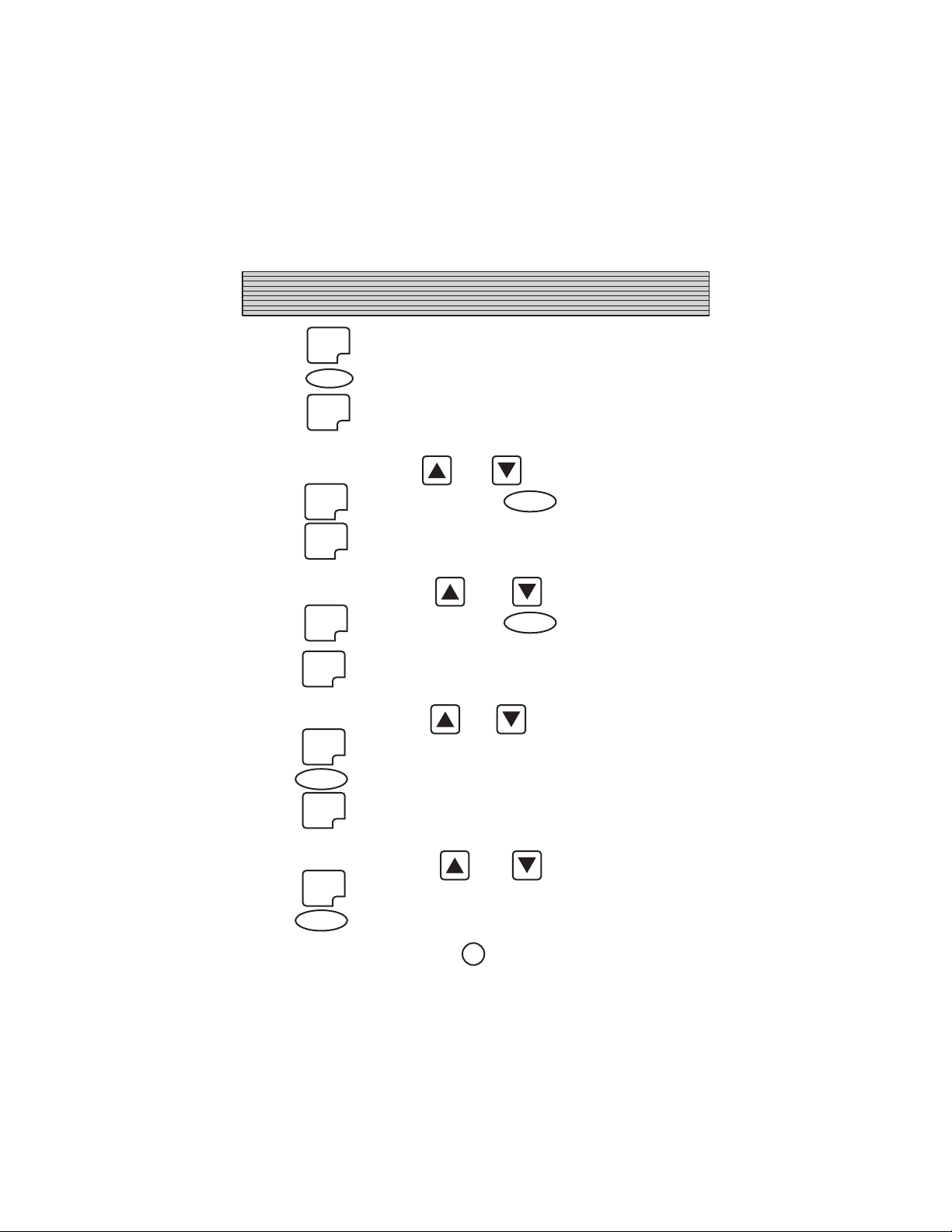
Press key once again, the scale will show
dt DD
where DD is the current date. Use and keys to change
date and press key to store the date.
Press key to skip date entry.
The scale will display
mn MM
where MM is the current month. Use and keys to change month
and press key to store the month.
Press key to skip month entry.
The scale will display
Yr YY
where YY is the current year. Use and keys to change year
and press key to store the year.
Press key to skip year entry.
The scale will display
hh.mm.ss
where hh.mm.ss is the current time.
3
ENTER
ENTER
ENTER
SET
UP
ZERO
ZERO
ZERO
OPERATION OF THE SCALE
Press key to change the time or
key to quit time entry.
Press key, the scale will show,
hh xx
where xx is the hour. Use and key to change hour.
Press key to save. Press key to skip hour entry.
Press key, the scale will display
mm xx
where xx is the minute. Use and key to change minute.
Press key to save. Press key to skip minute entry.
Press key, the scale will display
SS xx
where xx is the second. Use and key to change second.
Press key to save.
Press key to skip second entry.
Press key, the scale will display
Sr xxxx
where xxxx is the serial no. Use and key to change serial number.
Press key to save.
Press key to skip serial number entry.
Press
4
ENTER
ENTER
ENTER
ENTER
ENTER
ENTER
ENTER
ENTER
ENTER
TARE
ZERO
ZERO
ZERO
ZERO

PRINT OPTION
CT/CP series weighing scales can be attached to a serial printer for your printing
needs. Print out can be programmed to suit most of the printing requirements.
Note that the printer should have a serial port and baud rate of the scale and printer
should be same. 2 baud rates are available with the scale i.e. 2400 and 4800.
Printing option and patterns are controlled by parameters.
They are
There are 4 options
i) - Press key to start printing weight
and other details programmed as per (b), (c) and (d) below.
ii) - Printing is initiated when the weight kept on the pan
becomes stable.
iii) - All the displayed weights are printed along with
other details programmed as per (b), (c) and (d) below.
iv) - To print weights stored in memory along with details
programmed as per (b), (c) and (d) below.
Printer format. Five printout formats are available.
i) - Only weight.
ii) - Serial no and weight.
iii) - Serial no, Date and weight.
iv) - Serial no., Time and weight.
v) - Serial no., Date, Time and weight.
a) Print :
b) Pr.fmt. :
4 SETUP
5
PRINT

PRINT OPTION
c) Print type (Horizontal or Vertical)
Details will be printed horizontally.
Sr.No. Date Time Weight
001 12.05.2002 13:25:00 4.545 kg
002 12.05.2002 13:27:05 4.234 kg
Details will be printed vertically in a slip form.
Sr.No. : 001 Date : 12.05.2002
Time : 13:25:00 Weight : 4.545 kg
d) : Title for printout.
i) TLE-YES - To enable title printing.
ii) TLE-no - To disable title printing.
Set the above parameters (a) to (d) to your requirements and effect printing.
These parameters are available in SETUP functions. Refer SETUP functions in
chapter.
P-TYPE:
i) – Horizontal
ii) – Vertical
TITLE
6
1
2
Tabla de contenidos
Otros manuales de Escala de Contech


