
Conceptronic CMULTIRWU2 Manual de usuario

NEDERLANDS
1
Conceptronic CMULTIRWU2
Snelstart handleiding
Hartelijk gefeliciteerd met de aanschaf van uw
Conceptronic Multicardreader/writer.
In de bijgaande Snelstart handleiding wordt stap voor stap uitgelegd
hoe u de Conceptronic CMULTIRWU2 installeert.
Ingeval van problemen adviseren wij u onze support-site te bezoeken
(ga naar: www.conceptronic.net en klik op ‘Support’). Hier vindt u een
database met veelgestelde vragen waar u hoogstwaarschijnlijk de
oplossing voor uw probleem kunt vinden.
Heeft u andere vragen over uw product die u niet op de website kunt
vinden, neem dan contact met ons op via e-mail:
Voor meer informatie over Conceptronic producten kunt u terecht op
de Conceptronic website: www.conceptronic.net.
1. Pakket Inhoud
De volgende onderdelen dienen aanwezig te zijn in de verpakking:
1x Conceptronic CMULTIRWU2
1x USB Verlengkabel
1x Snelstart Handleiding
1x Garantiekaart

NEDERLANDS
2
2. Beschrijving van de Conceptronic CMULTIRWU2
Nr Beschrijving
1Slot voor Compact Flash / Micro Drive kaarten
2Slot voor andere kaarten
3Slot voor Memorystick kaarten (MS, MS-Pro, MS Duo, MS-Pro Duo)
4Slot voor SD/MMC kaarten (SD, MMC, RS-MMC)
Let op: Smart Media kaarten (SMC) worden niet ondersteund door de
CMULTIWRU2!
3. De CMULTIWRU2 installeren
Sluit de USB kabel van de CMULTIWRU2 aan op een vrije USB poort van
uw computer. Windows zal de CMULTIWRU2 automatisch detecteren en
installeren. Elk slot van de cardreader zal een eigen stationsletter
toegewezen krijgen.
Tip: Als de USB kabel van de CMULTIWRU2 te kort is kunt u de
meegeleverde USB verlengkabel gebruiken om de CMULTIWRU2
aan te sluiten op uw computer.
Uw Conceptronic CMULTIRWU2 is nu gereed voor gebruik!
1
2
3
4

ENGLISH
3
Conceptronic CMULTIRWU2
Quick Installation Guide
Congratulations on the purchase of your
Conceptronic Multicardreader/writer.
The enclosed Hardware Installation Guide gives you a step-by-step
explanation of how to install the Conceptronic CMULTIRWU2.
When problems occur, we advise you to go to our support-site (go to
www.conceptronic.net and click ‘Support’. Here you will find the
Frequently Asked Questions Database.
When you have other questions about your product and you cannot find
it at our website, contact us by e-mail: support@conceptronic.net
For more information about Conceptronic products, please visit the
Conceptronic Web Site: www.conceptronic.net
1. Package Contents
The following items must be present in your package:
1x Conceptronic CMULTIRWU2
1x USB Extension Cable
1x Quick Installation Guide
1x Warranty Card

ENGLISH
4
2. The Conceptronic CMULTIRWU2 explained
Nr Description
1Slot for Compact Flash / Micro Drive cards
2Slot for other cards
3Slot for Memorystick Cards (MS, MS-Pro, MS Duo, MS-Pro Duo)
4Slot for SD/MMC Cards (SD, SD-HC, MMC, RS-MMC)
Note: Smart Media cards (SMC) are not supported by the
CMULTIWRU2!
3. Installing the CMULTIRWU2
Connect the USB Cable of the CMULTIWRU2 to a free USB port on your
computer. Windows will automatically recognize and install the
CMULTIWRU2. Each slot will get a Drive Letter on your computer.
Tip: If the USB Cable of the CMULTIRWU2 is too short, you can use the
delivered USB Extension Cable to connect the CMULTIWRU2 to
your computer.
Your Conceptronic CMULTIRWU2 is now ready to use!
1
2
3
4

ESPAÑOL
5
CMULTIRWU2 de Conceptronic
Guía de instalación rápida
Felicidades por la compra de su lector /
grabador de multitarjetas de Conceptronic.
La guía de instalación de hardware incluida le orientará paso a paso
sobre cómo instalar el CMULTIRWU2 de Conceptronic.
En caso de surgir cualquier problema, visite nuestra página web de
asistencia técnica (haga clic en el apartado “Soporte” de
www.conceptronic.net). En esa sección podrá consultar la base de
datos de Preguntas Frecuentes (F.A.Q.).
Si tiene otras preguntas sobre nuestro producto y no las encuentra en
nuestro sitio web, póngase en contacto con nosotros por correo
electrónico: apoyo@conceptronic.net
Para más información sobre los productos de Conceptronic, visite el
sitio web de Conceptronic: www.conceptronic.net
1. Contenido del paquete
El paquete debe contener los siguientes elementos:
1x CMULTIRWU2 de Conceptronic
1x Cable de extensión USB
1x Guía de instalación rápida
1x Tarjeta de garantía

ESPAÑOL
6
2. Descripción del CMULTIRWU2 de Conceptronic
N.º Descripción
1Ranura para tarjetas Compact Flash / Micro Drive
2Ranura para otras tarjetas
3Ranura para tarjetas Memorystick (MS, MS-Pro, MS Duo, MS-Pro
Duo)
4Ranura para tarjetas SD/MMC (SD, SD-HC, MMC, RS-MMC)
Nota: Las tarjetas Smart Media (SMC) no son compatibles con el
CMULTIWRU2
3. Instalación del CMULTIRWU2
Conecte el cable USB del CMULTIWRU2 a un puerto USB libre de su
ordenador. Windows detectará e instalará automáticamente el
CMULTIWRU2. Cada ranura tendrá asignada una letra de unidad en su
ordenador.
Consejo: Si el cable USB del CMULTIRWU2 es demasiado corto, utilice
el cable de extensión USB incluido para conectar el
CMULTIWRU2 a su ordenador.
¡Ya puede utilizar el CMULTIRWU2 de Conceptronic!
1
2
3
4

DEUTSCH
7
Conceptronic CMULTIRWU2
Schnellinstallationsanleitung
Wir gratulieren Ihnen zum Kauf Ihres
Conceptronic Multikartenlesers/-schreibers.
In beiliegender Hardware-Installationsanleitung wird Ihnen Schritt für
Schritt gezeigt, wie der Conceptronic CMULTIRWU2 installiert werden
muss.
Wenn Probleme auftreten sollten, besuchen Sie unsere Support-Seite
(unter www.conceptronic.net) und klicken Sie auf ‚Support’. Dort steht
Ihnen unsere FAQ-Datenbank mit den häufig gestellten Fragen zur
Verfügung.
Wenn Sie weitere Fragen zu Ihrem Produkt haben, die Sie auf unserer
Webseite nicht beantworten können, kontaktieren Sie uns per E-Mail:
Detaillierte Informationen über Conceptronic Produkte finden Sie auf
unserer Webseite: www.conceptronic.net
1. Packungsinhalt
In der Verpackung ist Folgendes enthalten:
1x Conceptronic CMULTIRWU2
1x USB-Verlängerungskabel
1x Schnellinstallationsanleitung
1x Garantiekarte
DEUTSCH
8
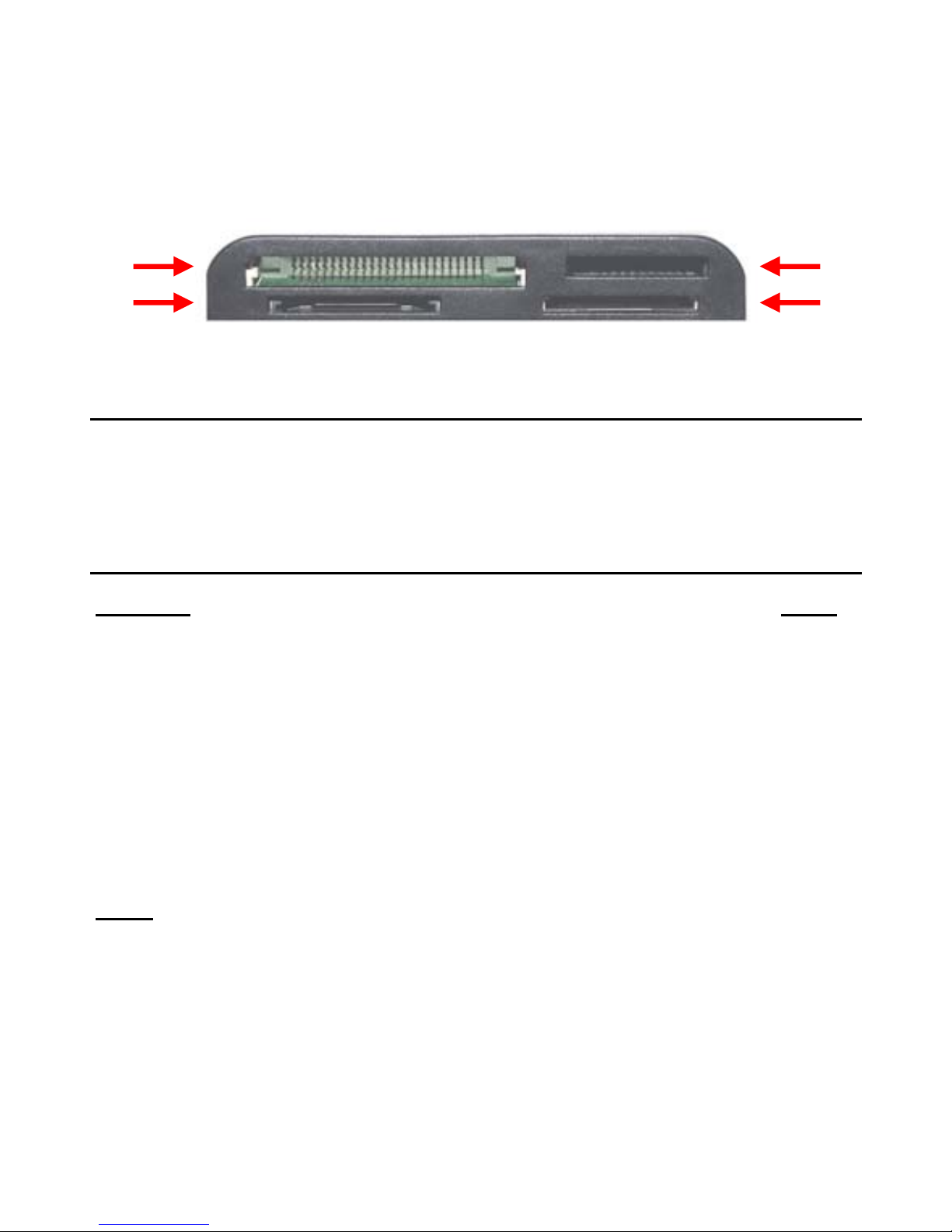
2. Erläuterungen zum Conceptronic CMULTIRWU2
Nr. Beschreibung
1Steckplatz für Compact Flash- /Microdrive-Karten
2Steckplatz für andere Karten
3Steckplatz für Memorystick-Karten (MS, MS-Pro, MS Duo, MS-Pro
Duo)
4Steckplatz für SD/MMC-Karten (SD, SD-HC, MMC, RS-MMC)
Hinweis: Smart Media-Karten (SMC) werden vom CMULTIWRU2 nicht
unterstützt!
3. Installation des CMULTIRWU2
Schließen Sie das USB-Kabel des CMULTIWRU2 an einen freien USB-Port
Ihres Computers an. Windows erkennt und installiert den CMULTIWRU2
automatisch. Jedem Steckplatz wird auf Ihrem Computer ein
Laufwerksbuchstabe zugeordnet.
Tipp: Wenn das USB-Kabel des CMULTIRWU2 zu kurz ist, können Sie
das im Lieferumfang enthaltene USB-Verlängerungskabel für
den Anschluss des CMULTIWRU2 an Ihren Computer verwenden.
Damit ist Ihr CMULTIRWU2 betriebsbereit!
1
2
3
4

FRANÇAIS
9
CMULTIRWU2 de Conceptronic
Guide d’installation rapide
Nous vous félicitons pour l’achat de ce
lecteur/graveur multi-cartes de Conceptronic
Le guide d’installation de hardware vous expliquera étape par étape
comment installer le CMULTIRWU2 de Conceptronic.
En cas de problème, nous vous conseillons de consulter notre site web
www.conceptronic.net et de cliquer sur « Support ». Vous y trouverez
les réponses aux questions les plus fréquentes (FAQ).
Pour toute autre question au sujet de notre produit, ou si vous ne
trouvez pas l’information dont vous avez besoin sur notre site web,
Pour de plus amples informations sur les produits Conceptronic, merci
de visiter notre site web : www.conceptronic.net
1. Contenu du paquet
Ce paquet doit contenir les éléments suivants :
1x CMULTIRWU2 de Conceptronic
1x Câble de rallonge USB
1x Guide d’installation rapide
1x Carte de garantie

FRANÇAIS
10
2. Explication du CMULTIRWU2 de Conceptronic
Nº Description
1Logement pour cartes Compact Flash / Micro Drive
2Logement pour autres cartes
3Logement pour cartes Memorystick (MS, MS-Pro, MS Duo, MS-Pro
Duo)
4Logement pour cartes SD/MMC (SD, SD-HC, MMC, RS-MMC)
Remarque:les cartes Smart Media (SMC) ne sont pas compatibles
avec le CMULTIWRU2 !
3. Installation du CMULTIRWU2
Connectez le câble USB du CMULTIWRU2 à un port USB disponible de
votre ordinateur. Windows le détectera automatiquement et installera
le driver du CMULTIWRU2. À chaque logement sera affectée une lettre
d’unité (Drive letter) dans votre ordinateur.
Conseil:Si le câble USB du CMULTIRWU2 est trop court, vous pouvez
utiliser la rallonge USB fournie afin de pouvoir connecter le
CMULTIWRU2 à votre ordinateur.
Vous pouvez dès maintenant utiliser votre CMULTIRWU2 de
Conceptronic !
1
2
3
4
Otros manuales para CMULTIRWU2
2
Tabla de contenidos
Idiomas:
Otros manuales de Lector de tarjetas de Conceptronic

Conceptronic
Conceptronic CCRSST Manual de usuario

Conceptronic
Conceptronic CMULTIFP2 Manual de usuario

Conceptronic
Conceptronic CMULTIFP Manual de usuario

Conceptronic
Conceptronic CMULTIRWU2 Manual de usuario

Conceptronic
Conceptronic CMULTCREXC Manual de usuario

Conceptronic
Conceptronic CCOMBOGR Manual de usuario

Conceptronic
Conceptronic CMULTITRV Manual de usuario

Conceptronic
Conceptronic CMULTiCRSi Manual de usuario

Conceptronic
Conceptronic CSVWCRPB Manual de usuario

Conceptronic
Conceptronic CMULTIRWU2 Manual de usuario


