CHIYU CYT-100MG Manual de usuario

CYT-100MG
User Manual
Document Version 1.0
Web Version 1.2 2011-05-17
Firmware Version 1.04.00, May 17 2011

【Index】
Ⅰ、Hardware Introduction.........................................................................................................1
Ⅱ、Product Overview................................................................................................................3
Ⅲ、WEB Login..........................................................................................................................4
Ⅳ、Web Function Instruction ..................................................................................................10
Main Menu........................................................................................................................10
1、IP Networking setup..............................................................................................10
(1) STATIC IP ........................................................................................................10
(2) DHCP Client.....................................................................................................11
2、Operation Mode.....................................................................................................12
(1) Modbus RTU Slave..........................................................................................12
(2) Modbus RTU Master........................................................................................13
(3) Modbus ASCII Slave ........................................................................................14
(4) Modbus ASCII Master......................................................................................15
3、Serial Type ............................................................................................................16
4、DDNS Setup..........................................................................................................17
(1) TZ0...................................................................................................................17
(2) Dyndns.............................................................................................................18
5、Advanced Modbus Setting ....................................................................................19
Management.....................................................................................................................20
1、Device Admin ........................................................................................................20
2、System Status .......................................................................................................21
3、Backup & Restore .................................................................................................22
4、Firmware Upgrade.................................................................................................23
5、PING .....................................................................................................................24
Copyright @ 2011. All Rights Reserved.
All trademarks and trade names are the properties of their respective owners.

1
-CYT-100MG-
Ⅰ、Hardware Introduction
Appearance
Specification
Item Specification
CPU 16 Bits, 100MHZ
Memory 256KB Flash & 2MB SDRAM
Watchdog System never halt
Ethernet 10/100 Base-T/Tx , Automatic MSI/MDI-x port
Communication Port RS-232, RS-422, RS-485
Connectors DB9(MALE)/RJ-45
RS-232 TxD, RxD, RTS, CTS, DTR, DSR, DCD,RI,GND
RS-422 Tx+,Tx-, Rx+, Rx-,GND (1200M for the longest distance)
RS-485 Data+, Data-,GND (1200M for the longest distance)
Power Input Choose one:
PWR1: DC9~24V(300MA MAX) 2-pin Separate terminal
PWR2: DC9~24V(300MA MAX) DC power to DC socket
Operating Temperature 0℃~ 55℃
Operating Humidity 5 ~ 95%RH
Storage Temperature -20℃~ 85℃
Surge Protection Serial port 15KV ESD
Electromagnetic protection Ethernet port 1.5KV
LED Indicator Power / RXD / TXD /ACT
Weight 315g
Dimensions ( L x W x H ) 106.5(86.5 without ear loop)*115(110 without RS232)*28mm

2
End point

3
Ⅱ、Product Overview
CYT-100MG apply for industrial control device, and it make TCP Modbus 及RTU/ASCII
Modbus devices can access and communicate data through CYT-100MG.
CYT-100MG can support 4 TCP Master and each Master can control maximum 32
demands.
The Web interface of CYT-100MG is simple, easily to operate, and without operation
system limitation.
Features
Support DHCP Client, when activate this function, CYT-100MG can get TCP/IP default
from DHCP Server when the system activates, Includes IP address, default getaway
IP and DNS server.
Support RTU Master/Slave and ASCII Master/Slave 4 modes setting.
Auto detecting 10/100 M Ethernet.
Enable users to conduct data access or management on CYT-100MG through various
operation system of IE , Netscape browser.
Allows users to back up and store file system parameter and restore it, for security
reasons the backup file will be stored encrypted.
Support 4 sets of remote IP connections at the same time

4
Ⅲ、WEB Login
CYT-100MG contains a HTTP server, thus CYT-100MG can link and connect through
Web browser, and then conduct setting.
Preparation
Before conducting CYT-100MG setting, please assure the following:
PC has connected to CYT-100MG, and PC and CYT-100MG are situated in the same
WAN with power supplied.
If the default IP address (192.168.168.125 ) is occupied by else device, then it is a
must to shut down that device first till the setting is over, and then allocate new IP
address to CYT-100MG.
How to search CYT-100MG
1、After installation of CYT-100MG and network cable is completed, use CYT-100MG’s
IP Search to search all CYT-100MG in a certain LAN, or download IP Search tool
from CHIYU homepage. Desktop icon as below:
2、Click IP Search icon, will display a window, as shown:

5
3、While the IP Search window shows up, it will display all CYT-100MG in LAN, and show
its Device name, Location, Model Name, IP Address, Subnet Mark, Gateway, Mac
Address. Select particular CYT-100MG, then its related information will appear below
the window, as shown:
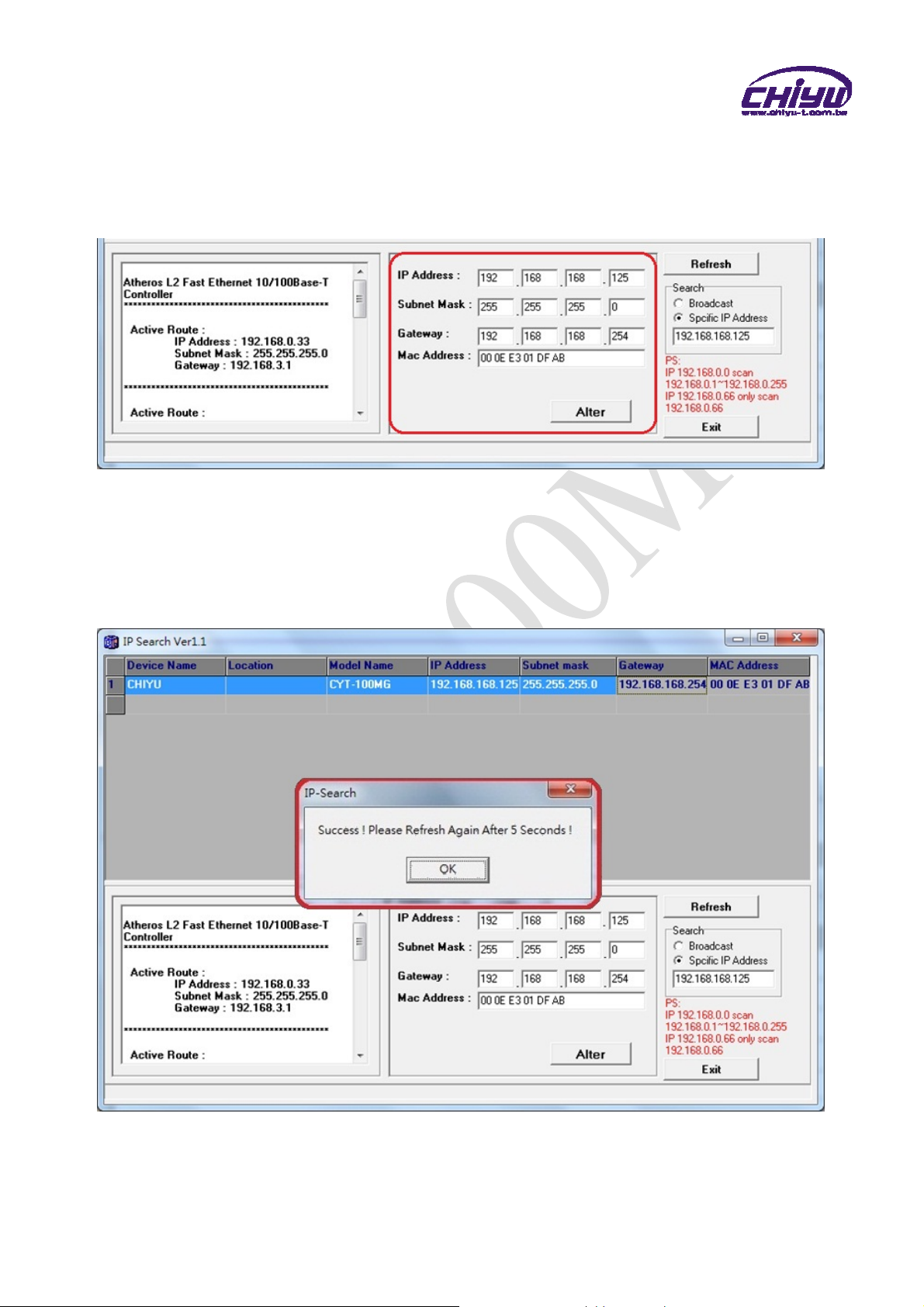
4、The showed information of CYT-100MG can be revised directly in the window, the part
can be modified: IP Address, Subnet Mask, Gateway. After modification completed
( MAC Address can not modify ),click Alter then it will display the modified
information, as shown:

6
5、After modification, if want to confirm whether the modification is correct or not, click
Refresh button to refresh and check information ( Fig-1 ), click Exit button to
leave.(Fig-2)
6、After modification, the IPaddress of CYT-100MG has matched with its WAN, if want to
get access into the Web of CYT-100MG, has two methods:
(1)Open IP Search, select and double click particular CTY-100MG, then to enter its
webpage.
(2)While the internet explorer opened, input CYT-100MG IP address to enter its
webpage
Remark:
WINDOWS XP:
《Step 1》
ClickWINDOWSXPmycomputer ,OpenControlPan on
the left side, please turn to traditional overview and select network link
《Step 2》
Click LAN, then select content, the link configuration will be shown, click Internet
Protocol (TCP/IP), then input the same setting as CYT-100MG, as below figure:

7
WINDOWS 7:
《Step 1》
Click Windows 7 icon, select , open and search for ,
click Alter Interface Card on the upper-left side.
《Step 2》
Click LAN link, select content, then the LAN settings will be shown, click Internet
Protocol(TCP/IPv4),then input same setting as CYT-100MG, as below figure.

8
How to login to CYT-100MG Web via web browser
1、Start Web browser ( ig: WIN 7 IE ), input CYT-100MG’s IP Address, for example: use
the default CYT-100MG IP Address: http://192.168.168.125
2、If connection failed, should check:
If CYT-100MG installed and its power supplied properly
To examine the LAN connection, can use start toolsExecuteInput cmd open
MS-DOS, Input “ ping” to test CYT-100MG connection, input command: ping
192.168.168.125, as shown below:
If no response received, it explains the link has troubles either the connection is
not proper or the PC’s IP address can not match with CYT-100MG’s IP address
Set the PC’s IP address with CYT-100MG’s IP address with same segment, if the
PC uses fixed IP address, the address must be ranged in: 192.168.168.1 ~
192.168.168.65 or 192.168.168.67 ~ 192.168.168.254 , thus it can be compatible
with CYT-100MG’s default IP address: 192.168.168.125, the Subnet Mask’s
setting must be: 255.255.255.0 , please refer to page 6 ~ 7
Tabla de contenidos
Manuales populares de Hardware de computadora de otras marcas

EMC2
EMC2 VNX Series Manual del propietario

Panasonic
Panasonic DV0PM20105 Manual de usuario

Mitsubishi Electric
Mitsubishi Electric Q81BD-J61BT11 Manual de usuario

Gigabyte
Gigabyte B660M DS3H AX DDR4 Manual de usuario

Raidon
Raidon iT2300 Manual de usuario

National Instruments
National Instruments PXI-8186 Manual de usuario