CHERUBINI BLUE BUS Manual de usuario

A510023
ISTRUZIONI - INSTRUCTIONS - EINSTELLANLEITUNGEN
INSTRUCTIONS - INSTRUCCIONES
I
GB
D
F
E
MODULO DI COMANDO E CENTRALIZZAZIONE
PER AVVOLGIBILI
CONTROL AND CENTRALIZATION MODULE
FOR ROLLING SHUTTERS
STEUER- UND ZENTRALISIERUNGSMODUL
FÜR ROLLLADEN
MODULE DE COMMANDE ET DE CENTRALISATION
POUR VOLETS ENROULABLES
MÓDULO DE MANDO Y CENTRALIZACIÓN
PARA PERSIANAS ENROLLABLES
BLUE BUS
A510024
BLUE BUS RX


23
Table of contents
- Product features ................................................................................................................... p. 24
- Electrical connections .......................................................................................................... p. 24
- Installation notes ................................................................................................................. p. 24
- Notes for the user ................................................................................................................ p. 24
- Legend ................................................................................................................................... p. 25
- Key to symbols on the remote control .............................................................................. p. 25
- Compatible remote controls (Blue Bus RX) ...................................................................... p. 25
- Key to symbols on the control switch ............................................................................... p. 26
- Connection to the Cherubini 2-wire bus ........................................................................... p. 26
- Blue Bus module connection to motors with standard wiring ....................................... p. 27
- Blue Bus module connection to white-wire motors ........................................................ p. 27
- Commands from a remote control (Blue Bus RX) ............................................................ p. 28
- Command sequences examples (Blue Bus RX)..................................................................... p. 28
- Function open/close programming remote control Skipper.................................................. p. 29
- Setting the rst remote control (Blue Bus RX) ..................................................................... p. 31
- Automatic disabling of the rst remote control setting function ......................................... p. 31
- Setting the rotation direction of the motor .......................................................................... p. 31
- Setting of additional remote controls (Blue Bus RX) ............................................................ p. 32
- Remote control memory clearing (Blue Bus RX)................................................................... p. 32
- Full memory clearing (Blue Bus RX) ..................................................................................... p. 32
- SPECIAL FUNCTION (Blue Bus RX): short-term setting of a remote control ......................... p. 33
- Conguration of the Blue Bus module ............................................................................... p. 34
- Congurating the local command and setting the type of motor ........................................ p. 34
- Conguration of the centralized command ......................................................................... p. 34
- Conguration of the auxiliary “Sensor” input ..................................................................... p. 35
- UP/DOWN commands of the module .................................................................................. p. 35
- Commands from the control switch .................................................................................. p. 35
- Operation of local commands ............................................................................................. p. 35
- Operation of centralized commands ................................................................................... p. 36
- Special commands (using Blue Tronic RX V32) .................................................................... p. 37
- Special commands (using modules A510008) ..................................................................... p. 39
- Technical features ............................................................................................................... p. 39
- Connection diagrams
- Centralization of Blue Bus modules in a sequence with a 2-wire bus
for motors with standard wiring ......................................................................................... p. 40
- Centralization of Blue Bus modules in a sequence with a 2-wire bus for white wire motors p. 41
- Centralization with a Blue Bus module and A510008 expansion modules .......................... p. 42
- Guarantee ............................................................................................................................. p. 103
ENGLISH

MOTORE
COM
CENTR CMD
LOC CMD
SENSOR
NC/NO
RESET/AUX
LED
SEQ IN SEQ OUT
24
ELECTRICAL CONNECTIONS
- Only professional technicians must perform installation, complying with all safety instructions,
especially those regarding electrical connections.
- To avoid short circuits, arrange an automatic bipolar switch with opening distance of the contacts of
at least 3 mm before the circuit.
- We recommend reading the instructions attached to the motors you are using carefully, before using
the Blue Bus module.
MOTOR
PRODUCT FEATURES
The Blue Bus control and centralisation module is indicated for the control of Cherubini mechanical and
electronic motors intended for rolling shutters applications.
INSTALLATION NOTES
- This unit should not be used by children or persons with reduced psycho-physical capacity unless
supervised or instructed by an adult on its use and operation.
- Inspect the system regularly for any signs of damage or wear. Do not use the unit if it is in need of
repair.
- ATTENTION: keep this instruction manual and comply with all important safety regulations herein.
Failure to comply with these regulations could cause harm and serious accidents.
NOTES FOR THE USER
ENGLISH
25
Legend
RESET/AUX Reset/Aux key (resets alarm /reverses motor rotation direction/clears remote control
memory)
LED Led warning lamps
CENTR CMD Input push buttons for centralised motor control
LOC CMD Input push buttons for local motor control
SENS IN Sensor input signal
SENS COM Sensor common signal
+12V +12 V DC output
0V Reference 0V output
SEQ IN Cherubini wire BUS input signal
SEQ OUT Cherubini wire BUS output signal
pMotor ascent control clean output contact
qMotor descent control clean output contact
COM Motor control common signal
L1 Phase voltage power output from the integrated current sensor
L Phase voltage power input
N Neutral voltage power input
Power input earth connection
KEY TO SYMBOLS ON THE REMOTE CONTROL
- short motor
rotation in one
direction
- long motor
rotation in other
direction
- double short
rotation
+
AB
APress button A
Press buttons A and B
at the same time
COMPATIBLE REMOTE CONTROLS (BLUE BUS RX)
Skipper
down
C
stop
B
up
A
Skipper
check the specic instruction
book
channel selector
Skipper
Skipper
display -
LED -
Skipper
Skipper
down
C
stop
B
up
A
Skipper
ENGLISH

26
- press the DOWN button
on the LOC CMD switch
- keep the DOWN
button
pressed for 1 second on the
CENTR CMD switch
- press the UP or DOWN button
on the LOC CMD switch
- press the UP and DOWN
button
on the
CENTR CMD switch quickly one after
the other (0.5 seconds)
- release the button formerly
pressed on the LOC CMD switch
- send a DOWN command
(automatically) from the SEQ OUT
connector (centralized command)
DOWN
CENTR CMD
DOWN
LOC CMD LOC CMD
LOC CMD
DOWN
UP /
1 sec Sequence (0.5 sec)
CENTR CMD
UP DOWN DOWN
SEQ OUT
KEY TO SYMBOLS ON THE CONTROL SWITCH
down
up Control unit type Product Code
Blue Bus A510023
Blue Bus RX A510024
CONNECTION TO THE CHERUBINI 2-WIRE BUS
SEQ OUT SEQ IN
0V
SEQ OUT SEQ OUTSEQ IN
0V 0V
Note: centralised control is transmitted from one Blue Bus module to the other by the Cherubini 2-wire
BUS.
Maximum length of the wire from one card to the other
Unshielded wire 10 m
Shielded or twist wire 50 m
ENGLISH

27
ENGLISH
BLUE BUS MODULE CONNECTION TO WHITE-WIRE MOTORS
Note 1: for complete installation examples refer to the diagrams at the back of the manual.
Note 2: the the output connection from L1 is used to propagate the centralised control and the
alarms signals through the Cherubini 2-wire BUS for the purposes of motor movement.
COM
BLUE BUS MODULE CONNECTION TO MOTORS
WITH STANDARD WIRING
COM
BLACK
BROWN
BROWN
BLUE
YELLOW-GREEN
YELLOW-GREEN
BLUE
BLUE
BROWN
WHITE
BROWN
BLUE
YELLOW-GREEN
YELLOW-GREEN
COM

28
COMMAND SEQUENCES EXAMPLES (BLUE BUS RX)
COMMANDS FROM A REMOTE CONTROL (BLUE BUS RX)
It is possible to control the Blue Bus RX control unit by means of a Cherubini remote control. Follow the
instructions shown in the following pages for programming. As far as all programming sequences are
concerned, we recommend also consulting the remote control instruction leaet.
Most of the command sequences have three distinct steps, at the end of which the motor indicates if
the step has been concluded positively or not, by turning in different ways. This section is provided to
demonstrate the motor indications. The buttons must be pressed as shown in the sequence, without
taking more than 4 seconds between one step and the next. If more than 4 seconds are taken, the
command is not accepted and the sequence must be repeated.
Command sequence example:
As we can see from the example, when the sequence ends positively, the motor returns to its starting
position in one long rotation. In fact, two short rotations in the same direction correspond to one long
rotation in the opposite direction.The motor returns to the starting position even when the sequence is
not completed; in this case by performing one or two short rotations.
Example of a wrong sequence:
Step 1
Step 1
> 4 sec repeat the
sequence
repeat the
sequence
+
AB
+
AB
Step 2
B
Step 1 Step 3
B
+
AB
Step 2
B
> 4 sec
ENGLISH

29
ENGLISH
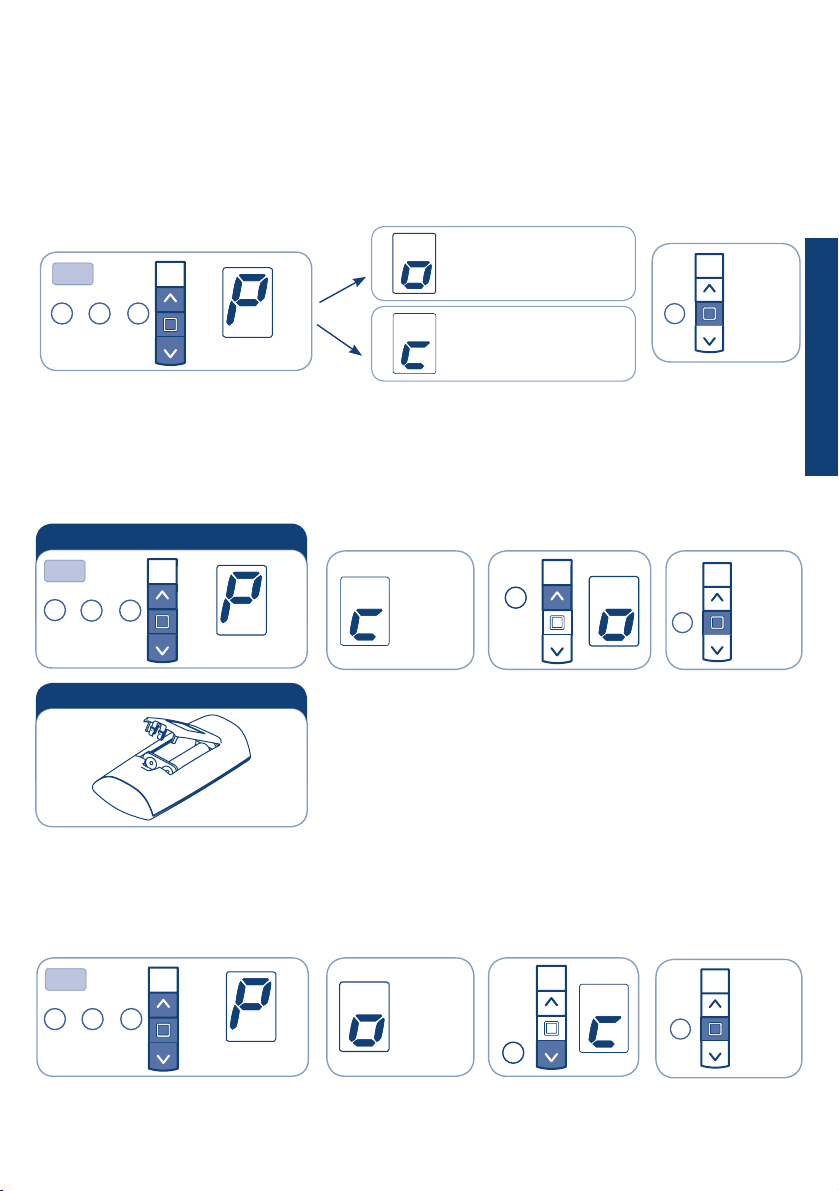
FUNCTION OPEN/CLOSE PROGRAMMING
REMOTE CONTROL SKIPPER PLUS - SKIPPER LUX - SKIPPER P-LUX
To prevent accidental changes to the programming of the motor during the daily use of the remote
control,the possibility of programming is disabled automatically 8 hours after sending the last sequence
(A+B or B+C).
CHECKING THE STATUS OF THE FUNCTION
To change the status of the function, see the sequences “ENABLE/DISABLE PROGRAMMING”
Proceed with programming as the instructions booklet
ENABLE PROGRAMMING
DISABLE PROGRAMMING
C
Open
or after
30 sec.
Remove and replace a battery
OPTION 2
OPTION 1
+ +
BC
Tn
B
+ +
A
A
BC
Tn or after
30 sec.
B
Open
programming
Closed
programming
3 sec
+ +
ABC
Tn or after
30 sec.
B
A
3 sec
Closed
3 sec

30
FUNCTION OPEN/CLOSE PROGRAMMING
REMOTE CONTROL SKIPPER - SKIPPER WALL
To prevent accidental changes to the programming of the motor during the daily use of the remote
control, the possibility of programming is disabled automatically 8 hours after sending the last sequence
(A+B or B+C).
CHECKING THE STATUS OF THE FUNCTION
To change the status of the function, see the sequences “ENABLE/DISABLE PROGRAMMING”
Proceed with programming as the instructions booklet
ENABLE PROGRAMMING
DISABLE PROGRAMMING
ON
Open
programming
Closed
programming
....
A
ON
C
....
.... Closed
Open
ON
or after
30 sec.
B
or after
30 sec.
+ +
ABC
1
Tn 2 3
OPTION 1
+ +
ABC
1
Tn 2 3
B
+ +
ABC
1
Tn 2 3 or after
30 sec.
B
Remove a battery Replace the battery
OPTION 2
B
2 sec
ENGLISH
Este manual sirve para los siguientes modelos
3
Tabla de contenidos
Otros manuales de Unidad de control de CHERUBINI
Manuales populares de Unidad de control de otras marcas

Festo
Festo Compact Performance CP-FB6-E Manual de lista de piezas

Elo TouchSystems
Elo TouchSystems DMS-SA19P-EXTME Manual de usuario

JS Automation
JS Automation MPC3034A Manual de usuario

JAUDT
JAUDT SW GII 6406 Series Guía rápida

Spektrum
Spektrum Air Module System Manual de usuario

BOC Edwards
BOC Edwards Q Series Manual de usuario


