
Cerio DT-200N Manual de usuario

User’s Manual
DT-200N Wireless N-Series Streamlining Router
1
CERIO Corporation
DT-200N
Wireless N-Series Streamlining Router
User’s Manual
V1.2

User’s Manual
DT-200N Wireless N-Series Streamlining Router
2
Table of Contents
1Introduction ...........................................................................................................................................4
1.1 Product Overview ..........................................................................................................................4
1.2 Features .......................................................................................................................................4
1.3 Package Contents..........................................................................................................................4
2Hardware Installation ...........................................................................................................................5
2.1 System Requirement......................................................................................................................5
2.2 Hardware Installation Procedures.....................................................................................................5
3Login ......................................................................................................................................................6
3.1 Configure your PC/NB to connect with DT-200N...............................................................................6
3.2 Additional Settings for Wireless Client ............................................................................................13
3.3 Checking PC’s IP and Connection with the Router ...........................................................................13
3.4 Login to DT-200N .......................................................................................................................14
4System configuration..........................................................................................................................16
4.1 Convenient Setup........................................................................................................................16
4.2 System information ......................................................................................................................19
4.3 System log..................................................................................................................................23
4.4 Internet Setup,............................................................................................................................24
4.5 Wireless management..................................................................................................................27
4.6 LAN Setup ..................................................................................................................................35
4.7 Applications and Gaming..............................................................................................................36
4.8 Application gateway .....................................................................................................................38
4.9 Security management ..................................................................................................................39
4.10 DDNS.........................................................................................................................................42
4.11 Routing.......................................................................................................................................43
4.12 System management ...................................................................................................................44
5How to extend your wireless coverage with WDS .............................................................................46
5.1 Introduction.................................................................................................................................46
5.2 Application Example.....................................................................................................................46
5.3 HowTo........................................................................................................................................47

User’s Manual
DT-200N Wireless N-Series Streamlining Router
3
6Product Specification..........................................................................................................................52

User’s Manual
DT-200N Wireless N-Series Streamlining Router
3
1Introduction
1.1 Product Overview
This DT-200N Wireless N-Series Streamlining Router is a cost-effective IP Sharing Router that enables multiple
users to share the Internet through an ADSL or cable modem. The DT-200N Wireless N-Series Streamlining Router
is embedded with a IEEE 802.11b/g/n access point that allows you to build up a wireless LAN. With the support of
new emerged 802.11n standard, the access point provides data transfer of up to 150Mbps, up to 6 times faster
than 802.11g.
1.2 Features
Before you begin the installation, please check the items of your package. The package should include the following
items:
¾DHCP Client, PPPoE Client, Static IP, PPTP Client, L2TP Client
¾Support wireless mode: AP, WDS,AP+WDS, Repeater
¾Client Infrastructure and support wireless security: WEP, WPA/WPA2-PSK
¾WMM / QoS, UPnP
¾IP Access Control
¾Virtual Service / DMZ / Port Trigger
¾VPN Pass-through (Support PPTP, L2TP and IPSec VPN)
¾Fully backward-compatible with 802.11b/g devices and works well with other Wireless N products.
1.3 Package Contents
Thanks for you choice Cerio Corporation products, after you purchasing our product from
distributor or shop, before you setup it, please open the package and check that all the
components listed below are include. If there is any item missing, please contact with the distributor
or the shop where you buy.
1. DT-200N x 1
2. RJ-45 UTP Cable x 1
3. 2dBi 2.4GHz Omni Antenna x 1
4. Quick Installation Guide x 1
5. CD-ROM (with User Manual and QIG) x 1
6. Power Adapter (DC 9V/500mA) x 1
7. Warranty Card x 1

User’s Manual
DT-200N Wireless N-Series Streamlining Router
4
2Hardware Installation
2.1 System Requirement
Windows, Macintosh or Unix-like Operating System with an installed Ethernet adapter.
Network cables. Use standard Cat.5 or Cat.5e UTP cables with RJ-45 connector.
With administrator's PC must be installed or support TCP/IP protocol.
For Internet access, and Internet Access account with an ISP, and either of a DSL or Cable modem.
2.2 Hardware Installation Procedures
The procedures to install the DT-200N Wireless N-Series Streamlining Router please refer to Figure 2-3.
1. Connecting your computer to the LAN port
Attach one end of the Ethernet cable with RJ-45 connector to your hub, switch or a computer’s Ethernet port,
and the other end to one of the LAN ports of your DT-200N Wireless N-Series Streamlining Router.
2. Connecting Cable/ADSL Modem to the WAN port
Connect the Ethernet cable attaching to your Cable/ADSL modem to the WAN port of your DT-200N Wireless
N-Series Streamlining Router.
3. Connecting the power adapter
Connect the single DC output connector of the power adapter to the power jack on the side of the DT-200N
Wireless N-Series Streamlining Router. Then plug the Power Adapter into an AC outlet.
4. Power on the following devices in this order:
Cable/ADSL modem, Router, and PCs.

User’s Manual
DT-200N Wireless N-Series Streamlining Router
5
3Login
3.1 Configure your PC/NB to connect with DT-200N
Please make sure your network interface card configuration has been completed and activated on your operating
system and connected to one of the LAN port of DT-200N through Cat.5 or Cat.5e cable. Please make sure the
LED on DT-200N is already on and the LED corresponds with the port which you connected.
By default, the DT-200N will enable DHCP service automatically and distribute an IP address to your host. the
DT-200N default IP is "192.168.1.254". make sure your PCs are configured to obtain an IP address automatically
from the Router by the steps below.
zWindows 2000/XP
Please follow the steps below to setup your computer
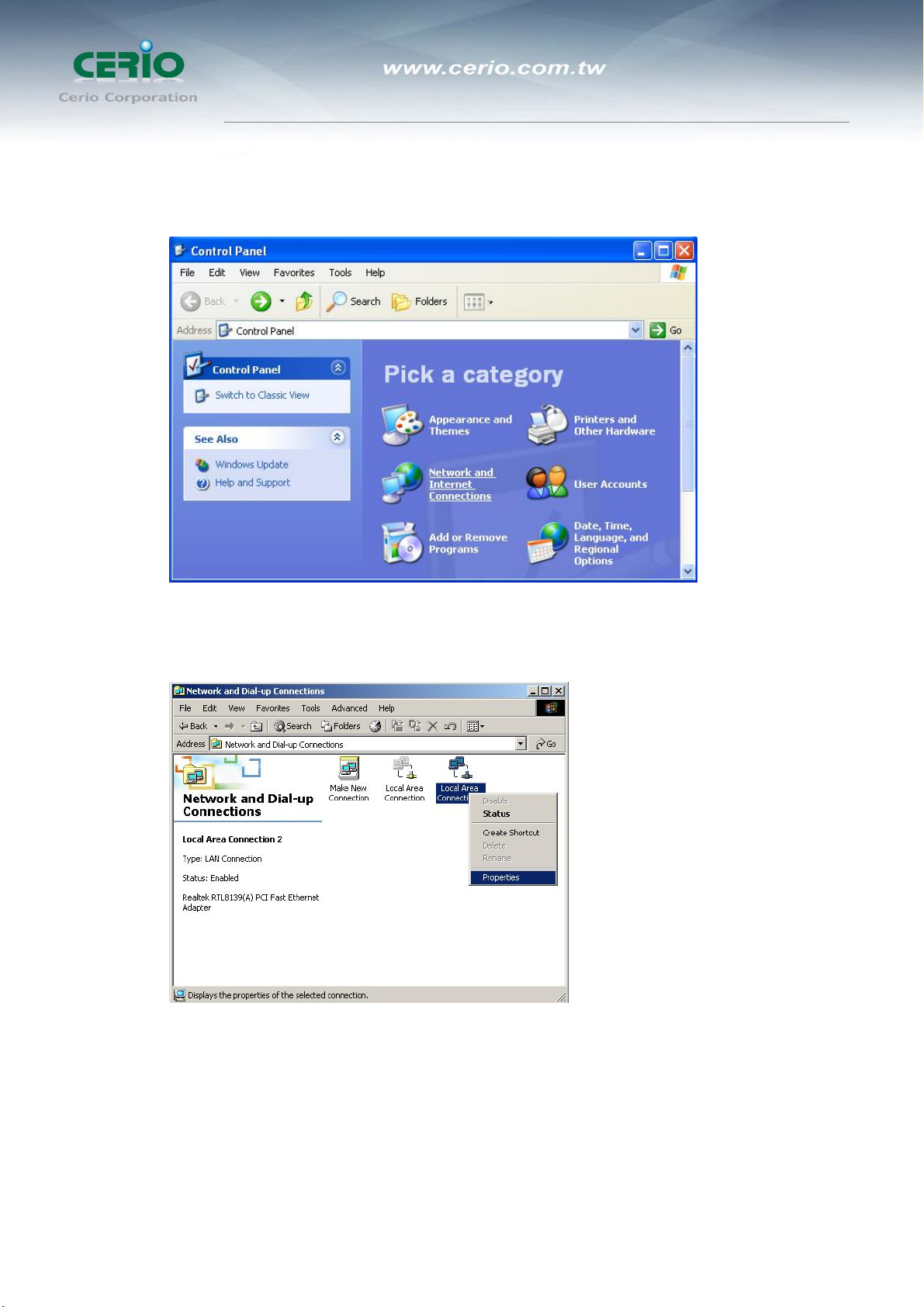
1. Go to Start ÆSettings ÆControl Panel
2. Double click the icon Network and Dial-up Connections
3. If you are Windows XP user, please do so.
Go to Start ÆSettings ÆControl Panel
User’s Manual
DT-200N Wireless N-Series Streamlining Router
6
4. Click Network and Internet Connections
5. Click Network Connections
6. Highlight the icon Local Area Connection, right click your mouse, and click Properties
User’s Manual
DT-200N Wireless N-Series Streamlining Router
7
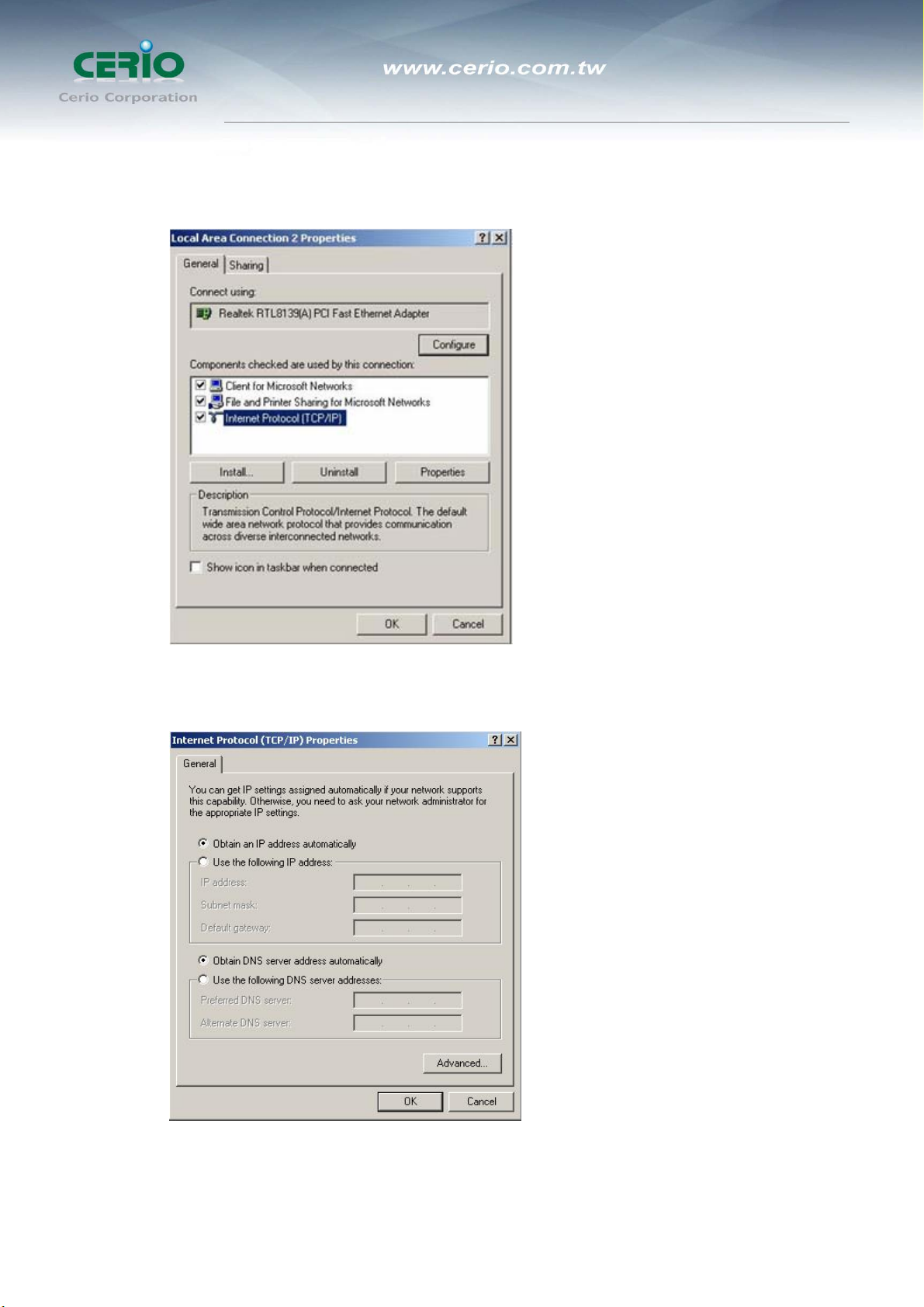
7. Highlight Internet Protocol (TCP/IP), and then press Properties button
8. Choose Obtain an IP address automatically and Obtain DNS server address automatically, and then press OK to
close the Internet Protocol (TCP/IP) Properties window
User’s Manual
DT-200N Wireless N-Series Streamlining Router
8
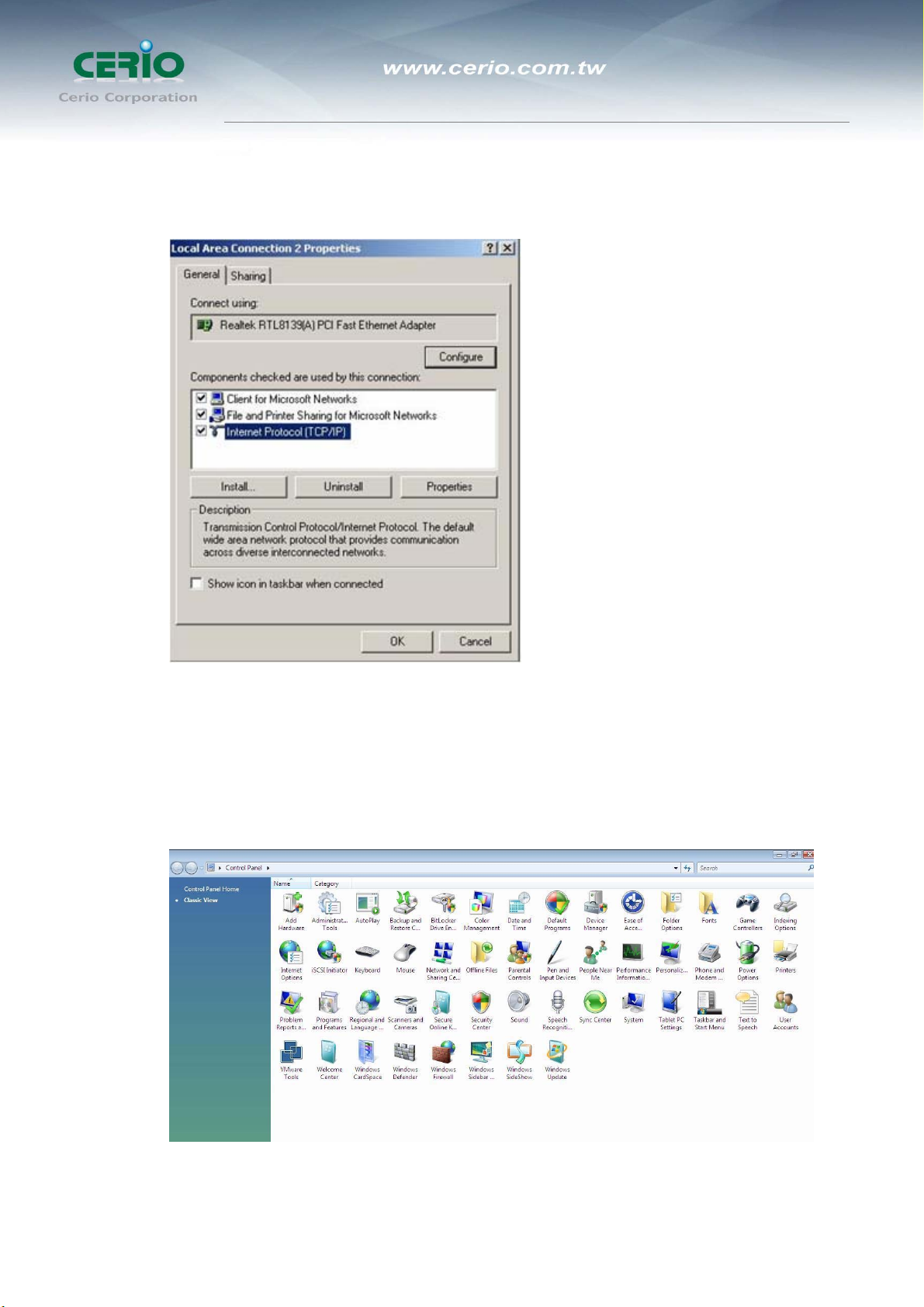
9. Press OK to close the Local Area Connection Properties window
zWindows Vista
Please follow the steps below to setup your computer:
1. Go to Start ÆSettings Æ Control Panel
2. Click Network and Sharing Center
User’s Manual
DT-200N Wireless N-Series Streamlining Router
9
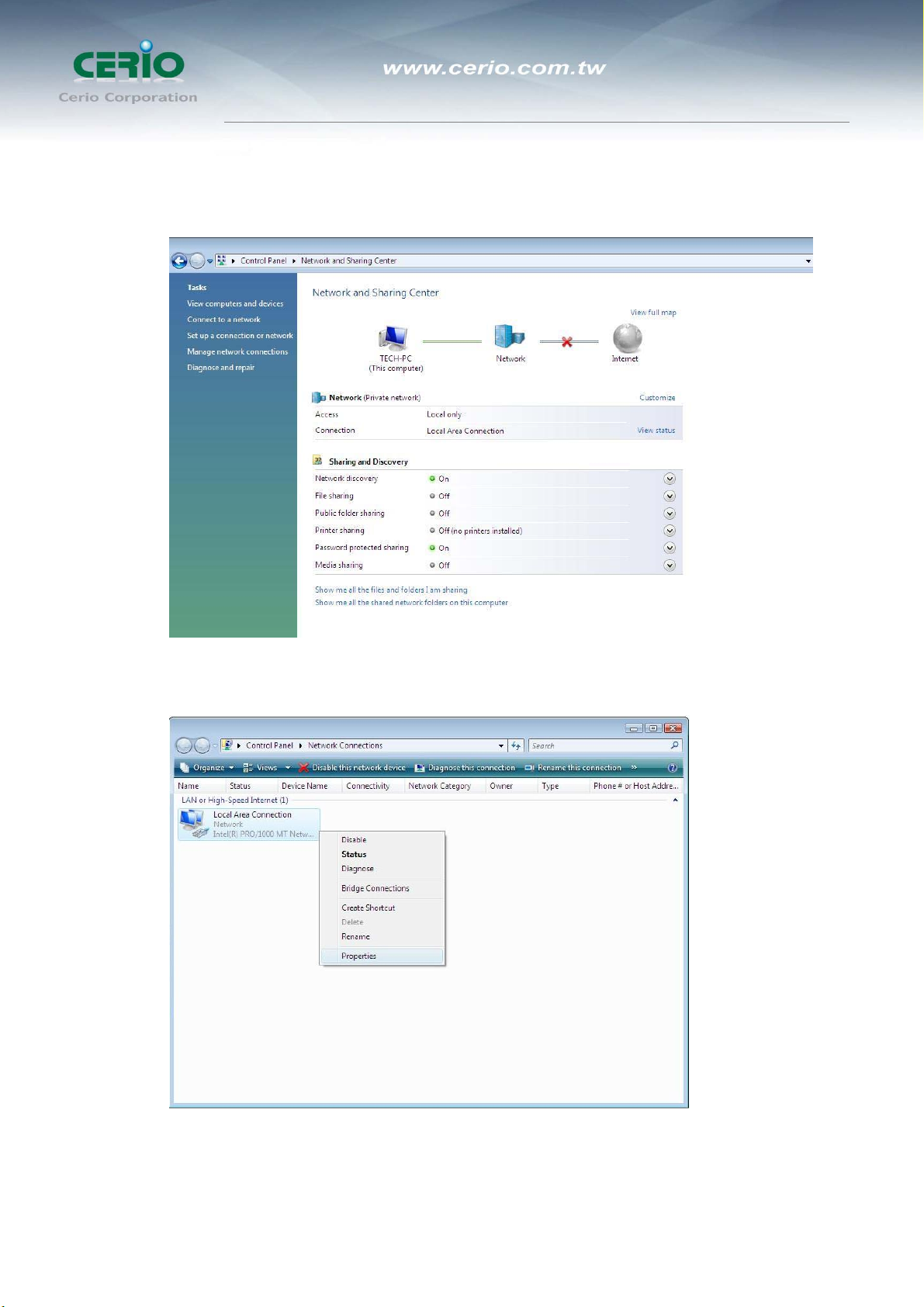
3. Click Manage Network Connections
4. Highlight the icon Local Area Connection, right click your mouse, and click Properties
Tabla de contenidos
Otros manuales de Enrutador inalámbrico de Cerio


