CBS ArcSafe RSK-SPB1 Manual de usuario

WHAT STANDS
BETWEEN YOU
AND ARC-FLASH
DANGER?
CBS Safe®
A Group CBS Company
Arc
CBSArcSafe.com | Email: [email protected]om | 877-4-SAFETY | Fax: 940-382-9435
WE
DO.
RSKSPB1 AND RSKSPB2
A Portable Actuator for Remotely Operating
Westinghouse SPB100 Breakers
USERS MANUAL
Rev. August 2019

CBSArcSafe.com | Email: info@CBSArcSafe.com
CBS Safe®
A Group CBS Company
Arc
User’s Manual for the following RSK models:
RSK-WL01R
• 1.0 Arc-Blast Hazards
• 2.0 Safety Information
2.1 Finger pinch points
2.2 Strong magnets
• 3.0 Battery Information
3.1 Battery requirements
3.2 Battery life
3.3 Battery replacement
3.4 Caution: static discharge potential
• 4.0 Operation
4.1 Connecting the control cable
4.2 Sequence of operation
4.3 Attaching and removing the actuator
4.4 Indicator lights
• 5.0 Care and Storage
5.1 Cleaning debris from magnets
5.2 Storage
• 6.0 Warranty
• 7.0 Specications
ELECTRICAL SWITCHING MAY PRESENT RISK OF SERIOUS INJURY OR DEATH. THIS DEVICE
SHOULD ONLY BE USED BY QUALIFIED PERSONS AFTER CAREFUL ANALYSIS OF THE HAZARDS.
DANGER
1.0 Arc-blast Hazards
The hazards associated with electrical arc-blasts are well documented. Studies conducted by numerous industries
and professional organizations have sought to quantify the intensity of arc-blast, the risks to personnel, and various
methodologies for mitigating the risks.
Without doubt, increasing the distance between the arc and a human is the single greatest favorable factor in reducing injuries.
The Chicken Switch® is not a panacea but rather one more tool available for protecting workers while they are performing
electrical switching.
Using a Chicken Switch® may not negate the need for additional personal protective measures. The user is ultimately
responsible for evaluating each situation to determine if additional protective measures are needed.

877-4-SAFETY | Fax: 940-382-9435
CBS Safe®
A Group CBS Company
Arc
2.0 Safety Information
ALWAYS connect the control cable to the actuator BEFORE
installing the Chicken Switch®.
2.1 Finger Pinch Points
NEVER place your ngers in the area where the actuator
extends when the control station is connected to the
actuator. The actuator could pinch your hand/ngers
against something nearby.
Also, keep ngers clear of the bottom of the actuator near
the magnets when the actuator is near a ferrous surface.
2.2 Strong Magnets
The holding magnets are very strong. Keep magnetically-
sensitive objects such as watches or computer disks away
from the bottom of the actuator.
3.0 Battery Requirements
• Eight (8) AA alkaline cells are required. Carefully observe
polarity when installing cells.
• Only Alkaline batteries should be used.
3.1 Battery Life
• A set of fresh alkaline cells should give hundreds of
operations.
3.2 Battery Replacement
• ALWAYS disconnect the control cable before replacing
batteries to avoid possible static damage of the
electronics!
• Turn the control station upside down, remove the
endplate retaining knob. Remove the endplate and slide
the cover out as shown below.
3.3 To connect/Disconnect Batteries:
3.4 CAUTION: Static Discharge Potential
• To avoid possible damage to electronic components
disconnect the control cable before replacing batteries.
4.0 Operation
ALWAYS connect the control cable to the actuator BEFORE
installing the Chicken Switch®.
4.1 Connecting the Control Cable:
1. Align the arrow on the cable end with the top of the
receptacle.
2. Push in and engage the threads on the coupling nut
and turn clockwise.
3.
After one or two turns of the coupling nut, push in on the
cable end. Repeat this until the connector is fully seated.
4. Use a similar technique of turn-stop-and-pull to
disengage the cable ends.
TO AVOID POSSIBLE DAMAGE TO
ELECTRONIC COMPONENTS DISCONNECT
CONTROL CABLE BEFORE REPLACING
BATTERIES.
WARNING

CBSArcSafe.com | Email: info@CBSArcSafe.com
A Group CBS Company
CBS
Safe®
Arc
4.2 Sequence of Operation:
1. Connect the control cable to the actuator and to the
hand-held controller.
2. Both plungers should be in the retracted position.
If they are not, DO NOT install the actuator on the
breaker. Doing so could inadvertently TRIP or CLOSE
the breaker.
3. Install the actuator on the breaker as described in
Section 4.3
4. Ensure you are at a safe distance from the circuit
breaker that is to be operated.
5. When ready to operate the breaker, press and hold
the ENABLE button and then press and hold the
appropriate button for the desired operation – either
OPEN or CLOSE. Both the Enable and OPEN or CLOSE
buttons must be pressed and HELD until the plunger
extends far enough to operate the breaker. If either
button is released, the plunger will not complete the
stroke and will retract immediately.
4.3 Attaching and Removing the Actuator:
The Chicken Switch
actuator opening will
align on this raised part of
the SPB breaker.
The area shown in BLUE
must be free of lamicoid
nameplates or anything
that would prevent the
actuator from seating
rmly over the face of
the breaker. Any such
obstructions will need
to be relocated to allow
proper installation of the
actuator.
To attach the actuator, complete the
following steps:
STEP 1: Align
opening in actuator
over the raised
portion on the face
of the breaker.
STEP 2: Rotate
the upper magnet
lever upward to latch
magnet onto breaker
door.
STEP 3: Rotate the
lower magnet lever
downward to latch
magnet onto breaker
door.
NOTE: Obstructions such as lamicoid nameplates on the
front of the breaker or on the breaker door above or below
the breaker may interfere with installing the actuator.
These obstructions may have to be relocated to allow for
proper installation.
To remove the actuator: :
Hold the actuator
rmly as shown
in the picture on
the previous page
and rotate the
lower magnet lever
upward and rotate
the upper magnet
lever downward
to disengage both
magnets.
The actuator can then
be gently pulled away
from the breaker.
This picture shows how to operate magnet lever to release
magnet.
NOTICE: The Chicken Switch® is designed as a portable
device. It is not designed to remain with the control unit
connected to the actuator for extended periods of time. To
do so will deplete a fresh set of batteries in a short amount
of time.

877-4-SAFETY | Fax: 940-382-9435
A Group CBS Company
CBS
Safe®
Arc
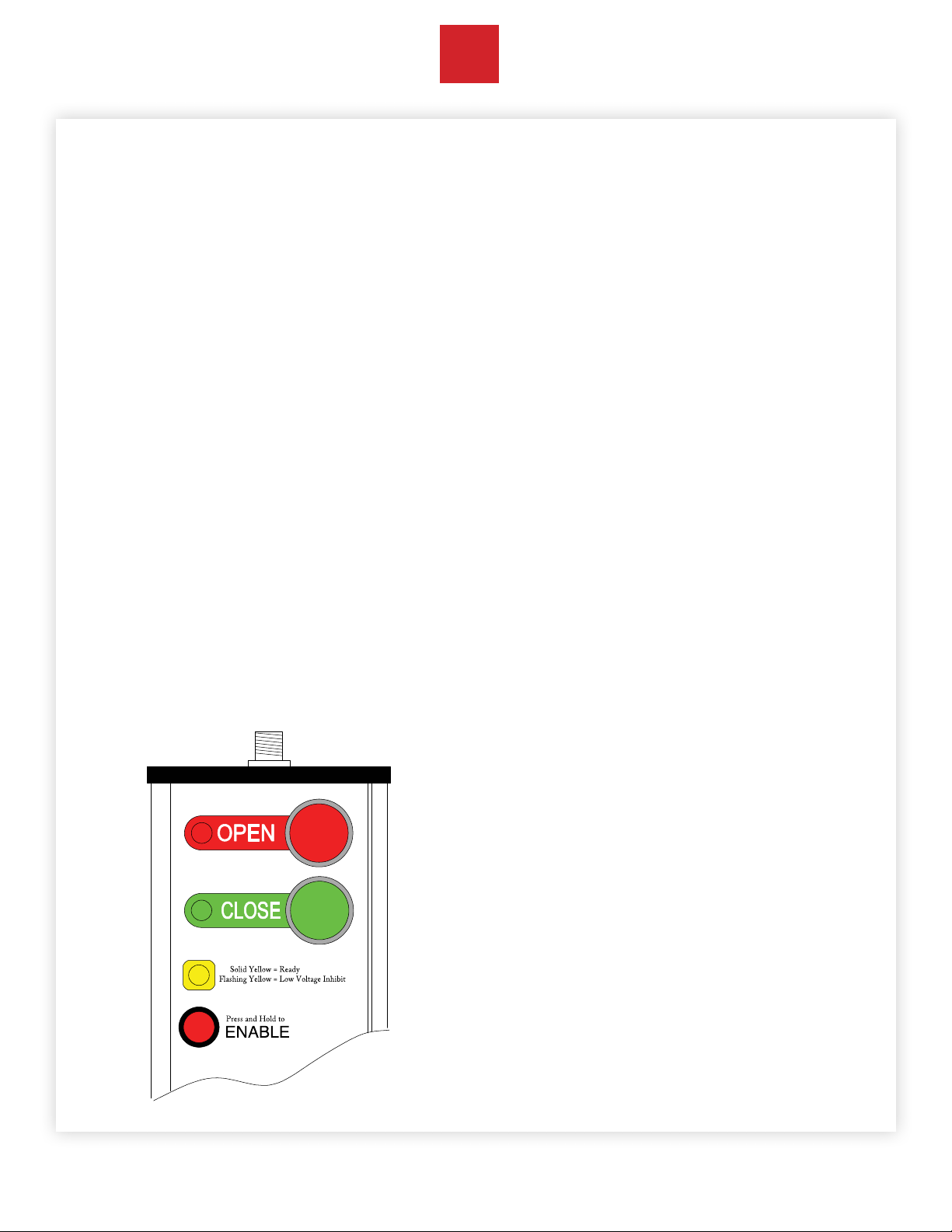
4.4 The Indicator Lights & Controls:
NOTE: Red and Green indicator lights only work when the
ENABLE button is depressed.
GREEN: indicates the actuator is being commanded to
extend the CLOSE plunger.
RED: indicates the actuator is being commanded to extend
the OPEN plunger.
YELLOW: indicates that both plungers are retracted and the
controller and batteries are healthy.
Rapidly blinking YELLOW indicates the battery voltage with
zero load has fallen to an unacceptable level. Operation is
inhibited until batteries with an acceptable voltage level are
installed.
The ENABLE button:
The Enable button must be continuously depressed in
order to command the actuator.
Releasing the enable button has the same aect as
releasing both RED and GREEN pushbuttons– the actuator
will retract both plungers.
Note: If a pushbutton is held in the trip or close position for
an extended amount of time, the plunger will remain in the
extended position. When the pushbutton or the enable
button is released, the plunger will retract.
5.0 Care and Storage
5.1 Cleaning the magnets:
Over a period of time, the magnets may attract ferrous
debris. Exercise care to avoid setting the actuator where
the magnets might attract debris. If this does occur, use a
paper towel or nylon bristle brush to clean the face of the
magnets. Keeping the magnet faces clean ensures that
maximum holding power is maintained.
5.2 Storage:
Remove all batteries from the control station if the device
will not be used for longer than 6 months.
Never store the batteries where the ambient temperature
might exceed 110º F.
Avoid getting the unit wet or storing it in a high humidity
location.

CBSArcSafe.com | Email: info@CBSArcSafe.com
A Group CBS Company
CBS
Safe®
Arc
CBS
Safe®
Arc
6.0 Warranty
CBS ArcSafe® guarantees all products manufactured by
CBS ArcSafe® only against defects in materials and/or
workmanship for a period of twelve (12) months commencing
on the date the product is received by the customer. THIS
WARRANTY IS IN LIEU OF ALL OTHER EXPRESS OR IMPLIED
WARRANTIES INCLUDING THOSE OF MERCHANTABILITY AND
FITNESS FOR A PARTICULAR PURPOSE.
CBS ArcSafe® will, at its option and its cost (excluding
shipping expenses) repair, replace or refund the purchase
price of any product manufactured by CBS ArcSafe® which
has a covered defect in materials and/or workmanship.
THIS IS CUSTOMER’S EXCLUSIVE REMEDY FOR BREACH OF
WARRANTY. IN NO EVENT WILL CBS ARCSAFE’S® LIABILITY
FOR DAMAGES (WHETHER ARISING FROM BREACH OF
CONTRACT OR WARRANTY, NEGLIGENCE, STRICT LIABILITY
OR OTHERWISE) EXCEED THE PURCHASE PRICE OF THE
PRODUCT CONCERNED NOR WILL CBS ARCSAFE® BE LIABLE
FOR PUNITIVE, INCIDENTAL, CONSEQUENTIAL OR SPECIAL
DAMAGES (INCLUDING WITHOUT LIMITATION LOST PROFITS)
EVEN IF ADVISED OF THE POSSIBILITY OF SUCH DAMAGES.
This warranty does not cover damage caused by accident,
improper care, negligence, normal wear and tear, natural
causes, unlicensed repairs, and incompetent supervision.
This warranty also does not cover repairs or replacements
made by unauthorized individuals except when agreed
to in writing. CBS ArcSafe® reserves the right to disallow
warranty repairs if the unit has been disassembled or
misused, as determined by CBS ArcSafe®in good faith.
Please contact us at (877) 472-3389.
2616 Sirius Road
Denton, TX 76208
(940) 382-4411
(877) 472-3389
WWW.CBSArcSafe.com

877-4-SAFETY | Fax: 940-382-9435
A Group CBS Company
CBS
Safe®
Arc
7.0 Specifications
MECHANICAL
Holding magnets: Two magnets, each rated @ 55.1 lbs force, 12,600 Gauss.
Linear Actuators: 12VDC rated.
Force: Linear actuators rated for approximately 12lbs
Typical operating Depending on the distance from the plunger to the breaker button, it may take one to two
speed: seconds for the actuator to operate the breaker.
Projected life: 20,000 operations
ELECTRICAL
Operating voltage: 12 volts DC
Fuse: 3 amp, quick-blow, AGC-3
Power supply: 8 AA alkaline disposable batteries. When used properly, one set of batteries should yield
over 700 operations.
Control Cable: 30 feet in length (9.1 meters), 5-conductor, extra-exible, PUR insulation
Controller: Requires two-hand operation. The ‘enable’ button must be depressed while operating the
OPEN or CLOSE buttons.
A programmable micro-controller manages control inputs, motor functions, monitors and
limits mechanical travel and performs timing functions to protect the actuators in a stalled
condition.
An intelligent ‘H-bridge’ motor driver provides start/stop/braking motor functions. The
H-bridge has integral thermal shutdown protection.

CBSArcSafe.com | Email: info@CBSArcSafe.com
A Group CBS Company
CBS
Safe®
Arc
Worldwide Headquarters & U.S. Sales
CBS ArcSafe, Inc. A Group CBS Company
2616 Sirius Road | Denton, TX 76208
Ph: 877-4-SAFETY | Ph: 940-382-4411 | Fx: 940-382-9435
info@CBSArcSafe.com
Charleston, WV Facility
4782 Chimney Drive | Charleston, WV 25302
Ph: 800-248-4958 | Ph: 304-965-9220 | Fx: 304-965-9221
U.K. /Europe Oce
27 Cressey Avenue | Shenley Brook End
Milton Keynes, Buckinghamshire
United Kingdom MK57EL
Phone: +447 770 500577
Chicken Switch is a Registered Trademark of CBS ArcSafe.
US Patent 7, 623,011
opyright 2004-2016, CBSArcSafe. All rights reserved.
Este manual sirve para los siguientes modelos
1
Tabla de contenidos
Otros manuales de Controladores de CBS ArcSafe

CBS ArcSafe
CBS ArcSafe RSA-104 Manual del propietario

CBS ArcSafe
CBS ArcSafe RSA-107 Manual del propietario

CBS ArcSafe
CBS ArcSafe RSA-138 Manual del propietario

CBS ArcSafe
CBS ArcSafe RSA-112 Manual del propietario

CBS ArcSafe
CBS ArcSafe RSK-AK11 Manual de usuario

CBS ArcSafe
CBS ArcSafe RSK-ABL1 Series Manual de usuario

CBS ArcSafe
CBS ArcSafe RSK-CS01W Manual de usuario

CBS ArcSafe
CBS ArcSafe RSA-138A Manual del propietario

CBS ArcSafe
CBS ArcSafe RSK-SACE2 Manual de usuario

CBS ArcSafe
CBS ArcSafe RSA-34 Manual del propietario