
Carry Pro118 Manual de usuario

Pro118
HDD Duplicator
User Guide V 1.0

2
Content
Chapter 1 - Product Introduction
1. Features .......................................................................................................... 3
2. ProductOverview .......................................................................................... 3
3. FunctionTable ............................................................................................... 4
Chapter 2 - Function Introduction
1. Copy ............................................................................................................... 5
2. Compare ....................................................................................................... 5
3. Copy&Compare ......................................................................................... 5
4. Erase ............................................................................................................... 6
4.1 QuickErase .............................................................................................. 7
4.2 FullErase ................................................................................................... 7
4.3 DoDErase ................................................................................................ 7
4.4 DoDEraseComp ..................................................................................... 8
5. Utility ............................................................................................................... 8
5.1 ShowHDDInfo. ........................................................................................ 8
5.2 UpdateSystem ........................................................................................ 9
5.3SystemInfo. .............................................................................................. 9
6. Setup ................................................................................................................ 10
6.1 CopyArea ................................................................................................ 10
6.1.1SystemandFiles
6.1.2AllPartition
6.1.3WholeHDD
6.2 SkipError ................................................................................................... 12
6.3 EraseMaster ............................................................................................. 12
6.4 UnknownFormat ...................................................................................... 12
6.4.1Copyunknown
6.4.2Skipunknown
6.5 TransferRate ............................................................................................ 13
6.6 ErasePattern ............................................................................................ 13
6.6.1ONEByte
6.6.24MBByte
6.7Language ................................................................................................. 13
6.8 RestoreDefault ........................................................................................ 13
Chapter 4. Specication
Specication .......................................................................................................... 14

3
Chapter 1 - Product Introduction
1. Features
●Highcopyspeedsupportsupto90MB/second.
●AutopowercontroltoprotectsyourHDD.(HDDonlypoweronwhen
working)
●Support2.5"and3.5"SATAHDD,IDEHDDandSSD.
●Support3differentduplicatormode;quickcopy(Systemandfiles),All
partitionsandWholeHDD.
●SupportLinux(Ext2/Ext3),NTFS,FATquickcopymodecopiesonlyDataand
Systemareacanhighlyincreasethecopyefciency.
●SupportDoDstandarderasefunction.
●Autodetectandshowsthebadsectorquantity.
●Lightweightforeasycarry(320g).
2. Product Overview
A. System Overview
B. LCD Conguration
Backward
Forward
Conrm/OK
Cancel/Back
Sourceport Targetport
Red:Fail
Green:Pass
Yellow:Powering
Function
Time(mm:ss)
TargetHDD Totalsize(Source)
Copyprogress% Copiedprocessedsize(Target)

4
Chapter 1 - Product Introduction
3. Function Table
Function Description
1.Copy TocopysourceHDDtomultipletargetHDDs.Refertofunction6.Setupfor3differentcopy
modeselection.
2.Compare TocomparedatabitbybitbetweensourceandcopiedHDDs.
3.Copy+Compare ItmakescopyfirstandthencomparecopiedHDDwithsourceHDDtoensuredata
correctness.
4.Erase
Note:Function6.3canselectto
erasesourceHDDornot
4.1QuickErase
EraseHDD’sindextableonly,ittakesshorttimetoexecutethisfunction.
4.2FullErase
ErasethewholeHDDcontent.
4.3DoDerase
EraseHDDsthreetimescomplyingwithUSADepartmentofDefense(DoD)standard.
4.4DoDEraseComp
EraseHDDsthreetimescomplyingwithnUSADepartmentofDefense(DoD)standard
andbitbybittocheckifdataiscompletelyerased.
5.Utility
5.1ShowHDDinfo
ShowsHDD’sbasicinformationsuchasHDDmodelnameandcapacity
5.2UpdateSystem
5.2.1UpdateBIOS
ToupdatethesystemrmwareviatheHDD.
5.2.2FormatHDD
ToformattheHDDwitha2GBFATpartitioninorderto
quicklysavermwareintheHDD.
5.3SystemInfo
Thisfunctionwillshowinformationoftheduplicatorsystem,includingcontrollermodel
numberandsoftwareversion.
6.Setup
6.1CopyArea
Setupcopymode.
6.1.1Systemandles
SettocopysourceHDD'sdataareaonly.
6.1.2ALLpartition
SettocopysourceHDD'sallpartitions.
6.1.3WholeHDD
SettocopythewholesourceHDD.
6.2SkipError
SettoignoreerrorofsourceHDDwhilecopying.(0-100SettoignoreerrorofsourceHDD.)
6.3EraseMaster
SetuptoerasesourceHDDor
not.
6.3.1Disable
DisableerasesourceHDD.
6.3.2Enable
EnableerasesourceHDD.
6.4UnknownFormat
6.4.1Copyunknown
Copyunknownareawhenthedevicecannotidentify
theformat.
6.4.2Skipunknown
Skipcopyunknownareawhenthedevicecannot
identifytheformat.
6.5TransferRate
SelectthepropertransferrateUDMA2-7.7isthefastest.
6.6ErasePattern
6.6.1ONEByte
Arandomcharactertobewrittenintoeverybyte.
6.6.24MBByte
Asetofrandomcharactertobewrittenintoasetof
area.
6.7Language
English/Japanese
6.8RestoreDefault
Backtooriginalmanufacturersetting.

5
Chapter 2 - Function Introduction
1. Copy
ItcopiesdatafromsourceHDDtotargetHDD.Pleasemakesureyouhave
choosecorrectcopymodeyouliketouse,aboutthethreecopymodesplease
refertofunction[6.1CopyArea]fordetails.
2. Compare
ItisusedtocheckifthedataonsourceHDDisidenticaltotargetHDDafter
duplication.
3. Copy & Compare
ItmakescopyrstandthencomparecopiedHDDwithsourceHDDtoensure
datacorrectness.
Beforecopy,therearetwosetupstobereminded:
a. ShowsthequantityofbadsectorinSourceandTargetHDDs.
CopyProcess
(ifthereisanybadsector)
Thedefaultsettingis"SystemandFiles".
CopiedTime
Totaldatacapacity
Copieddatacapacity
CopyProcess
CopiedTime
Sourcebadsector
Targetbadsector
CopyProcess

6
Chapter 2 - Function Introduction
Copyresult:
(Pass)
(Fail)
b. Selectthesuitablecopymodebyfunction6.1CopyArea,theDefault
settingisquickcopymode"SystemandFiles".
4. Erase
Pleasechoosetheappropriateerasemethodwhenyouliketodisposeor
re-usetheHDDs.
Function6.3EraseMasteristodetermineerasesourceHDDornot.
Thedefaultsettingis"DisableerasesourceHDD".
Thefunctioncanbestoppedwhileprocessingbypressing[ESC]for
about3~4seconds.
TotalcopyTime
Sourcebadsector
Targetbadsector
Thedefaultsettingoferrorcounteris0.Ifyouliketoincreasethe
acceptederrorsectorsoftheHDD,youcanusefunction6.2tosetup
"skiperror".
ThespecialfeaturesofquickcopySystemandFiles:
●Usingthiscopymode,thesystemwillanalyzethesource'scopy
dataareaonly,andonlycopydataandsystemleoftheHDD.
Thereisnoneedtocopyrestofemptyspace.
●ThisfunctiononlysupportFAT,NTFSandLinux(Ext2andExt3)
●Itisstronglysuggestedtousethesamecapacityofsourceand
targetHDD.

7
Chapter 2 - Function Introduction
4.1 Quick Erase
ThefunctionwillONLYerasetheindexoftheHDD.Itisthequickestwaytoerase
HDD.ItwilldamagethedatainHDD,pleasemakesureyouhavebackupall
importantdatabeforeusingthisfunction.
4.2 Full Erase
ThefunctionwillerasethewholesectorsonthetargetHDD.Itwilltakelonger
timethanquickerase.ItwilldamagethedatainHDD,pleasemakesureyou
havebackupallimportantdatabeforeusingthisfunction.
4.3 DoD Erase
ThisistocomplywiththeU.S.A.DepartmentofDefense(DoD5220)standard
tofullyerasetheHDDthreetimesbitbybittorewriteHDDtoguaranteethe
datawasdeleted.ItwilldamagethedatainHDD,pleasemakesureyouhave
backupallimportantdatabeforeusingthisfunction.
Steps of Erase:
① ShowinghowmanyHDDareready,press tostart.
② Erasing.
③ Showstheresultwhennish.

8
Chapter 2 - Function Introduction
4.4 DoD Erase Comp
BesidesDoDerase,thisfunctionwillalsoexecutecomparefunctiontomake
suretherandombitwascorrectlywritten.ThiswayoferaseistoeraseHDDover
eachsectorthreetimes:thersttimewithzeros(0x00),secondtimewith0xFF
andthethirdtimewithrandomcharacters.Thereisonenalpasstocompare
randomcharactersbyreading.ItwilldamagethedatainHDD,pleasemake
sureyouhavebackupallimportantdatabeforeusingthisfunction.
5. Utility
5.1 Show HDD Info.
ThisfunctionwillshowHDD'sbasicinformationsuchasHDDcapacityandmodel
number.
Steps of Show HDD Info.:
① Selectfunction.
② ShowsHDDinformation.
PortNo.
HDDmodel
number
HDDcapacity

9
Chapter 2 - Function Introduction
5.2 Update System
Youcanfollowthestepstoupdatesystemrmware:
① SelectFunction5.2.2
② DownloadtheBIOSfromPCtoyourHDD.
FormatHDD
③ PluginHDDintoduplicator,selectfunction5.2.1toupdateBIOS.
5.3 System Info.
Thisfunctionshowsinformationoftheduplicatorincludesmodelnameand
rmwareversion.
HDDEnclosure PC
HDD
USB
Thepurposeofthisisbecause2GBFAtHDDPartitioncanspeedup
updateprocess.
BIOSversion
10
Chapter 2 - Function Introduction
6. Setup
6.1 Copy Area
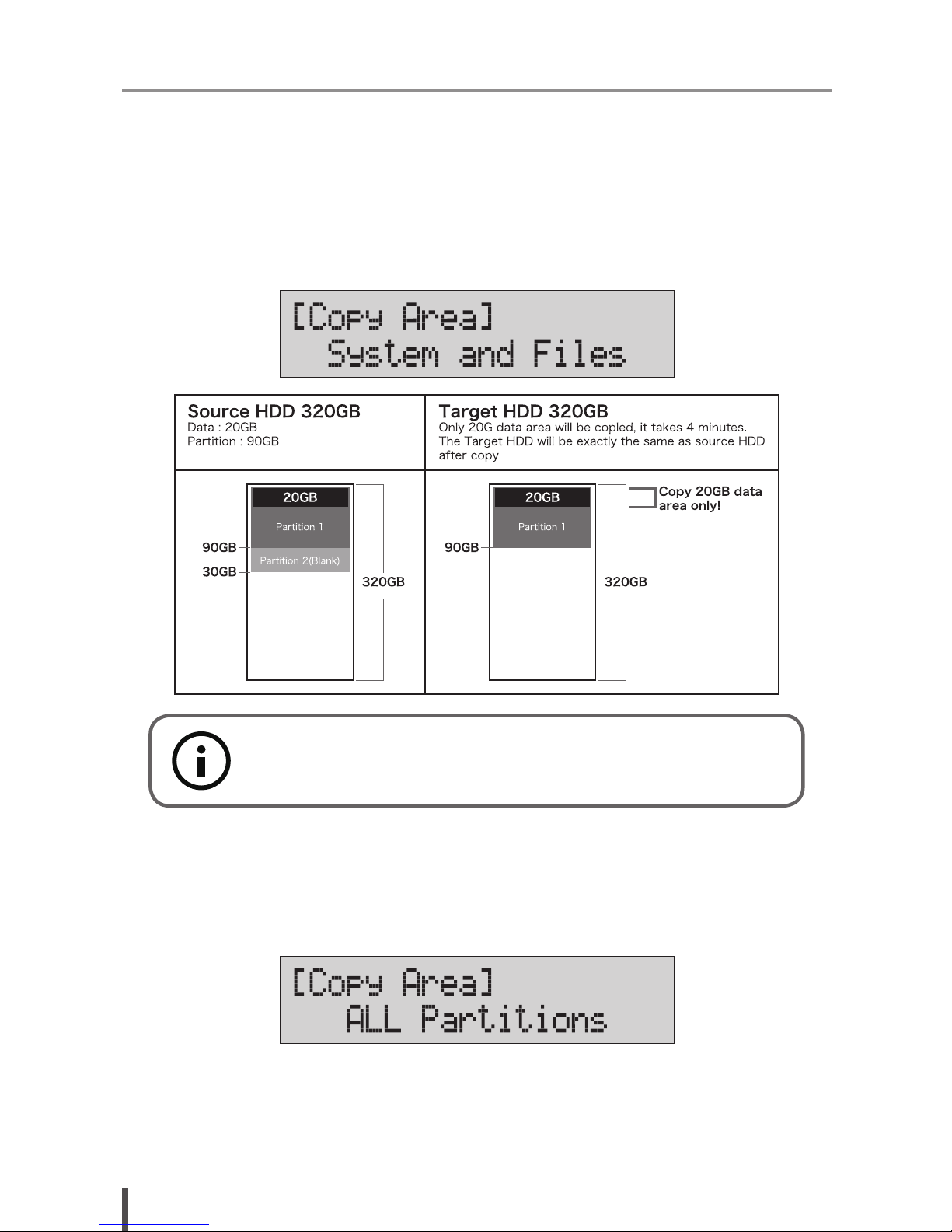
6.1.1 System and Files
ItwillcopysourceHDD'sSystemandFilesinsteadofthewholeHDD.Thesystem
willanalyzethesourceHDDandidentifythedataareatocopy.Aslongasthe
sourceHDD'sdatawithinthetargetHDD'sspace,thecopywillbeprocessed.
6.1.2 All Partition
Thismodewillbitbybitcopyallofthepartitionsnomatterthereisdataexistor
not.ThecapacityoftargetHDDhastobebiggerthanthepartitionrequired
capacity.
SystemandFilesonlysupportsFAT,NTFSandEXT2/EXT3forquick
copy.
Otros manuales para Pro118
1
Tabla de contenidos
Otros manuales de Duplicadora de discos de Carry


Manuales populares de Duplicadora de discos de otras marcas


StarTech.com
StarTech.com 8STSATDUP11 Manual de usuario

DUPLO SEIKO CORPORATION
DUPLO SEIKO CORPORATION Duprinter DP-460 Manual de usuario

Addonics Technologies
Addonics Technologies UDFH7 Manual de usuario

Vinpower Digital
Vinpower Digital MiniLoader VDX-1 Manual de usuario

Addonics Technologies
Addonics Technologies CFASTD5 Manual de usuario

MicroBoards Technology
MicroBoards Technology Quic Disc QD-2 Manual de usuario