
Cardio Zone E-CZ500 Manual de usuario

Customer Service
(888) 340-0482
Manufactured By:
Keys Fitness Products
4009 Distribution Drive
Suite 250
Garland, TX 75041
SERIAL TAG IS LOCATED ON THE FRAME
Model Name: E-CZ500
Date of Purchase:
Serial Number:
Owner’s Manual
E-CZ500 Elliptical
315-00119
10/07 Rev B

2
Important Safety Information 3
Assembly 5
Console Instructions 10
Monitoring Your Heart Rate 17
Warm-Up Exercises 18
Troubleshooting/Cleaning/Maintenance 21
Parts List 22
Exploded Views 23
Warranty Information 24
Table of Contents

3
WARNING! Before using this unit or starting any exercise program, consult your physician.
This is especially important for persons over the age of 35 and/or persons with pre-existing
health problems. The manufacturer or distributor assumes no responsibility for personal injury
or property damage sustained by or through the use of this product.
WARNING! To reduce the risk of electrical shock, burns, fire, or other possible injuries to the
user, it is important to review this manual and the following precautions before operation.
SAFETY PRECAUTIONS AND TIPS
1. It is the owner's responsibility to ensure that all users of this unit have read the Owner's
Manual and are familiar with warnings and safety precautions.
2. This unit has a user maximum capacity of 300 pounds.
3. The unit should only be used on a level surface and is intended for indoor use only. The unit
should not be placed in a garage, patio, or near water and should never be used while you
are wet. It is recommended that a mat be placed under the unit to protect floor or carpet
and for easier cleaning.
4. Follow safety information in regards to plugging in your unit. Do not run the power cord
underneath your unit. Do not operate the unit with a damaged or frayed power cord.
5. Wear comfortable, good-quality walking or running shoes and appropriate clothing. Do not
use the unit with bare feet, sandals, socks or stockings.
6. Always examine your unit before using to ensure all parts are in working order.
7. Allow the unit to fully stop before dismounting.
8. Pets should never be allowed near the unit.
9. Do not leave children unsupervised near or on the unit.
10. Never operate the unit where oxygen is being administered, or where aerosol products are
being used.
11. Never insert any object or body parts into any opening.
12. For safety and to prevent damage to your unit, no more than one person should use the
unit at a time.
13. Always unplug the unit before cleaning and/or servicing. Service to your unit should only be
performed by an authorized service representative, unless authorized and/or instructed by
the manufacturer.
14. Failure to follow these instructions will void the unit warranty.
Important Safety Information

4
Important Safety Information
SAFETY PRECAUTIONS AND TIPS FOR CHEST STRAP
1. It is the owner's responsibility to ensure that all users of this unit have read the Owner's
Manual and are familiar with warnings and safety precautions.
2. Do not place chest strap near devices that generate large magnetic fields. TV sets, elec-
tric motors, radios, and high voltage power lines can affect the transmitter’s performance.
These items can interfere with the heart rate signal and possibly affect the heart rate read-
ings on the console.
3. Handle the Chest Strap with care. Dropping the transmitter might cause damage that could
void the warranty.
4. Do not use the chest strap if you have a cardiac pacemaker or if your are taking medications
for a heart condition. Medication or electrical pulses from the pacemaker can interfere with
accurate heart rate readings.
5. Do not bend the strips inside the chest strap. This can cause the chest strap to loose
conductivity.
6. The chest strap has batteries that need to be replaced periodically. A faulty battery can
cause inaccurate reading.
5
Thank You for purchasing the CardioZone E-CZ500 Elliptical! The quality product you have
chosen was designed to meet your needs for cardiovascular exercise. Before you start, please
read the Owner’s Manual and become familiar with the operation of your new unit.
Remember to take time to perform stretching exercises, provided in this manual, to help avoid
injury.
If you are taking medication, consult your physician to see what effect the medication will have
on your exercise heart rate.
If you have heart problems, you are not active, and/or are over the age of 35 years, do not
use the pre-set programs or start an exercise program without first contacting and receiving
your physician's consent.
To avoid the risk of electrical shock, always keep the console dry. Do not spill liquids on the
console. CardioZone recommends a sealed water bottle for beverages consumed while using
the unit.
Assembly
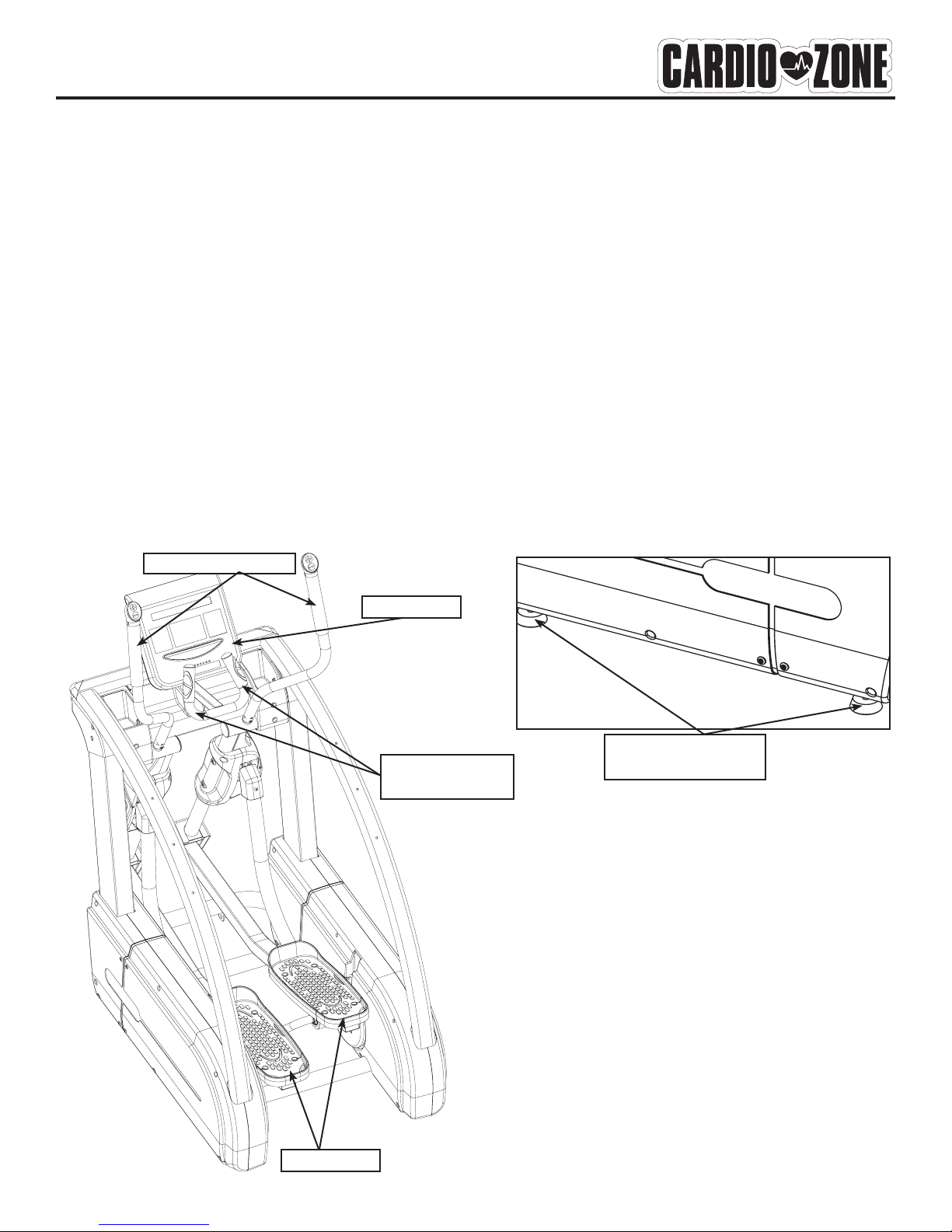
Please review the following drawing below to familiarize yourself with the listed
parts.
CONSOLE
LEVELER FEET
2 PER SIDE
PEDALS
PULSE GRIP
HANDLEBARS
HANDLEBARS

6
Getting Started - The CardioZone E-CZ500 Elliptical will require some assembly. Unpack
the box in a clear area. Remove packing material. Do not dispose of packing material until
assembly is complete and unit is working properly. Place the unit on a clean level surface for
assembly. Make sure there is easy access to an electrical outlet. Before starting the assembly,
the unit should be placed as close as possible to its final location. Tools have been provided for
use while assembling this product.
Assembly Parts
1. Owner’s Manual
2. Linkage
3. Left and Right Handlebars
4. Console
5. Console Cable
6. Console Mast
7. Rear Cover
8. M8*50mm Hex Bolt - Qty 3
9. M8*12mm Hex Bolt - Qty 4
10. M8*20mm Hex Bolt - Qty 6
11. M5*12mm Screw - Qty 9
Assembly
Figure 1
Locate bag labeled Figure 1. Lift pedal and
place left Linkage onto Sleeve and align
holes. Secure Linkage to unit using four
M8*12 mm Hex Bolts.
Note: Left Linkage will be wrapped in plas-
tic. Right Linkage will already be secured
to the sleeve.
LINKAGE
SLEEVE
M8*12MM HEX BOLT
Figure 1

7
Assembly
Figure 2
Locate bag labeled Figure 2. Attach
Handlebars to Main Frame using three
M8*20mm Hex Bolts. Repeat for other
handlebar. Connect the toggle wires from
both handlebars to the toggle jacks. Note:
The toggle wire will only go into the jack
one way.
Figure 2
Figure 3
Remove Rear Cover from unit by removing
five screws.
Figure 3
LEFT HANDLEBAR
RIGHT HANDLEBAR
LEFT TOGGLE WIRE
M8*20mm HEX BOLT
RIGHT TOGGLE
WIRE
TOGGLE
JACKS
TOGGLE
WIRE
TOGGLE
JACKS

8
8
Assembly
Figure 5
Locate bag labeled Figure 5. Connect 7 Pin,
3 Pin and Grounding cables. Refer To Figure
5 and 5a.
Attach Console to Console tube using four
M5*12mm Philips Head Screws.
Note: Ensure that all wires are secure
inside console. Be careful not to pinch wires.
7 PIN
CONNECTOR
Figure 4
Locate bag labeled Figure 4. Slide Tube
down into Main Frame. Secure using three
M8*50mm Hex Head Bolts. Cable should
extend thru bottom and top of Console
Tube.
Figure 4
3 PIN
CONNECTOR
CONSOLE
CABLES
7 PIN
CONNECTOR
3 PIN
CONNECTOR
2 GROUND
CONNECTORS
Figure 5a
Figure 5
GROUNDING
TERMINALS
M8*50mm HEX BOLT

9
Assembly
CONGRATULATIONS!
You have completed assembly of your E-CZ500 Elliptical
Figure 6
Attach Rear Cover to Main Frame using five
M5*12mm Philip Head Screws removed in
figure 3. While attaching the Rear Cover,
allow 3 loops to remain exposed.
Note: Do not force Rear Cover back into
place, this will damage Rear Cover.
Warning: Before moving to Figure 7, make
sure that only 3 loops of the Actuator Cable
are exposed. The excess wire should be
placed inside of the rear cover.
Figure 6
REAR COVER
M5*12MM SCREW
Figure 7
Level machine so that it does not
wobble. Leveler feet screw in and out
to level machine. After machine is level,
tighten leveler nut to secure levelers in
place.
Figure 7
LEVELER
ACTUATOR
CABLE

10
Console Instructions
Take a few moments to review the console layout. Below is an overview of the console keys
and their different functions.
OVERVIEW
START -
Press to enter Quick Start Mode. In Pause Mode, this button is used to resume exercise
session.
ENTER/SCAN -
In Program Mode, this button is used to confirm the values you set.
During exercise, pressed once, will place the main console window in Auto Scan Mode. The
display will change every four seconds from Time/Distance/Speed/Strides Per Min To Calories/
Pulse/Level/Cal/Hr. To exit Auto Scan Mode and enter Manual Scan Mode, Press and Hold but-
ton for two seconds. Console will beep twice. Manual Scan Mode allows you to toggle dis-
play from Time/Distance/Speed/Strides Per Min To Calories/Pulse/Level/Cal/Hr by pushing the
ENTER/SCAN button. To return to Auto Scan Mode, Press and Hold button for two seconds.
Console will beep twice to confirm switch.
Tabla de contenidos
Otros manuales de Entrenador elíptico de Cardio Zone

Manuales populares de Entrenador elíptico de otras marcas

Weslo
Weslo Momentum 4.0 Elliptical Manual de operación y mantenimiento

Progear Fitness
Progear Fitness Air elliptical pro 1307 Manual de usuario

Torque Fitness
Torque Fitness XPLLP Manual de usuario

Octane Fitness
Octane Fitness PRO3700C Manual de usuario

Xterra
Xterra FS5.8e Manual de usuario

Bodyguard
Bodyguard E-40 Manual de usuario

Bonn Germany
Bonn Germany Concept 2.2 Manual de usuario

Precor
Precor Resolute RSL 620 Manual de usuario

NordicTrack
NordicTrack E 9.2 Elliptical Manual de usuario

Vision Fitness
Vision Fitness X6600iNetTV Manual de usuario

Matrix
Matrix MX-A5x Manual de usuario

SportsArt Fitness
SportsArt Fitness ECO-NATURAL Elite E874 Manual de usuario


