BZB Gear BG-PACKSHOT-C10X Manual de usuario

BG-PACKSHOT-C10X
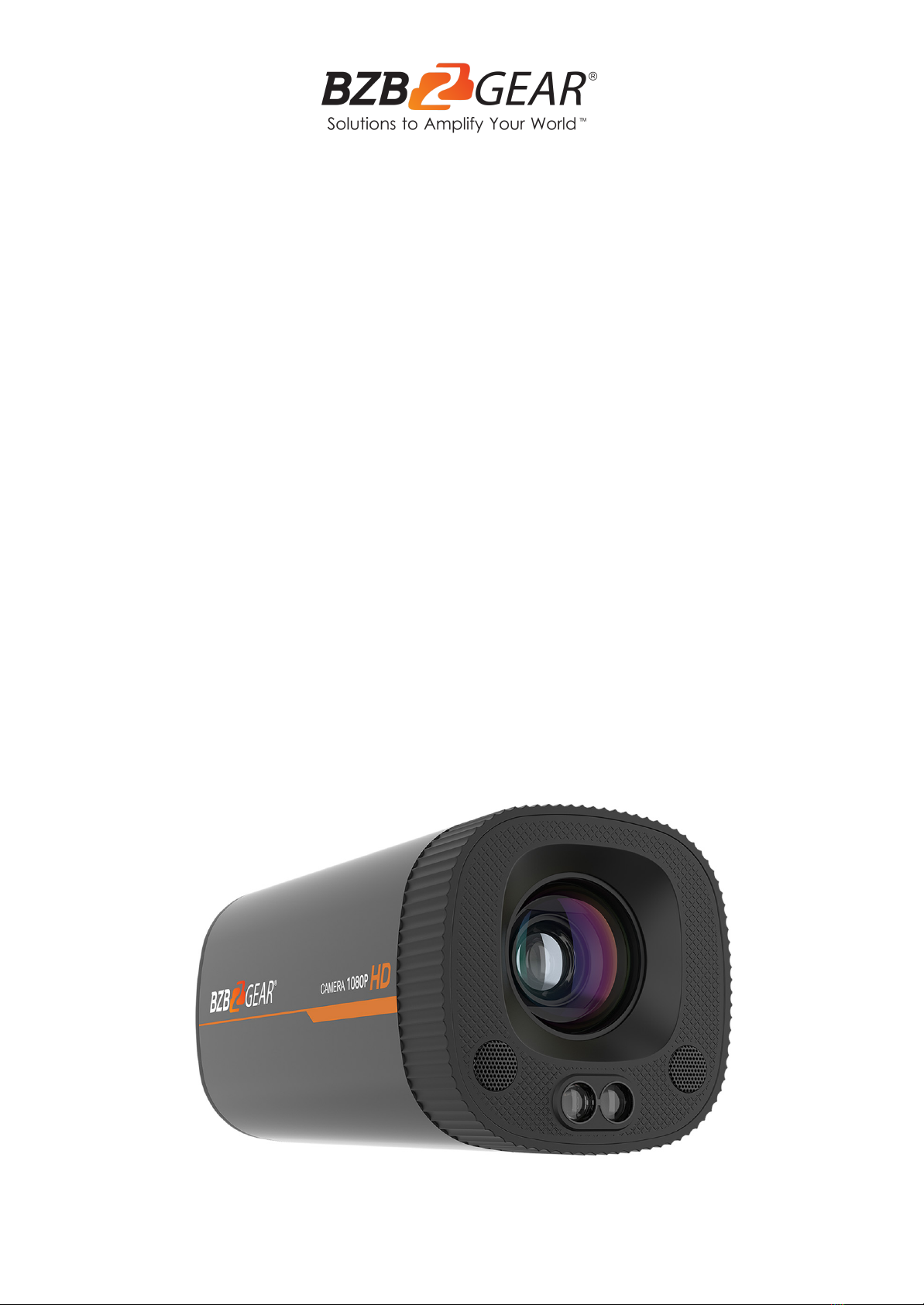
1080P Full HD HDMI/USB 3.0 Vertical Live Streaming Box Camera
User Manual

BZBGEAR BG-PACKSHOT-C10X PRODUCT MANUAL
Address: 830 National Drive #140, Sacramento, CA 95834, USA ·Tel: +1(888)499-9906 ·Email: support@bzbgear.com 2

BZBGEAR BG-PACKSHOT-C10X PRODUCT MANUAL
TABLE OF CONTENTS
Statement 4
Safety Precaution 4
Introduction 5
Features 5
Packing List 5
Technical Specifications 6
Camera Overview 7
Remote Control 9
Keys Introduction for IR Remote Control 9
Menu Introduction 11
Maintenance and Troubleshooting 14
Application Example 15
Tech Support 16
Warranty 16
Mission Statement 16
Copyright 16
Address: 830 National Drive #140, Sacramento, CA 95834, USA ·Tel: +1(888)499-9906 ·Email: support@bzbgear.com 3

BZBGEAR BG-PACKSHOT-C10X PRODUCT MANUAL
Statement
Please read these instructions carefully before connecting, operating, or configuring this
product. Please save this manual for future reference.
Safety Precaution
●To prevent damaging this product, avoid heavy pressure, strong vibration, or immersion
during transportation, storage, and installation.
●The housing of this product is made of organic materials. Do not expose to any liquid,
gas, or solids which may corrode the shell.
●Do not expose the product to rain or moisture.
●The product has no power switch. Remove power immediately if the camera is not in
proper working condition to avoid electrical shock.
●To prevent the risk of electric shock, do not open the case. Installation and maintenance
should only be carried out by qualified technicians.
●Installation and use of this product must strictly comply with local electrical safety
standards.
●The power supply of the product is ±12V, the max electrical current is 2A.
●Do not use the product beyond the specified temperature, humidity, or power supply
specifications.
●This product does not contain parts that can be maintained or repaired by users.
Damage caused by dismantling the product without authorization from BZBGEAR is not
covered under the warranty policy.
●Installation and use of this product must strictly comply with local electrical safety
standards.
●Do not turn the camera head manually. Doing so may result in mechanical damage.
Camera should only be placed on a stable horizontal surface and cannot be installed at
an angle.
●Make sure there are no obstacles within the camera’s rotational range when installing.
Never power on before installation has been completed.
Address: 830 National Drive #140, Sacramento, CA 95834, USA ·Tel: +1(888)499-9906 ·Email: support@bzbgear.com 4

BZBGEAR BG-PACKSHOT-C10X PRODUCT MANUAL
Introduction
Go viral with the BG-PACKSHOT-C10X! This 1080p HD camera features fast, accurate
near-field auto-focus, an integrated stereo microphone, and the ability to swap between
landscape and portrait formats with the flip of a switch. Specifically designed for content
creators, this camera makes it easy to create high-quality videos and streams with crisp
audio and accurate color reproduction.
Ideal for up-close and personal shoots, the BG-PACKSHOT-C10X is a versatile solution for
capturing videos and photos meant to be viewed on both traditional monitors as well as
mobile devices. This makes it possible to record not only for wide format platforms like
YouTube, but also for vertical-focused content like TikTok and YouTube Shorts.
Features
●Full HD Resolution: 1/2.8 inch high quality CMOS sensor. Resolution is up to
1920x1080 with frame rate up to 30fps.
●Optical Zoom Lens: 10X optical zoom lens and 68.8° wide angle lens.
●Multiple Video Interfaces: HDMI, USB3.0; Simultaneously output audio and video
signal
●Leading Auto Focus Technology: Fast, accurate, and stable auto focusing
technology.
●Horizontal and Vertical Screen: Allows the user to switch formats from landscape
to portrait to optimize for mobile devices.
●Built-in microphone: Dual microphone array with a 6 meter omnidirectional pickup
pattern (optimal pickup distance is 3 meters) and a noise suppression algorithm
which enhances voice capture.
●Multiple Audio/Video Compression Standards: Support YUY2 / NV12 / MJPG /
H.264 / H.265 video compression format.
●Low Noise and High SNR: High SNR image is achieved with low noise CMOS.
Advanced 2D/3D noise reduction technology further reduces the noise while
ensuring high image clarity.
●Easy to use: No need to download drivers, USB output is plug and play with a
convenient user experience.
Packing List
●1x BG-PACKSHOT-C10X Camera
●1x Wireless Remote Control
●1x USB3.0 Cable
●1x User Manual
●1х Quick Start Guide
Address: 830 National Drive #140, Sacramento, CA 95834, USA ·Tel: +1(888)499-9906 ·Email: support@bzbgear.com 5

BZBGEAR BG-PACKSHOT-C10X PRODUCT MANUAL
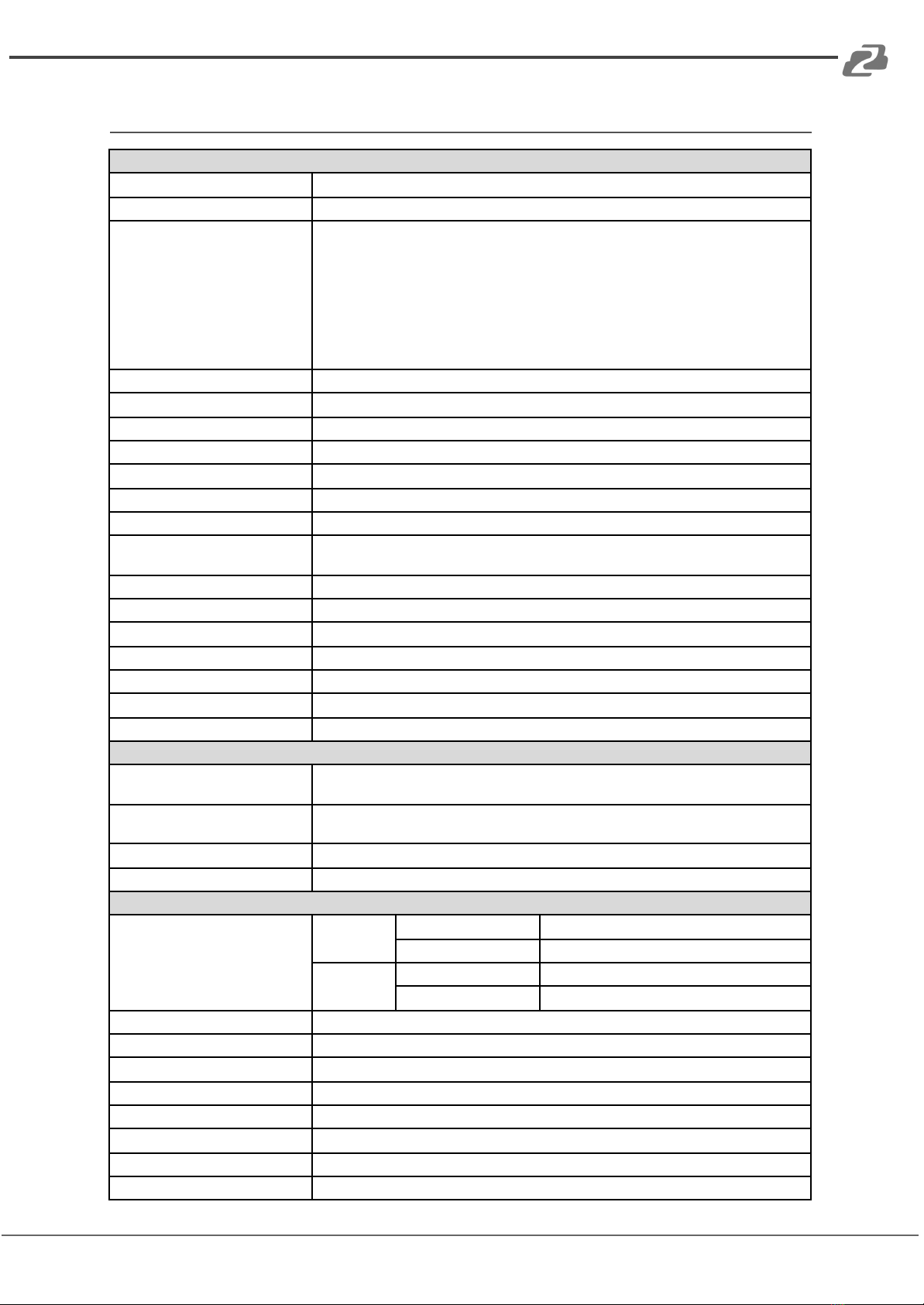
Technical Specifications
Camera Parameter
Sensor
1/2.8 inch sensor
Effective Pixels
2 Megapixel, 16:9
Video Format
HDMI video format
1080I@60fps, 1080I@50fps, 1080P@30fps, 1080P@25fps, 720P@60fps,
720P@50fps
USB3.0 interface video format
Horizontal screen: 1920×1080@30fps, 1280×720@30fps,
1024×576@30fps, 960×540@30fps, 800×448@30fps, 640×360@30fps,
640×480@30fps, 320×176P@30fps
Vertical screen: 1080×1920@30fps, 720×1280@30fps, 576×1024@30fps,
540×960@30fps, 448×800@30fps, 480×720@30fps, 480×640@30fps
View Angle
8.8°~68°
Focus Length
f=4.34mm~41.66mm
AV
F1.85 ~ F2.63
Optical Zoom
10X
Minimum Illumination
0.1Lux (F1.8, AGC ON)
DNR
2D&3D DNR
Super Auto noise reduction
On/Off
White Balance
Auto / Manual / One Push / 3000K / 3500K / 4000K / 4500K / 5000K / 5500K / 6000K /
6500K / 7000K
Focus
Auto / Manual / One Push Focus
Exposure
Auto / Manual
BLC
On/Off
SNR
>50dB
Vertical Screen Switch
On/Off
Focus Assist
On/Off
Minimum Object Distance
10cm(W)~100cm(N)
Input/Output Interface
Video Output
USB Interface: USB 3.0
HDMI Interface: HDMI 1.4
Video Compression
Format
YUV, NV12, MJPG, H.264
Audio Input
Built-in 2 MIC pickups
Control Interface
USB Interface
Other Parameter
Input Voltage/Current
Voltage
Power Adapter
12
USB
5V
Current
Power Adapter
0.425
USB
1A(Max.)
Power Consumption
5W (Max.)
Stored Temperature
-10°C~+60°C
Stored Humidity
20%~90%
Working Temperature
-10°C~+50°C
Working Humidity
20%~80%
Dimension (W*H*D)
78 x 138 x 78mm
Weight
1.3 lbs [0.6Kg]
Application
Indoor
Address: 830 National Drive #140, Sacramento, CA 95834, USA ·Tel: +1(888)499-9906 ·Email: support@bzbgear.com 6

BZBGEAR BG-PACKSHOT-C10X PRODUCT MANUAL
Camera Overview
Camera Interfaces
1. Power: Connect supplied 12V power adapter.
2. HDMI: Connect to an HDMI device such as a video production switcher or a video
display up to 1080p@30Hz.
3. USB: Connect a USB 3.0 cable to a PC for plug & play connectivity for any
conferencing service like Skype or Zoom, supporting resolutions up to 1080p@30Hz.
Address: 830 National Drive #140, Sacramento, CA 95834, USA ·Tel: +1(888)499-9906 ·Email: support@bzbgear.com 7

BZBGEAR BG-PACKSHOT-C10X PRODUCT MANUAL
Dimensions
Interfaces and Connection
Address: 830 National Drive #140, Sacramento, CA 95834, USA ·Tel: +1(888)499-9906 ·Email: support@bzbgear.com 8

BZBGEAR BG-PACKSHOT-C10X PRODUCT MANUAL
Remote Control
Match Code for Wireless Remote Control
One-to-One Code Matching:
Press the "set" and "*" keys combined for 3 seconds, LED indicator
starts flashing. Camera will receive the signal and power on. The LED
indicator will turn off if the code matching is successful. The camera can
be controlled by the wireless remote control only after one to one code
pairing.
If one-to-one code matching fails, the red LED light flashes for 20
seconds and then will go off. The camera will halt code matching and
activate sleep mode; Hold the power for 3 seconds to wake the camera
up and re-match code.
Note: Upon matching code successfully, please select the camera’s
address to control it.
Clear Code:
Press the "set" and "*" keys combined for 3 seconds, the LED indicator
will start flashing. Camera will power off and on and the LED indicator
will go off if the code clearing is successful.
Sleep Mode and Wake Up:
Press and hold the power button for 3 seconds to wake up the camera
from sleep mode.
Keys Introduction for IR Remote Control
●In this manual, “press the key” means a click rather than a long-press, and a special
note will be given if a long-press for more than one second is required.
●When a key-combination is required, do it in sequence. For example, 【*】+【#】+【F1】
means press “【*】” first and then press “【#】” and last press “【F1】”.
1. Standby Key
The camera enters standby mode if the power button is pressed for 3 seconds.
Press and hold power for 3 seconds to wake up the camera and it will perform the
system self-check again and return to the HOME position (If preset (0) position is set, the
camera will return to the preset (0) position).
Address: 830 National Drive #140, Sacramento, CA 95834, USA ·Tel: +1(888)499-9906 ·Email: support@bzbgear.com 9

BZBGEAR BG-PACKSHOT-C10X PRODUCT MANUAL
2. Camera Selection
Select the camera’s address to control it.
3. Focus Control
Auto: Auto focus mode
Manual: Manual focus mode
Focus + (near): Press【FOCUS +】 key (Valid only in
manual focus mode)
Focus - (far): Press【FOCUS -】 key (Valid only in manual
focus mode)
Press and hold the keys, focusing will continue and stop
based on the key being pressed and released.
4. Zoom Control
ZOOM +: press【ZOOM +】key to zoom in
ZOOM - : press 【ZOOM -】key to zoom out
Press and hold the keys, the action of zoom will continue
until the key is released.
5. Set and Clear Presets
Set Preset: press 【SET PRESET】 button, and then press the
number key 0-9 to set preset positions.
Note: 10 presets are available via the remote control.
Call Preset: Press a number key (0-9) to call a preset position.
Clear Preset: Press【CLEAR PRESET】and then press the
number key 0-9 to clear the preset position.
Note: press the【#】 key three times to clear all presets.
Address: 830 National Drive #140, Sacramento, CA 95834, USA ·Tel: +1(888)499-9906 ·Email: support@bzbgear.com 10
Tabla de contenidos
Otros manuales de Cámara digital de BZB Gear

BZB Gear
BZB Gear BG-UPTZ 12X Manual de usuario

BZB Gear
BZB Gear BG-UPTZ-ND 12X Manual de usuario

BZB Gear
BZB Gear BG-BSHAN Manual de usuario

BZB Gear
BZB Gear BG-LVPTZ-30XHSP Manual de usuario

BZB Gear
BZB Gear BG-ADAMO-JRDA Manual de usuario

BZB Gear
BZB Gear BG-VPTZN-HSU3 Manual de usuario

BZB Gear
BZB Gear BG-MAESTRO Manual de usuario

BZB Gear
BZB Gear BG-VPTZ-HSU3 Manual de usuario

BZB Gear
BZB Gear BG-ADAMO-JR Manual de usuario

BZB Gear
BZB Gear BG-B20SHA Manual de usuario