
brena TWW02W Manual de usuario

Visit our website for a more detailed
explanation of our products where you can
watch our videos and be setup within minutes
brena.uk
2 Way Audio
Wireless NVR Monitor
Surveillance System
User Manual
Model: TWW02W

Content
Camera & NVR Specifications.................................................................................................................................................................Page 2-3
NVR & Camera Installation.......................................................................................................................................................................Page 5
Camera Bracket Adjustments...................................................................................................................................................................Page 6
Menu Bar & Channel Toolbar.................................................................................................................................................................Page 7
NVR Password Setup............................................................................................................................................................................Page 8-9
General Setup.......................................................................................................................................................................................Page 9-10
Record Setup.................................................................................................................................................................................Page 10-11-12
Motion Detection Setup.............................................................................................................................................................Page 12-13-14
Network Setup..................................................................................................................................................................................Page 15-16
Email Alerts Setup.................................................................................................................................................................Page 16-17-18-19
Mobile Phone Setup For Remote Viewing Via App......................................................................................................Page 19-20-21-22-23
Video Playback........................................................................................................................................................................................Page 24
Video Backup To USB..................................................................................................................................................................Page 24-25-26
Video Manage.........................................................................................................................................................................................Page 26
Setup of Additional Cameras To Your NVR With Wireless Add....................................................................................................... Page 27
Hard Disk Installation.............................................................................................................................................................................Page 28
F&Q & Troubleshooting...................................................................................................................................................................Page 29-30
Contact.....................................................................................................................................................................................................Page 31
Warrantee Terms & Conditions...................................................................................................................................................................Page 1
Power Adapter Safety Instructions..........................................................................................................................................................Page 4

Brena warrants this product against defects in workmanship and material for a period of one (1) year from its original
purchase date. You must present your receipt as proof of date of purchase for warranty validation. Any unit which proves
defective during the stated period will be repaired without charge for parts or labour or replaced at the sole discretion of
Brena. The end user is responsible for all freight charges incurred to send the product to Brena's repair center. The end
user is responsible for all shipping costs incurred when shipping from and to any country other than the country of origin.
The warranty does not cover any incidental, accidental or consequential damages arising from the use of or the inability to
use this product. Any costs associated with the fitting or removal of this product by a tradesman or other person or any
other costs associated with its use are the responsibility of the end user.
This warranty applies to the original purchaser of the product only and is not transferable to any third party. Unauthorized
end user or third party modifications to any component or evidence of misuse or abuse of your device will render all
warranties void.
Please email us at [email protected] or [email protected] to arrange a repair.
Warrantee Terms & Conditions
-1-

-2-
Camera Specifications
Model: CAM- BR0103W

-3-
⚫5mp recording and playback, enjoy high-definition picture quality
⚫H.265+ high compression ratio, reducing storage space and transmission bandwidth
⚫Built-in wireless network card, get rid of the shackles of network cables
⚫Built-in security dedicated WIFI module, stable signal and strong anti-interference ability
⚫On board audio output, sound and picture synchronization
⚫Regional motion detection and humanoid detection, real-time push alarm information
⚫AI intelligent playback, simple and efficient
⚫Supports multi-channel remote monitoring from mobile phone and PC client, view anytime and anywhere
NVR Specifications
Wireless NVR
Model: K8208-3W/K828H-3W
Model: NVR-BR0108W

POWER ADAPTER SAFETY INFORMATION
Safety Instructions:
•Please note the charger can become warm during
operation
•Do not open the charger
•Keep the charger in a dry place (indoor use only)
•Do not use the charger if there is any sign of
damage to the enclosure or pins
•Keep out of reach of children – charger is not a
toy
Operating Instructions:
•Plug charger into wall socket
•Connect to CCTV equipment
•Please remove the charger if not in use
Specifications:
•Model: SA0241-1202000BB
SA0122-1201000BB
•Input 100-240Vac, 50/60Hz
•Output voltage 12v - 2.0a 24.0W
12v - 1.0a 12.0W
-4-
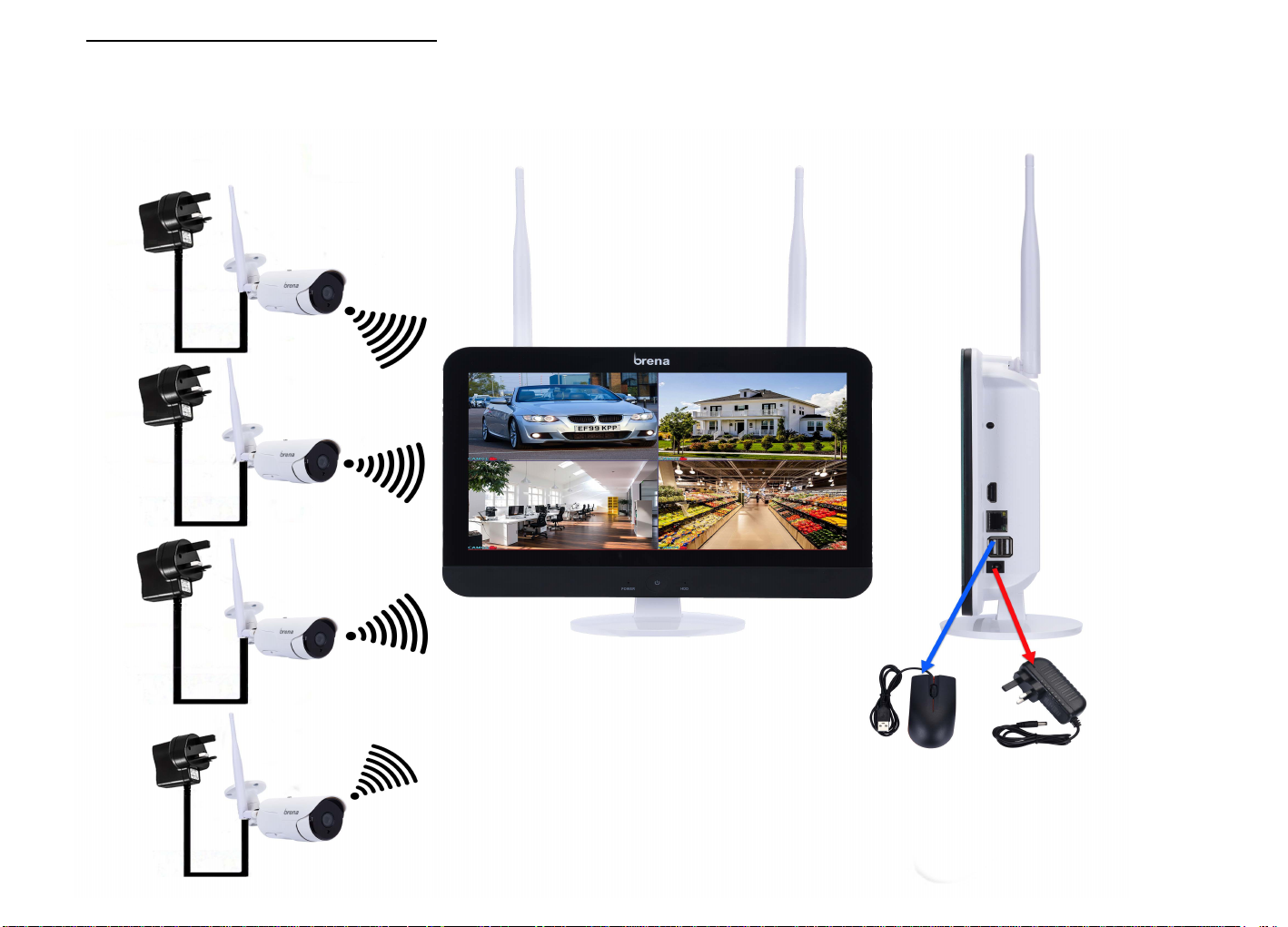
NVRDQGCDmHrDIQsWDllaWLRQ
5
Connect your NVR and Cameras to the correct power adapters provided and wait for your NVR to automatically
detect your cameras on the monitor

&DPHUD%rDFNHWAGMXVWPHQWV
First screw will enable adjustment of
bracket and allow rotation of camera
Second screw will enable you to adjust
camera up,down, left and right
Third screw allows bracket turning and
removal for easier installation
6
1
2
3

Menu Bar
Click on the right button of your
mouse to enter the Menu Bar
*Split Screen: Change status of live view. you can choose to view multiple
cameras or any single camera.
*Video Manage: Manage Ip Cameras and NVR channels.
*System Setup: All System Settings.
*Video Playback: Playback Recorded Videos.
*Video Backup: Backup recorded videos to a USB drive.
*Setup Wizard: Step by Step guide for 1st time general settings and setup.
*Fast Network: Shortcut to Network settings.
*Repeater: View and set camera cascade and relay.
*Wireless Add: Add Ip cameras into NVR channels wirelessly.
*Exit System: Logout, Reboot, Close screen output and Shutdown the system.
-7-
Click on the corresponding channel with the left mouse button to activate the toolbar at the bottom of the pop-up
channel, then click the corresponding icon to enable selected function settings
From left to right: Audio output switch button: Electronic zoom button: Camera light control and color adjustment button:
PTZ button
Channel Toolbar

NVRPDssword 6HWXS
1. After the NVR is powered on, Right click the mouse to enter
System Setup
2. You will be prompted to enter the password for your nvr.
Leave password section blank(Do not type anything into the
box) and pressOK
%y GHfDXlWWhH nvrGRHsQRWhDvHDSDssword
3. Select the System Admin tab 4. Then select the User tab on the left
-8-
System Admin
User
brena.uk
brena.uk
brena.uk
brena.uk
Tabla de contenidos
Manuales populares de Sistema de seguridad de otras marcas


EDM
EDM Solution 6+6 Wireless-AE Manual de usuario

Highway Safety Group
Highway Safety Group EA401 Manual de usuario

Siren
Siren LED GSM Manual de usuario

Detection Systems
Detection Systems 7090i Instrucciones de montaje

Se-Kure Controls
Se-Kure Controls MicroMini SK-4841 Manual de usuario

Siemens
Siemens FDM273 Manual de usuario