
bluthner e-KLAVIER 1 Manual de usuario

Bedienungsanleitung
Owner’s Manual
Manuel d’utilisation
Made in Germany
THE GOLDEN TONE
D I G I T A L
e
-Klavier 1
Made in Germany
DIGITAL
2
for EU Countries: NOTICE
This Product complies with the requirements for European Directive EMC 2004/108/ EC
Dieses Produkt entspricht der europäischen Richtlinie EMC 2004/ 108/EC Ce produit
conforme aux exigences de la directive europeenne EMC 2004/108/EC Questo Prodotto
e conforme alle esigenze della direttiva europea EMC 2004 / 108/EC Este producto
cumple con la directrice EMC 2004/108/EC
Dit product beantwoordt aan de richtlijn EMC/108/EC
For Canada: NOTICE
This digital apparatus meets all requirements of the Canadian Interference-Causing
regulations. For Canada: AVIS: Cet appareil numerique respecte toutes les exigencies du
Reglements sur la materiel brouilleur du Canda.
For USA: NOTICE
FEDERAL COMMUNICATIONS COMMISSION RADIO FREQUENCY INTERRERENCE STATEMENT
This Equipment has been tested and found comply with the limits of the FCC rules for
a digital device. These limits are designed to provide reasonable protection against
harmful interference in a residential installation. This equipment generates, uses, and can
radiate radio frequency energy, and, if not installed and used in accordance with the
instructions, may cause harmful interference to radio communications. However, there is
no guarantee that interference will not occur in a particular installation. If this equipment
does cause harmful interference to radio or television reception, which can be
determined by turning the equipment on and off, the user is encouraged to try correcting
the interference by one or more of the following points:
- Decrease or increase the separation between the equipment or receiver.
- Relocate or reorient the receiving antenna
- Connect the equipment onto a other outlet from that to which the receiver is
connected
- Consult your dealer or an experienced RADIO/ TV technician for help
Notice: Unauthorized Modication or changes on this system/ equipment can void the
user authority to operate this equipment. This Equipment requires shielded interface in
order to meet FCC Rules.
ECLARATION OF CONFORMITY: for USA
Model Name: Blüthner e-Klavier 1
Type of Equipment: Digital Piano
Responible Party: Julius Blüthner Pianofortefabrik G.m.b.H
Address: Dechwitzerstraße 12, 04463 Großpösna
Telephone: +49(0)34297 75130
Dieses Symbol bedeutet, dass dieses Produkt in EU- Ländern getrennt vom
Hausmüll gesammelt werden muss. Mit diesem gekennzeichnete Produkte dürfen
NICHT zusammen mit dem Hausmüll entsorgt werden. Sie sollten einem getrennten
Rücknahmensystem zugeführt werden. Dies sind regionale Bestimmungen.
Made in Germany
e-Klavier 1
3
Inhaltsverzeichnis | Table of Contents | Table des matieres DE EN FR
Vorwort | Forward | Avant propos 4 17 30
Ausstattungsmerkmale | Features | Contenu 4 17 30
Sicherheitshinweise | Satefy Info | Informations de sécurité 5 18 31
Vor dem Ersten Spiel | Before You Play | Avant de jouer 7 20 33
Bedienelemente | Controls | Contrôles 7 20 33
Selektions-Tasten | Selection Keys | Touches de sélection 8 21 34
Kopfhörer | Headphones | Prises casques
8 21 34
Anschlüsse | Connections | Connections 9 22 35
MIDI Einstellungen | MIDI Settings |
Prises MIDI
9 22 35
Verwendung der Pedale | Using the Pedals | Utiliser les pédales
10 23 36
Spielen auf dem Instrument | Playing Your Instrument | Jouer
votre instrument
10 23 36
Auswählen von Klängen |Sound selection | Choix des sons
10 23 36
Others (weitere Klänge | add‘l sounds| sons supplémentaires)
10 23 36
Layers & Splits | Layers et split 11 24 37
Functionen | Functions | function
12 25 38
Metronom | Metronome | Métronome 12 25 38
Aufnahme | Record | Enregistreur 13 25 39
Transponierung | Transpose| Transposer
13 26 39
Feinstimmung | Tune |
Accorder
13 26 39
Anschlagsempndlichkeit | Touch| Réglage du Toucher
14 27 40
Edit FX | Sélecteur FX 14 27 40
Edit Reverb | Sélecteur de Reverb 14 27 40
Demo Songs |
Morceaux de démo
15 28 41
Save settings | Sauvegarder setup
15 28 41
Standby Mode | Fonction standby 15 28 41
Spezikationen | Specications | Spécication 16 29 42
MIDI Implementation | Utilisation Midi 43 43 43
Kunden - Service | Customer Service | Service après vente 44 44 44

Owner’s Manual
Made in Germany
Deutsch FrançaisEnglish
e-Klavier 1
17
FORWARD
First, you should refer to the chapter entitled “Before You Play” (page 20-23) in
this manual. There the names of the controls and their functions are explained,
as well as their connections and the instrument set up. The chapter entitled,
“Playing the Instrument” (page 23-24) gives an overview of the instrument, and
the most frequently used functions, such as sound selection, pedal function,
Metronome, and the Demo song selection and song list.
In the “Settings” chapter (page 25-28), you will nd descriptions for the Touch,
Tone and Transposition functions, as well as a list of specications and a MIDI
Implementation chart.
FEATURES
BLÜTHNER PIANO SOUND
The Blüthner e-Klavier recreates the unique sound of the hand-made, world-
renowned Blüthner Model One concert Grand piano. All 88 keys of this
exceptional instrument have been meticulously recorded and analyzed. While
playing on the new Blüthner e-Klavier, the nuances of each note have been
faithfully reproduced by new Acoustic Piano Simulation© (APS) Blüthner sound
technology.
This unique process accurately recreates the broad dynamic range
of the original instrument with a natural sound. The large selection of
high-quality sounds are further supported by additional effects, such
as Harmonic Damper Modeling©, Aliquot Resonance Modeling© and
Reverb, which provide a more realistic sound reproduction.
BLÜTHNER GRAND TOUCH IVORY-FEEL KEYBOARD
The Blüthner Grand-Touch keyboard provides a unique action dynamic with
the enhanced weight and feel of wooden keys and synthetic ivory keytops. The
mechanical implementation gives one a tactile response comparable to that
of a concert Grand.
*The white keys are made of wood and the black keys are synthetic.
Owner’s Manual
Made in Germany
DeutschFrançais English
DIGITAL
18
SAFETY ADVISORY
Please read carefully before you continue!
WARNING! Always follow the precautions described below to avoid
the risk of serious injury or death, electric shock, short-circuiting, damages, re
or similar hazards. These precautions include the following points, but do not
constitute an exhaustive list:
POWER CORD / POWER SUPPLY Always use the correct power
voltage printed on the nameplate and the associated power cord. Protect the
power supply from heaters, radiators, and similar heat- emitting sources. Do not
bend or turn the power cord too much, and avoid laying the power cord in
places where someone could trip or roll something over it.
DO NOT OPEN Never try to open any part of your keyboard to
disassemble or modify it in any way. If you encounter any problem, please
contact our qualied Blüthner Customer Service Team. (See back page.)
IMPORTANT Never connect or disconnect the power plug with wet
hands.
WATER HAZARD Please make sure that the instrument is never
exposed to moisture or dampness. The instrument should not be used in damp
or wet environments. Do not place containers with liquid contents, e.g. glasses,
bottles, vases, etc., on the instrument, as this can cause liquid to penetrate into
the instrument. In the event liquid enters the instrument, immediately turn off
the power and unplug the power cord.

Owner’s Manual
Made in Germany
Deutsch FrançaisEnglish
e-Klavier 1
19
FIRE PROTECTION Do not put candles or open ames on the
instrument. An open ame could cause a re.
PLACE OF INSTALLATION Do not expose the instrument to excessive
dust, vibrations, or extreme heat or cold. Avoid placing the instrument near
TV sets, mobile phones, or other electrical devices, as this can lead to noise,
interference or cross-modulation. Place the instrument on a solid and secure
base to prevent accidental tipping or falling. Your instrument should be placed
a minimum distance of 5 cm away from the wall in order to provide adequate
air circulation. Disconnect all connected cables before moving the instrument.
WARNING Only remove dust or dirt with a soft cloth. Only use slight
pressure while cleaning to avoid scratching the surface of the instrument. When
cleaning, do not use thinners, solvents or liquids with chemical substances.
HANDLING WARNING Please be careful not to jam your ngers in
the movable keyboard cover. Please do not insert objects into any of the
openings in the instrument. In the event that an object does become lodged in
the instrument, immediately unplug the power cord and contact the Blüthner
Customer Service Team. (See back page.) The instrument may only be repaired
by authorized personnel.
ADVISORY Blüthner Piano Factory is not responsible for damage
caused by the improper use or handling of the instrument, or by any
unauthorized changes to the instrument, or for the loss or destruction of stored
data. Always turn the power off when the instrument is not in use! Even if the
power is off, current still ows to the instrument. If the instrument will not be used
for some time, ensure a galvanic separation of the instrument from the power
lines by unplugging the power cord from the outlet.
ACCESSORIES
• MANUAL
• POWER SUPPLY
• WARRANTY CARD
TUNING:The Blüthner e-Klavier does not need to be tuned.
TRANSPORT:The instrument can be shipped assembled.
Owner’s Manual
Made in Germany
DeutschFrançais English
DIGITAL
20
BEFORE YOU PLAY
DIRECT CONTROL
INTERFACE
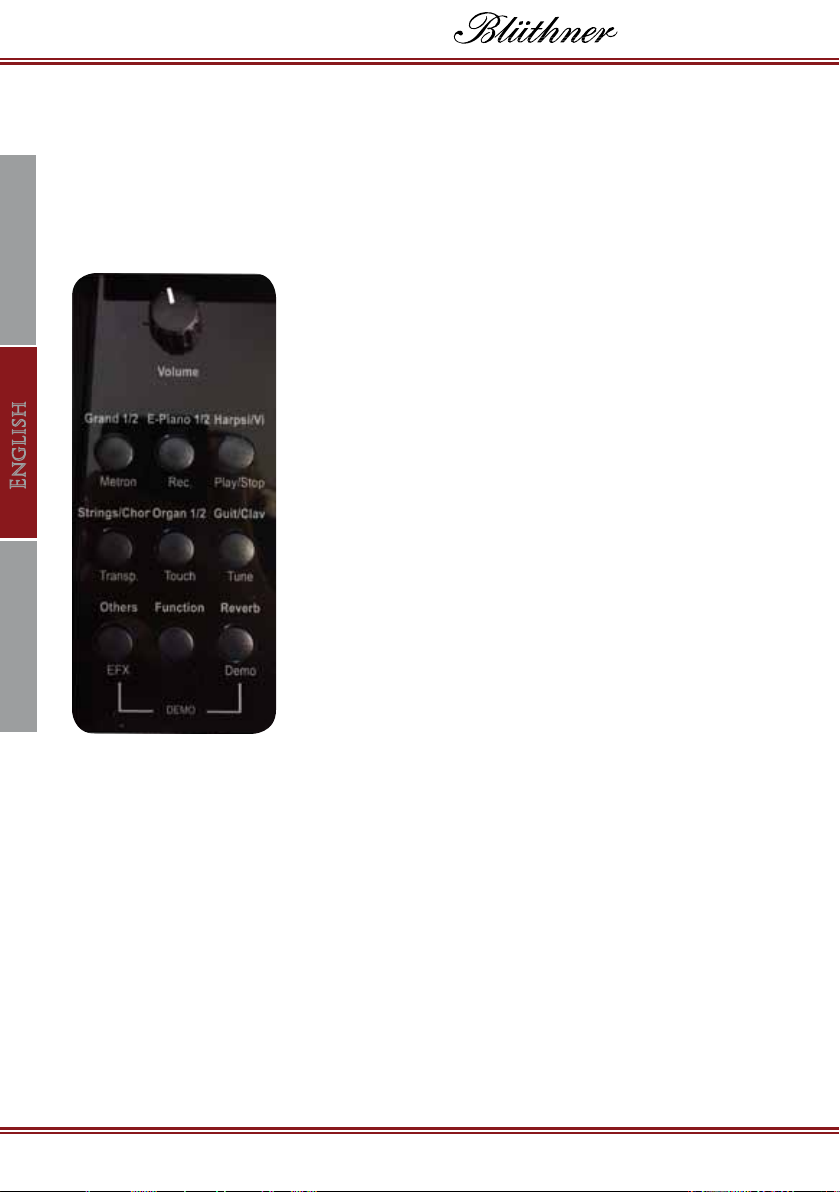
Power ON / OFF: (To the right of the key-
board.) Turns the instrument on and off.
Volume: Adjusts the volume of the piano and
the headphones.
Grand Piano 1 & 2: Sound selection/
Metronome: Starts and stops the Metronome
function. (See page 25.)
E-Piano 1 & 2: Sound selection/
Record: Starts the recording mode to record
songs. (See page 26.)
Harpsichord & Vibraphone: Sound selection/
Play: Starts and stops the playback function.
(See page 26.)
Strings & Choir: Sound selection/ Transpose:
Starts and stops the Transpose function. (See
page 26.)
Organ 1 & 2: Sound selection/
Touch: Adjusts the touch sensitivity or velocity
of the keyboard. (See page 27).
Guitar & Clavier: Sound selection/
Tune: Changes the tuning in 0,5 cent steps. (See page 26.)
Others: Further sound selection(Vintage Piano, Celeste, Warm Pad, etc.)/
EFX: Effects menu selection. (See page 28.)
Function: This button is paired with the selection of all functions, except
Reverb and Demo songs.
Reverb: Changes the level of Reverb./
Demo : Select Demo songs. (See page 28.)
1
23 4
567
8910
1
2
3
4
5
6
7
8
9
10

Owner’s Manual
Made in Germany
Deutsch FrançaisEnglish
e-Klavier 1
21
Caution: If you connect the power cord into the outlet, make sure that
the voltage matches the voltage specied on the nameplate.
Caution: Never unplug the power cord with wet hands.
This may result in electric shock or even electrocution.
HEADPHONE PORTS (Under the keybed, left)
The e-Klavier comes with two headphone jacks. Upon
inserting the headphones into headphone jack A, the built-in
loudspeakers turn off. Using the headphone B jack, the built-in
speaker system does not switch off.
NOTE: You should not use the headphones for too long at too high
a volume level. This can lead to severe and permanent hearing damage.
(Tinnitus).
POWER SUPPLY (Connection on the lower back panel.)
Selection Keys and Numeric Value Entry
The - / + Selection Keys (A1/B1) and Numeric Value Keys 0-9 allow you to enter
parameter input for many functions by using the keyboard as a numeric pad.

Owner’s Manual
Made in Germany
DeutschFrançais English
DIGITAL
22
MIDI SETUP
MIDI is an acronym for Musical Instrument Digital Interface. It is an international
standard that allows devices such as electronic instruments and computers to
communicate with each other.
MIDI Host Connection: The Blüthner e-Klavier 1 is accessible over a MIDI-USB
connection. Connect your e-Klavier 1 to a PC or tablet or notebook to transfer
MIDI les.
CONNECTIONS
(Beneath the keyboard)
• DC In: To connect the included 19V power cable to a power outlet.
• Audio OUT: : Here you can connect your Blüthner HL-1 to an amplier,
recorder, or other active speaker system.
• Audio IN: Here you can connect other devices to the Blüthner e-Klavier,
e.g. MP3 players, CD players, keyboards, sound modules or expanders.
• Pedal: Here you can connect the pedals to the instrument.
• USB-HOST: To connect a PC for MIDI and data transmission.
Owner’s Manual
Made in Germany
Deutsch FrançaisEnglish
e-Klavier 1
23
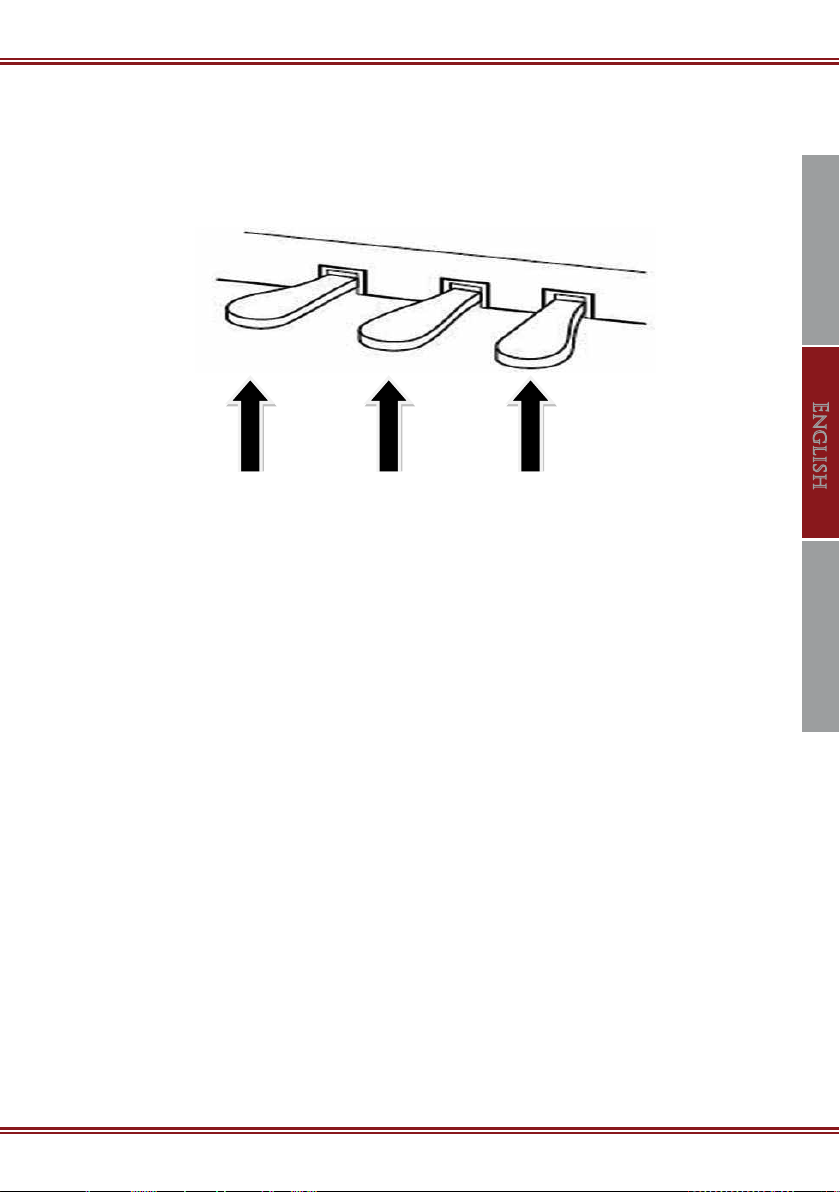
USING THE PEDALS
The Blüthner e-Klavier is tted with 3 pedals, which function like the pedals
of a grand piano.
Soft Pedal: reduces the volume level and makes the sound softer.
Sostenuto Pedal: sustains all the notes currently held down when rst depressed,
while allowing subsequent notes to play normally.
Sustain Pedal: simulates the withdrawal of the dampers in an acoustic piano,
allowing the sound to continue after releasing the keys until the pedal is
released.
Damper PedalSostenuto PedalSo Pedal
PLAYING YOUR INSTRUMENT
SOUND SELECTION
The e-Klavier has twenty-three sounds in the standard library. The rst twelve
sounds are listed on the top six buttons on the keypad. Press the button once
for the rst listed sound (i.e. Grand 1). Hold the button down for two seconds to
select the second listed sound (i.e. Grand 2).
Others (Accessing additional sounds)
To select additional sounds, press and hold the Others button while scrolling to
your desired sound using the - / + Selection Keys (A1/B1) on the Keyboard.
Otros manuales para e-KLAVIER 1
2
Tabla de contenidos
Otros manuales de Instrumento musical de bluthner

bluthner
bluthner e-Klavier 3 Manual de usuario

bluthner
bluthner e-Klavier 2 PRO-88 Manual de usuario

bluthner
bluthner PRO-88 EX Manual de usuario

bluthner
bluthner PIANETTE Manual de usuario

bluthner
bluthner e-KLAVIER 1 Manual de usuario

bluthner
bluthner Homeline e-Klavier Manual de usuario

bluthner
bluthner e-KLAVIER 1 Manual de usuario

bluthner
bluthner e-Klavier 1 Art Style Manual de usuario


