Page 6
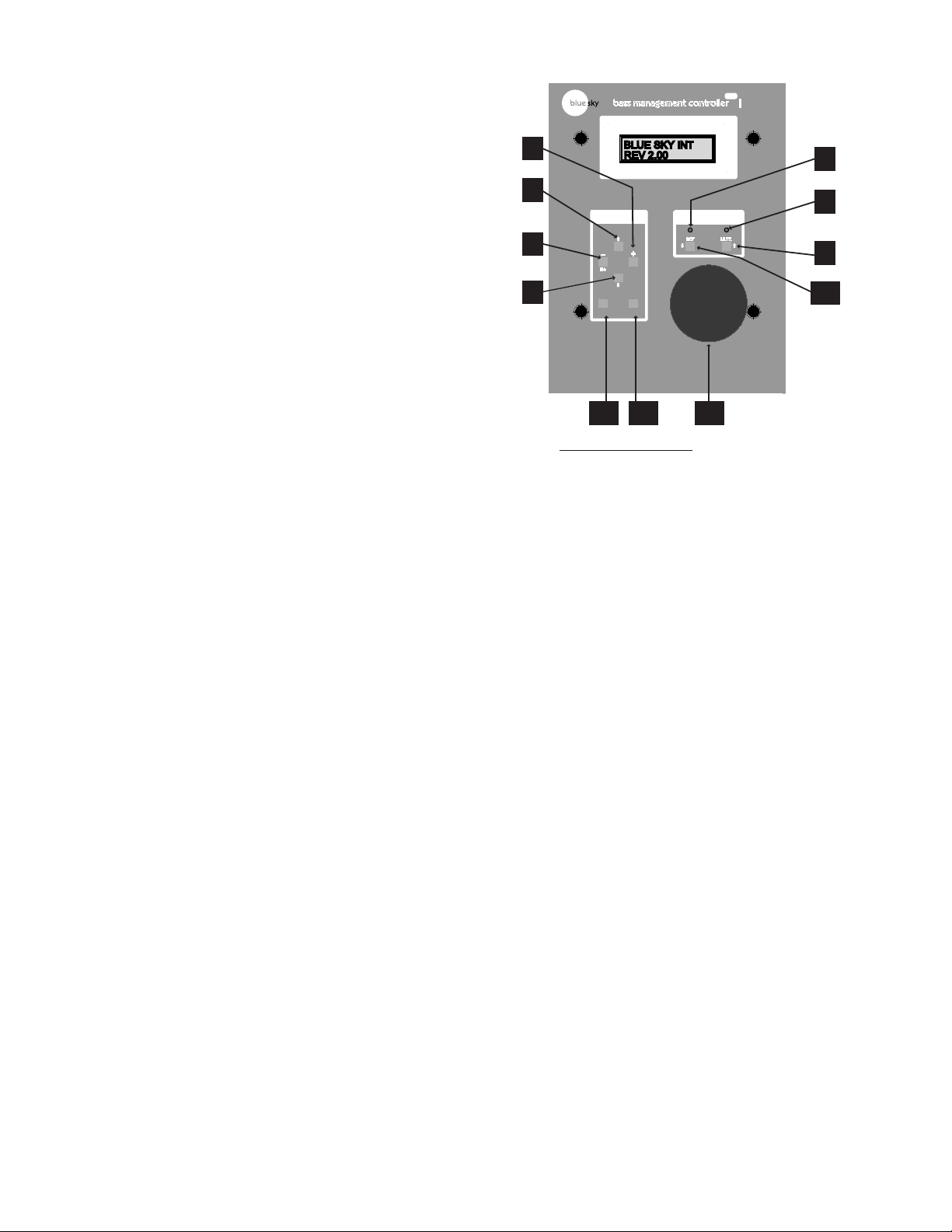
5. L(eft) / - / NO Button -
USER MODE: The “L” button activates the solo function for the “left output”.
When a second I/O unit is connected, the solo function for the “left output
#2” can be activated by holding this button down for 2 seconds. Solo can
be cancelled by doing any of the following; activating the solo function on
another channel, muting the system, or by pressing the “REF” / reference
button.
SETUP MODE: Used to adjust parameters within the software. Press to decrease
individual channel levels and un-mute channels. See the “Software Features”
section on page 8 and 9 for more information.
6. SUB(woofer) / Arrow Down - Navigation Button -
USER MODE: The “SUB” button activates the solo function for the “subwoofer
output”. When a second I/O unit is connected, the solo function for the
“subwoofer output #2” can be activated by holding this button down for 2
seconds. Solo can be cancelled by doing any of the following; activating the
solo function on another channel, muting the system, or by pressing the “REF”
/ reference button.
SETUP MODE: Used to scroll down through the software submenus. See the
“Software Features” section on page 8 and 9 for more information.
7. REF(erence) LED - This LED is “ON” when the REF (reference) control
button / setting has been activated. It indicates that the gain is set to the user
predefined reference level setting. See item 10 below.
8. MUTE LED - “On” when all outputs have been muted. “Flashing” when one
or more channels have been muted within the “Mute Channels” submenu of
the software or if the solo function has been activated. See item 9 below.
9. MUTE Control Button -
Toggles the system in and out of mute. Press this button to mute all outputs.
Press again to cancel Mute. Moving the Volume Control Knob will also cancel
mute .
SETUP MODE: In the “PRESET MENU”, this key is used to change the letters, in
the “CHANGE NAME” preset sub menu. See the “Software Features” section
on page 8 and 9 for more information.
10. REF (reference) Control Button -
USER MODE: Toggles the system in and out of reference gain. Press this button
to set the gain to the user defined reference gain. Press again to cancel. Moving
the Volume Control Knob will bring the system out of the reference setting.
SETUP MODE: In the “PRESET MENU”, this key is used to change the letters, in
the “CHANGE NAME” preset sub menu. See the “Software Features” section
on page 8 and the 5.1 System “Calibration Section” on page 12 for more
information.
11. LS (left surround) / SELECT Button -
USER MODE: The “LS” button activates the solo function for the “left surround
output”. When a second I/O unit is connected, the solo function for the
“left surround output #2” can be activated by holding this button down for
2 seconds. Solo can be cancelled by doing any of the following; repeating
the same action, activating the solo function on another channel, muting the
system, or by pressing the “REF” / reference button.
SETUP MODE: Hold down for 5 seconds to activate “SETUP MODE” and then
press again to scroll through the main software menus, “PRESET MENU”, “MUTE
CHANNELS”, “CAL(ibrate) CHANNELS” and “SETUP MENU”. See the “Software
Features” section on page 8 and the 5.1 System Calibration Section on page
12 for more information.
12. RS (right surround) / CANCEL Button -
USER MODE: The “RS” button activates the solo function for the “right surround
output”. When a second I/O unit is connected, the solo function for the
“right surround output #2” can be activated by holding this button down for
2 seconds. Solo can be cancelled by doing any of the following; repeating
the same action, activating the solo function on another channel, muting the
system, or by pressing the “REF” / reference button.
SETUP MODE: Press to cycle backwards through the menu and to get out of
any sub menu operations.
IMPORTANT: The BMC saves all changes upon exit of a menu, so any changes
made will be saved, even when the “CANCEL” button is used to back out of a
menu or sub menu. See the Software See the “Software Features” section on
page 8 and 9 for more information.
13. Volume Control Knob - Turn to control overall nominal system gain from
-50 dB to 0 dB, in .5dB increments. Turning this knob will cancel the system
MUTE and REF gain operations. Turning this knob while in the menus will
temporarily override the menu operation to adjust the system gain. Once knob
is released, the menu will be reactivated.
SELECT CANCEL
bass management controller Remote
NO
+
YES
MUTE
REF
MK II
MENU GAIN
c
LR
SUB
LS RS
REV 2.00
BLUE SKY INT
Main Aux
12
7
8
3
4
5
6
9
10
11 12 13