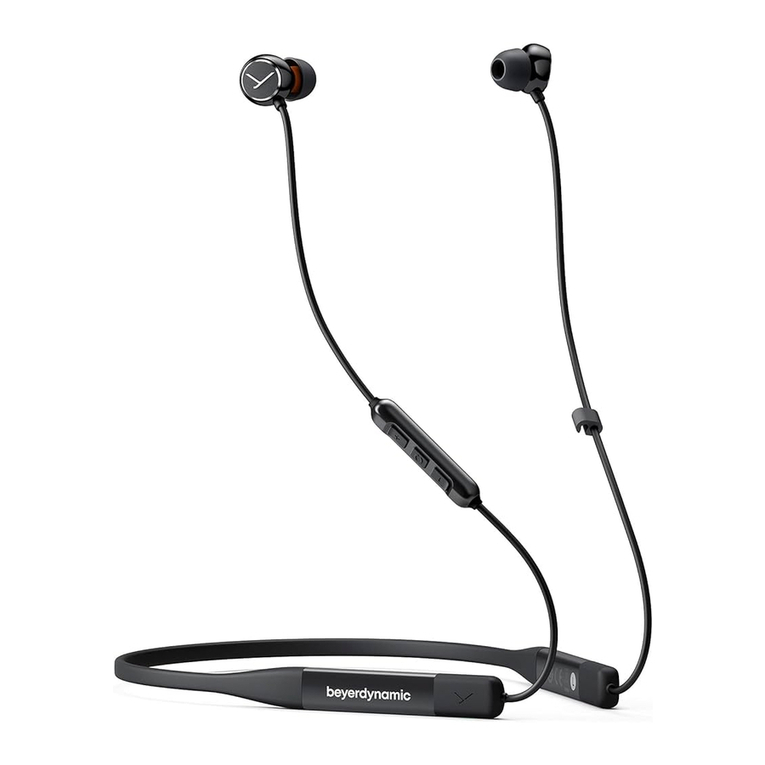
Beyerdynamic AMIRON WIRELESS Manual de usuario

Manual
AMIRON WIRELESS
–


Amiron wireless – Headphones 3
English . . . . . . . . . . . . . . . . . . . . . . . . . . . . . . . . . . . . . . . . . . . . . . . . . . . . . . 4
Deutsch. . . . . . . . . . . . . . . . . . . . . . . . . . . . . . . . . . . . . . . . . . . . . . . . . . . . . 26
Français . . . . . . . . . . . . . . . . . . . . . . . . . . . . . . . . . . . . . . . . . . . . . . . . . . . . 46
Español . . . . . . . . . . . . . . . . . . . . . . . . . . . . . . . . . . . . . . . . . . . . . . . . . . . . . 66
русский. . . . . . . . . . . . . . . . . . . . . . . . . . . . . . . . . . . . . . . . . . . . . . . . . . . . . 86
. . . . . . . . . . . . . . . . . . . . . . . . . . . . . . . . . . . . . . . . . . . . . . . . . . . . . 106
한국어. . . . . . . . . . . . . . . . . . . . . . . . . . . . . . . . . . . . . . . . . . . . . . . . . . . . . 126
中文 . . . . . . . . . . . . . . . . . . . . . . . . . . . . . . . . . . . . . . . . . . . . . . . . . . . . . . 146

Amiron wireless – Headphones
4
Thank you for choosing Amiron wireless Bluetooth headphones. For best
possible listening experience, you will find a comprehensive description on how to use
your Amiron wireless.
Safety instructions
Caution:
When you connect the headphones, please make sure that the volume level is
set to minimum. Adjust the volume level only after putting on the headphones.
We would like to point out that excessively high volumes and long listening times
may cause hearing damage. Hearing defects always constitute an irreversible impairment
of hearing ability.
Always ensure an adequate volume level. It is advisable to keep listening times as short
as possible at high volume levels. According to the Occupational Health and Safety
Regulations of erman trade associations B V B3, noise pollution e.g. in the workplace
must not exceed 85 dB (room volume level) during a maximum permissible listening
time of 8 hours. If the volume level is increased by 3 dB respectively, the permissible
listening time is cut in half, i.e. at 88 dB, the listening time is 4 hours, at 91 dB
2 hours, etc.
The beyerdynamic MIY App allows you to personalise your Amiron. The App’s tracking
function allows to use the Amiron so that the headphones will not exceed a maximum
of acoustic impact (“noise”) that is calculated from common, general findings. Please
note that the Amiron wireless and the MIY App can only register noise impact that is
created by the headphones themselves; other, external sources of noise such as con-
struction noise, concerts, etc. can of course not be considered in the calculation of
acoustic impact. Therefore, the Amiron wireless and the MIY App do not offer a summary
of the entire exposure of your hearing. The MIY App only displays the acoustic load that
is wirelessly transmitted via the Amiron and allows to limit it to acceptable levels.
Danger to life!
Headphones drastically reduce perception of external sounds. Using headphones in road
traffic can be potentially dangerous. The user’s hearing must not be impaired to the
extent that it causes road safety risks. Please also make sure that you do not use the
in-ear headphones within an area of potentially dangerous machines and tools.
isk of injury!
Avoid sudden movements when using wired headphones. You might seriously hurt
yourself especially if you wear piercings, earrings, glasses, etc., where the wire can get
caught.

english
Amiron wireless – Headphones 5
Box contents
• Amiron wireless headphones
• Connecting cable with remote control, mini jack (3.5 mm)
• Charging cable USB-A to USB-C
• Hard case
• Warranty booklet
• Quick Start uide
beyerdynamic MIY app
By using the beyerdynamic MIY app you can personalise your Amiron wireless. The app
is available for Apple iOS and Android and can be downloaded from both the Apple App
Store and the oogle Play Store.
Note firmware version 1.0
The following descriptions refer to the firmware version 1.0 installed on the present
Bluetooth headphones.
Firmware Update
A more recent firmware version than installed (version 1.0) might be available. If available,
you can perform this update yourself.
• Download the firmware update tool from the Amiron product page at
www.beyerdynamic.com to your computer.
• Turn on the Amiron wireless and connect it to your computer using the USB charge
cable 2.
• Start the update tool and follow the instructions on the screen.
Compatibility
The Amiron wireless is compatible with Bluetooth playback devices that support the
following profiles:
• A2DP (for audio transmission)
• HFP (for phone operation)
• HSP (voice output)
• AVRCP (for the transmission of controls signals)
Note:
All associated functions are only available, if they are supported by the playback
device.

Amiron wireless – Headphones
6
Supported audio codecs
Within the A2DP profile, the Amiron wireless supports the audio codecs SBC, AAC,
aptX™, aptX™ LL and aptX™ HD. The best audio quality is offered by aptX™ HD.
aptX™ LL offers the shortest audio latency.
Note:
Please note that only audio codecs can be used for audio transmission, which are
available in the playback device.
Playback device and Amiron wireless automatically communicate on the best, commonly
available codec in the following order:
1. aptX™ LL
2. aptX™ HD
3. aptX™
4. AAC
5. SBC
Note: Please note that most playback devices do not indicate which codec is active.

english
Amiron wireless – Headphones 7
Controls and indicators
1Touch pad
2USB connection for charging cable
(USB-C)
3LED button
4Microphone
5Mini jack connector 3.5 mm for
audio cable
4
2
3
1
5
L

Amiron wireless – Headphones
8
Turning on / off
The functions listed below refer to the Amiron wireless when it has already been paired
with a Bluetooth enabled device.
•Turning on:
Hold down the button 3 for approx. 2 seconds.
The LED 3 will illuminate red once.
•Turning o :
Hold down the button 3 for approx 6 seconds.
The LED 3 will illuminate red once and then go out.
Pairing with the player
Before you use the Amiron wireless for the first time, you have to pair it with your mobile
phone or another Bluetooth enabled device. The pairing process may be different with
various players. Please refer to the appropriate manual of the player.
• When the Amiron wireless is turned off, press the button 3for 6 seconds to start
the Bluetooth mode. The LED 3 will rapidly flash blue and red in turns.
• Activate the Bluetooth function on your player and, if necessary, search for new
devices.
• Select “beyerdynamic Amiron wireless” under the available devices in the Bluetooth
menu of your player and pair both devices. Each time when turning on, both devices
are paired automatically.
Alternatively, you can connect the Amiron wireless
with an NFC-capable playback device through NFC.
The Amiron must be switched on. It does not matter
whether the Amiron is in pairing mode or not.
• Activate the NFC function on your playback de-
vice so that all necessary information can be
transmitted to the playback device and a connec-
tion can be established.
• Hold the playback device to the left headphon
housing so that the two NFC chips are close to
each other. If required, test this by sliding move-
ments.

english
Amiron wireless – Headphones 9
Pairing and clearing the list of players
If there are already several players in the list of your Amiron wireless and your Amiron
wireless cannot be paired with another new player, the list is full and should be cleared
so that the new player can be added.
This is how to clear the list:
• Hold down the button 3 of the turned off Amiron wireless for more than 10 seconds,
so that the Amiron wireless will switch into the pairing mode and clear the list of
players simultaneously.
Multi point operation
The Amiron wireless can be paired to up 8 Bluetooth enabled devices. Active connections
can be established with up to two devices at a time. However, playback of music and
phone operation is only possible with one device at a time. Phone operation has priority
over playback of music; i. e. playback of music is interrupted during phone calls.
The following priorities apply during the use of playback devices:
Setting up multi point
• Pair the Amiron wireless with the first device (refer to “pairing with the player”).
• Deactivate the Bluetooth connection on the first device.
• Switch the Amiron wireless off.
• Press the button 3for 6 seconds to start pairing mode (LED 3flashes slowly alter-
nating blue and red).
• Pair the Amiron wireless with the second device (refer to “pairing with the player”).
• Re-activate the bluetooth connection to the first device that automatically connects
to the Amiron.
• Once both devices are paired with the Amiron wireless, the Amiron wireless
automatically connects with both devices each time it is powered up.
Priority Profile Playback device (PD)
1 HFP (phone operation) PD 1 (device used first)
2 HFP (phone operation) PD 2 (device used second)
3
A2DP (playback of music)
PD 1 (device used first)
4
A2DP (playback of music)
PD 2 (device used second)

Amiron wireless – Headphones
10
Using up multi point
If you have connected the Amiron wireless with two devices
– and have just activated media playback, briefly tap the touch pad 1twice to accept
an incoming call.
– and have just finished a call, briefly tap the touch pad 1twice to restart the media
playback that was playing most recently.
Media playback
Please note that the functions described below, depend on the player and the player
software and may not be available. The Amiron wireless only transmits control signals
that comply with the Bluetooth standard.
Important: To avoid malfunction, use only one finger when you use the touch pad 1.
2 X
•Start / stop media playback:
Briefly tap the touch pad 1 twice.
•Play next track:
Drag your finger forwards on the touch
pad 1.
2 x
Otros manuales para AMIRON WIRELESS
2
Este manual sirve para los siguientes modelos
1
Tabla de contenidos
Idiomas:
Otros manuales de Auriculares inalámbricos de Beyerdynamic