
Bascom BSM-PWA Manual de usuario

User Manual / Gebrauchsanweisung /
Manuel d’utilisation / Gebruikershandleiding
POE WIFI ADAPTER

Table of content / Inhalt / Table des matières / Inhoudsopgave
SAFETY INSTRUCTIONS
DECLARATION OF CONFORMITY
PACKAGE CONTENT
HOW TO INSTALL
OVERVIEW
SPECIFICATIONS
WARRANTY
................................................................................................................................................1
......................................................................................................................... 1
....................................................................................................................................................... 2
............................................................................................................................................................. 3
............................................................................................................................................................................ 6
............................................................................................................................................................... 8
........................................................................................................................................................................... 8
Table of content
SICHERHEITSHINWEISE
KONFORMITÄTSERKLÄRUNG
VERPACKUNGSINHALT
INSTALLATION
ÜBERSICHT
TECHNISCHE DATEN
GARANTIE
...............................................................................................................................................9
................................................................................................................................. 9
.............................................................................................................................................. 10
................................................................................................................................................................. 11
......................................................................................................................................................................... 14
................................................................................................................................................... 16
.......................................................................................................................................................................... 16
Inhalt

Table of content / Inhalt / Table des matières / Inhoudsopgave
................................................................................................................................17
...................................................................................................................... 17
.................................................................................................................................. 18
........................................................................................................................................... 19
.......................................................................................................................................................... 21
............................................................................................................................................................ 24
.......................................................................................................................................................................... 24
INSTRUCTIONS DE SÉCURTIÉ
DÉCLARATION DE CONFORMITÉ
CONTENU DE L’EMBALLAGE
GUIDE D’INSTALLATION
VUE D’ENSEMBLE
SPÉCIFICATIONS
GARANTIE
Table des matières
VEILIGHEIDSINSTRUCTIES
CONFORMITEITSVERKLARING
INHOUD VERPAKKING
INSTALLEREN
OVERZICHT
SPECIFICATIES
GARANTIE
...................................................................................................................................... 25
........................................................................................................................... 25
.............................................................................................................................................. 26
................................................................................................................................................................... 27
........................................................................................................................................................................ 30
................................................................................................................................................................. 32
.......................................................................................................................................................................... 32
Inhoudsopgave

English
1
Bascom products are designed and tested to meet strict safety requirements.
Carefully read the instructions below before you start working with the
products and, if necessary, consult the instructions again, so you are always
using the product safely.
Safety Instructions
Bascom Camera’s B.V. hereby declares that the product is in conformity with the essential
requirements and other relevant provisions of guidelines 2004/108/EC and 2006/95/EC. A copy of
the declaration of conformity can be found on our website: www.bascom-cameras.com/conformity/.
Declaration Of Conformity
Carefully follow the operating instructions when connecting this product.
Keep all parts of the product out of the reach of children.
Do not drop the product and do not shake the product. A rough treatment could damage the
internal electronic switch and the fine mechanics.
Do not operate this product near water.
This product should never be placed near or over a radiator or heat register.
Only a qualified technician should service this product. Opening or removing covers may result
in exposure to dangerous voltage points or other risks.
Avoid plugging the device right next to noisy sources such as cell phone chargers, desktop
computers, vacuum cleaners, etc. This can result in poor transmission speed.
Before cleaning the product, remove the product from the power source.
Only clean the exterior of the product, with a soft, dry cloth.
Do not use aggressive chemicals, solvents or strong detergents to clean the product.
Contact your supplier if you have any doubts about connecting the product, the product safety
or the operating mode of the product.

English
2
Package Content
POE WIFI ADAPTER
PWR
WPS
WiFi
ETH
POE

English
3
How to install
English
4
Before we start
This WiFi adapter is used to connect a camera to your wireless network. Please make sure
the recorder from your camera system is connected to the same network. Normally this is
done by using a network cable between your recorder and router. Once the camera is
connected to your wireless network. The recorder will find the camera automatically.
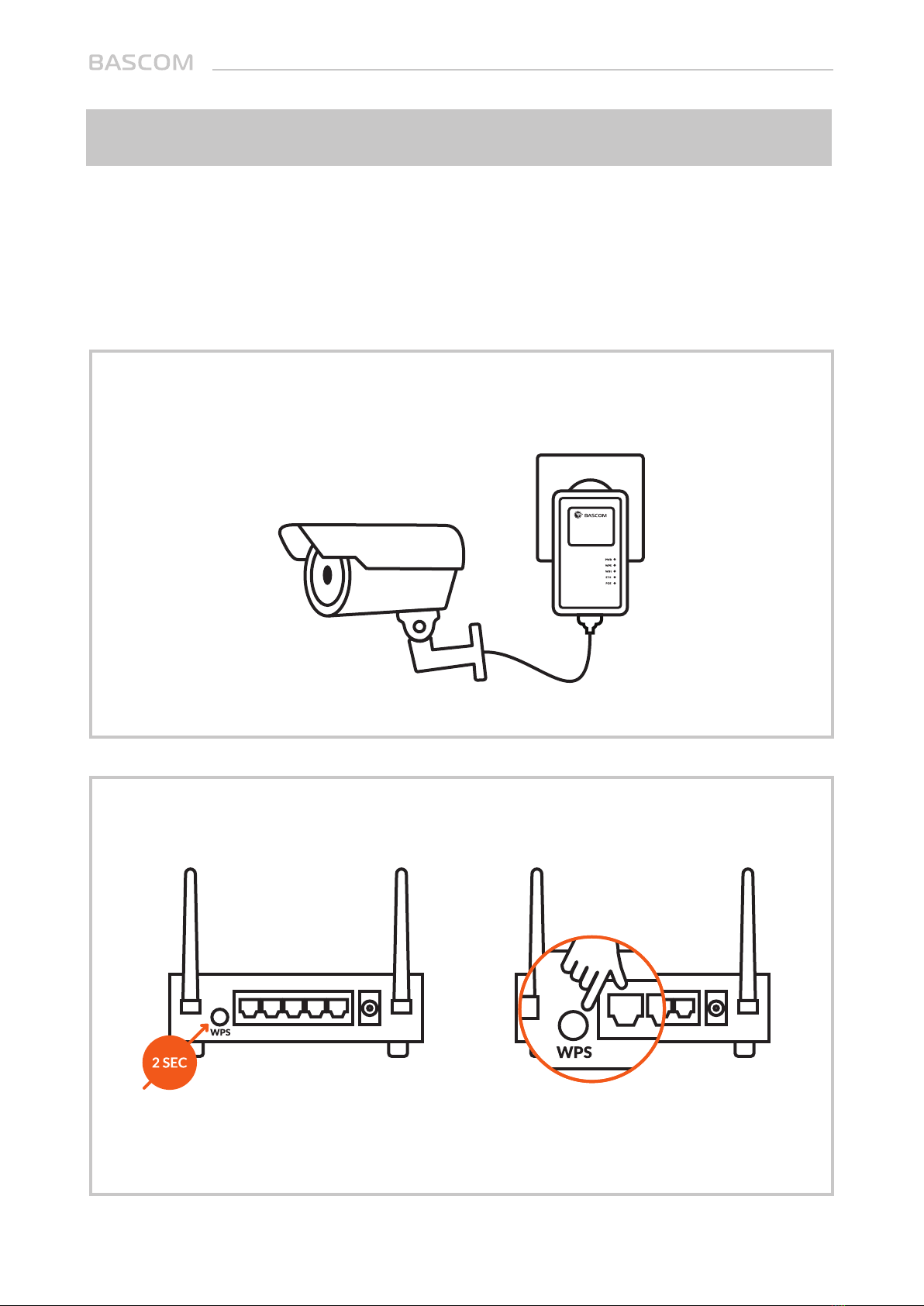
Step 1: Plug the WiFi adapter into a power outlet and connect the camera to the
adapter.
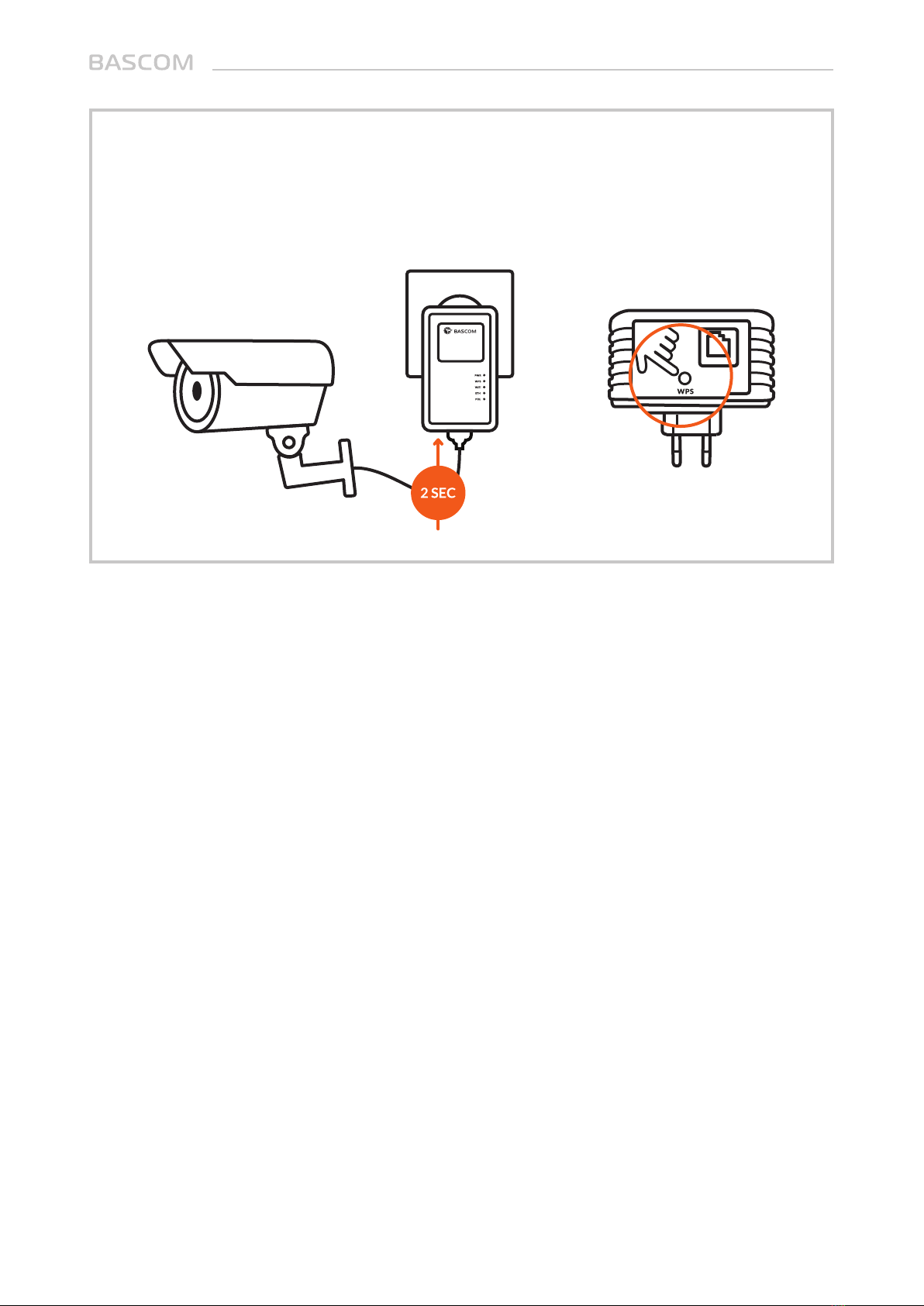
Step 2: Press the “WPS button” on your router. Do the same on the WiFi adapter
within 2 minutes (see the next step).
If your router does not have a WPS button, you can also use its web configuration
menu’s WPS function to establish a connection.
WPS
English
5
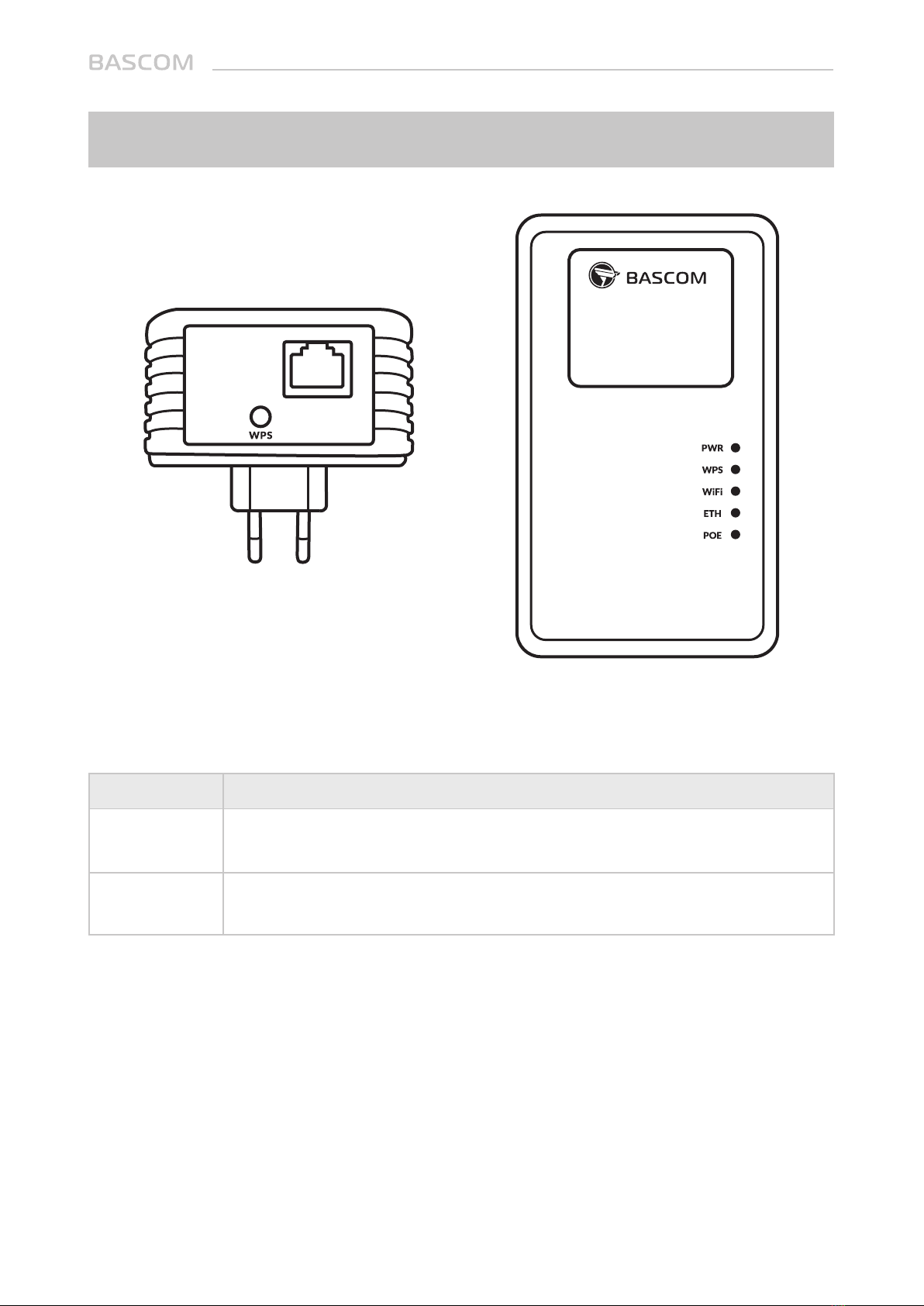
Step 3: Press and hold the ‘WPS button’ on the WiFi adapter for 2 seconds, the ‘WPS’
LED will start flashing. Once connected successful, the ‘WPS’ LED is steady ‘ON’. This
means the installation is completed.
English
6
Overview
10/100M Ethernet LAN Port with PoE. Connect to a camera or other network
device.
Press this button for 2 seconds to start the WPS function.
ITEM NAME INDICATION
Lan
WPS

English
7
LED indicators
LED
Green
Green
Green
Green
Green
On
Off
Blinking
On
Off
Blinking
On
Off
Blinking
On
Off
On
Off
Power
No power
WPS is in progress of waiting for another WPS
device’s connection, blinking (0.1 second on,
0.1 second off) for 2 minutes
Connected
Not connected
Transfering or receiving data
WiFi is connected
WiFi is not connected
LAN port is active (transferring or receiving data)
Lan port is connected
Lan port is not connected
PoE function is working
PoE function is not working
COLOR LED STATUS INDICATION
PWR
WPS
WiFi
ETH
POE
Tabla de contenidos
Idiomas:
Manuales populares de Módem de otras marcas


US Robotics
US Robotics 3453C Manual de usuario

MaxTech
MaxTech Plug & Play Internal Voice/FAX/Data/SVD... Manual de usuario

Zte
Zte MF823 Manual de usuario

Four-Faith
Four-Faith F1403 Manual de usuario

Sierra Wireless
Sierra Wireless AIRLINK MP595W Manual de usuario

Gemtek
Gemtek WiMAX WIXFBR-103 Manual de usuario