
Axon Digidata 1322A Manual de usuario

Digidata 1322A Operator’s Manual, Copyright 2000-2001, Axon Instruments, Inc.
Digidata 1322A
Operator’s Manual
Part Number 2500-135 Rev D July 2002 Printed in USA
Copyright 2000-2001 Axon Instruments, Inc.
No part of this manual may be reproduced, stored in a retrieval system or transmitted,
in any form or by any means, electronic, mechanical, photocopying, microfilming,
recording, or otherwise, without written permission from Axon Instruments, Inc.
QUESTIONS? Phone: +1 (510) 675-6200
Fax: +1 (510) 675-6300
Web: www.axon.com
If you encounter difficulties and need technical support, PLEASE read the
TROUBLESHOOTING section on page 9 before you call Axon Instruments.


i
COPYRIGHT
The information in this manual is copyrighted and must not be reproduced in any
form whatsoever without written permission from Axon Instruments, Inc.
VERIFICATION
This instrument is extensively tested and thoroughly calibrated before leaving the
factory. Nevertheless, researchers should independently verify the basic accuracy
of the instrument using suitable test signals.
DISCLAIMER
This equipment is not intended to be used and should not be used in human
experimentation or applied to humans in any way.
CAUTION
Do not open the unit. There are no user-serviceable parts inside.

ii
Digidata 1322A Operator’s Manual, Copyright 2000-2001, Axon Instruments, Inc.
Declaration of Conformity
Manufacturer: Axon Instruments, Inc.
3280 Whipple Road
Union City, CA 94587
USA
Type of Equipment: Signal Conditioning Amplifier
Model Number: Digidata 1322A
Year of Manufacture: 2000
Application of Council Directives:
EC EMC Directive 89/336/EEC as amended
EC Low Voltage Directive 73/23/EEC as amended
Harmonized Standards to which Conformity is Declared:
EMC: EN 55011: 1998, Class B
EN 50082-1: 1998
Safety: EN 61010-1: 2001
I, the undersigned, hereby declare that the equipment specified above conforms to
the above Directives and Standards.
Authorized Signature and Date: (Signature on file)

iii
Table of Contents
TABLE OF CONTENTS
Chapter 1 INTRODUCTION.............................................................................. 1
Introduction to the Digidata 1322A..................................................................... 1
Components......................................................................................................... 2
Minimum Computer Requirements..................................................................... 2
Recommended Computer System ....................................................................... 2
Notes on the SCSI Adapter Card......................................................................... 3
Rack Mount Kit ................................................................................................... 3
Chapter 2 INSTALLATION ............................................................................... 5
Instructions .......................................................................................................... 5
Chapter 3 TROUBLESHOOTING .................................................................... 9
Functional Checkout............................................................................................ 9
Step 1............................................................................................................... 9
Step 2............................................................................................................... 9
Step 3............................................................................................................. 10
Troubleshooting ................................................................................................ 11
Grounding and Minimizing Noise..................................................................... 13
Before you call… .............................................................................................. 14

iv
Digidata 1322A Operator’s Manual, Copyright 2000-2001, Axon Instruments, Inc.
Chapter 4 INTERFACE DESCRIPTION........................................................ 15
Front Panel ........................................................................................................ 15
Analog Input.................................................................................................. 16
Analog Output ............................................................................................... 16
Digital Output................................................................................................ 16
Trigger In....................................................................................................... 16
Rear Panel.......................................................................................................... 17
Telegraph Inputs............................................................................................ 17
Digital Outputs .............................................................................................. 17
Trigger Output............................................................................................... 18
Line Frequency Output.................................................................................. 18
Digital Outputs (0-15) ................................................................................... 18
Digital Inputs (0-15) ...................................................................................... 19
Peripherals ..................................................................................................... 19
SCSI ID ......................................................................................................... 19
SCSI Ports ..................................................................................................... 19
SCSI Termination.......................................................................................... 20
Power Supply ................................................................................................ 20
Chapter 5 SPECIFICATIONS .......................................................................... 21
Analog Input.................................................................................................. 21
Analog Output ............................................................................................... 22
Digital Inputs................................................................................................. 22
Digital Outputs .............................................................................................. 22
Trigger In....................................................................................................... 22
STANDARD WARRANTY and REPAIR SERVICE ..................................... 23
INDEX .................................................................................................................. 25

Introduction •1
Chapter 1
Chapter 1
INTRODUCTION
Introduction to the Digidata 1322A
The Digidata 1322A is a high-resolution, low-noise digitizer intended for precision
scientific applications. The Digidata 1322A digitizes at an aggregate speed of
500 kHz. It provides sixteen multiplexed, 16-bit analog inputs and two non-
multiplexed, 16-bit analog outputs. There are sixteen digital input lines and sixteen
digital output lines, as well as Tag and Start digital inputs.
The Digidata 1322A communicates with the host computer through the SCSI bus.
To minimize the likelihood of installation or performance problems, every Digidata
1322A is supplied from the factory with a SCSI adapter card that should be
installed into the computer, although you may choose to use an existing SCSI port.
The Digidata 1322A is compatible with both the Windows and Macintosh operating
systems. It is a plug-and-play device; it is automatically recognized by Windows
95, 98, and 2000. The Digidata 1322A is supported by Clampex 8, AxoScope 8,
and AxoGraph 4.2 (and higher versions). AxoScope is an easy-to-use, full-featured
data acquisition program for Windows that is provided free with the Digidata.
The Digidata 1322A has higher speed, lower noise and better resolution (greater
dynamic range) than the previous Digidata 1200 models. New features also include
better instrument telegraph support and line-frequency triggering.
The Digidata 1322A is intended for benchtop use, but it is supplied with a simple
rack-mount kit.

2 •Introduction
Digidata 1322A Operator’s Manual, Copyright 2000-2001, Axon Instruments, Inc.
Components
• Digidata 1322A with power cord
• SCSI cable, 10 ft. length
• CD-ROM with AxoScope 8 (Windows only)
• Manual (includes Warranty Registration Card)
• SCSI adapter card and device driver CD-ROM
• Rack Mount Kit
Minimum Computer Requirements
• IBM PC-compatible computer with a Pentium 133 MHz or faster, OR
Power Macintosh
• One open PCI slot
• 32 MB RAM
• 200 MB hard disk
• Parallel port (if using with the parallel port key required by pCLAMP)
• 800 x 600 display system (small fonts)
• Windows 95, 98, NT 4.0, or Windows 2000 operating system (PC), OR
System 7.5 (Mac)
Recommended Computer System
• IBM PC-compatible computer with a Pentium 200 MHz or faster, OR
Power Macintosh G4
• One open PCI slot
• 64 MB RAM (or higher)
• 1 GB hard disk (or more)
• Parallel port (if using with the parallel port key required by pCLAMP)
• 1024 x 768 display system (large or small fonts)
• Windows 95, 98, NT 4.0, or Windows 2000 operating system (PC), OR
System 9 (Mac)

Introduction •3
Chapter 1
Notes on the SCSI Adapter Card
One SCSI adapter card is provided with every Digidata 1322A. Be sure to read the
SCSI Adapter Installation Guide. Some users may prefer to use an existing SCSI
port on the computer. While it is possible to use other models of SCSI adapters,
Axon Instruments can provide technical support only for the SCSI adapter bundled
with the Digidata 1322A. The Digidata 1322A is compatible with the popular
Adaptec SCSI adapter cards. The Digidata 1322A and cable use high-density
50-pin connectors. You may need a special adapter or cable to connect to a SCSI
adapter with a wide-SCSI connector (e.g., Adaptec 2940W or 2940UW).
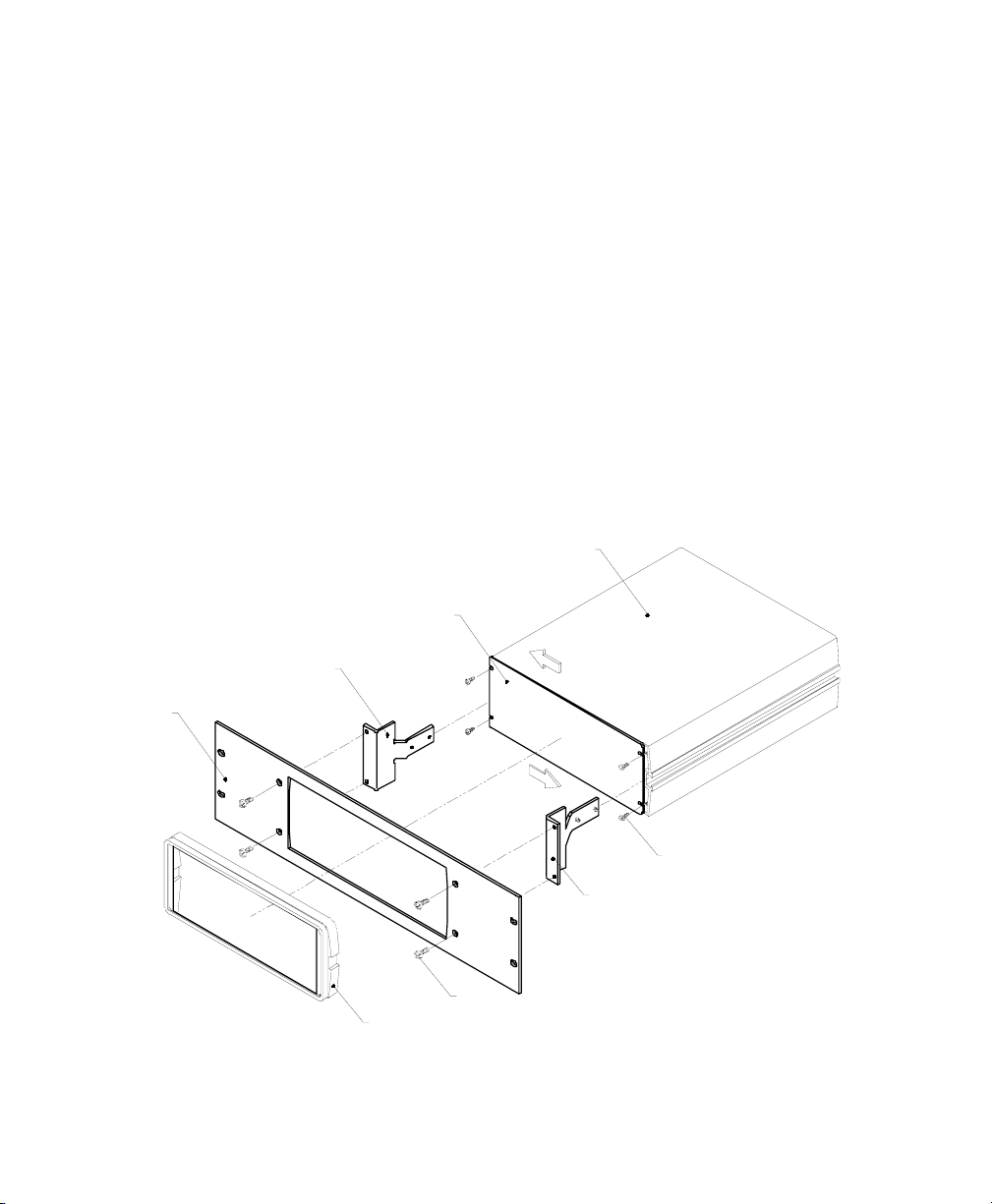
Rack Mount Kit
The Digidata 1322A is designed to be a desktop unit. However, some users may
want to mount the Digidata 1322A in a rack, so a Rack Mount Kit is provided.
The Rack Mount Kit includes the following parts:
One Rack Mount Panel
Two Side Brackets with set screws
Four Screws
Refer to the figure on the next page and follow these instructions for installation:
1. Remove the bezel (the frame that surrounds the front panel)
a. Use one finger to pull one side of the bezel outward (see figure) to unhook it.
b. Remove the bezel.
c. Do NOT remove the front panel!
2. Mount the Side Brackets
a. Before inserting the Side Brackets, loosen the screws on the front panel (to
allow clear access to the grooves on the side panels).
b. Insert one Side Bracket on each side of the Digidata 1322A.
c. Tighten the screws on the front panel.
d. The Side Brackets should be free to move along the grooves of the side
panels.
4 •Introduction
Digidata 1322A Operator’s Manual, Copyright 2000-2001, Axon Instruments, Inc.
3. Attach the Rack Mount Panel
a. Slide the Rack Mount Panel around the front panel.
b. Snap the bezel back in place around the front panel.
c. Pull the Rack Mount Panel flush up against the bezel.
d. Position the Side Brackets up against the Rack Mount Panel.
e. Use the four Screws to secure the Rack Mount Panel to the Side Brackets.
f. Tighten the Side Bracket set screws up against the side panels.
4. Secure the entire unit in the rack
a. Place the unit (Digidata 1322A) plus the attached rack mount assembly in
the rack.
b. Secure the Rack Mount Panel to the rack with four rack screws (not
included).
ENCLOSURE
MOUNTING BRACKET
MOUNTING PANEL
BEZEL
LARGESCREW
SMALLCREW
MOUNTING BRACKET
FRONTPANEL
Tabla de contenidos
Otros manuales de Amplificador de Axon

Axon
Axon AutoMate Scientific MultiClamp 700B Manual de usuario

Axon
Axon Synapse CDV07 Manual de usuario

Axon
Axon Synapse CDV08 Manual de usuario

Axon
Axon Synapse SAM08 Manual de usuario

Axon
Axon Axopatch-1D Manual de usuario

Axon
Axon MultiClamp 700A Manual de usuario

Axon
Axon Synapse HDR07 Manual de usuario

Axon
Axon MultiClamp 700B Manual de usuario


