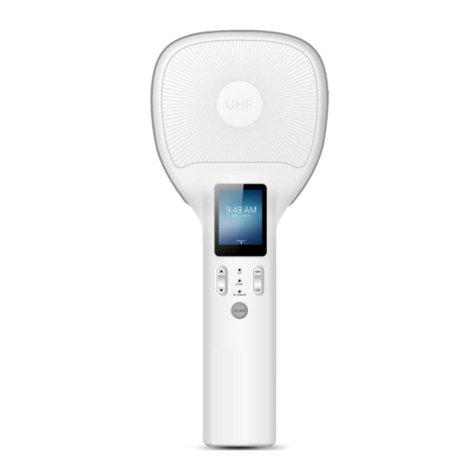
AXEM Technology UniSled Manual de usuario

AXEM Technology
11 rue Auguste Perret, 94042 Créteil, FRANCE –[email protected] –+33 (0)1 41 94 11 85 –www.axemtec.com
Siret : 45071140300045 - APE : 4652Z - RCS : CRETEIL 450711403 - N° TVA intracom : FR05450711403 - Capital : 500 000,00 €
File : UniSled User Guide
Version : V1.1
1/17
UniSled
User Guide

AXEM Technology
11 rue Auguste Perret, 94042 Créteil, FRANCE –[email protected] –+33 (0)1 41 94 11 85 –www.axemtec.com
Siret : 45071140300045 - APE : 4652Z - RCS : CRETEIL 450711403 - N° TVA intracom : FR05450711403 - Capital : 500 000,00 €
File : UniSled User Guide
Version : V1.1
2/17
Table of content
1Product introduction.................................................................................................................3
1.1 Introduction.......................................................................................................................3
1.2 Precaution before using battery........................................................................................3
1.3 Charger.............................................................................................................................4
1.4 Notes................................................................................................................................4
2Installation instruction ..............................................................................................................5
2.1 Appearance......................................................................................................................5
2.2 Battery charge ..................................................................................................................6
2.3 Buttons and function area display.....................................................................................6
3Demo Test...............................................................................................................................7
3.1 Install demo-uhf-bt (1.0.8).................................................................................................7
3.2 Pairing device...................................................................................................................8
3.3 UHF Scan function............................................................................................................9
3.4 UHF configuration...........................................................................................................10
3.5 UHF Tag Reading and Writing........................................................................................12
3.6 UHF Tag Lock and Kill....................................................................................................13
3.6.1 Lock Function..........................................................................................................13
3.6.2 Kill Function.............................................................................................................14
3.7 Firmware Upgrade..........................................................................................................15
3.8 Barcode Scan Test.........................................................................................................16
4Device characteristics............................................................................................................17
4.1 Physical characteristics...................................................................................................17
4.2 Performance...................................................................................................................17
4.3 User environment ...........................................................................................................17
4.4 Data collection................................................................................................................17
4.4.1 Barcode scanner......................................................................................................17
4.4.2 RFID UHF................................................................................................................17

AXEM Technology
11 rue Auguste Perret, 94042 Créteil, FRANCE –[email protected] –+33 (0)1 41 94 11 85 –www.axemtec.com
Siret : 45071140300045 - APE : 4652Z - RCS : CRETEIL 450711403 - N° TVA intracom : FR05450711403 - Capital : 500 000,00 €
File : UniSled User Guide
Version : V1.1
3/17
1Product introduction
1.1 Introduction
The UniSled, product of MBA5 family makes any mobile terminal in a smartphone shape a
professional data collection device. It adapts to any smartphone running under Android or iOS.
Connect your deviceand the UniSled very easily in a Bluetooth connection.The UniSled has several
features such as powerful UHF RFID reading/writing and 1D/2D barcodes scanning.
1.2 Precaution before using battery
Do not leave battery unused for long time, no matter it is in device or inventory. If battery has been
used for 6 months already, it should be check for charging function or it should be disposed correctly.
The lifespan of Li-ion battery is around 2 to 3 years, it can be circularly charged for 300 to 500 times.
(One full battery charge period means completely charged and completely discharged.)
When Li-ion battery is notin used, it will continue dischargeslowly. Therefore, battery charging status
should be checked frequently and take reference of the related battery charging information on the
manuals.
Observe and record the information of a new unused and non-fully charged battery. On the basis of
operating time of new battery and compare with a battery that has been used for long time. According
to product configuration and application program, the operating time of battery would be different.
Check battery charging status at regular intervals.
When battery operating time drops below about 80%, charging time will be increased remarkably.
If a battery is stored or otherwise unused for an extended period, be sure to follow the storage
instructions in this document. If you do not follow the instructions, and the battery has no charge
remaining when you check it, consider it to be damaged. Do not attempt to recharge it or to use it.
Replace it with a new battery.
Store the battery at temperatures between 5 °C and 20 °C (41 °F and 68 °F).
Be careful to check the direction of insertion of the battery: there is no coding.

AXEM Technology
11 rue Auguste Perret, 94042 Créteil, FRANCE –[email protected] –+33 (0)1 41 94 11 85 –www.axemtec.com
Siret : 45071140300045 - APE : 4652Z - RCS : CRETEIL 450711403 - N° TVA intracom : FR05450711403 - Capital : 500 000,00 €
File : UniSled User Guide
Version : V1.1
4/17
1.3 Charger
The charger type is GME10D-050200FGu, output voltage/current is 5V DC/2A. The plug considered
as disconnect device of adapter.
1.4 Notes
Note 1:
Using the incorrect type battery has danger of explosion.
Please dispose the used battery according to instructions.
Note 2:
Due to the used enclosure material, the product shall only be connected to a USB Interface of
version 2.0 or higher. The connection to so called power USB is prohibited.
Note 3:
The suitable temperature for the product and accessories is 0-10℃to 50℃.
Note 4:
CAUTION RISK OF EXPLOSION IF BATTERY IS REPLACED BY AN INCORRECT TYPE.
DISPOSE OF USED BATTERIES ACCORDING TO THE INSTRUCTIONS.

AXEM Technology
11 rue Auguste Perret, 94042 Créteil, FRANCE –[email protected] –+33 (0)1 41 94 11 85 –www.axemtec.com
Siret : 45071140300045 - APE : 4652Z - RCS : CRETEIL 450711403 - N° TVA intracom : FR05450711403 - Capital : 500 000,00 €
File : UniSled User Guide
Version : V1.1
5/17
2Installation instruction
2.1 Appearance
Indicating lamp instructions

AXEM Technology
11 rue Auguste Perret, 94042 Créteil, FRANCE –[email protected] –+33 (0)1 41 94 11 85 –www.axemtec.com
Siret : 45071140300045 - APE : 4652Z - RCS : CRETEIL 450711403 - N° TVA intracom : FR05450711403 - Capital : 500 000,00 €
File : UniSled User Guide
Version : V1.1
6/17
2.2 Battery charge
By using USB contact, the original adaptor should be used for charging the device. Make sure not
to use other adaptors to charge the device.
2.3 Buttons and function area display
Unisled has 1 power button and 3 indicating lamps.

AXEM Technology
11 rue Auguste Perret, 94042 Créteil, FRANCE –[email protected] –+33 (0)1 41 94 11 85 –www.axemtec.com
Siret : 45071140300045 - APE : 4652Z - RCS : CRETEIL 450711403 - N° TVA intracom : FR05450711403 - Capital : 500 000,00 €
File : UniSled User Guide
Version : V1.1
7/17
3Demo Test
3.1 Install demo-uhf-bt (1.0.8)
1. Copy demo-uhf-bt (1.0.8.) into internal storage of smartphone.
2. Click to install.
3. Click to open demo.

AXEM Technology
11 rue Auguste Perret, 94042 Créteil, FRANCE –[email protected] –+33 (0)1 41 94 11 85 –www.axemtec.com
Siret : 45071140300045 - APE : 4652Z - RCS : CRETEIL 450711403 - N° TVA intracom : FR05450711403 - Capital : 500 000,00 €
File : UniSled User Guide
Version : V1.1
8/17
3.2 Pairing device
1. Switch on Bluetooth function of smartphone or MBA5-P1x device.
2. Power on Unisled.
3. Click BLUETOOTH in the demo.
4. Click SEARCH to search for Nordic_UART_CW.
5. Click Nordic_UART_CW to connect.
1. Switch on Bluetooth function of smartphone.
2. Power on UniSled.
3. Click BLUETOOTH in the demo.
4. Click SEARCH to search Nordic_
6. After connecting successfully, user could click 3 dots on top right to check UHF version, battery
percentage and UHF module temperature.

AXEM Technology
11 rue Auguste Perret, 94042 Créteil, FRANCE –[email protected] –+33 (0)1 41 94 11 85 –www.axemtec.com
Siret : 45071140300045 - APE : 4652Z - RCS : CRETEIL 450711403 - N° TVA intracom : FR05450711403 - Capital : 500 000,00 €
File : UniSled User Guide
Version : V1.1
9/17
3.3 UHF Scan function
1. Click SINGLE or AUTO in demo or pull the trigger on UniSled, the UHF tags could be read.
2. Click STOP in demo to stop reading of UHF tags.
3. Click CLEAR to clean all EPC information.

AXEM Technology
11 rue Auguste Perret, 94042 Créteil, FRANCE –[email protected] –+33 (0)1 41 94 11 85 –www.axemtec.com
Siret : 45071140300045 - APE : 4652Z - RCS : CRETEIL 450711403 - N° TVA intracom : FR05450711403 - Capital : 500 000,00 €
File : UniSled User Guide
Version : V1.1
10/17
3.4 UHF configuration
Click CONFIG in demo to adjust working mode and output power.
Tabla de contenidos
Otros manuales de Sistema RFID de AXEM Technology

AXEM Technology
AXEM Technology Atid AT188N Manual de usuario

AXEM Technology
AXEM Technology Eagle Manual de usuario

AXEM Technology
AXEM Technology S-8800 Manual de usuario

AXEM Technology
AXEM Technology S-8600 Manual de usuario

AXEM Technology
AXEM Technology D-10 Series Manual de usuario

AXEM Technology
AXEM Technology AX'Up wire Manual de usuario

AXEM Technology
AXEM Technology Atid AT188N Manual de usuario