AVGear AVG-MA2 Manual de usuario

AVG-MA2
The AVG-MA2 Mini Audio Amplifier is a
compact-size digital amplifier (Class-D) with 3
inputs (1 L+R stereo audio, 1 analog audio, 1
optical fiber audio).
Features
3 audio inputs: 1 L+R stereo, 1
analog, 1 optical fiber
Switchable stereo / mono output
Complete EQ management:
including LINE, BASS, TREBLE
Easy volume adjustment via a
rotary knob
Audio loop output
Intuitive LED indicators for input
source, control and volume setting
Controllable via RS232, IR, TCP/IP
(optional)
Web-based GUI
Power off memory function
Easy installation with rack-mounting
design

AVG-MA2
PLEASE READ THIS PRODUCT MANUAL CAREFULLY
BEFORE USING THIS PRODUCT.
This manual is only for operation instruction only, and
not to be used in a maintenance capacity. The
functions described in this version are current as at
March 2015. Any changes of functions and
operational parameters will be updated in future
manual versions. Please refer to your dealer for the
latest product details.
Version 1.0 1/3/15

AVG-MA2
SAFETY OPERATION GUIDE
In order to guarantee the reliable operation of the equipment and safety of the
user, please abide by the following procedures in installation, use and
maintenance:
1. The system must be earthed properly. Please do not use two blade plugs
and ensure the AC power supply ranges from 100v to 240v and from 50Hz
to 60Hz.
2. Do not install the switcher in an environment where it will be exposed to
extreme hot or cold temperatures.
3. This unit will generate heat during operation, please ensure that you allow
adequate ventilation to ensure reliable operation.
4. Please disconnect the unit from mains power if it will be left unused for a
long time.
5. Please DO NOT try to open the casing of the equipment, DO NOT attempt to
repair the unit. Opening the unit will void the warranty. There are high
voltage components in the unit and attempting to repair the unit could result
in serious injury.
6. Do not allow the unit to come into contact with any liquid as that could result
in personal injury and product failure.

AVG-MA2
TABLE OF CONTENTS
Introduction ..............................................................................................................1
Introduction to the AVG-MA2........................................................................1.1
Features.......................................................................................................1.2
What’s in the Box........……………………………………………………………………2
Product Appearance of the AVG-MA2....................................................................3
Front Panel
....................................................................................................3.1
Rear Panel
....................................................................................................3.2
System Connection..................................................................................................4
System Applications.....................................................................................4.1
Usage Precautions.......................................................................................4.2
Connection Diagram.....................................................................................4.3
Connection Procedure..................................................................................4.4
Audio Output Connection
...............................................................................4.5
Stereo output (default): 2x50Watt@8Ohm
........................................4.5.1
Mono output: 1x100Watt@4Ohm
......................................................4.5.2
Loop Connection ..........................................................................................4.6
System Operation.....................................................................................................5
Front Panel Button Control
.............................................................................5.1
IR Control
......................................................................................................5.2
RS232 Control
...............................................................................................5.3
Connection with the RS232 Communication Port
..............................5.3.1
Installation/Removal of RS232 Control Software
...............................5.3.2
Basic Settings
..................................................................................5.3.3
RS232 Communication Commands
..................................................5.3.4
TCP/IP Control
..............................................................................................5.4
Control Modes
.................................................................................5.4.1
Control via TCP/IP Communication Software
....................................5.4.2
GUI for TCP/IP Control
.....................................................................5.4.3
Port Management
............................................................................5.4.4
Specification.............................................................................................................6
Panel Drawing ..........................................................................................................7
Troubleshooting & Maintenance.............................................................................8

AVG-MA2
1. Introduction
1.1. Introduction to the AVG-MA2
The AVG-MA2 Mini Audio Amplifier is a compact-size digital amplifier (Class-D) with
3 inputs (1 L+R stereo audio, 1 analog audio, 1 optical fiber audio). It features a
switchable stereo or mono output, and boasts complete EQ adjustment and intuitive
work status display, making it an ideal addition in a classroom or conference room
application.
1.2. Features
3 audio inputs: 1 L+R stereo, 1 analog, 1 optical fiber
Switchable stereo / mono output
Complete EQ management: including LINE, BASS, TREBLE
Easy volume adjustment via a rotary knob
Audio loop output
Intuitive LED indicators for input source, control and volume setting
Controllable via RS232, IR, TCP/IP (optional)
Web-based GUI
Power off memory function
Easy installation with rack-mounting design

AVG-MA2
2. What’s in the Box
1 x Mini Audio Amplifier
4 x Screws
1 x IR Remote
1 x User manual
2 x Detachable Mounting Ears
2 x Pluggable Terminal Blocks (1 3-pin & 1 4-pin)
1 x Power Adapter (DC 33V @ 4A)
1 x IR Receiver (5V, without carrier)
Note: Please confirm if the product and the accessories are all included, if not,
please contact your dealer.

AVG-MA2
3. Product Appearance of the AVG-MA2
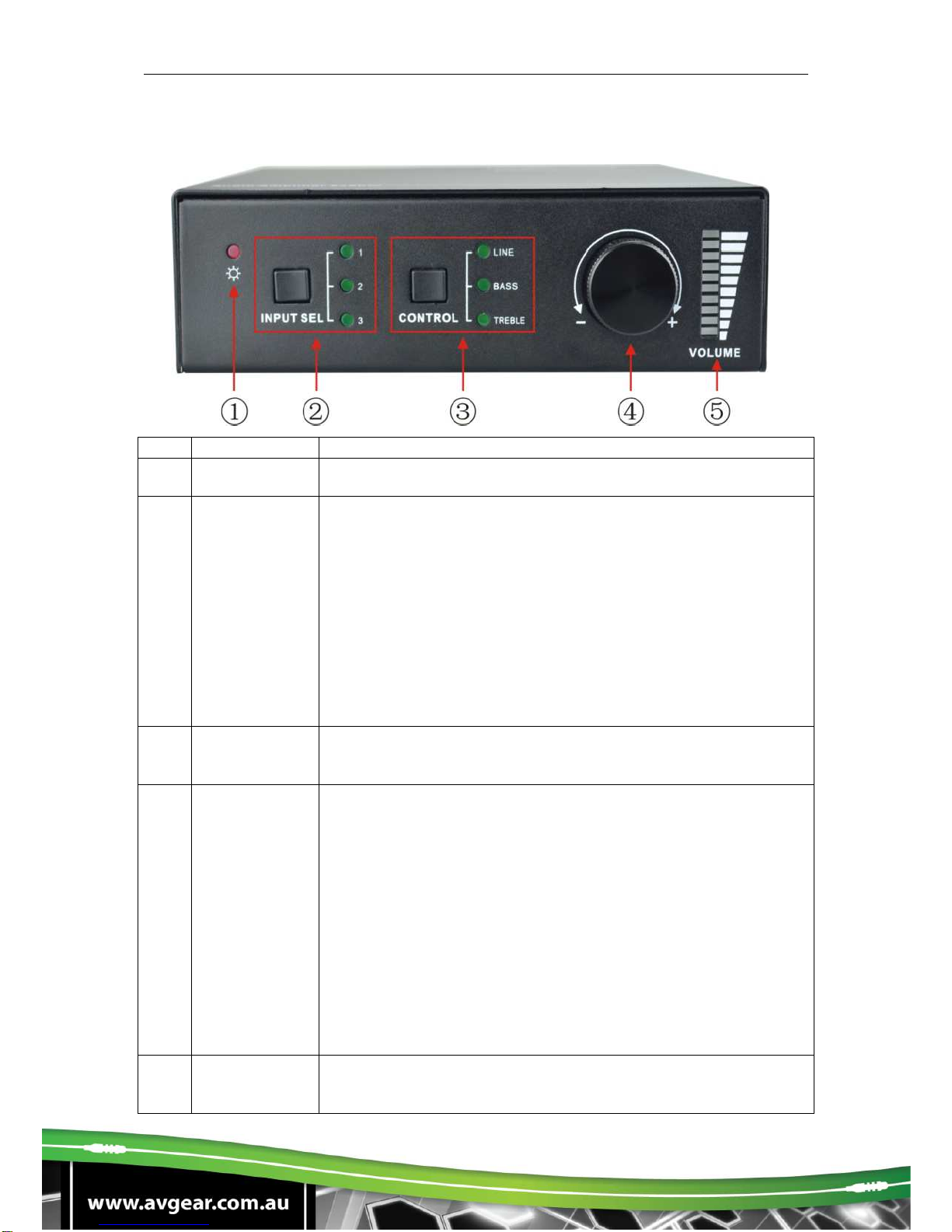
3.1. Front Panel
No.
Name
Description
①
Power LED Illuminates red when powered on
②
Input
Selection Press to select any one of the 3 inputs, indicators will light
accordingly
Input 1~3 corresponds to audio sources connected to the 3
audio input ports separately;
1: L+R stereo audio
2: 3.5mm analog audio
3: optical audio
③
Control Press to select the audio to be controlled, including LINE,
BASS, TREBLE
④
Volume Knob Press to mute/unmute the audio
Note: press the button to mute the audio, toggling it
again to restore the audio at the same volume, users
can also rotate the knob to enable audio output at
respective volume.
Rotate the knob to adjust volume, volume bars will
change accordingly
Clockwise Rotation: Volume up
Anticlockwise Rotation: Volume down
⑤
Volume Bars Indicate real-time volume setting, 10 bars in total, no volume
bar will be lit when the audio is muted

AVG-MA2
Operation Format: “INPUT SEL” + “CONTROL” + “Volume Knob”
Example: To adjust bass audio of input 3, select input 3 -> choose bass -> adjust
the volume knob.
Note: Pictures shown in this manual are for reference only.

AVG-MA2
3.2. Rear Panel
No. Name
Description
①CONTROL
TCP/IP
: (optional) connect with control device to enable IP
control via web-based GUI& TCP/IP communication
software
Indicators will blink when connected to control device
and communicating normally
RS232
: connect with control device to enable serial control
IR IN
: connect with IR receiver to collect infrared signal
Channel Switcher
: dial to STEREO or MONO to enable
corresponding output mode
②
INPUTS Audio input area: 3 audio inputs in total, including 1 stereo
audio, 1 analog audio and 1 optical audio
③OUTPUTS
LOOP
: analog audio loop output port, available only when input
signal is L+R stereo audio
Audio Output: including stereo audio (2x50W@8Ω), or mono
output (1x100W@4Ω)
④
DC 33V Insert DC 33V ,4A power adapter here
⑤
GND Connect to ground
Note: Select Stereo or Mono Output before connecting output device. Once
connected, do not change the status while it’s working.

AVG-MA2
4. System Connection
4.1. System Applications
The AVG-MA2’s reliable performance in a control and transmission environment
makes the AVG-MA2 ideal for the IT computer realm, signal monitoring, big screen
displays, conference systems, television broadcast, education, banking and security
institutions etc.
4.2. Usage Precautions
1. System should be installed in a clean environment with temperature and humidity
maintained to within equipment specification.
2. All of the power switches, plugs, sockets and power cords should be insulated
and safe.
3. All devices should be connected before power is turned on.
4. Use straight-thru Cat5e/Cat6 with TIA/EIA T568B terminations to connect TCP/IP
port.
4.3. Connection Diagram
Tabla de contenidos
Otros manuales de Amplificador de AVGear