
Avante VOTE-TRAKKER Manual de usuario

Avante International Technology, Inc.
VOTE-TRAKKER™ Election Official Manual
Part B
Sections 4 - 5
Version 4.4.3
Date: June 7, 2002
© 2001-2002 Avante International Technology, Inc.

Avante International Technology, Inc.
Version 4.4.3 ii
Table of Contents
1. INTRODUCTION ............................................ ERROR! BOOKMARK NOT DEFINED.
1.1 ABOUT THIS MANUAL ......................................................... ERROR!BOOKMARK NOT DEFINED.
1.1.1 Basic Operational Functions ................................................Error! Bookmark not defined.
1.1.2 Voter Operating Functions and Modes.................................Error! Bookmark not defined.
1.2 SAFETY INFORMATION......................................................... ERROR!BOOKMARK NOT DEFINED.
2. OPERATIONAL ENVIRONMENT............... ERROR! BOOKMARK NOT DEFINED.
2.1 MEANS OF INTERFACE BY THE VOTER:................................ ERROR!BOOKMARK NOT DEFINED.
2.2 POLL WORKER FUNCTIONS: ................................................ ERROR!BOOKMARK NOT DEFINED.
3. OPERATIONAL FEATURES ........................ ERROR! BOOKMARK NOT DEFINED.
3.1 BEFORE VOTING AND VID#: ............................................ ERROR!BOOKMARK NOT DEFINED.
3.2 HOW TO START VOTING?................................................... ERROR!BOOKMARK NOT DEFINED.
3.3 THE VOTING PROCESS –HOW THE VOTER VOTES ............. ERROR!BOOKMARK NOT DEFINED.
3.3.1 Enter the VID# to initiate voting.......................................Error! Bookmark not defined.
3.3.2 Verify the ballot.................................................................Error! Bookmark not defined.
3.3.3 Straight Party Line Option (When available) ...................Error! Bookmark not defined.
3.3.4 Make the selections if “Straight-Party-Line” voting is not allowed..... Error! Bookmark
not defined.
3.3.5 How to perform a “Write-In” on VOTE-TRAKKER™.....Error! Bookmark not defined.
3.3.6 Checking choices and making changes before pressing “Cast Vote” Error! Bookmark
not defined.
3.3.7 Voting on Public Questions, Initiatives, and Propositions .............Error! Bookmark not
defined.
3.3.8 Casting vote before all contests were selected..................Error! Bookmark not defined.
3.3.9 Cast vote and end voting when all contests have been selected .........Error! Bookmark not
defined.
3.3.10 Cast vote - collect your voter receipt ................................Error! Bookmark not defined.
3.3.11 How to vote a provisional ballot.........................................Error! Bookmark not defined.
3.3.12 CUMULATIVE VOTING ................................................... ERROR!BOOKMARK NOT DEFINED.

Avante International Technology, Inc.
Version 4.4.3 iii
3.3.13 RANKING VOTING................................. ERROR! BOOKMARK NOT DEFINED.
3.3.14 PRIMARY ELECTIONS.......................... ERROR! BOOKMARK NOT DEFINED.
4. ELECTION OFFICIAL OPERATING PROCEDURES.............................................. 1
4.1 HOW TO PREPARE A VOTE-TRAKKER™ FOR AN ELECTION .................................................. 1
4.1.1 Load Ballot.......................................................................................................................... 1
4.1.2 Prepare hardware components............................................................................................ 8
4.1.3 Test the VOTE-TRAKKER™................................................................................................ 9
4.2 OPEN POLL ON ELECTION DAY.................................................................................................. 20
4.2.1 Activate the VOTE-TRAKKER™ ....................................................................................... 25
4.2.2 Ballot and Logic Test ......................................................................................................... 29
4.2.3 Tally Accuracy Test (Optional).......................................................................................... 31
4.3 CHOICE OF INSTRUCTION LANGUAGE ...................................................................................... 33
FIGURE 4.3A ................................................................................................................................... 33
4.4 HOW TO HANDLE A “FLEEING VOTER” .................................................................................... 34
4.5 HOW TO ACTIVATE THE ADA FUNCTION FOR THE VISUALLY IMPAIRED VOTERS..................... 35
4.6 OPENING AND CLOSING TIMES .................................................................................................. 41
4.7 CLOSE VOTING .......................................................................................................................... 42
4.8 COUNT PROVISIONAL BALLOTS................................................................................................. 49
5. OPERATION SUPPORT ............................................................................................... 51
5.1 SYSTEM WARRANTY .................................................................................................................. 51
5.2 SYSTEM CORRECTIONS UNDER WARRANTY................................................................................ 51
5.3 ERROR MESSAGES ..................................................................................................................... 51
5.3.1 Missing/Not Available Errors ............................................................................................ 52
5.3.2 Incorrect / Incomplete Errors ............................................................................................ 52
5.3.3 Computer Errors................................................................................................................ 53
6. APPENDICES................................................... ERROR! BOOKMARK NOT DEFINED.
6.1 GLOSSARY ........................................................................ ERROR!BOOKMARK NOT DEFINED.
6.2 REFERENCES ..................................................................... ERROR!BOOKMARK NOT DEFINED.
6.2.1 Miscellaneous Error Screens ............................................Error! Bookmark not defined.

Avante International Technology, Inc.
Version 4.4.3 iv
6.2.2 Manufacturer’s Recommended Security Procedures.......Error! Bookmark not defined.
6.2.3 Machine Setting & Testing Functions...................................Error! Bookmark not defined.
6.3 CALIBRATION OF TOUCH SCREEN........................................ ERROR!BOOKMARK NOT DEFINED.
7. PRINTER INFORMATION............................ ERROR! BOOKMARK NOT DEFINED.
1. GENERAL DESCRIPTION............................ ERROR! BOOKMARK NOT DEFINED.
2. CONSTRUCTION............................................ ERROR! BOOKMARK NOT DEFINED.
2.1 CONFIGURATION.................................................................. ERROR!BOOKMARK NOT DEFINED.
2.2 PRINCIPLE OF OPERATION.................................................... ERROR!BOOKMARK NOT DEFINED.
2.2.1 Drive and paper feed.............................................................Error! Bookmark not defined.
2.2.2 Printer ...................................................................................Error! Bookmark not defined.
2.2.3 Presenter ...............................................................................Error! Bookmark not defined.
3. GENERAL SPECIFICATIONS...................... ERROR! BOOKMARK NOT DEFINED.
4. PAPER ROLL SPECIFICATIONS................ ERROR! BOOKMARK NOT DEFINED.
5. DISPLAYS AND FUNCTIONS ...................... ERROR! BOOKMARK NOT DEFINED.
5.1 LEDS................................................................................... ERROR!BOOKMARK NOT DEFINED.
5.2 RESUME BUTTON.............................................................. ERROR!BOOKMARK NOT DEFINED.
5.3 POWER SWITCH AND BUTTON COMBINATIONS.................... ERROR!BOOKMARK NOT DEFINED.
5.4 SENSOR ADJUSTING MODE .................................................. ERROR!BOOKMARK NOT DEFINED.
5.6 ERROR MESSAGES ............................................................... ERROR!BOOKMARK NOT DEFINED.
5.7 NEAR-END SENSOR POSITION.............................................. ERROR!BOOKMARK NOT DEFINED.
6. CUTTER............................................................ ERROR! BOOKMARK NOT DEFINED.
7. PRESENTER .................................................... ERROR! BOOKMARK NOT DEFINED.
8. RELIABILITY.................................................. ERROR! BOOKMARK NOT DEFINED.
8.1 DURING OPERATION............................................................. ERROR!BOOKMARK NOT DEFINED.
8.2 DURING STORAGE ................................................................ ERROR!BOOKMARK NOT DEFINED.
8.3 LIFE TEST ............................................................................ ERROR!BOOKMARK NOT DEFINED.

Avante International Technology, Inc.
Version 4.4.3 v
9. INSTALLING THE PAPER ROLL ............... ERROR! BOOKMARK NOT DEFINED.
10. MAINTENANCE............................................ ERROR! BOOKMARK NOT DEFINED.

Avante International Technology, Inc.
Version 4.4.3 1
4.1 How to prepare a VOTE-TRAKKER™ for an election
VOTE-TRAKKER™ is designed to be working alone and independent of any computer network
or communication network. The first step to prepare a VOTE-TRAKKER™ for an election is to
load the ballot onto the voting unit.
4.1.1 Load Ballot
VOTE-TRAKKER™ is designed to receive ballot information via a ballot CD disc generated by
a Ballot Generation Computer (For information on how to generate a ballot CD, refer to the
Ballot Generation Module and Manage Ballot Data Module in the Election Administrator’s
Manual). You should have a ballot CD, floppy disk and flash memory card ready.
Remove the top cover of the VOTE-TRAKKER™ so that you can gain access to the CD-RW
drive, floppy drive and PCMCIA slot for flash memory. Insert the floppy disk and flash memory
card into their correct locations prior to turning on the power. If the system is turned on without
the floppy and/or flash memory in place you will get a message telling you what is missing.
When you press “OK” the next screen will tell you a critical component has failed. You must
press “OK” and the system will shut down. See figures 4.1.1A and 4.1.1B.
4. Election Official Operating Procedures
Figure 4.1.1B
Fi
g
ure 4.1.1A
Avante International Technology, Inc.
Version 4.4.3 2
Plug the VOTE-TRAKKER™ into the power outlet via UPS. Press the Power On/Off switch
button at the rear bottom of the VOTE-TRAKKER™ to turn on the system. This will turn on the
computer and other hardware components. Once the computer is turned on, press the CD-RW
door open-button, place the ballot CD into the CD-RW drive and close the door.
Wait until the system boots up and you see the following screen, Figure 4.1.1C.
Figure 4.1.1C
CD-RW Drive Floppy Drive
Flash Memory
(PCMCIA Slot)
CD-RW Door open button
Floppy Drive
Flash Memory
(PCMCIA Slot)

Avante International Technology, Inc.
Version 4.4.3 3
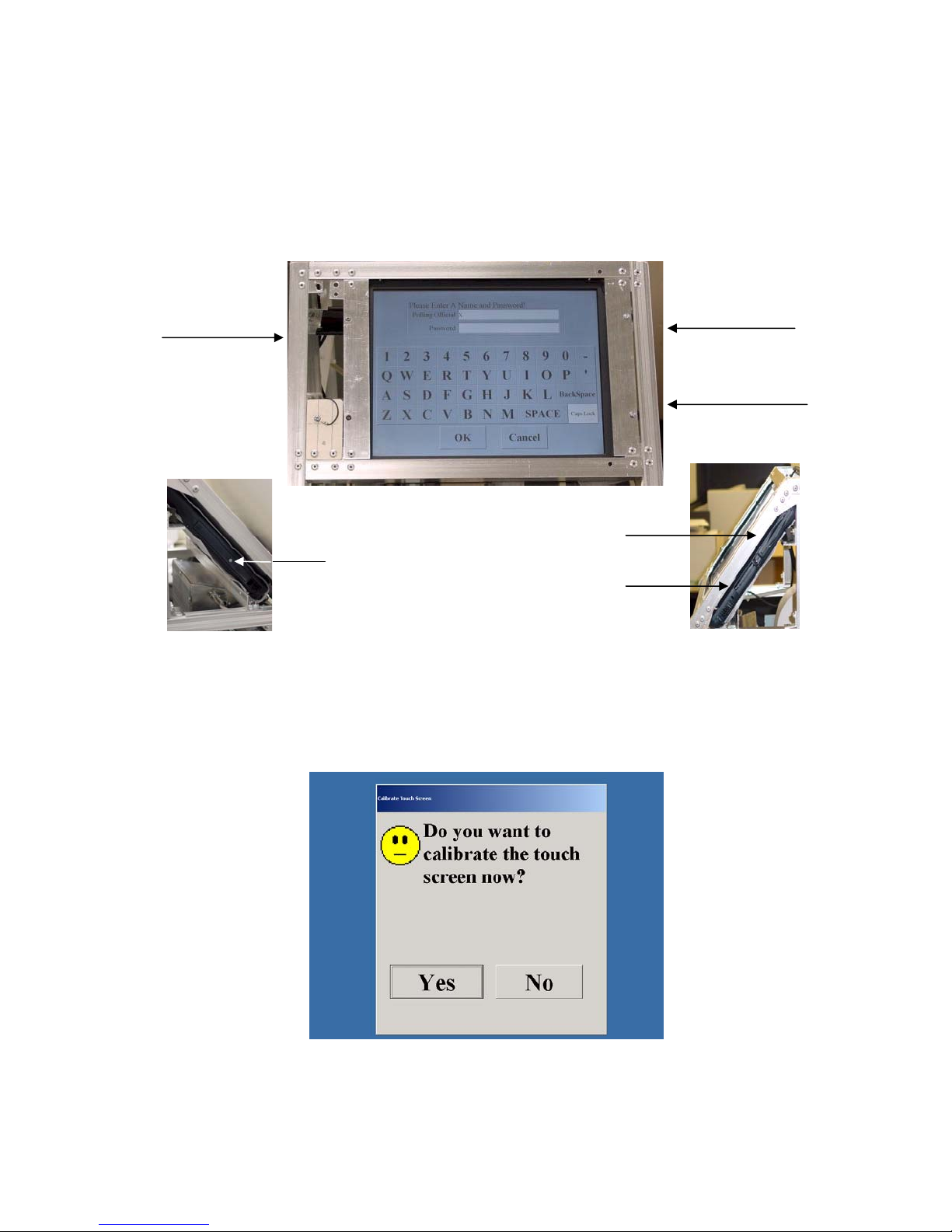
Check around the perimeter of this window to make sure the touch screen is working. If the
touch screen is functioning properly, then press the “No” button to move to the next screen. If
the touch screen is off calibration (meaning the pointer is not exactly where your finger touch is),
then use your finger to adjust the position to get the arrow to point to the “Yes” button. When
the arrow is over the “Yes” button, press the screen to activate the calibration program. Details
of the calibration program are described in section 6.3. If the touch screen is completely non-
functional, contact Avante International Technology, Inc. for assistance.
Upon completion of calibrating the touch-screen or aborting the touch-screen calibration process,
Figure 4.1.1D will confirm that the computer has detected a ballot CD in the CD-RW drive:
Press the “Yes” button to continue loading new ballot. If you press “No”, the system will start to
load the most recent voting database. If you press “No” by mistake you can return to this screen
by removing the CD-RW and then replacing it.
Figure 4.1.1D

Avante International Technology, Inc.
Version 4.4.3 4
The next screen, Figure 4.1.1E asks for the Polling Official username and password for loading
ballot. Use exactly the same username and password as in the Manage Ballot Data Module. Both
the username and the password are case-sensitive. After you enter the Polling Official, press on
the “Password” space to enter the correct password. The default Polling Official is Super01 and
the Password is Vote01. Press “OK” to continue.
If you choose “Quit” the system will return to the voting module log-in screen Figure 4.1.1F
and load the last ballot used after the Polling Official username and Password are entered. The
system default settings require two sets of polling officials’ names and passwords: Enter 11 in
the polling official’s field and leave the password field blank, press “OK”. Enter 22 in the
polling official’s field, and leave the password field blank, press “OK”.
Fi
g
ure 4.1.1E
Figure 4.1.1F

Avante International Technology, Inc.
Version 4.4.3 5
You can press the “About” button to see the version number of the “Load Ballot Data” software
Figure 4.1.1G.
After the correct username and password are entered, Figure 4.1.1E the computer will verify that
the VOTE-TRAKKER™’s serial number is included in the ballot CD. If the computer cannot
find a matching number in the CD, the following screen, Figure 4.1.1H will appear to notify the
election official:
Figure 4.1.1H
If this happens, check with the county election office to add this voting machine’s serial number
into the ballot program and generate another CD disc to try loading again. The serial number is
located on the outside back of the unit.
Figure 4.1.1G
Otros manuales para VOTE-TRAKKER
1
Tabla de contenidos
Otros manuales de Registrador de datos de Avante


