Aurora ASP-442A Manual de usuario

USERS GUIDE
Manual Number: 190701 | Firmware Rev: 00.02
www.auroramm.com
ASP-442A
4x4 Series HDMI 2.0a Matrix

USERS GUIDE
www.auroramm.com
ii
SAFETY INSTRUCTIONS
Please review the following safety precautions. If this is the first time using this model, then read this manual before
installing or using the product. If the product is not functioning properly, please contact your local dealer or Aurora for
further instructions.
The lightning symbol in the triangle is used to alert you to the presence of dangerous voltage inside the product
that may be sufficient to constitute a risk of electric shock to anyone opening the case. It is also used to indicate
improper installation or handling of the product that could damage the electrical system in the product or in other
equipment attached to the product.
The exclamation point in the triangle is used to alert you to important operating and maintenance instructions.
Failure to follow these instructions could result in injury to you or damage to the product.
Be careful with electricity:
Power Outlet:
To prevent electric shock, be sure the electrical plug used on the product power cord
matches the electrical outlet used to supply power to the Aurora product. Use the power adapter and power
connection cables designed for this unit.
Power Cord: Be sure the power cord is routed so that it will not be stepped on or pinched by heavy items.
Lightning: For protection from lightning or when the product is left unattended for a long period, disconnect
it from the power source.
Also follow these precautions:
Ventilation: Do not block ventilation slots, if applicable, on the product, or place any heavy object on top of
it. Blocking airflow could cause damage. Arrange components so that air can flow freely. Ensure that there
is adequate ventilation if the product is placed in a stand or cabinet. Put the product in a properly ventilated
area, away from direct sunlight or any source of heat.
Overheating: Avoid stacking the Aurora product on top of a hot component, such as a power amplifier.
Risk of Fire: Do not place unit on top of any easily combustible material, such as carpet or fabric.
Proper Connections: Be sure all cables and equipment are connected to the unit as described in this
manual.
Object Entry: To avoid electric shock, never stick anything in the slots on the case, or remove the cover.
Water Exposure: To reduce the risk of fire or electric shock, do not expose to rain or moisture.
Cleaning: Do not use liquid or aerosol cleaners to clean this unit. Always unplug the power to the device
before cleaning.
ESD: Handle this unit with proper ESC care. Failure to do so can result in failure.
FCC
This device complies with Part 15 of the FCC Rules. Operation is subject to the following two (2) conditions:
1. This device may not cause harmful interference.
2. This device must accept any interference received, including interference that may cause undesired operation.
Trademarks
All trademarks in this document are the properties of their respective owners.

USERS GUIDE
www.auroramm.com
ii
TABLE OF CONTENTS
PACKAGE CONTENTS ......................................................................................................................................................... 3
INTRODUCTION..................................................................................................................................................................... 4
About ................................................................................................................................................................................... 4
Features .............................................................................................................................................................................. 4
ASP-442A Front .................................................................................................................................................................. 5
ASP-442A Rear................................................................................................................................................................... 6
APPLICATION ........................................................................................................................................................................ 7
ASP-442A Application......................................................................................................................................................... 7
OPERATION ........................................................................................................................................................................... 8
LCD Readout....................................................................................................................................................................... 8
Routing ................................................................................................................................................................................ 9
EDID.................................................................................................................................................................................. 10
Presets .............................................................................................................................................................................. 11
Lock Mode......................................................................................................................................................................... 11
Show Network Address..................................................................................................................................................... 11
Firmware Update............................................................................................................................................................... 12
PC CONTROL SOFTWARE................................................................................................................................................. 13
ASP Matrix Manager ......................................................................................................................................................... 13
SERIAL COMMANDS .......................................................................................................................................................... 18
RS-232 Telnet Commands................................................................................................................................................ 18
APPENDIX 1 ......................................................................................................................................................................... 21
Troubleshooting ................................................................................................................................................................ 21
APPENDIX 2 ......................................................................................................................................................................... 22
Technical Specifications.................................................................................................................................................... 22
APPENDIX 3 ......................................................................................................................................................................... 23
Warranty............................................................................................................................................................................ 23

USERS GUIDE
www.auroramm.com
4
INTRODUCTION
About
The ASP-442A is a 4x4 4K HDMI Matrix offering the power and flexibility you need at a cost-effective price. Route Ultra
High Definition video sources and multi-channel digital audio from any of the 4 HDMI inputs to the any of the 4 HDMI
outputs at the same time. The front keypad and LCD display are designed for easy operation and quick status of. LAN
and RS-232 ports have advanced protocols allowing hot plug detection, signal detection, EDID table loading/recalling,
presets, and more.
The advanced protocol features make the ASP-442A perfect for commercial applications with auto switching, digital
signage with device detection, or residential systems with home automation.
Features
HDMI 2.0a/HDCP 2.2
Resolutions up to 4K2K 60Hz 4:4:4
HDR High Dynamic Range
HDMI 3D Compliant
HDCP 2.2 Compliant
Allows Any Source to be Displayed on Multiple Displays at the Same Time
Allows any HDMI Display to View any HDMI Source at Any Time
Supports 7.1 Channel Digital Audio
Advanced EDID Functions
Remote Setup Functions via Windows Application
Easy Installation with Rack Mounting
Front LCD Status Display
Labeling of Inputs, Outputs, and Presets on Front Display

USERS GUIDE
www.auroramm.com
5
ASP-442A Front
Front
Power: Power switch for turning the unit on or off. When first turned on all Input and Output LEDs will light for 1
second to show operation of LED working.
LCD Display: Top row shows the input routed to relative Output number below.
EDID: Utilized for setting up the EDID management.
Save: Preset save function. Press Save for 3 seconds then an Input or Output number to store a preset into one of
the 8 locations of the current routing setup.
Recall: Preset recall function to restore a saved preset from one of the 8 stored presets.
Route: When pressed a user can set up any input to any outputs followed by enter for all the routes to happen at the
same time.
Enter: Used to confirm entries. Also, if pressed with nothing selected, it will show the units Output connected status,
Input connected status, IP address, Subnet Mask, Gateway, MAC, and Firmware on the LCD.
Input 1-4: Input source selections and used with various modes of operation.
Output1-4: Output source selections and used with various modes of operation.
* Note: Make certain you have the latest firmware for optimal performance and features listed in manual.

USERS GUIDE
www.auroramm.com
6
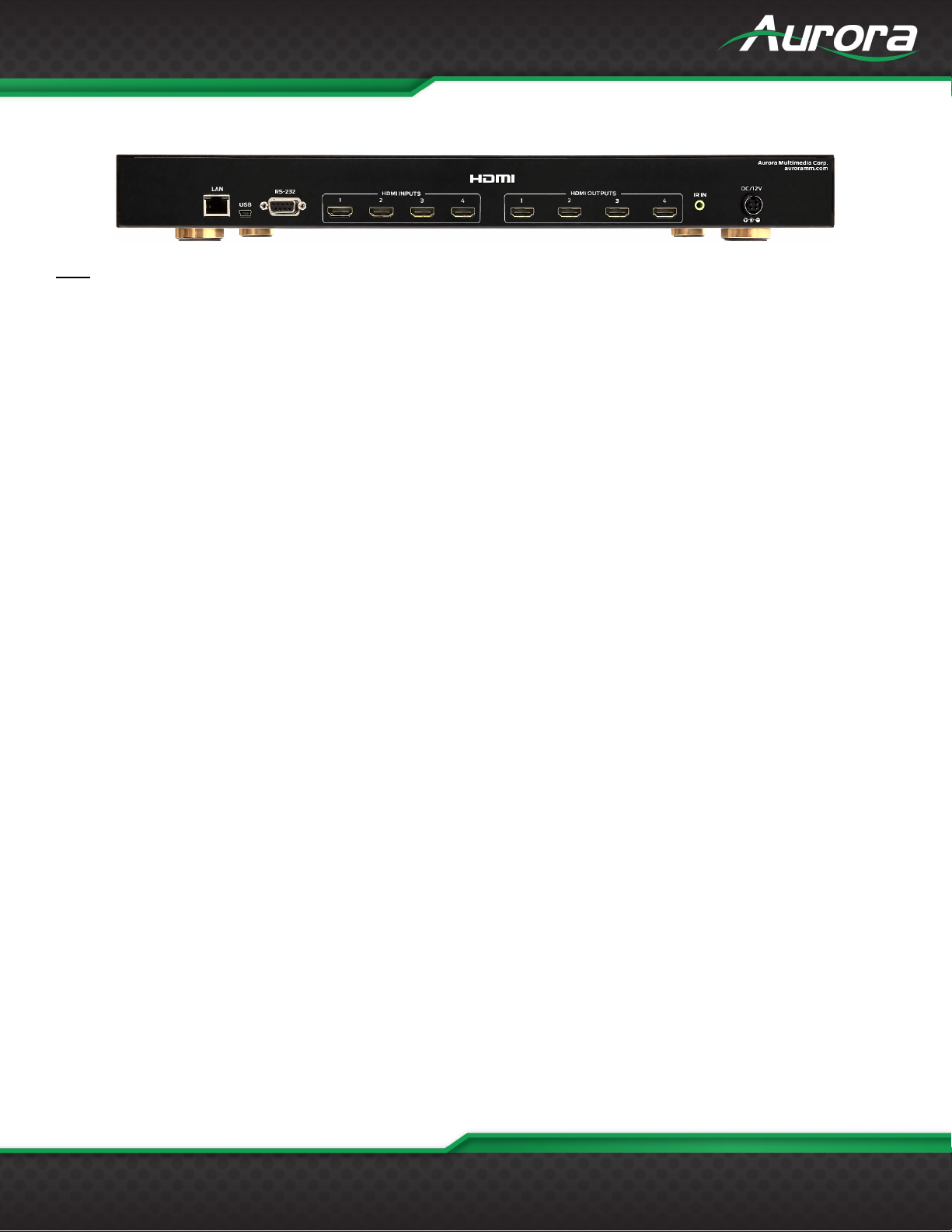
ASP-442A Rear
Rear
Inputs 1-4: 4 HDMI 2.0a inputs for a variety of sources up to 4K60Hz resolutions.
Outputs 1-4: 4 HDMI 2.0a outputs for a variety of destinations up to 4K60Hz resolutions.
LAN: Control remotely using Telnet.
RS232: Connect RS-232 device up at 9600 baud for remote control.
USB: For PC control.
IR IN: Remote control via IR remote with IR receiver unit.
DC12V: Connect the included 12v DC desktop style power supply.

USERS GUIDE
www.auroramm.com
7
APPLICATION
ASP-442A Application

USERS GUIDE
www.auroramm.com
8
OPERATION
LCD Readout
The LCD will reflect what Output is routed to which input when in an idle state. The ASP-442A (4x4) will only show 1, 2, 3,
and 4 on the LCD unlike the ASP-442A, which will show 1-4 since it is a 4x4.
1-1 If the input/output is not routed, will show “0”.
1-2 Press ENTER will turn to next page to check other status as per 1-3 to 1-4.
1-3 Output Connections shows each output with active connected display. If a slash is underneath, then nothing is
connected. If a destination like a display is present a “D” will show.
1-4 Input Connections shows each input with active connected source. If a slash is underneath, then nothing is connected
or powered. If a source like a PC is disconnected, an “S” will show.
1-5 IP Address

USERS GUIDE
www.auroramm.com
9
1-6 Subnet Mask
1-7 Gateway
1-8 MAC Address
1-9 Firmware Revision
1-10 Will revert to mapping if you do not press any button for 3 seconds.
The LCD will also show various states of operation and displaying information depending on the mode of operation.
Routing
The ASP-442A has 3 ways of making a route for optimal flexibility.
Technique 1
Press ROUTE, all the input / output buttons will light for connected HDMI inputs.
Press desired input, then the output(s) will light that it is routed to.
Tabla de contenidos
Otros manuales de Conmutador de matriz de Aurora