
Audio & Design ProDAB-1 Plus Manual de usuario

ProDAB-1 Plus
&
ProDAB-2 Dual
Quick Start Guide
Version 4.0
ProDAB Version 210/210
Audio & Design

ProDAB Quick Start Guide
Audio & Design
2
1Initial Configuration
Getting Started:
ProDAB takes approximately 35 seconds to boot up,
during this time the power LED will flash.
Press to select:
DAB/DAB+
MP3
Web (Internet Radio)
FM
When the OLED display is not in screen saver mode
(Pressing any of the “Nav” keys will bring the unit out of
screen saver)
DAB Mode: display the available DAB services OK,
will select the currently displayed service.
MP3 Mode: display the MP3 files available OK, will
play the currently displayed file.
Web Mode: display available web links OK, will
select the currently displayed link.
FM Mode: tune FM receiver in 100KHz steps OK,
will tune to the currently displayed frequency.
Unlocked
To Unlock front panel press and hold Unlock button
until padlock symbol changes to Unlocked. This button
will also jump out of Screen Saver or Main Menu to
service display.
When displaying currently selected service, station or
track press to change displayed information.
Locked
When ProDAB is shipped from the factory it will require a “DAB Scan” to find
your local multiplexers. You will see a message “No Stream Selected – Press OK
for Menu” Press the OK button then select DAB Scan use the button to
select the type of scan you require and to start scanning. ProDab will then
select the first service alphabetically that it finds. Press to view all other
found services & OK to select.

ProDAB Quick Start Guide
Audio & Design
3
Press and hold Preset button to save
currently selected service, station, MP3
track or Web link.
Pressing whilst the preset directory is shown will cycle through
the available presets, including those not available by direct access
buttons –i.e. Presets 5 to 15
Presets also store mode, so can be used as a quick way to switch
between DAB, FM, MP3 & Web.
Mono/Stereo selection will change the audio
output in all modes, including IP stream output.
The headphone output is suitable to drive
headphones with a minimum impedance of 16Ω
Tuner selection button selects which output is
currently being monitored by the headphone
output and controlled by the front panel buttons
LED Meters - Over = 1dB below fsd.
0dBu = -18dB below fsd
Press and hold Tuner button to change unit mode between Diversity
or Independent modes

ProDAB Quick Start Guide
Audio & Design
4
2OLED DAB Display screens
Press Info button to cycle through available
display screens
Basic screen with Service Name, program
information, bit rate & mode
Information about selected MUX, audio
algorithm, CID & SID, allocated Consumers
Units.
Technical information for both tuners
Oscilloscope display to help with setting change
over parameters
See Change Over section for more details.

ProDAB Quick Start Guide
Audio & Design
5
3Network set-up
Setting up IP address mask & default gateway.
Press OK then select SYSTEM with then
.
Select NETWORK MENU with or then
Choose between STATIC & DHCP using keys
Then press Next Menu
If Static press to edit IP address/net mask.
Then use to select & to change items
then OK to save Note: net mask of
255.255.255.0 is shown as /24 i.e. 24 bits
Press Next Menu
To edit use to select & to change
items then OK to save
Press Next Menu
To edit use to select & to change
items then OK to save
Press Next Menu
Note: The embedded web server can be
accessed via the set IP address port 80.
Press Next Menu
ProDAB Quick Start Guide
Audio & Design
6
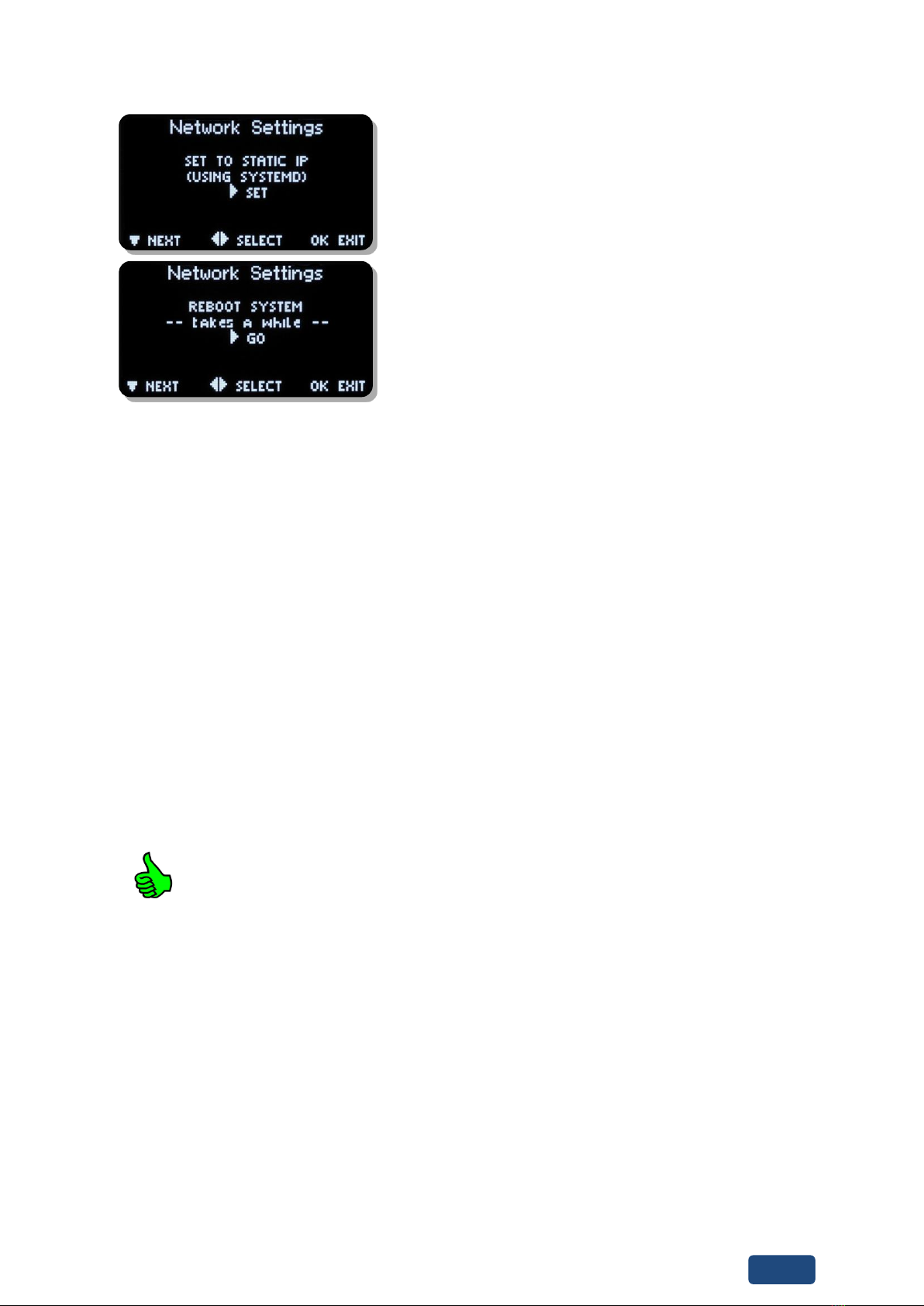
to save settings
Next Menu
And to re-boot Operating System
Units are shipped with the network set to Static (192.168.0.7).
To upload MP3 files use a SFTP client such as Filezilla, but, note that we use non-
standard port for SSH & SFTP of 43222 or use Web Interface (Full User Manual
can be downloaded using the Help Button on the Web Interface).
Login details for MP3 upload:
Username - mp3
Password - 2033740
Filezilla download - https://filezilla-project.org/
When displaying menus pressing or takes you to the next or
previous menu item. OK is for selecting/accepting the desired action
or parameter.
Will take you into sub-menu or editing function.

ProDAB Quick Start Guide
Audio & Design
7
4DAB Scan
Press OK then select DAB SCAN with then
Choose between Radio A & B using keys
Then to go to next menu option
Choose between NEW SCAN which will clear
current station list or RE-SCAN to append to
current list using Then to go to next
menu option
Choose NORMAL SCAN or THOROUGH SCAN
using keys. Then to go to next menu
option
Press OK to start Scan or to change scan
starting MUX or to change scan ending
MUX.

ProDAB Quick Start Guide
Audio & Design
8
5System Menu
Thento go to next menu option
to access, option time before unit will automatically
lockout front panel keys. Press and hold Unlock/Clr key
to unlock.
to access sub-menu, this sets the MUX range for
DAB Scan options:
UK Range 10B to 13A
EU Range 05A to 13F
to access sub-menu, this sets Tuner 1 & 2 as fully
independent or diversity mode.
to access sub-menu
options:
100KHZ
50KHZ
to access sub-menu
options:
OFF
AUTO BLEND –Audio will automatically be mixed to
Mono as RSSI decreases.
to access sub-menu
options:
DISABLED
ENABLED

ProDAB Quick Start Guide
Audio & Design
9
to access sub-menu
options:
DISABLED
ENABLED
to access sub-menu
options:
NONE (Disabled) Unit will return to previous setting
when powered up
Select Preset which should be used on power up.
to access sub-menu
to access sub-menu
to edit
to edit
to access Engineering sub-menu

ProDAB Quick Start Guide
Audio & Design
10
to access Network sub-menu, see Network setup
section on previous pages
to access sub-menu
to access sub-menu, manage copy/delete stored
MP3 files
Otros manuales para ProDAB-1 Plus
1
Este manual sirve para los siguientes modelos
1
Tabla de contenidos
Otros manuales de Receptor de Audio & Design


