AstroAI True RMS 6000 Manual de usuario

ASTROAI USER MANUAL
TRUE RMS DIGITAL MULTIMETER
Thank you for purchasing the True RMS 6000 Count Digital Multimeter from AstroAI. The
AstroAI True RMS Digital Multimeter is designed to be safely and accurately used by
professionals in a commercial setting or weekend DYer’s that need a little more utility from their
standard digital multimeter. This manual provides all safety information, operation instruction,
specifications, and maintenance for the meter. The instrument performs AC/DC Voltage, AC/DC
Current, Resistance, Audible Continuity, Diode, hFE, Frequency, Capacitance, and
Temperature Testing. Thank you again for choosing AstroAI, if you have any questions or
NOTE: Fully read and understand this manual before using this Digital Multimeter.
WARNING: To avoid possible electric shock or personal injury, and to avoid possible damage to
the Meter or to the equipment being tested, adhere to the following rules:
●Before using the Meter, inspect the exterior casing. Do not use the Meter if it is damaged
or if all or part of the exterior casing is removed. Look for cracks or missing plastic. Pay
special attention to the insulation around the connectors.
●Inspect the test leads for damaged insulation or exposed metal. Check the test leads for
continuity.
●Do not apply more than the rated voltage, as marked on the Meter, between the
terminals or between any terminal and grounding.
●The manual rotary switch should be placed in the correct position before measurement
and should NOT be moved during measurement to prevent damage to the Meter.
●When the Meter is working at an effective voltage over 60V in DC or 30V rms in AC,
special care should be taken because there is a danger of electric shock.
●Use the proper terminals, function, and range for your measurements.
●Do not use or store the Meter in a high-temperature environment, do not expose to high
levels of humidity, or near strong magnetic fields. The performance of the Meter may
deteriorate after dampening.
●When using the test leads, keep your fingers behind the finger guards.
●Disconnect circuit power and discharge all high-voltage capacitors before testing
resistance, continuity, diodes or hFE.
●Replace the battery as soon as the battery indicator appears. With a low battery, the
Meter might produce false readings that can lead to electric shock and personal injury.
●Remove the connection between the testing leads and the circuit being tested, and turn
the Meter power off before opening the Meter case.
●When servicing the Meter, use only the same model number or identical electrical
specifications replacement parts.
●The internal circuit of the Meter shall not be altered at will to avoid damage of the Meter
and any accident.

●Clean using a soft cloth and mild detergent for the surface of the Meter. Do not use
abrasive materials or solvents to prevent the surface of the Meter from corrosion and
damage.
●Turn the Meter off when not in use and take out the battery when it is not going to be
used for an extended period of time. Regularly check the battery as it may leak when it
has not been used for some time. Replace the battery as soon as leaking appears. A
leaking battery will damage the Meter.
ELECTRICAL SYMBOLS
∽
AC (Alternating Current)
Low Battery
⎓
DC (Direct Current)
Diode
≂
AC and DC
Fuse
Earth Ground
Continuity Test
Double Insulated
⚠
Warning
AUTO
Auto Range
Dangerous Voltage may be present
Complies with EU directives
SPECIFICATIONS
Digital Display
5 ¾ , 5999
Sampling Speed
2 times per second
LCD Size
64 x 42mm
Range Selection
Auto or Manual
Polarity Indication
Yes
Overload Indication
Yes
Low Battery Indication
Yes

Operating Environment
32°F~104°F (0°C~40°C); <80% RH
Storage Temperature
14°F~122°F (-10°C~50°C); <85% RH
Power
1 x 9V 6F22 Battery Included
Dimensions
190x90x35mm
Weight
Approx 357g
Temperature Test
Yes
Transistor Test
Yes
Diode Test
Yes
Continuity Test
Yes
External Current Test
Yes
Capacitance
Yes
Frequency
Yes
Safety/Compliances
EN 61010-1 CAT III 600V, CATII 1000V
DC Voltage
600mV6 ±(0.8%+5), V/60V/600V ±(0.8%+3), 1000V ±(1%+5)
AC Voltage
600mV ±(1.2%+8); 6V/60V/600V ±(1.2%+6); 750V ±(1.2%+8)
Temperature
-40°C~1370°C; -40°F~2000°F (1-5%+4 depending on temp)
DC Current
600μA/6000μA/60mA/600mA ±(0.8%+5); 6A/10A ±(1.5%+3)
Transistor hFE
PNP & NPN (lb≈2μA; Vce≈1V)
Resistance
600Ω/6KΩ/60KΩ/600KΩ/6MΩ ±(1.5%+3); 60MΩ ±(1.5%+5)
Capacitance
60nF/600nF/6μF/60μF/600μF/60mF
Frequency
0~60MHz ±(1%+5)
Accuracy is guaranteed for 1 year when stored at 73°F ±9°F

MULTIMETER DIAGRAM
1. Magnetic Hanger
2. LCD Screen
3. Function Buttons
4. Rotary Function Switch
5. 10A Terminal
6. μA/mA Terminal
7. COM Terminal
8. INPUT Terminal
9. Silicone Sleeve
10. Multi-Function Socket

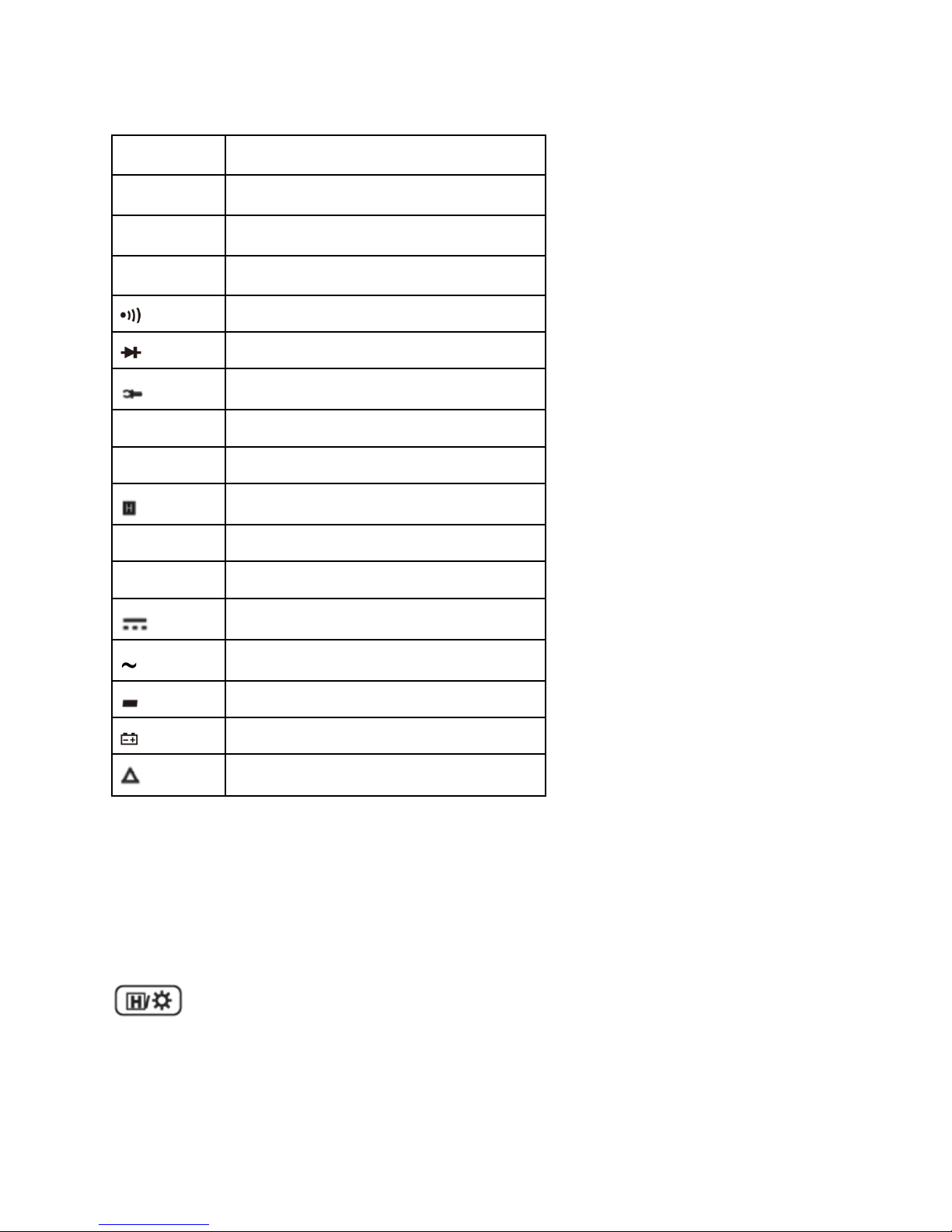
LCD SCREEN DIAGRAM
%
Duty Cycle
℉
Fahrenheit Temperature
℃
Celsius Temperature
hFE
Transistor hFE
Continuity Test
Diode Test
External Current Test (Clamp)
AUTO
Autorange Mode
APO
Automatic Power-Off
Data Hold
MAX
Maximum Reading
MIN
Minimum Reading
DC
AC
Negative Reading
Low Battery, Replace Immediately
Relative Mode
GETTING TO KNOW YOUR DEVICE
Select Button
When using the rotary switch to select a multimeter function, use the Select Button to further
select the function. This applies only to multifunction settings like the temperature and test
functions.
Button
Hold and backlight function button. When taking a measurement, press this button to hold the
data for easier recording. Press the button again to remove the hold function.
Press and hold this button to turn on the backlight on the LCD screen.

Max/Min Button
When taking a measurement, press this button once to enter “Max Mode”. In this mode, the
multimeter will capture the highest reading it records. Press this button again to enter “Min Mode”
which will capture the lowest reading it records.
Press and hold this button to exit the Max/Min Modes.
Range Button
AC/DC Voltage, AC Current, and Resistance can all be measured in both Auto and Manual
ranging. The multimeter will come set to Auto, but if you desire to select the range manually,
press the Range Button repeatedly to find the desired range. Beware of selecting a range too
low, as it will Overload the device and the multimeter will not give a reading.
Press and hold the Range Button to return back to Auto Ranging.
Relative Button
When taking measurements, you can utilize the Relative Button to get more accurate readings
by removing the resistance of the test leads, for example. To activate this function, simply press
the Relative Button. A small triangle (delta symbol) will appear on the display and the reading
should change to zero.
Press the Relative Button again to exit relative mode.
Hz/Duty Button
When using the Hz/Duty Cycle function on the multimeter, quickly switch between functions by
pressing this button. You can also switch to measuring Hz while measuring other functions, like
Voltage, for example, by pressing this button during measurement.
Clamp Meter Attachment (Not Included)
Use a clamp meter attachment to measure currents, use the COM terminal for the black lead
from the clamp meter and the Input terminal for the red lead from the clamp meter.
Multi-Function Socket (Included)
Use the multi-function socket to measure both Capacitors and Transistors. Be sure to correctly
insert the multi-function socket into the COM and INPUT. the negative terminal on the multi-
function socket on the left side and the positive on the right side.
DETAILED SPECIFICATIONS
Accuracy is guarantied for 1 year 23°C±5°C less than 80%RH

DC Voltage (Auto ranging)
Range
Resolution
Accuracy
600mV
0.1mV
±(0.8% of rdg + 5dgts)
6V
1mV
60V
10mV
600V
100mV
±(0.8% of rdg + 3dgts)
1000V
1V
±(1.0% of rdg + 5dgts)
Input Impedance: 10MΩ
Overload Protection: 600V DC/AC RMS
Max. Input voltage: 600V DC
Measure DCV 1000V under CATII
AC Voltage (Auto ranging)
Range
Resolution
Accuracy
600mV
0.1mV
±(1.2% of rdg + 8dgts)
6V
1mV
60V
10mV
±(1.2% of rdg + 6dgts)
600V
100mV
750V
1V
±(1.2% of rdg + 8dgts)
Input Impedance: 10MΩ
Frequency Range: 40Hz ~ 400Hz
Overload Protection: 600V DC/AC rms
Measure AC V 750V under CATII CAT III
Max. Input voltage: 600V AC RMS CATIII

Temperature
Range
Resolution
Accuracy
-40~1370°C
1°C
-40°C~150°C:±(1% + 4)
-40°F~302°F
±(5% + 4)
302°F~2000°F
1°F
±(2.5% + 3)
Overload Protection: F0.4A/600V Fuse
DC Current
Range
Resolution
Accuracy
600µA
0.1µA
6000µA
1µA
60mA
10µA
600mA
100µA
±(0.8% of rdg + 5dgts)
6A
1mA
10A
10mA
±(1.5% of rdg + 3dgts)
Overload Protection:
●“mA” Jack: F0.4A/600V fuse
●“10A” Jack: F10A/600V fuse
Max.Input Current:
●“mA” jack: 600mA
●“10A” jack: 10A
(For measurements >5A: Duration <10 seconds, interval >15 minutes)
Voltage Drop:
●600µA, 60mA: 60mV,
●6000µA, 600mA and 10A ranges: 600mV

Transistor hFE Test (Connect Adapter )
Range
hFE
Test Current
Test Voltage
PNP & NPN
0~1000
Ib≈2µA
Vce≈1V
AC Current
Range
Resolution
Accuracy
600µA
0.1µA
6000µA
1µA
60mA
10µA
600mA
100µA
±(1.5% of rdg +8dgts)
10A
100mA
±(2.0% of rdg +10dgts)
Overload Protection:
●“mA” jack: F0.4A/600V fuse
●“10A” jack: F10A/600V fuse Max.
Input Current:
●“mA” jack: 400mA
●“10A” jack: 10A
(For measurements>5A: duration<10 seconds, interval >15 minutes)
Voltage Drop:
●600µA, 60mA ranges: 60mV
●6000µA, 600mA and 10A ranges: 600mV
Frequency Range: 40Hz ~ 400Hz

Resistance (Auto Ranging)
Range
Resolution
Accuracy
600Ω
0.1Ω
6KΩ
1Ω
60KΩ
10Ω
600KΩ
100Ω
6MΩ
1KΩ
±(1.5% of rdg + 3dgts)
60MΩ
10KΩ
±(1.5% of rdg + 5dgts)
Open Circuit Voltage: about 0.25V
Overload Protection: 250V DC/AC RMS
600A AC current through a clamp (DT3303 optional)
600A
1mV/10A
±(2.5%+10)
200A
1mV/1A
Diode and Continuity
Range
Introduction
Remark
The approximate forward voltage
drop will be displayed
Open circuit voltage: about 1.5V
The built-in buzzer will sound if
the resistance is less than about
30Ω.
Open circuit voltage: about 0.5V
Overload Protection: 250V DC/AC rms
For continuity test: When the resistance is between 30Ω and 70Ω, the buzzer may sound or
may not sound. When the resistance is more than 70Ω, the buzzer will not sound
Este manual sirve para los siguientes modelos
1
Tabla de contenidos
Otros manuales de Multímetro de AstroAI
Manuales populares de Multímetro de otras marcas

Gossen MetraWatt
Gossen MetraWatt METRAmax 6 Manual de usuario

PeakTech
PeakTech 4000 Manual de uso y cuidado

YOKOGAWA
YOKOGAWA 90050B Manual de usuario

Gossen MetraWatt
Gossen MetraWatt METRALINE DMM16 Manual de usuario

Fluke
Fluke 8846A Manual de operación y mantenimiento

Tempo Communications
Tempo Communications MM200 Manual de usuario