
Archon AS-01A Manual de usuario

Userguide V1.0 Oct 24, 18 Archon Fit Smart Scale 1
Archon Fit Smart Scale ( AS-01A ) User guide ver 1.0
Contents: Page
1.) How can I connect Fit Scale to my mobile device ? 1
2.) How to use Fit Scale and Megafit APP to measure? 5
3.) How do I enable Bluetooth on my iOS (11 or above) ? 6
4.) Is it necessary for the APP to be on whenever I use the scale? 7
5.) How can I add multiple users? 7
6.) How do I modify my gender, age, or height? 9
7.) How can I connect the app to Apple Health Kit? 10
8.) How can I connect the app to Google Fit? 11
9.) How can I connect the app to Fitbit? 14
10.) How can I add Megafit friend? 16
11.) How do I view my data history? Can I delete some of the data? 17
12.) How do I compare data obtained at different time frame? 19
13.) Reset Archon Fit Smart Scale 20

Userguide V1.0 Oct 24, 18 Archon Fit Smart Scale 2
Archon Fit Smart Scale ( AS-01A ) User guide ver 1.0
1) How can I connect Fit Scale to my mobile device ?
1.1)Press the button on the back of the scale or plug in USB charger to activate the Scale.
1.2)Charge up the Scale battery by 5V/1A usb charger. It will normally take 3 to 4 hours to fully charge it.
1.3)Please make sure that your Phone Bluetooth is turned on, the scale is near your device.
1.4)Download mobile application program to your phones or tablets by scanning the QR code as below and
follow APP instruction. Or you can download “Megafit”app from Appstore or Playstore
1.5) Register and input profile data.
1.6) Pairing Fit Scale to mobile device. Tap the “+” icon on the upper right corner to enter “My Connected
Accessories” page to start connection. Gentle step on scale, display turn on and show 0.00kg. The APP
will screen nearby devices, tap the scale that is closest to you and start Bluetooth connection.

Userguide V1.0 Oct 24, 18 Archon Fit Smart Scale 3
Note: When pair up the scale, please keep the LED of the scale always bright.
1.7) If your device uses Android 6.0, please make sure you have granted location rights to Megafit.

Userguide V1.0 Oct 24, 18 Archon Fit Smart Scale 4
1.8) If you cannot locate your device after performing 1.2), pls try turn on your GPS.
1.9) Grant location rights to Megafit:
1.10a) Go to your phone Settings menu and find Apps.

Userguide V1.0 Oct 24, 18 Archon Fit Smart Scale 5
1.10b) Find Megafit in your apps and tap App Info.

Userguide V1.0 Oct 24, 18 Archon Fit Smart Scale 6
1.10c) Enable location permissions.
2.) How to use Fit Scale and Megafit APP to measure?
2.1) Open the Megafit app. Make sure the Bluetooth function is on. Step on the scale to turn on its display
and begin weighing.
Measured digits flash twice means weighing finish.
Number 0 roll from left to right means body fat measurement finish. It will take 5 to 10 sec to finish
weighing process.

Userguide V1.0 Oct 24, 18 Archon Fit Smart Scale 7
2.2 Check the body report in APPs
3.) How do I enable Bluetooth on my iOS ( 11 or above ) ?
3.1) Open your Megafit app.
3.1.1) From the bottom of your screen, swipe up to access your control panel. (On iPhone X, swipe from the
upper right corner.)
3.1.2) Tap on your Bluetooth icon.
Userguide V1.0 Oct 24, 18 Archon Fit Smart Scale 8
4.) Is it necessary for the APP to be on whenever I use the scale?
You do not need to open the app every time while you ae using the scale. Data will be stored in the scale
each time you measure, for up to 20 measurement. Next time when you open the app and connection is re-
established, all the previous data per corresponding member will be uploaded to the app. If there is a
difference of about 6 lb (3 kg) or more, or if there are significant changes in the data over a short period of
time, the app will allow manual allocation of each data to the correct member. This helps avoid mistakes in
the automation. You are also allowed to delete data that doesn't belong to any of the members.
5.) How can I add multiple users?
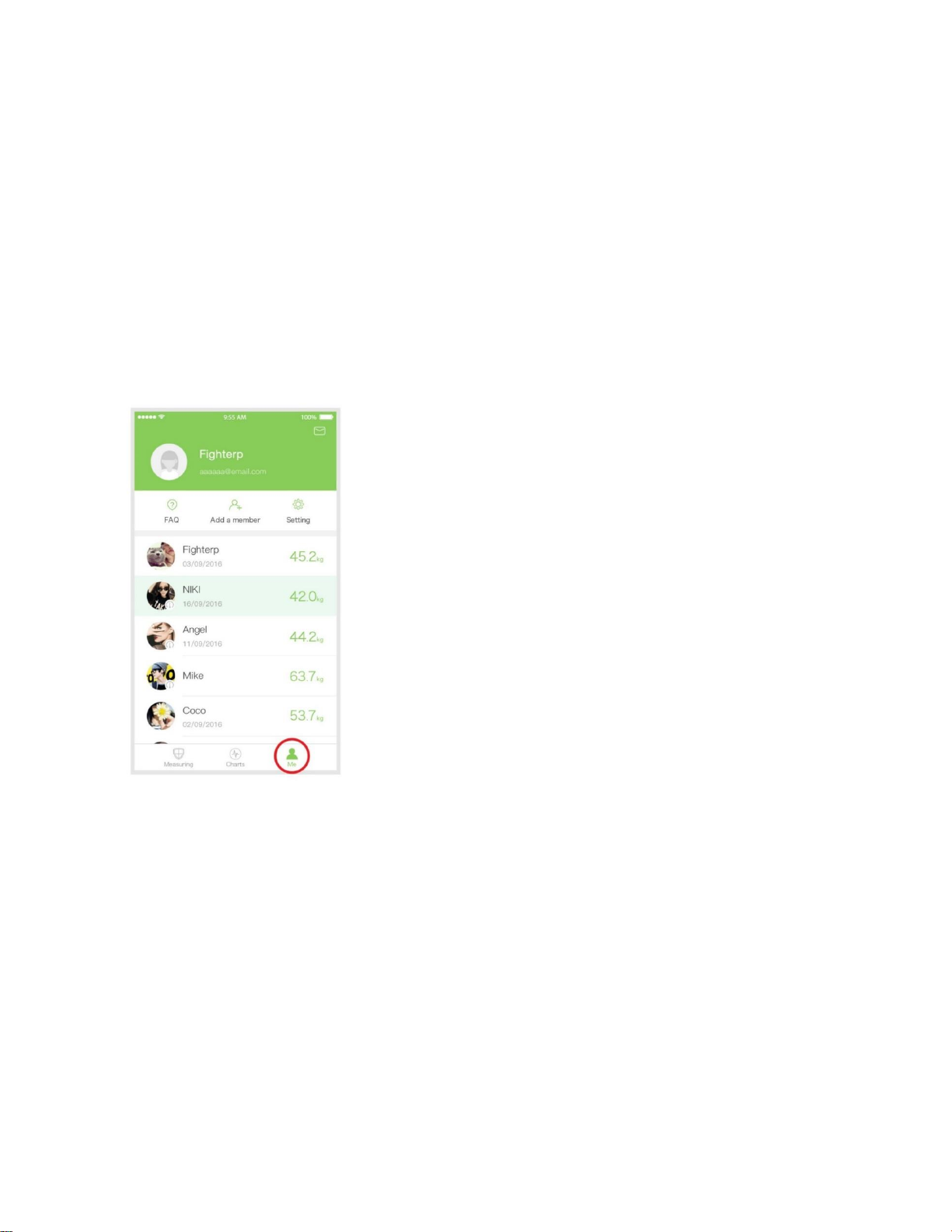
Answer: 5.1) Tap on the "My Account" icon (lower right corner of main screen).
5.2) Tap on "Add a Member" icon (top center). A prompt will appear. Select "Add User". New user has to fill in
his/her name and other information. Tap "Confirm" once you have finished.

Userguide V1.0 Oct 24, 18 Archon Fit Smart Scale 9
5.3) Measurement users are not required to register but need to fill in required body data.
5.4) If someone you want to add is already a Registered User at Megafit account (different from a Measuring
User), you'll need to send an invitation to add him/her to your account. Tap "Add Megafit Friends" and follow
the instructions.
5.5) After a Measuring User is added, you can select the user in your user list to obtain measurements.

Userguide V1.0 Oct 24, 18 Archon Fit Smart Scale 10
6.) How do I modify my gender, age, or height?
6.1) Tap on the “My Account” icon (lower right corner of main screen).
6.2) Tap on the user profile picture at the top.
Tabla de contenidos


