AMIMON AMN32225 Grizzly Manual de instrucciones

AMN32225 (Grizzly)
User/Installer Manual
An AMIMON Inc. Document
Copyright 2014
Version 1.1
www.amimon.com

Important Notice
AMIMON Ltd. reserves the right to make corrections, modifications, enhancements, improvements, and
other changes to its products and services at any time and to discontinue any product or service without
notice. Customers should obtain the latest relevant information before placing orders and should verify that
such information is current and complete. All products are sold subject to AMIMON's terms and conditions
of sale supplied at the time of order acknowledgment.
AMIMON warrants performance of its hardware products to the specifications applicable at the time of sale
in accordance with AMIMON's standard warranty. Testing and other quality control techniques are used to
the extent AMIMON deems necessary to support this warranty. Except where mandated by government
requirements, testing of all parameters of each product is not necessarily performed.
AMIMON assumes no liability for applications assistance or customer product design. Customers are
responsible for their products and applications using AMIMON components. To minimize the risks
associated with customer products and applications, customers should provide adequate design and
operating safeguards.
AMIMON does not warrant or represent that any license, either express or implied, is granted under any
AMIMON patent right, copyright, mask work right, or other AMIMON intellectual property right relating to
any combination, machine, or process in which AMIMON products or services are used. Information
published by AMIMON regarding third-party products or services does not constitute a license from
AMIMON to use such products or services or a warranty or endorsement thereof. Use of such information
may require a license from a third party under the patents or other intellectual property of the third party, or
a license from AMIMON under the patents or other intellectual property of AMIMON.
Reproduction of information in AMIMON data books or data sheets is permissible only if reproduction is
without alteration and is accompanied by all associated warranties, conditions, limitations, and notices.
Reproduction of this information with alteration is an unfair and deceptive business practice. AMIMON is
not responsible or liable for such altered documentation.
Resale of AMIMON products or services with statements different from or beyond the parameters stated by
AMIMON for that product or service voids all express and any implied warranties for the associated
AMIMON product or service and is an unfair and deceptive business practice. AMIMON is not responsible
or liable for any such statements.
All company and brand products and service names are trademarks or registered trademarks of their
respective holders.

Revision History
Version
Date
Description
1.0
Sep 15, 2014
Initial Release
1.1
Oct. 21, 2014
Add notification about Power Supply on pages 9, 11.
Replace the Module picture

Table of Contents
Important Notice ........................................................ 2
Revision History ......................................................... 3
Table of Contents........................................................ 4
Safety Instructions ...................................................... 5
Introduction............................................................... 6
Front view ............................................................................................7
Back view .............................................................................................7
LED behaviors .......................................................................................8
FCC Caution..............................................................11
S
Y
Z
0
1
0
M

Safety Instructions
When operating this equipment, read and follow all the instructions in this manual.
Do not open unit.
Do not block the air ventilation openings.
Use only accessories specified or recommended by Amimon.
When devices are switched on keep away at least 20 cm from your body.
Do not expose to moisture or excessive heat.
Keep away from water
Use the mains plug to disconnect the apparatus.
Clean with a dry cloth only.
Unplug this apparatus during lightning storms or when unused for long periods of time.
To reduce the risk of fire or electric shock, refer servicing to qualified service personnel.
Keep these instructions in a safe and accessible place for future use.
Explanation of graphical symbols:
High Voltage Sign: warns the user of the presence of uninsulated "dangerous
voltage" within the product enclosure, which may be of sufficient magnitude to
constitute a risk.
General Warning Sign: warns the user of the presence of important operating
and maintenance (servicing) instructions in the product manual.

Introduction
The GRIZZLY is wireless A/V receiver board, which works at the 5GHz unlicensed band.
It is are based on AMIMON's WHDI Professional chipset that consist of the AMN2220 baseband
receiver and the MAXIM 2851 ICs, presents the ultimate solution for HDMI receiver of the WHDI
system. The perfect HDMI video, audio quality, the high robustness and the invisible latency of
the wireless system are unmatched by any other wireless technology and presents a true
alternative to cable. The WHDI system transmits uncompressed video and audio streams
wirelessly and thus simplifies and eliminates system issues, such as: lip-sync, large buffers and
other burdens like retransmissions or error propagation.
System Technical Specifications:
Transmitter AMN35253
Video Interface:
HDMI
Audio:
Over I2S interface
Frequency
Control:
Non-DFS channel center Frequencies :
EU: 5190, 5230 MHz
US: 5190; 5230; 5755; 5795 MHz
DFS Frequencies:
EU: 5270; 5310; 5510; 5550; 5590; 5630; 5670 MHz
US: 5270; 5310; 5510; 5550; 5670 MHz
SRD Frequencies (EU only):
5755; 5795; 5835 MHz
Bandwidth
40MHz
Antenna:
4 receiving + 1 transmitting/receiving
3 on-board chip antennas and 2X External using on-board U.FL
Connectors
Environment:
Operational - 0:40° C, 10%~90% humidity
Storage - 0:55° C, 10%~90% humidity
Voltage:
5V ±10% via the mini-USB connector
Size:
L: 85mm x W: 60mm x H: 15mm
User Control:
3 LEDs indicating Power, Video lock and Network lock
Connector for software update; button for registration;
Reset button
FCC ID
VQSAMNZGMD1
Table 1: Technical Specifications

1PRODUCT DESCRIPTION
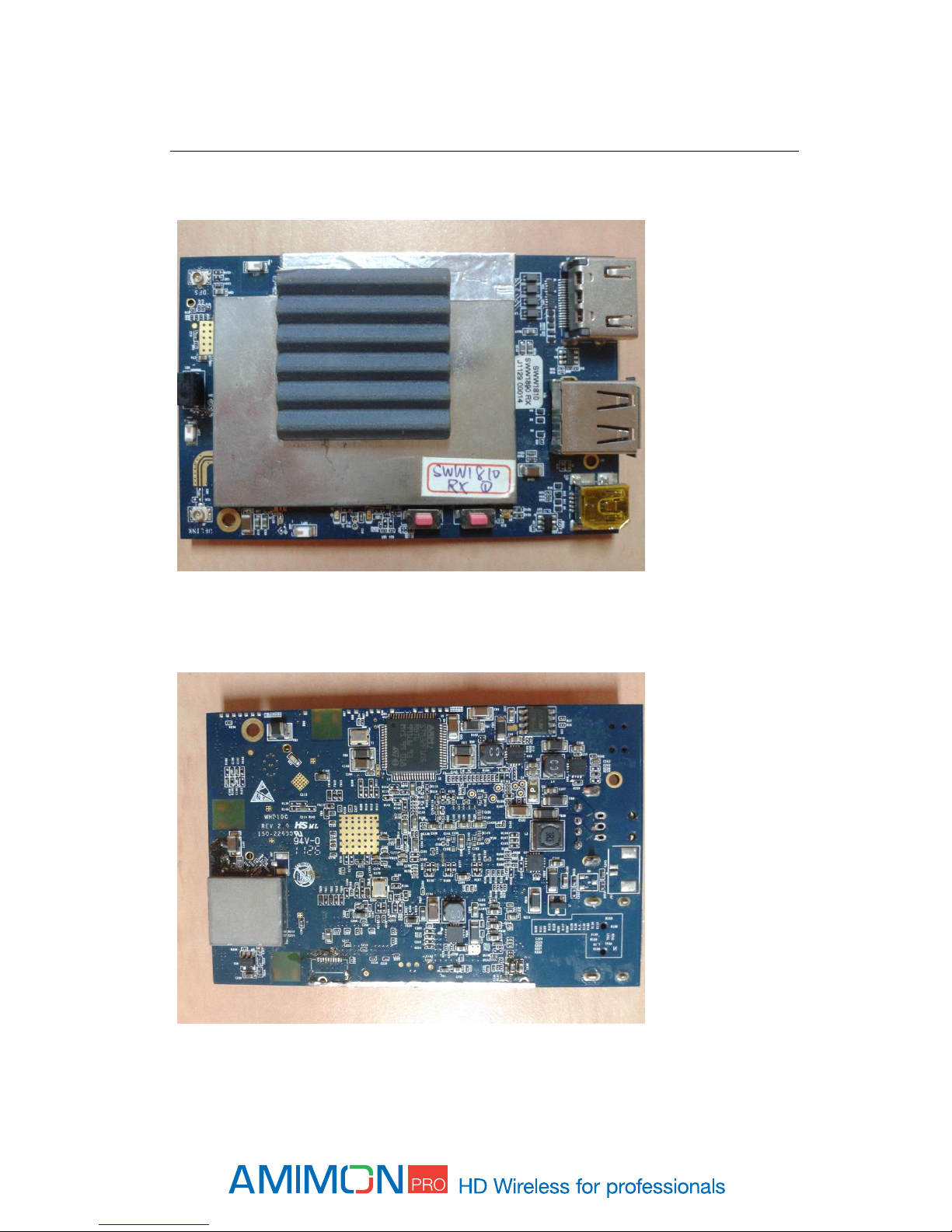
Front view
Figure 1 –Rx Grizzly top-side
Back view
Figure 2 –Rx Grizzly bottom side

LED behaviors
Network LED
BLINKING MODE
DESCRIPTION
Solid
When a connection to Tx is established*/Link quality is good
Slow
Device is in listen mode/Link quality is reasonably good
Normal
During link setup mode/during registration
Fast
System Error (Video LED flashing as well)/Link quality is poor
*In Aerial mode even when Tx is out of range.
Video LED
BLINKING MODE
DESCRIPTION
Solid
Video signal is locked
Fast
System Error (Video LED flashing as well)
Power LED
BLINKING MODE
DESCRIPTION
Solid
Power is supplied

2PRODUCT INSTALLATION
The AMN352225 is referred as the main platform that comprises a wireless Video Display Unit (VDU). It
provides HDMI video signal Interface connector output. The source of the video and audio is a compatible
remote wireless Video Source Device (VSU). At common application, the VSU is connected to a video
source, and transmits the video over wireless to the VDU, which is connected to the video monitor.
The AMN35225 is designed to be integrated into a host device, to provide a complete wireless Video
Display Unit.
At common application, the AMN352225 shall provide standard video interface that can be connected to
standard video monitor or any other device with standard HDMI input
It is advised to verify compatibility of the AMN35225 to the host device, before initiating the installation.
Installation of AMN352225 must provide the adequate heat dissipation means, to provide the module
ambient temperature within the product operating conditions as specified.
Please Note:
A regulated power supply will need to be used with this module and may be subject to further
FCC testing.

3SYSTEM SETUP
See ‘Product Description’for port location described in this section.
1. Connect the Amimon-AMN352225 receiver to compatible Video Interface device.
2. Connect the AMN352225 to a video monitor through the HDMI video interface Connector.
3. Power ON the AMN352225.
Note: For maximal range
Keep line of sight between the transmitter and the receiver.
Avoid placing any obstacles besides the transmitter or the receiver.
Position both transmitter and receiver in an upwards position, for enhanced antennas
performance.
Mount the Amimon - AMN352225 module with proper air ventilation.
Bring the transmitter and receiver closer together while trying to maintain at least 1 meter
between them.
Tabla de contenidos
Manuales populares de Hardware de computadora de otras marcas

EMC2
EMC2 VNX Series Manual del propietario

Panasonic
Panasonic DV0PM20105 Manual de usuario

Mitsubishi Electric
Mitsubishi Electric Q81BD-J61BT11 Manual de usuario

Gigabyte
Gigabyte B660M DS3H AX DDR4 Manual de usuario

Raidon
Raidon iT2300 Manual de usuario

National Instruments
National Instruments PXI-8186 Manual de usuario