
Amberg Technologies TMS ScanControl Manual de usuario

User guide
TMS ScanControl
Surveying for tunnelling professionals
01/04/2014 (Application version 1.9)

TMS ScanControl User guide
© Amberg Technologies 2014
01/04/2014 (Application version 1.9)
Trockenloostrasse 21
PO Box 27
8105 Regensdorf-Watt
Switzerland
Phone: +41 44 870 92 02
Fax: +41 44 870 06 18
[email protected], www.amberg.ch/at
Art.no. 10316
TMS ScanControl User guide

Table of Contents
Introduction ............................................................................................................................. 5
1. Supported instruments ............................................................................................... 5
2. Software license agreement ....................................................................................... 5
3. Installation / De-installation ......................................................................................... 5
1. Introduction to TMS ScanControl ....................................................................................... 7
1.1. User Interface .......................................................................................................... 7
1.2. Status information .................................................................................................... 7
1.3. Operation buttons .................................................................................................... 8
1.4. Output window ......................................................................................................... 8
2. Working with Leica HDS, Z+F Imager or Amberg Profiler .................................................. 9
2.1. Start-up procedure ................................................................................................... 9
2.2. Data transmission .................................................................................................... 9
2.3. Prism on Scanner .................................................................................................. 10
2.4. Setup dialog ........................................................................................................... 10
2.5. Measuring functions .............................................................................................. 11
3. Working with FARO Focus 3D .......................................................................................... 17
3.1. Start-up procedure ................................................................................................. 17
3.2. Data transmission .................................................................................................. 18
3.3. Recommended scan parameters .......................................................................... 20
3.4. Prisms on scanner ................................................................................................. 21
3.5. Setup dialog ........................................................................................................... 21
3.6. Measuring functions .............................................................................................. 22
4. Important hints .................................................................................................................. 27
4.1. Notebook / data storage ........................................................................................ 27
4.2. Data handling ........................................................................................................ 27
4.3. Laser security switch off ........................................................................................ 27
3
TMS ScanControl User guide

4

Introduction
Congratulations for the purchase of TMS ScanControl.
TMS ScanControl is the system control software for Leica HDS, Z+F Imager and Amberg
Profiler 5003 scanners. It is required for data acquisition in the field.
1. Supported instruments
TMS ScanControl supports the following measuring devices:
• Leica HDS6000/6100/7000 (min. firmware version 7.5)
• Z+F Imager 5006/5010 (min. firmware version 7.5)
• Amberg Profiler 5003 (min. firmware version 7.5)
• FARO Focus 3D
Note
Since program version 1.9.8.1, controlling Leica HDS4500 is no longer supported. To
aquire scans with ScanControl and HDS4500, you may use a program version up to
1.9.6.10 on your field computer. However, positioning and processing of scans from
HDS4500 is fully supported also in version 1.9.8.1 and above.
2. Software license agreement
You can find the software license agreement under the following link: http://www.ambergtech-
nologies.ch/downloads/company/
3. Installation / De-installation
3.1. System requirements
Table 1. System requirements
Windows XP / Windows 7Operating system
512 MBRAM
50MB (software only)Hard disk capacity
Pentium 1.1 GHzProcessor
See also Chapter 4, Important hints on page 27 to get more information about an optimum
notebook configuration.
5
TMS ScanControl User guide

Note
Before shipment the Panasonic CF notebook is configured to optimize the data collection
with scanner device. Do not install other software on the notebook or change notebook
settings.
3.2. Software installation
3.2.1. Latest software release
TMS ScanControl is a module within TMS Office. You may download the latest software release
of TMS Office on our home page http://www.amberg.ch/at
3.2.2. Installation
The installation of TMS ScanControl is included in the installation of TMS Office. A separate
start icon will be created on the desktop to have a quick entry into the measuring interface.
The TMS Office program is supplied in a compressed form and can be used only after it has
been installed on the hard-disk.
The procedure is as follows:
1. Insert the CD-ROM
2. A menu is automatically loaded and displayed. Select from here "Install TMS Office".
3. If the menu is not loaded automatically, double-click on the file Autorun.exe on the CD-
ROM.
4. If you have downloaded the program from the Internet, unzip the file to an empty directory
and double-click on the file Setup.exe.
5. Follow the instructions during the installation.
When you have a full license of the software, you must additionally install the dongle and the
drivers for the dongle.
3.2.3. De-Installation
Use the function "De-Installation" to remove the software from your operating system.
Please note, only files that are unmodified, can be un-installed. Therefore demo data files will
not be un-installed automatically. You will need to delete them manually (e.g. with MS Explorer).
6
3.2. Software installationTMS ScanControl User guide
Chapter 1. Introduction to TMS
ScanControl
TMS ScanControl contains the functions for successful data acquisition with the systems Leica
HDS, Z+F Imager, Amberg Profiler 5003 and FARO Focus 3D.
The software is optimized for field work. All important functions for the measurements can be
executed by specific icons on the touch screen. Within TMS ScanControl the measuring pro-
cedure follows the concept of the Amberg Positioning Method (APM).
1.1. User Interface
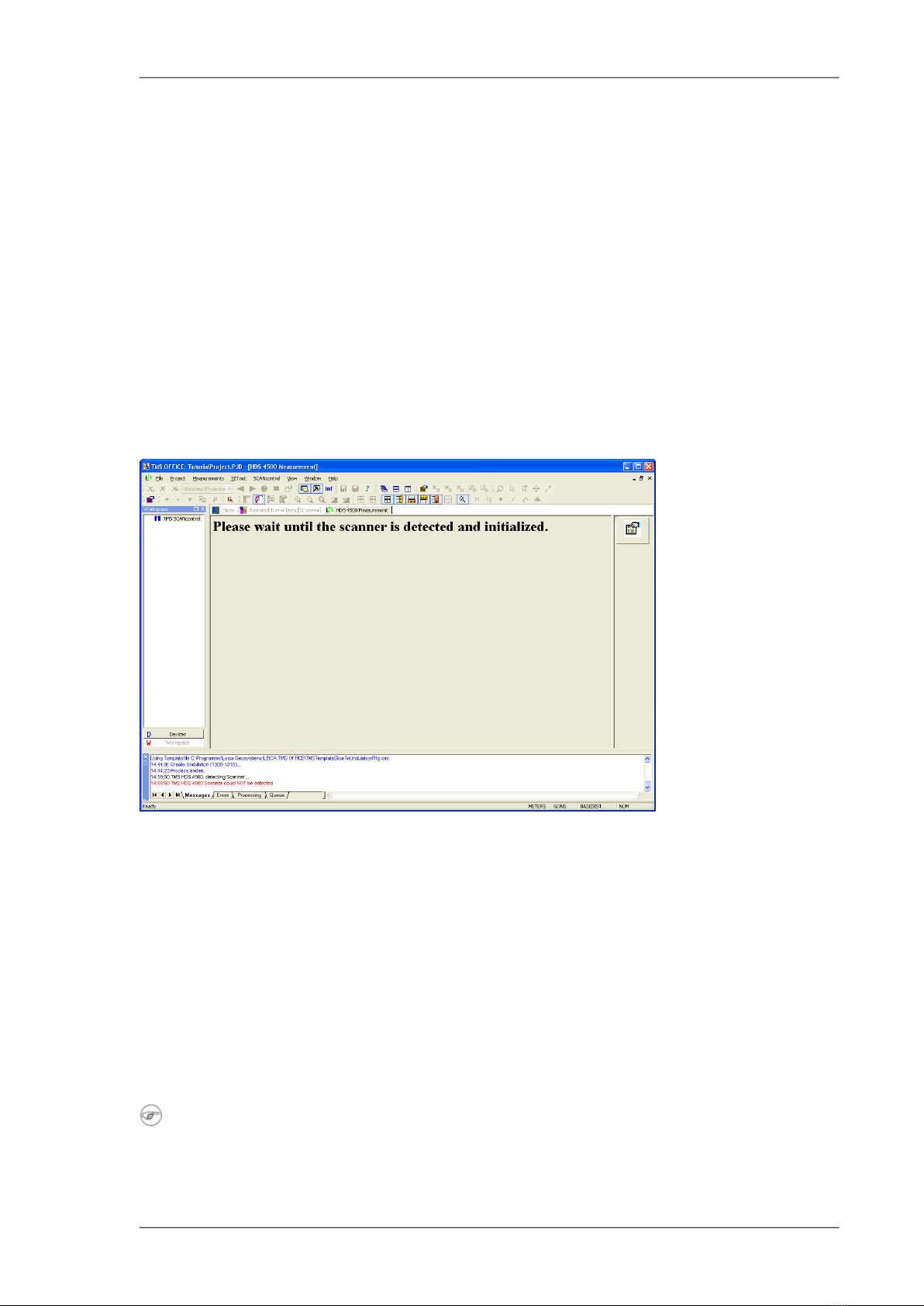
Figure 1.1. User Interface
The screen view is made up of different sections:
• Status information
• Operation buttons
• Output window
1.2. Status information
Current status is shown. Follow the instructions on the screen to make sure that the positioning
procedure is done correctly.
Note
To change the view in the window press CTRL+A. This will provide information required
during trouble shooting and to check release numbers of the software and firmware.
7
TMS ScanControl User guide

1.3. Operation buttons
The control of the operation during the measurement can be done using the buttons on the
touch screen.
1.4. Output window
All the relevant information about the data acquisition is shown in the output window.
8
1.3. Operation buttonsTMS ScanControl User guide

Chapter 2. Working with Leica HDS, Z+F
Imager or Amberg Profiler
2.1. Start-up procedure
To start a measurement follow the steps below:
• Setup the scanner system on the tripod and connect all cables.
• Level the scanner by using the tribrach.
• Setup the sphere prism in a distance of approximately 10m (depending on the scan resolu-
tion).
• Check that the cables are not tangled up.
• Start the notebook.
• Start TMS ScanControl by double-clicking on the corresponding desktop icon.
• The software will automatically communicate with the scanner. If the scanner was not re-
cognized, check the network connection between the notebook and the scanner.
• Select one of the available scanning resolutions.
• Set a new scanner position.
• Set face one position and measure the prism on top of the scanner.
• Start the scanner. While scanning measure the sphere prism with the total station.
• Set face two position and measure the prism on top of the scanner.
• Finish scan.
• Close image after a quick check.
2.2. Data transmission
In order to be able to use the Leica HDS, Z+F Imager or Amberg Profiler 5003, the connection
has to be set. Choose File »Options »Scanner... in TMS Office. The dialogue below will be
opened. In TMS ScanControl you can only reach this dialogue, if the Scanner Measurement
window is closed. So if you start TMS ScanControl and you haven't already done the setting
in TMS Office, you must first close the Scanner Measurement window and then open the
dialogue.
9
TMS ScanControl User guide
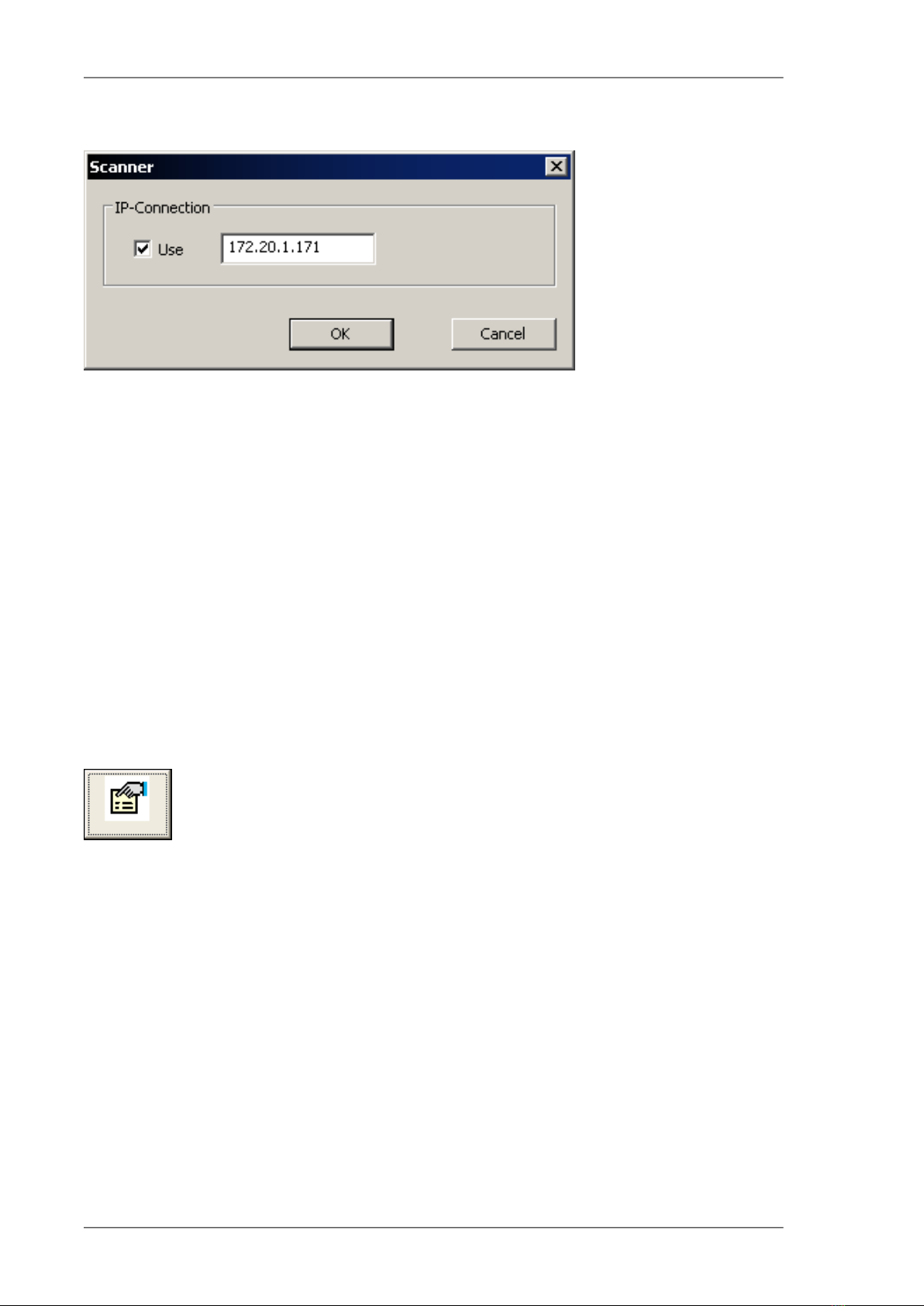
Figure 2.1. Scanner setting
Activate the option Use and input the IP-address of the scanner. This IP-address you can find
on the display of the Leica HDS, Z+F Imager or Amberg Profiler 5003 after the start-up of the
system.
2.3. Prism on Scanner
In order to be able to use the Amberg Positioning Method for the positioning of the scanner, a
prism is needed on top of the scanner. There is a certain prism adapter that can be mounted
on the housing of the scanner. Take care that the prism is mounted on the side where the
display is installed. This is important for the determination of the orientation of the system.
2.4. Setup dialog
Press the following button or choose ScanControl » Setup to open the setup dialog.
Figure 2.2. Setup button
Relevant parameters are set in this dialog.
10
2.3. Prism on ScannerTMS ScanControl User guide
Tabla de contenidos
Otros manuales de Instrumento de medición de Amberg Technologies

Manuales populares de Instrumento de medición de otras marcas


Endress+Hauser
Endress+Hauser Proline Promag 50 Especificaciones técnicas

Siemens
Siemens SITRANS F Coriolis FCT030 Manual de lista de piezas

KLINGER
KLINGER CMF V Series Manual de usuario

EXFO
EXFO FTB-2 Manual de operación y mantenimiento

Keysight
Keysight M8290A Manual de usuario

ADTEK
ADTEK MW-5 Manual de usuario