
Amazon B07WC1SZXX Manual de usuario

Body Weight Scale with BMI technology
Pèse-Personne avec Technologie IMC
Körperwaage mit BMI-Technologie
Bilancia Pesapersone con tecnologia Indice di Massa Corporea
Báscula de Peso Corporal con Tecnología BMI
Personenweegschaal met BMI-technologie
体重計、BMI テクノロジー付
B07WC1SZXX

English . . . . . . . . . . . . . . . . . . . . . . . . . . . . . . . . . 3
Français . . . . . . . . . . . . . . . . . . . . . . . . . . . . . . . 13
Deutsch . . . . . . . . . . . . . . . . . . . . . . . . . . . . . . . 23
Italiano . . . . . . . . . . . . . . . . . . . . . . . . . . . . . . . . 33
Español . . . . . . . . . . . . . . . . . . . . . . . . . . . . . . . 42
Nederlands . . . . . . . . . . . . . . . . . . . . . . . . . . . . 51
日本語 . . . . . . . . . . . . . . . . . . . . . . . . . . . . . . . . . 60

3
EN
IMPORTANT SAFEGUARDS
Read these instructions carefully and retain them for future use.
If this product is passed to a third party, then these instructions
must be included.
When using electrical appliances, basic safety precautions should always
be followed to reduce the risk of fire, electric shock, and/or injury to
persons including the following:
• Use this product only on a firm, level ground.
• This product is not a toy. Children should not play with the product.
• Do not place this product in an environment with strong
electromagnetic disturbances.
• Handle this product with care at it is a precision instrument.
CAUTION Risk of injury! Do not apply shock that may cause the
glass surface to break.
SAVE THESE INSTRUCTIONS
Battery Warnings
• Do not mix old and new batteries or batteries of different types or
brands.
• Exhausted batteries should be immediately removed from product
and properly disposed.
• Keep batteries out of the reach of children.
• Do not dispose of batteries in fire.
• Remove batteries from product if it is not to be used for an extended
period of time unless it is for emergency purposes.
• If the battery leaks avoid contact with skin and eyes. Rinse affected
areas immediately with plenty of clean water, then consult a doctor.
• Always insert batteries correctly with regard to polarity (+ and –)
marked on the battery and the product.
• Do not short-circuit batteries.
• Do not charge batteries.
• Do not force discharge batteries.

4
EN
• Do not heat batteries.
• Do not weld or solder directly to batteries.
• Do not dismantle batteries.
• Do not deform batteries.
• Do not encapsulate and/or modify batteries.
• Store unused batteries in their original packaging away from metal
objects.
• Always select the correct size and type of battery most suitable for
the intended use. Information provided with the equipment to assist
correct battery selection should be retained for reference.
• Clean the battery contacts and also those of the equipment prior to
battery installation.
• Remove exhausted batteries promptly.
This symbol stands for “Conformité Européenne”, which
means “Conformity with EU-directives”. With the CE-
marking the manufacturer confirms that this product
complies with applicable European directives and
regulations.
Intended Use
• This product is intended for weighing persons with a weight of up to
400 lbs (180kg / 28 st) only.
• This product is intended for household use only. It is not intended for
commercial use.
• This product is intended to be used in dry indoor areas only.
• No liability will be accepted for damages resulting from improper use
or non-compliance with these instructions.
NOTICE
This product is for general reference only. It is not intended
to replace any professional health or medical equipment.
Before First Use
• Check the product for transport damages.
• Remove all the packing materials.
DANGER Risk of suffocation! Keep any packaging materials
away from children – these materials are a potential source of danger,
e.g. suffocation.
5
EN
Product Description
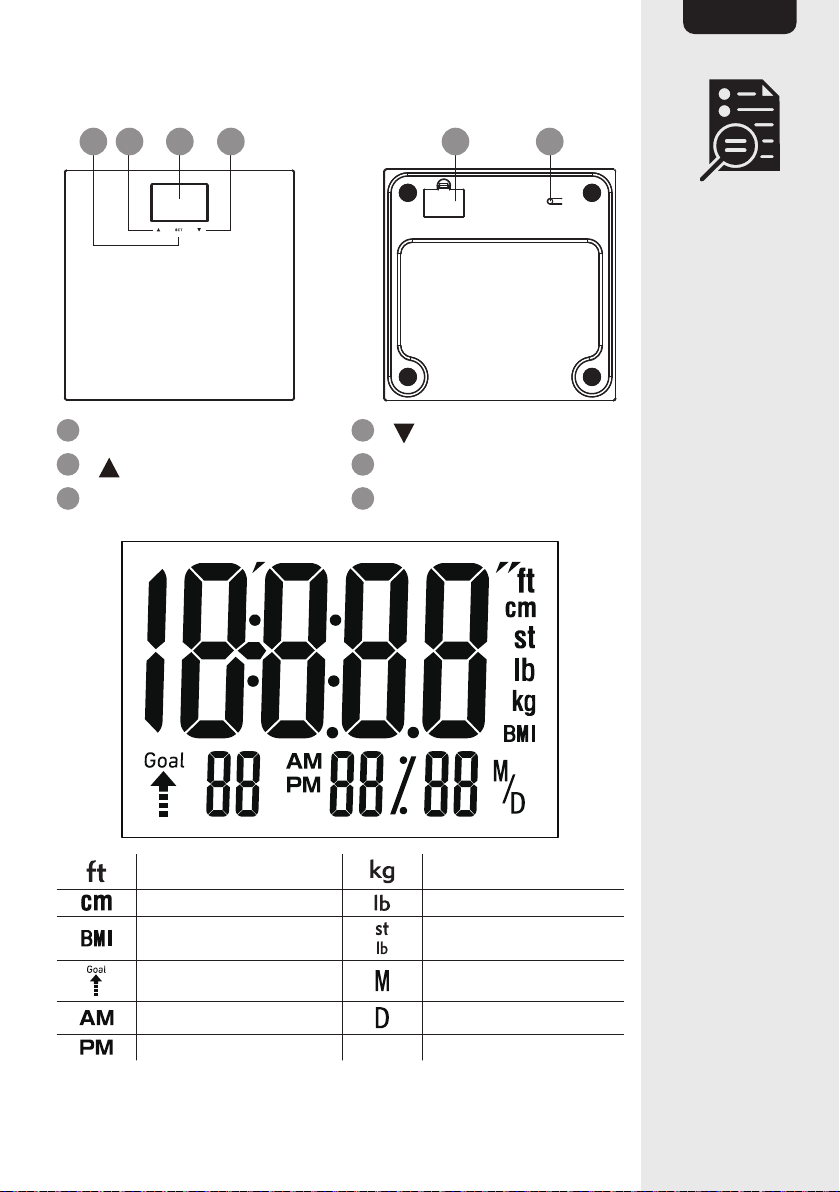
A B C D E F
ASET key Dkey
Bkey EBattery compartment
CDisplay FUnit button
Foot Kilogram
Centimeter Pound
Body Mass Index Stone
Goal weight Month
Morning Day
Afternoon

6
EN
Operation
Inserting batteries
1.5V-AAA
1.5V-AAA
1.5V-AAA
• Remove the battery compartment (E) cover on the backside of the
product.
• Insert 3x 1.5 V AAA batteries.
• Close the battery compartment (E) cover.
NOTICE
Battery is low when the symbol is shown on the
display(C). Replace the batteries to continue to use the product.
Switching on
• To switch on the product, lightly step on, then step off the product.
Alternatively press the unit button (F). 0 is shown on the display (C).
A user profile must be set up if it is desired to acquire the weight
records and the Body Mass Index (BMI).
Setting up the clock
• Press and hold the SET key (A) for 5 seconds.
• Press (B) or (D) to set then press SET key (A) to confirm the
year.
• Press (B) or (D) to set then press SET key (A) to confirm the
month.
• Press (B) or (D) to set then press SET key (A) to confirm the
date.
• Press (B) or (D) to set then press SET key (A) to confirm the
hour (am/pm).
• Press (B) or (D) to set then press SET key (A) to confirm the
minute. Clock is set when the display (C) shows “done”.

7
EN
Switching between metric and imperial units
• Press the unit button (F) repetitively to toggle between metric
(kilograms) and imperial (pounds, stones) systems.
Weighing
NOTICE
In this mode, the weight is not recorded. Detailed
measurements are not available.
• Step on the product and stand still.
• The display (C) shows the weight value.
• The product automatically turns off after a few seconds.
NOTICE
The product is overloaded when is shown on the
display (C). Step off the product.
Setting up a user profile
1. User ID
• Press the SET key (A) to enter setting mode when the scale is off.
Ifthe product is on, press and hold “SET” to enter setting mode.
“P1”flashes.
• Select a user ID. Press (B) or (D) to toggle between P1 to P4.
• Press the SET key (A) to confirm selection.
2. Height
• After setting a user ID, the product switches to height settings.
• Press (B) or (D) to input the height. Press and hold (B) or
(D) to increase or decrease the number faster.
• Press the SET key (A) to confirm selection.

8
EN
3. Goal weight
• After setting the height, the product switches to goal weight settings.
• Press (B) or (D) to input the desired goal weight. Press and
hold (B) or (D) to increase or decrease the number faster.
• Press the SET key (A) to confirm selection.
4. Weight
• After setting the goal weight, 0 is shown on the display (C).
• Step on the product and stand still.
• The display (C) shows the weight value. The profile setup is done.
Registering first measurement
• Press the SET key (A) then press (B) or (D) to select the user
ID. User ID flashes 3 times and the display (C) sets to 0.
• Step on the product, and stand still.
• Step off the product when the weight data is locked.
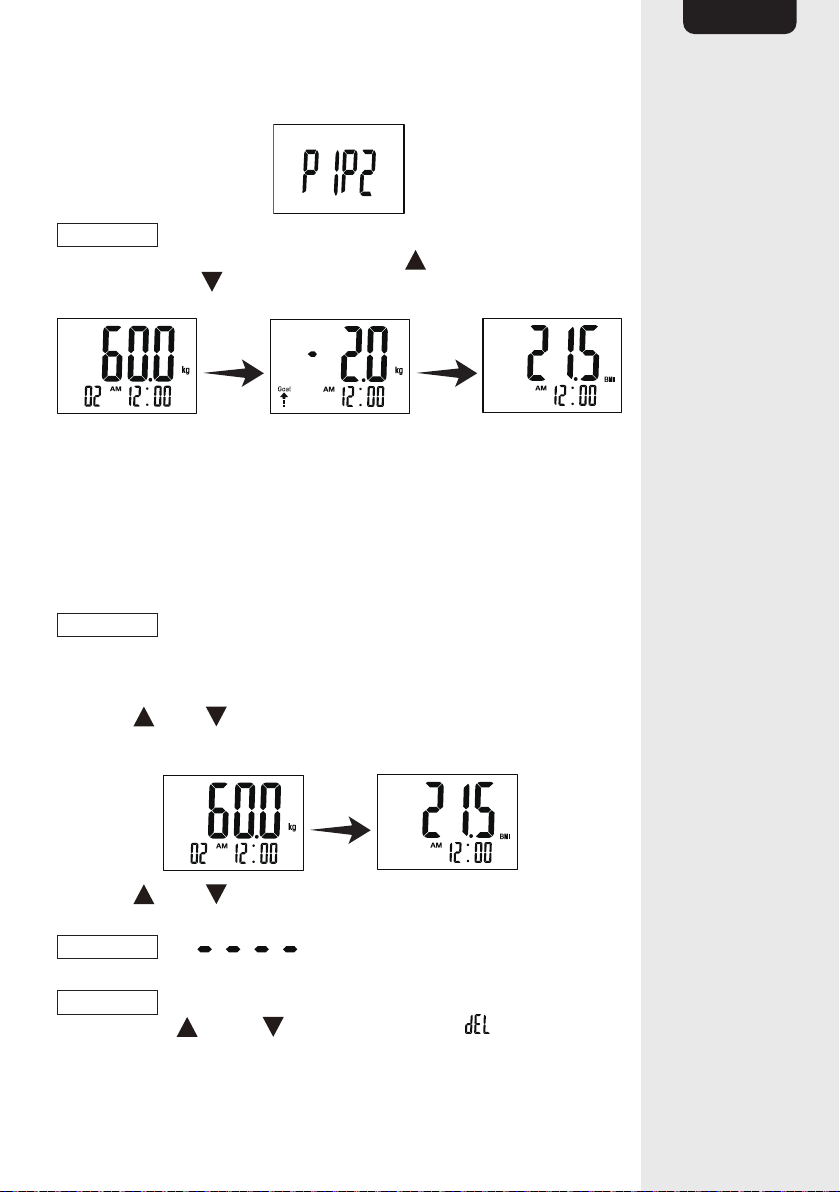
• The detailed measurements are shown 2 times in the following
sequence: weight, difference from goal weight and BMI (Body Mass
Index).
Registering daily measurement
• Step on the product and stand still.
• Step off the product when the weight data is locked.
9
EN
• The product automatically identifies the user ID.
NOTICE
If the product identifies two or more users, the display (C)
shows these users alternately 2 times. Press (B) to choose the user ID
at the left or press (D) to choose the user ID at the right.
• The detailed measurements are shown 2 times in the following
sequence: weight, difference from goal weight and BMI (Body Mass
Index).
• Goal weight profile shows the ‘+’ sign when the actual weight is over
the target weight. Alternatively, shows ‘-’ sign when the actual weight
is lesser than the target weight.
Checking previous weight data
NOTICE
The product records the last 20 sets of data only.
• Lightly step on, then step off the product. Alternatively press the unit
button (F). 0is shown on the display (C).
• Press (B) or (D) to select the user ID. The user ID flashes and
the product sets to 0.
• Press (B) or (D) to select the desired set of data. The data is
shown 1 time in the sequence of weight and BMI (Body Mass Index).
NOTICE
The symbol is shown when there are no data
sets available for that user ID.
NOTICE
To delete all data from 1 user ID, after selecting the user ID,
press and hold (B) and (D) for 5 seconds. The symbol is shown
after the data is deleted.

10
EN
BMI (Body Mass Index)
• Maintaining proper weight is essential to healthy living. Obesity has
been linked to a higher risk of heart disease, diabetes and some
forms of cancer. The Body Mass Index (BMI) is the most widely
accepted measurement of weight according to health professionals.
The Analyzer will calculate your BMI on your height and weight.
NOTICE
Consult a doctor and go for a complete body check up for
any health concern.
Cleaning and Maintenance
NOTICE
During cleaning do not immerse the electrical parts of the
product in water or other liquids. Never hold the product under running
water.
• To clean the product, wipe with a soft, slightly moist cloth.
• Dry the product after cleaning.
• Never use corrosive detergents, wire brushes, abrasive scourers,
metal or sharp utensils to clean the product.
FCC – Supplier’s Declaration of Conformity
Unique Identifier B07WC1SZXX - Body Weight Scale
with BMI technology
Responsible Party Amazon.com Services, Inc
U.S. Contact Information
410 Terry Ave N.
Seattle, WA
98109, United States
Telephone Number (206) 266-1000
FCC Compliance Statement
1. This device complies with Part 15 of the FCC rules. Operation is
subject to the following two conditions:
(1) this device may not cause harmful interference, and
(2) this device must accept any interference received, including
interference that may cause undesired operation.
2. Changes or modifications not expressly approved by the party
responsible for compliance could void the user’s authority to operate
the equipment.
Tabla de contenidos


