Alotcer AR7088H-WSTD Manual de usuario

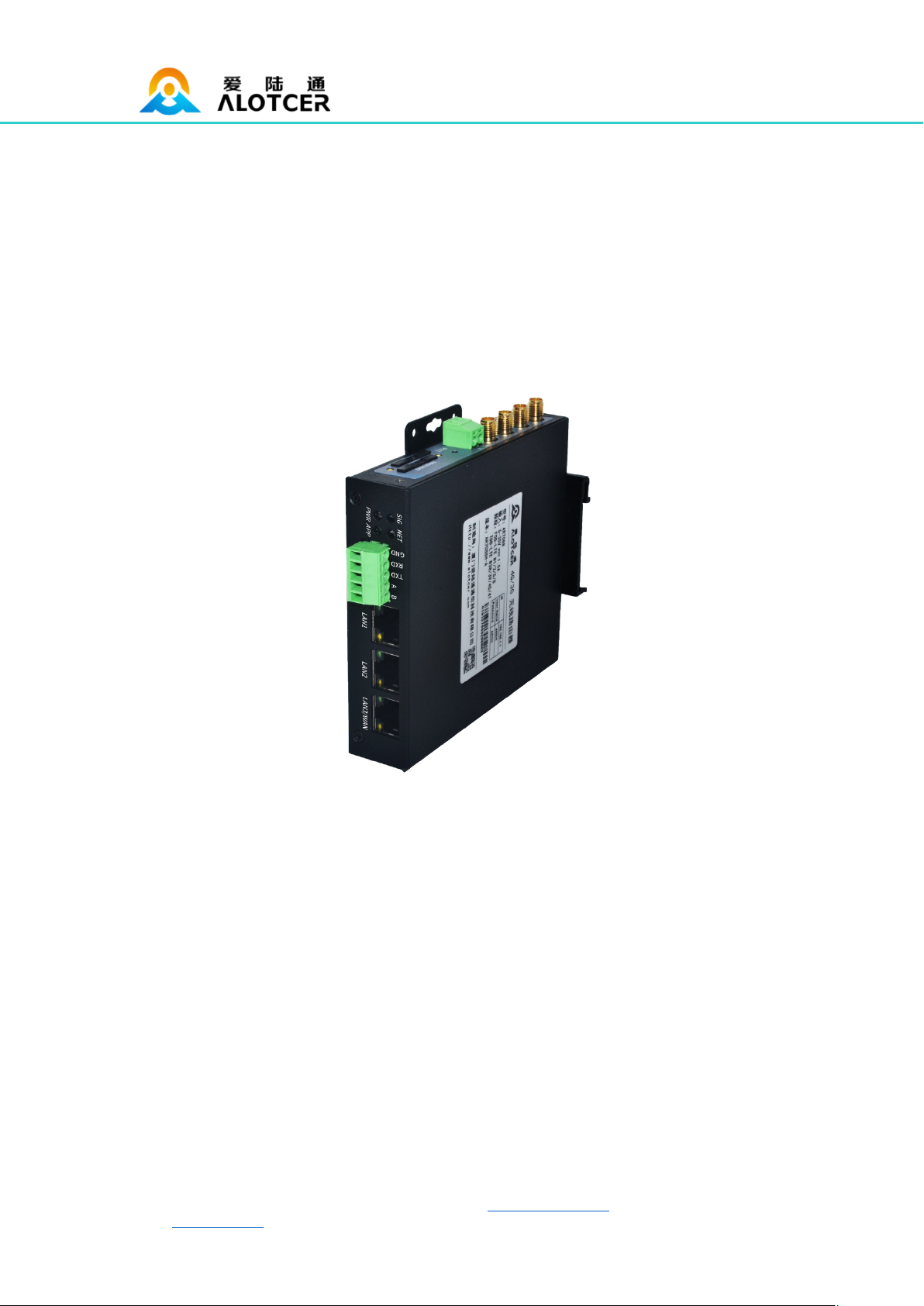
AR7088H Router User Manual
Web:en.alotcer.com Add: NO.146-148, 2nd XingBei Road, JiMei District, XiaMen, China.
AR7088H Router User Manual
Applicable Models:
Product
Type
Model
Product Name
Product
Type
Model
Product Name
AR7088H-WSTD
WCDMA Cellular Router
AR7088H-W
WCDMA Cellular WiFi Router
AR7088H-ESTD
EVDO Cellular Router
AR7088H-E
EVDO Cellular WiFi Router
AR7088H-FSTD
FDD-LTE Cellular Router
AR7088H-F
FDD-LTE Cellular WiFi Router
Standard
AR7088H-DSTD
TDD/FDD-LTE Cellular Router
Enhanced
AR7088H-D
TDD/FDD-LTE Cellular WiFi Router
AR7088H-WS
WCDMA Dual SIM Cellular
WiFi Router
AR7088H-WP
GPS+WCDMA Cellular WiFi Router
AR7088H-ES
EVDO Dual SIM Cellular WiFi
Router
AR7088H-EP
GPS+EVDO Cellular WiFi Router
AR7088H-FS
FDD-LTE Dual SIM Cellular
WiFi Router
AR7088H-FP
GPS+FDD-LTE Cellular WiFi Router
Dual SIM
(Enhanced)
AR7088H-DS
TDD/FDD-LTE Dual SIM
Cellular WiFi Router
GPS
(Enhanced)
AR7088H-DP
GPS+TDD/FDD-LTE Cellular WiFi Router
AR7088H-WSP
GPS+WCDMA Dual SIM
Cellular WiFi Router
AR7088H-ESP
GPS+EVDO Dual SIM Cellular
WiFi Router
AR7088H-FSP
GPS+FDD-LTE Dual SIM
Cellular WiFi Router
GPS+Dual
SIM
(Enhanced)
AR7088H-DSP
GPS+TDD/FDD-LTE Dual SIM
Cellular WiFi Router
WiFi Router
AR7088H-N
WiFi Router
Xiamen Alotcer Communication Technology Co., Ltd.
Tel:+86 592-6195619
Fax:+86 592-6195620
Web:en.alotcer.com
E-mail:[email protected]
Add:NO.146-148, 2nd XingBei Road, JiMei District,
XiaMen,China.

AR7088H Router User Manual
Web:en.alotcer.com Add: NO.146-148, 2nd XingBei Road, JiMei District, XiaMen, China.
Contents
Contents............................................................................................................................................3
Chapter 1 Brief Introduction .....................................................................................................5
1.1 General...............................................................................................................................5
1.2 Product Feature ................................................................................................................5
1.3 Block Diagram...................................................................................................................7
1.4 Product SPEC ...................................................................................................................7
1.5 Ordering Information ........................................................................................................9
Chapter 2 Installation Introduction ........................................................................................10
2.1 General.............................................................................................................................10
2.2 Encasement List .............................................................................................................10
2.3 Installation and Cable Connection ...............................................................................10
2.4 Power................................................................................................................................15
2.5 Indicator Lights Introduction..........................................................................................15
2.6 Reset Button Introduction..............................................................................................16
Chapter 3 Configuration and Management .........................................................................17
3.1 Configuration Connection..............................................................................................17
3.2 Access the Configuration Web Page...........................................................................17
3.2.1 IP Address Setting ..............................................................................................17
3.2.2 Access the Configuration Web Page ...............................................................18
3.3 Basic .................................................................................................................................20
3.3.1 WAN ......................................................................................................................20
3.3.2 WAN Status..........................................................................................................23
3.3.3 LAN Status ...........................................................................................................23
3.4 Advanced .........................................................................................................................24
3.4.1 Statically Assigned..............................................................................................24
3.4.2 Advanced Router.................................................................................................25
3.4.3 MAC Address Clone ...........................................................................................25
3.4.4 SDNS ....................................................................................................................26
3.5 Wireless............................................................................................................................26
3.5.1 Basic Settings ......................................................................................................26
3.5.2 Wireless Security.................................................................................................27
3.5.3 Wireless Status....................................................................................................28
3.6 VPN...................................................................................................................................29
3.6.1 PPTP .....................................................................................................................29
3.6.2 L2TP......................................................................................................................30
3.6.3 IPSEC....................................................................................................................30
3.6.4 GRE.......................................................................................................................31
3.7 Security ............................................................................................................................32
3.7.1 Firewall..................................................................................................................32
3.7.2 Access Restriction...............................................................................................33
3.7.3 MAC Filter.............................................................................................................35

AR7088H Router User Manual
Web:en.alotcer.com Add: NO.146-148, 2nd XingBei Road, JiMei District, XiaMen, China.
3.7.4 Packet Filter .........................................................................................................36
3.8 Forwarding.......................................................................................................................36
3.8.1 Port Forwarding ...................................................................................................36
3.8.2 Port Range ...........................................................................................................37
3.8.3 Port Triggering .....................................................................................................37
3.8.4 DMZ.......................................................................................................................38
3.9 QoS Setting .....................................................................................................................39
3.9.1 Traffic monitoring.................................................................................................39
3.10 M2M................................................................................................................................39
3.10.1 Serial ...................................................................................................................39
3.11 Administration ...............................................................................................................41
3.11.1 Language and Reboot......................................................................................41
3.11.2 Password............................................................................................................41
3.11.3 Management......................................................................................................41
3.11.4 System Time......................................................................................................43
3.11.5 Configure............................................................................................................43
3.11.6 Upgrade..............................................................................................................44
3.11.7 DDNS..................................................................................................................45
3.11.8 Syslog .................................................................................................................45

AR7088H Router User Manual
Web:en.alotcer.com Add: NO.146-148, 2nd XingBei Road, JiMei District, XiaMen, China.
Chapter 1 Brief Introduction
1.1 General
AR7088H ROUTER is a kind of terminal device that developed based on 2G/3G/4G/5G,
WIFI, VPN technology. It adopts high-powered industrial 32-bits CPU and embedded real
time operating system. It supports RS232 and RS485, Ethernet and WIFI port that can
conveniently and transparently connect one device to a cellular network, allowing to
connect to your existing serial, Ethernet and WIFI devices with only basic configuration.
It has been widely used on M2M fields, such as intelligent transportation, smart grid,
postal services,industrial automation, telemetry, finance, POS, water supply, environment
protection, post, weather, and so on.
Router Application Topology
1.2 Product Feature
Items
Contents
High-powered industrial cellular module
High-powered industrial 32bits CPU
Housing: Iron, providing IP30 protection.
Industrial
Design
Power range: DC 5~35V

AR7088H Router User Manual
Web:en.alotcer.com Add: NO.146-148, 2nd XingBei Road, JiMei District, XiaMen, China.
Support hardware and software WDT
Support auto recovery mechanism to make router always online
Ethernet port: 1.5KV magnetic isolation protection
RS232/RS485 port: 15KV ESD protection
SIM/UIM port: 15KV ESD protection
Power port: reverse-voltage and over voltage protection
High
Reliability
Antenna port: lightning protection (optional)
Support standard RS232 and RS485, Ethernet and WIFI port that
can connect to serial, Ethernet and WIFI devices directly
Support standard WAN port and PPPOE protocol that can connect
to ADSL directly
Support intellectual mode, enter into communication state
automatically when powered
Support several work modes
Convenient configuration and maintenance interface(WEB or
CLI)
Standard and
Convenience
Supports Fixed ear and 35mm Din-rail mounting
Support multiple WAN access methods, including static IP, DHCP,
PPPOE, 2.5G/3G/4G/5G.
Support double link backup between 2.5G/3G/4G/5G and WAN
(optional).
Support VPN client(PPTP, L2TP, IPSEC and GRE).
Support remote management, SYSLOG, SNMP, TELNET, SSH,
HTTPS, etc.
Support local and remote firmware upgrade,import and export
configure file.
Support NTP, RTC embedded.
Support multiple DDNS provider service.
Support MAC address cloning.
WIFI support 802.11b/g/n. support AP, client. (optional)
WIFI support WEP,WPA,WPA2 encryption. (optional)
Support multiple online trigger ways, including SMS, ring and data.
Support link disconnection when timeout.
Support APN/VPDN.
Support multiple DHCP server and DHCP client, DHCP binding
MAC address, DDNS, Firewall, NAT, DMZ host, QoS, traffic
statistics, real-time display data transfer rate etc.
Support TCP/IP, UDP, FTP(optional), HTTP, etc.
Supports SPI firewall, VPN pass-through, access control, URL
filtering,etc.
High-
performance
and Security
Support local log storage.

AR7088H Router User Manual
Web:en.alotcer.com Add: NO.146-148, 2nd XingBei Road, JiMei District, XiaMen, China.
Support GPS/Beidou (optional).
Support Dual SIM(optional).
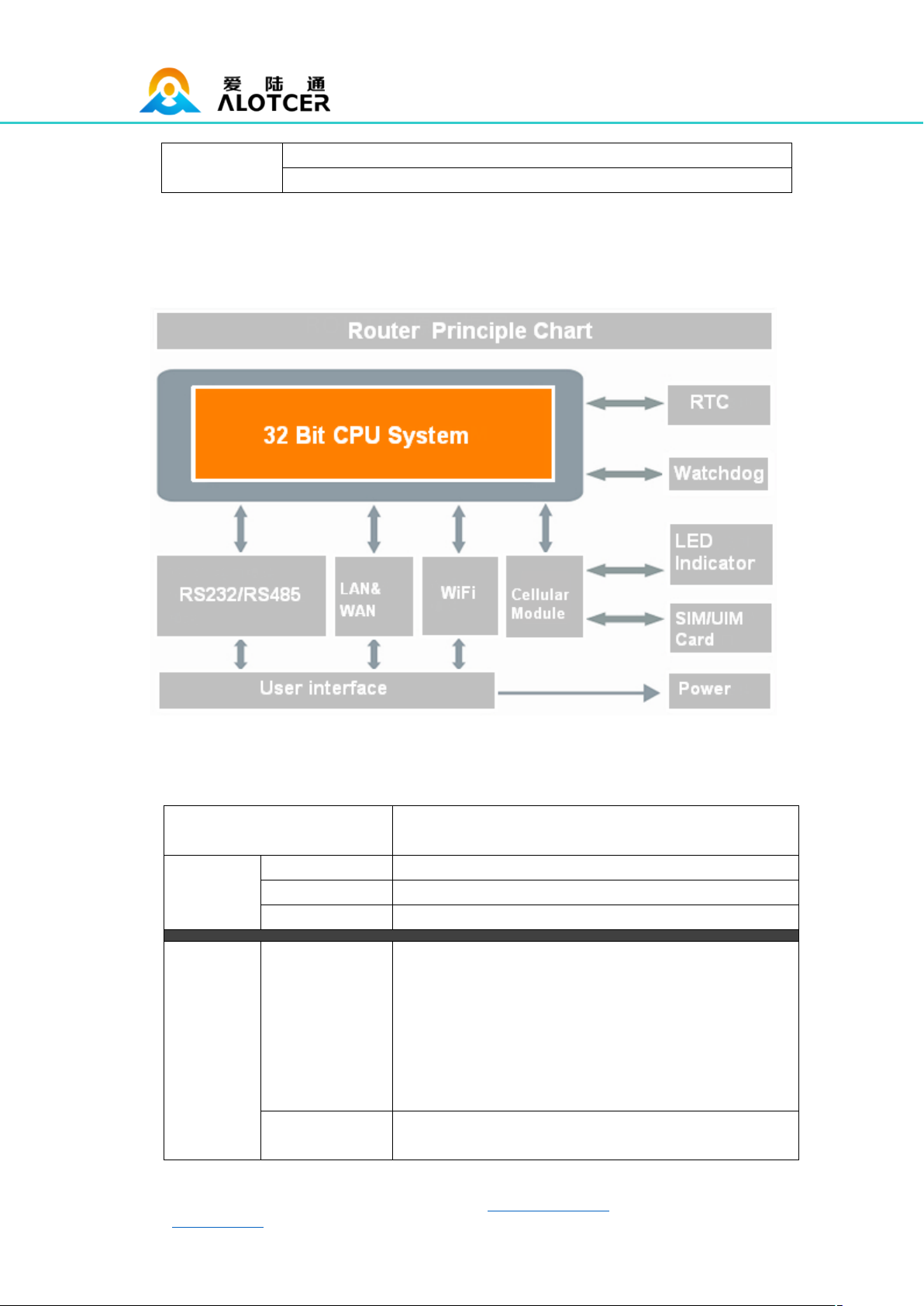
1.3 Block Diagram
1.4 Product SPEC
Items
Contents
CPU
Industrial 32 bits CPU
FLASH
16MB (Extendable to 64MB)
Hardware
System
SDRAM
128MB
Serial
1 RS232 and 1 RS485, 15KV ESD protection
Serial port: 5 PIN industrial terminal, 3.5mm pitch
Data bits: 5, 6 ,7, 8
Stop bits: 1, 1.5(optional), 2
Parity: none, even, odd, space, mark
Baud rate: 110~230400 bps
Large serial port data cache:10MB
Interface
WAN/LAN
1 10/100Mbps WAN(RJ45,can configurable as LAN)
port, auto MDI/MDIX, 1.5KV magnetic isolation

AR7088H Router User Manual
Web:en.alotcer.com Add: NO.146-148, 2nd XingBei Road, JiMei District, XiaMen, China.
protection
LAN
2 10/100Mbps Ethernet ports(RJ45), auto MDI/MDIX,
1.5KV magnetic isolation protection
Antenna
Cellular/GPS: Standard SMA female interface, 50
ohm
WIFI: Standard SMA male interface, 50 ohm
SIM/UIM
Standard 3V/1.8V user card interface, 15KV ESD
protection
Power
2 PIN industrial terminal, 3.81mm pitch, reverse-
voltage and over voltage protection
Reset
Press this key for 8 seconds to restore the Router to
its original factory default settings
Indicator
“PWR”、”SIG”、”NET”、”APP” 、”Link”(RJ45)
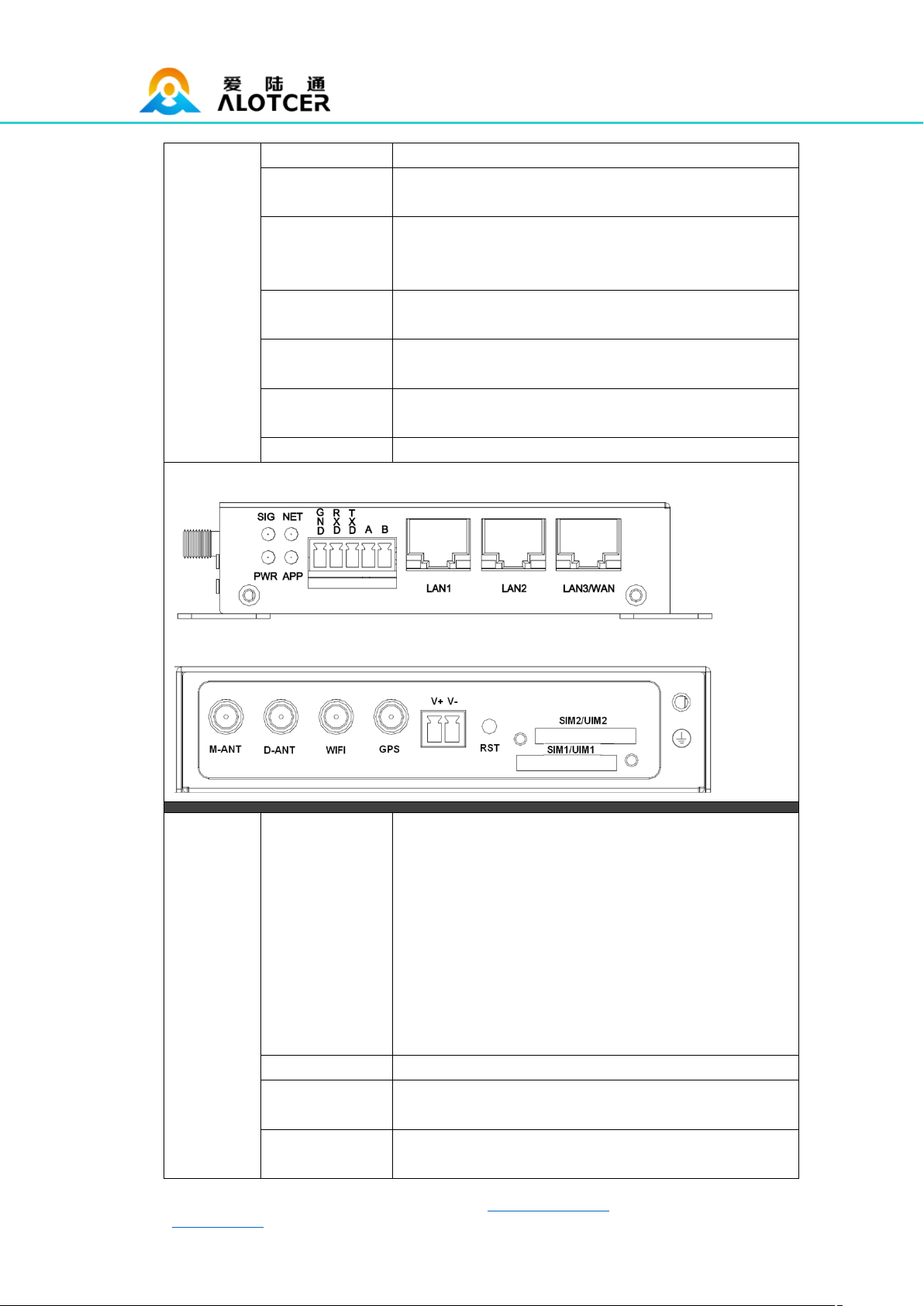
Router front interface diagram:
Router side interface diagram:
Wireless
Network
GSM/GPRS/EDGE: 850/900/1800/1900MHz
CDMA: 800/1900MHz
WCDMA/HSUPA/HSPA+: 850/900/1900/2100MHz
CDMA2000 1x/ EVDO Rev. A: 800/1900MHz
TD-SCDMA: 1880-1920/2010-2025MHz(A/F)
TDD-LTE:Band 38/39/40/41& Band 61/62 (Private
Network)
FDD-
LTE:Band1/2/3/4/5/7/8/12/13/17/18/19/20/21/25/26/28
/66
PPP Protocol
Support PPP Protocol
PPP Heartbeat
Maintaining links with the cellular network to prevent
forced sleep, to ensure the stability of dial-up link.
Network
Network
Authentication
Support CHAP/PAP Authentication

AR7088H Router User Manual
Web:en.alotcer.com Add: NO.146-148, 2nd XingBei Road, JiMei District, XiaMen, China.
TCP Heartbeat
Monitor the server connection
Standard
IEEE802.11b/g/n
Bandwidth
IEEE802.11b/g: 54Mbps (max)
IEEE802.11n: 150Mbps (max)
WIFI
(optional)
Security
WEP, WPA, WPA2, etc. WPS (optional)
Power range
DC 5~35V, Recommended 12VDC/1.5A
Communication
Current
<500mA (@12VDC)
Power
supply
Standby
Current
<250mA(@12VDC)
Dimensions
107x98x24mm
Weight
350g
Physical
Installation
Mount Kit or DIN Rail 35mm (optional)
Operating
Temperature
-35~+75ºC (-31~+167℉)
Storage
Temperature
-40~+85ºC (-40~+185℉)
Environm
ental
Limits
Operating
Humidity
95% ( unfreezing)
1.5 Ordering Information
Version
Model
Network Abbreviation
Function Extension
AR7088H
-WSTD: WCDMA
-ESTD: EVDO
-DSTD: TDD/FDD-LTE
-FSTD: FDD-LTE
N/A
AR7088H
-W: WCDMA
-E: EVDO
-D: TDD/FDD-LTE
-F: FDD-LTE
-N: Without wireless Module
S: Dual SIM Card
P: GPS

AR7088H Router User Manual
Web:en.alotcer.com Add: NO.146-148, 2nd XingBei Road, JiMei District, XiaMen, China.
Example
AR7088H-FSP: AR7088H FDD-LTE Router, Support GPS, Dual
SIM Card.
Chapter 2 Installation Introduction
General
The router must be installed correctly to make it work properly.
Warning: Forbid to install the router when powered!
2.2 Encasement List
Name
Quantity
Remark
Router host
1
Cellular antenna (Male SMA)
1 or 2
Network cable
1
Power Terminal
1
Serial terminal
1
Certification card
1
Maintenance card
1
WIFI antenna (Female SMA)
1
Optional
Power adapter
1
Optional
RS232 cable
1
Optional
RS485 cable
1
Optional
GPS antenna
1
Optional
35mm Din-rail Buckle
1
Optional
2.3 Installation and Cable Connection
Dimension (The fixing piece is detachable): (Unit: mm)
Este manual sirve para los siguientes modelos
22
Tabla de contenidos
Otros manuales de Enrutador de red de Alotcer
Manuales populares de Enrutador de red de otras marcas

NETGEAR
NETGEAR FS526T - Switch Manual de usuario

Korenix
Korenix JetNet 5710G Series Manual de usuario

Automated Logic
Automated Logic ZN551 Manual del propietario

Cisco
Cisco ASR 1000 Series Manual del operador

EnGenius
EnGenius ESR-9710 Manual de usuario

Cisco
Cisco 805 Series Instrucciones de funcionamiento y seguridad