Allflex RS340 Manual de usuario

EID_UM_080041_RS340M1.0_EN
The Allflex RS340 Stick Reader
User Manual

2
Allflex E ID Readers with Dynamic Tuning NetworkTM
Congratulations for your acquisition of an Allflex EID reader.
This device is equipped with the new “DTN - Dynamic Tuning NetworkTM”
technology, an exclusive Allflex innovation (patent pending).
The “DTN - Dynamic Tuning NetworkTM” technology provides a significant
improvement of reader performance in several areas, including improved tag signal
reception, better noise immunity and increased read distance.
This is obtained by dynamically optimizing the electrical characteristics of the reader
antenna during tag activation and reception cycles.

3
Unpacking
The Allflex RS340 Stick Reader is offered for sale in several package types,
depending on the country of purchase. Please refer to local websites / brochures to
explain the specific package offered locally. As an example, Australia and New
Zealand offer “Standard” and “Premium Kit” packages.
The standard RS340 kit is shipped in a cardboard shipping box and includes:
•RS340 Stick Reader
•Instruction Guide
•1 x 9.6 Volt DC NiMH rechargeable battery pack
•100 / 240VAC – 12VDC Trickle Charger
•Power / Data Cable
•Allflex Stick Reader Configurator© CD-ROM or NLIS Link software CD-
ROM (Australia only)
•5-metre power supply with alligator clips*
•Snap hook
The “Premium Kit” is shown below and includes all of the items above except the
100 / 240VAC – 12VDC Trickle Charger, plus the following items.
•2 extra 9.6 volt battery packs
•1 extra serial cable
•AK320 Battery Pack Fast Charger and 100 / 240VAC-18VDC power supply
•Enclosed in a rugged plastic case
*Not proposed for sale in Europe.

4
Figure 1 - Stick Reader Features and User Interface
Stick Reader User Interface
Figure 1 illustrates the Stick Reader’s features that comprise the user interface and
that are pertinent to its operation. Each feature and its corresponding functional
description is described in Table 1 below.
Table 1 - Stick Reader Features and Descriptions of Use
Feature Description of Use
Antenna[1] Emits activation signal and receives transponder signal
Red LED Indicator Illuminates whenever antenna is emitting activation
signal (when green button is pressed)
Green LED Indicator Illuminates whenever a transponder has been read
Audible Beeper [1] Beeps once on first transponder reading and twice for
repeat
[1] Item is internal to enclosure and cannot be seen.

5
Green READ Button Applies power and causes activation signal to be emitted
for reading transponder
Data/Power Cable Conveys external power to Reader and serial data to and
from Reader
DB9 Connector w/
DC Power Jack Connects serial data to PC, scale head, or data logger
RS232 port. Accepts 12 VDC input as Reader power
source
Fiberglass Tube Rugged, watertight enclosure
Screw-on Endcap Provides access to battery compartment
Handle Grip Rubber anti-slip gripping surface
Cable Connector Electrical interface for attaching Data/Power Cable
Rubber End Cap Protect the reader from shocks

6
Preparing for use
In order to proceed, it is necessary first to fully charge the Battery Pack as described
below and to have an few electronic identification eartags available for testing.
It is very important to carry out the following three steps before
using the Stick Reader.
Step 1: Installing the battery pack in the Stick Reader

7
Step 2: Trickle charging the battery pack. (Applicable to the Standard Kit)
The Rapid Charger is available as an optional accessory, or as a standard item
in a “Premium Kit” package.
Rapid Charger – charged to
85% in 2hrs (Applicable to the
standard 720mAh batteries). If
larger batteries are offered in
the future, charge time will
extend in proportion. IE A
1000mAH would be around 3
hrs.
Spare Batteries can also be
purchased

8
30 / 39 cm
11
,
8 / 15
,
3 inches
4
> 3s NO ID TAG
DETECTED!
Read zone
No Read
Typical read:
30cm for HDX sheep tags
39cm for HDX cattle tags
0001 HDX ISO:
982 00000115008
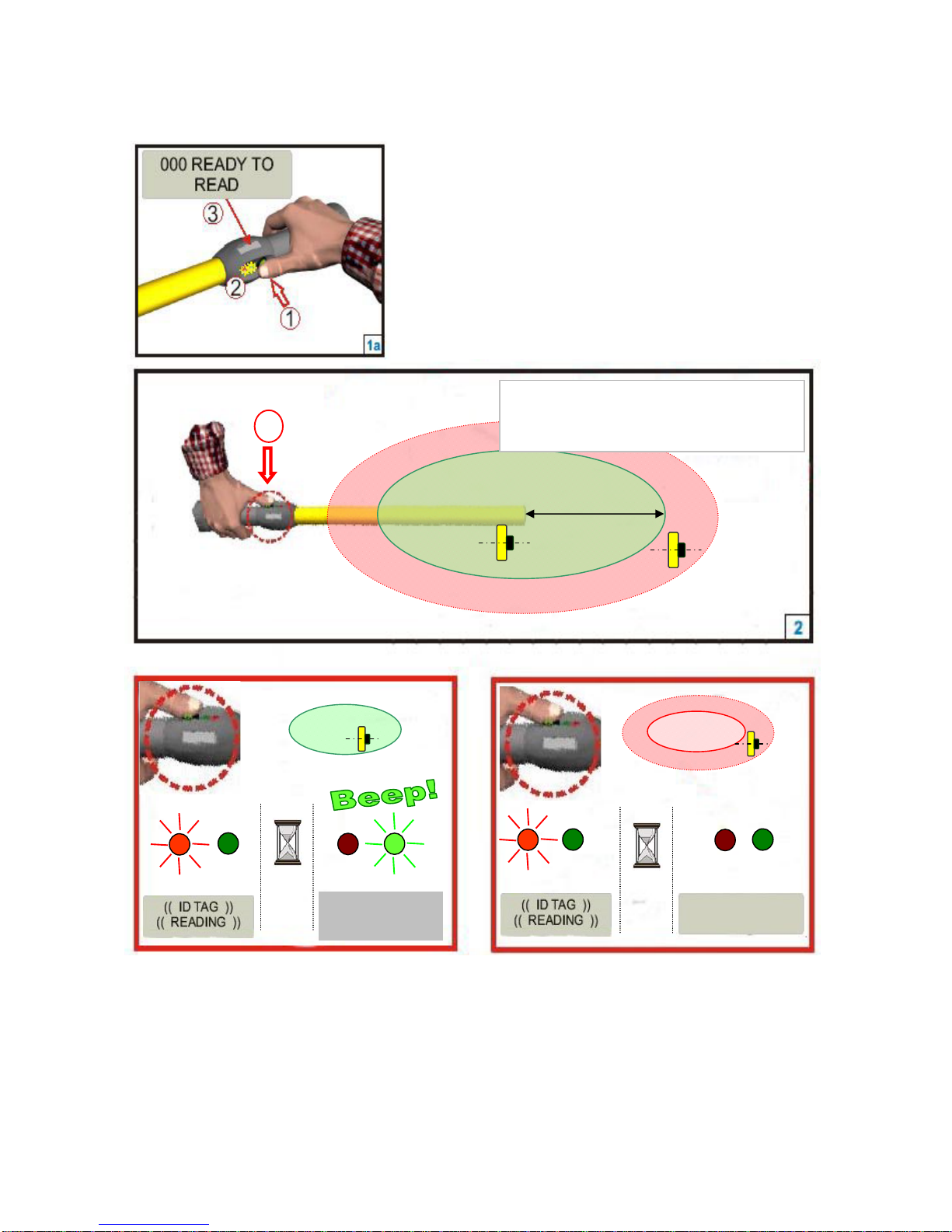
Step 3: Activating the RS340 Stick Reader and read test
Press the Green Button to “Wake Up” the
reader from Sleep Mode.
After the reader is awake – Press the button to
read a tag.
When the button is depressed, the red lamp will flash indicating that it is looking
for a tag. Keep the green button depressed and when a tag is detected, the green
light will flash and the reader will emit a beeping sound. The display will show
the Tag number and the Count.

9
Stick Reader Power Supply
Power Source Requirements
The RS340 Stick Reader contains a 9.6VDC – 720mAh NiMH rechargeable battery
pack, which serves as its primary power source. Alternately, the RS340 can be
powered:
•From its external AC Adapter/Charger (Via the serial cable),
•Via the power supply cable with alligator clip*in conjunction with any external
DC power source (Input Rating 9-12 VDC – 1A).
•By connecting to older model battery packs (PW250) that were used with the
Grey (RS250) Allflex Stick Reader.
Special Notes Regarding Power Requirements
The older RS250 (Grey) stick readers can be powered by connecting directly to some
weigh scale heads (without the battery pack). The RS340 (Yellow) requires a higher
voltage level than most scales produce and hence cannot be used in the same manner,
unless the scale head is externally powered from a car battery, or AC charger.
Otherwise, the yellow reader must have its own charged battery inserted.
Note 1 - The RS340 Stick Reader is designed to operate only with the
Battery Pack provided. The RS340 will not operate with individual
battery cells of either disposable or rechargeable variety.
*Not proposed for sale in Europe
CAUTION
RISK OF EXPLOSION IF BATTERY IS REPLACED BY AN
INCORRECT TYPE.
DISPOSE OF USED BATTERIES ACCORDING
TO THE INSTRUCTIONS

10
Note 2 - Do not use this apparatus near water when connected to AC/DC
adapter.
Note 3 - Do not install near any heat sources such as radiators, heat
registers, stoves, or other apparatus (including amplifiers) that produce
heat.
Note 4 - Unplug this apparatus during lightning storms or when unused
for long periods of time.
AC Adapter - The RS340 Stick Reader can be powered using its AC Adapter/Charger
regardless of the charge state of the Battery Pack. The AC Adapter can be used as a
power source even if the Battery Pack has been removed from the Stick Reader. If the
AC Adapter has been connected, the user may proceed with configuration and
performance testing while the Battery Pack is charging. This configuration could
affect reading performances.
Note 5 - The Stick Reader’s integral Battery Pack is affected by
temperature. At 0°C (32°F), the Battery Pack will deliver only about half
of its rated energy capacity. At lower temperatures, the Battery Pack
may deliver unsatisfactory performance. When the RS340 Stick Reader
is used in low temperature environments, connection to an external
power source, such as the Allflex PW250 Battery Pack, and placement of this
external Battery Pack close to the user’s body, is recommended.
Note 6 - To ensure proper Battery Pack charging, charging should be
conducted only in an environment where the temperature is between
15°C and 30°C (60°F to 85°F). Charging at temperatures outside these
boundaries will result in unsatisfactory charge acceptance by the Battery
Pack. For more information about the characteristics of rechargeable batteries, please
see the white paper at
[http://www.national.com/appinfo/power/files/f19.pdf#page=1].
!
!
!
!
!
Tabla de contenidos
Otros manuales de Lector de tarjetas de Allflex