
Alfano AStrO Manual de usuario

1
QUICK
START
GUIDE
AStrO
Ver.10.309
Toll Free : 1 (877) 462-7296
Visit : www.Alfano-usa.com

2
Thank you for purchasing the latest in data acquisition technology, the AStrO.
We hope that it surpasses your expectations.
This is the Quick Start Manual for the AStrO, please take a few minutes to
acquaint yourself with the features this product offers you.
We have tried to make the manual as user friendly as possible, making it
easy for you to input data.
As we are always striving for excellence in our products, we welcome your
feedback and comments on this product, guide or any of our other products.
Satisfied customers are our business.
Look for new innovations to come in the future.
Happy Racing!
Note:
If you require a detailed manual, please see AstrO’s user manual in our web site
ALFANO DATA ACQUISITION Inc.
----------------------------------------------------------------------------------------------------------------------------
Toll Free: 1 (877) 462-7296 www.Alfano-usa.com
3
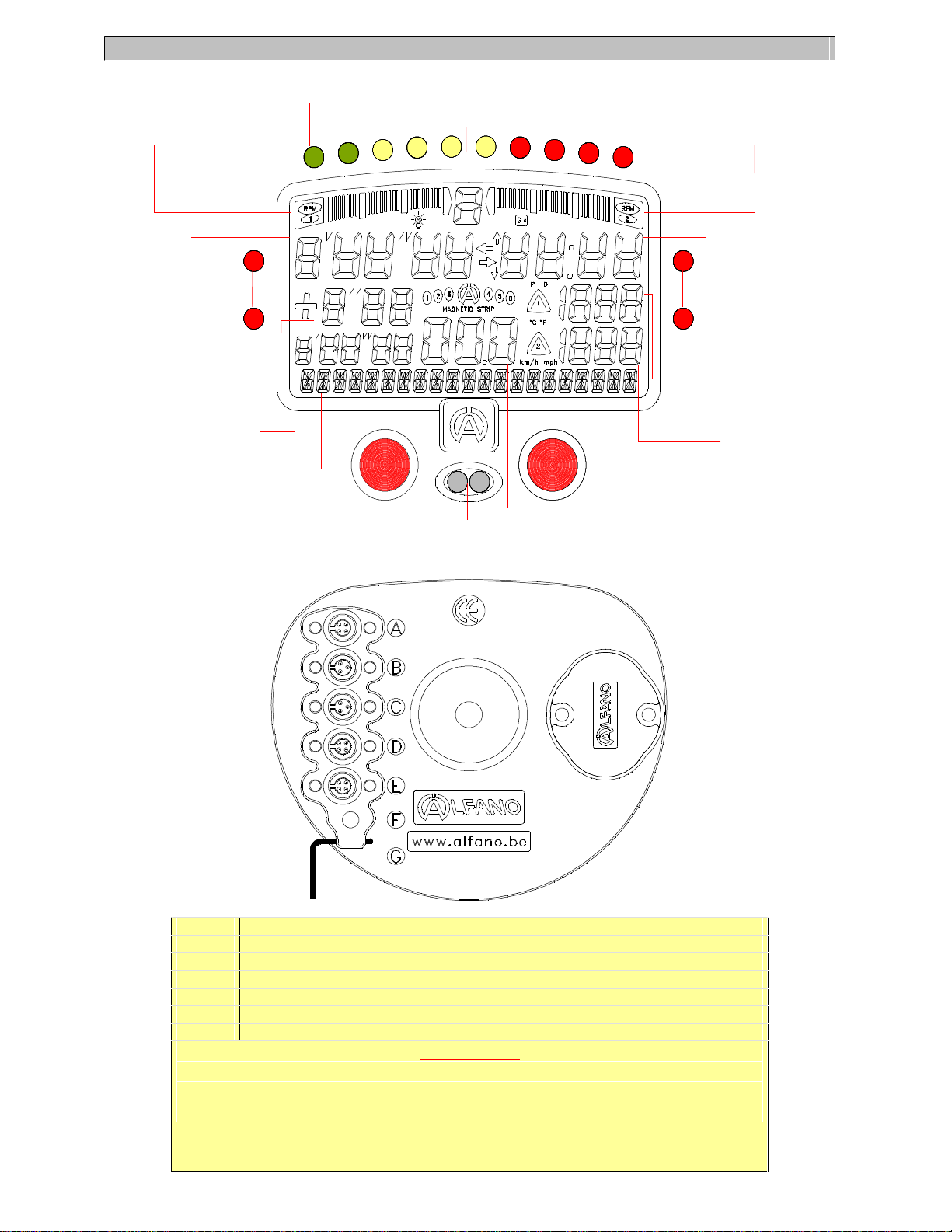
Gear position
Lap time
Configurable 10 shift lights RPM
Graphic RPM 1 or
temperature 1 Display
Best lap time
Navigation Guide of
21 characters
Configurable lap time
difference (between last lap,
best lap or targeted lap)
Temperature Alarm LED 1
Download data to a PC via
very high speed infrared pen
Speed (direct or with speed sensor)
Temperature 1
Te
mperature 2
Temperature Alarm LED 2
RPM Display
Graphic RPM 1 or
Temperature 2 Display
Display
A G-Force sensor for track mapping
BTemperatures 1 inputs “NTC” type, thermocouple “K” type (EGT, CHT, WT,…)
CTemperatures 2 inputs “NTC” type, thermocouple “K” type (EGT, CHT, WT,…)
DMagnetic or infrared receiver (for lap times)
ESpeed sensor
FRPM direct connection (for low powered ignition)
GRPM sensor
ATTENTION
Attach connectors only with type TX20 screwdriver, provided.
Do not overtighten the connectors.

4
Low Pre-
Set Temperature Alarm 1
High Pre-Set Temperature Alarm 1
Low Pre-Set Temperature Alarm 2
High Pre-Set Temperature Alarm 2
When Bottom LED is on :
temperature is Below the
Pre-Set Range
When both LEDS are off :
temperature is between the
Low and High Pre-Set Range 2 Flashing LEDS :
Temperature is Above the
Pre-Set High Range
Simple push of button gives access to menu 1
from 1 to 7
---------------------------------------------------------------
Holding for 2 seconds gives access to menu 2
«CONFIG SYSTEM » from 10 to 28
Number of sessions
Number of laps in the Session
Total number of Laps
Access to the counters memorized in ON mode
STOP
Access to the counters memorized in ON mode
Time remaining to record data in minutes. This
varies according to configuration and sensors
connected to the system
START
STOP
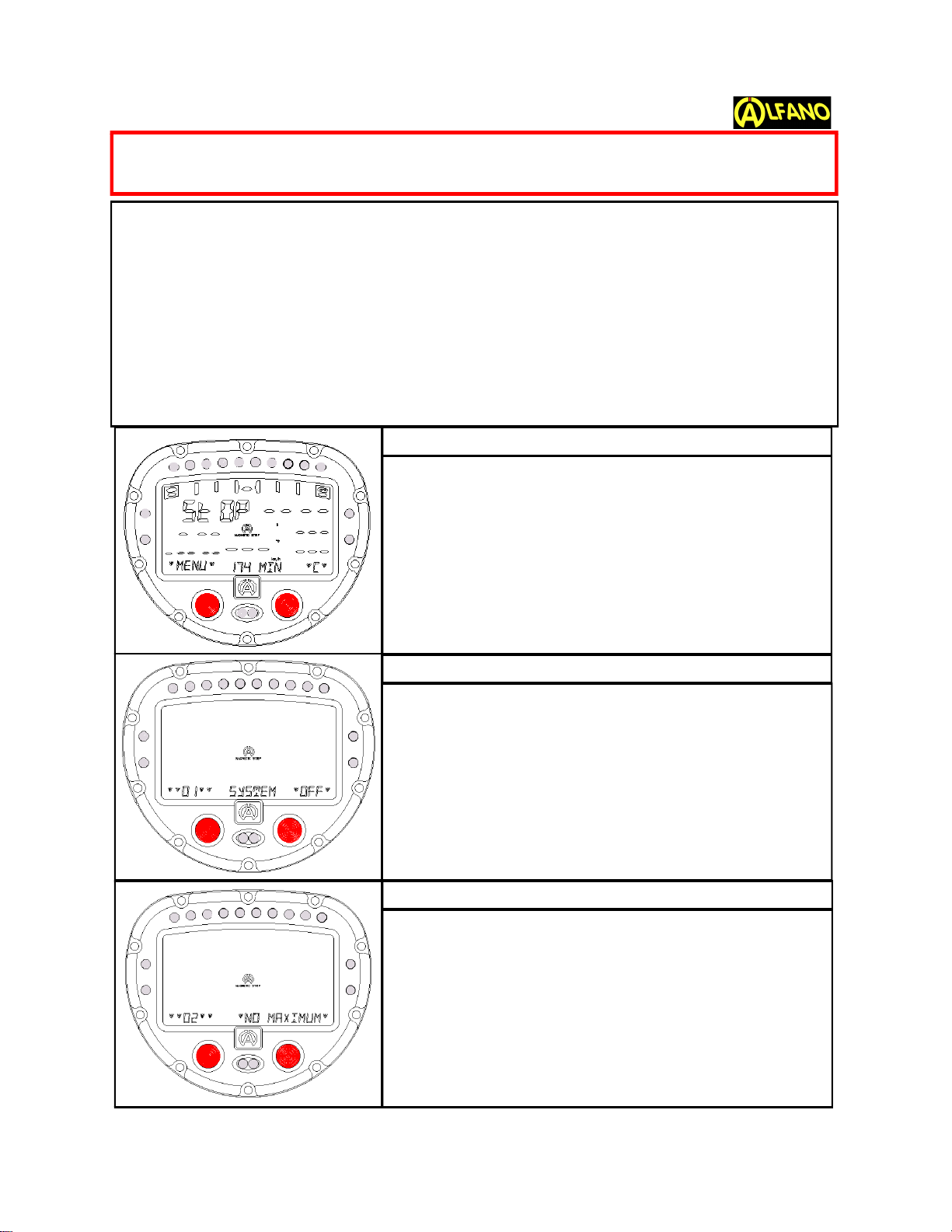
TO START; PRESS BOTH BUTTON AND HOLD 3 sec
To scroll through the menus: press briefly the left button.
To make your selection from one of the menus: press the right but-
ton.From STOP Mode,(The screen w/the STOP icon) if you hold the
left button for more than 2 seconds you will be in Configuration Mode.
From any screen: if you hold the left button for more than 2 seconds,
it will bring you back to Stop Mode. Also, If you delay too long on a cer-
tain screen, it will bring you automatically back to Stop Mode, .
This is the main menu for the AStrO.
“174”:Time in minutes available to record data.
"C°": Choice that was made between Celcius over
Fahrenheit (C° or F°).
"D": Dynamic mode over Peak Delay (D or P).
"(1), (2)"...: Number of strips or beacons at that track.
"Km/h": Choice that was made between Metric or Imperial
(mph).
"C": (on the right bottom of screen) tells you to press right
button to get into the counters.
Press the left button to pass to the next menu.
Pressing the right button will manually turn off the
unit.
If on this menu you read "No Maximum", it means you
have no data in memory.
When data has been stored, pressing the right button will
bring you to the Maximum RPM, Speed, Gear, Temp 1,
Temp 2, combining all the laps and best of all laps.
Press the left button to pass to the next menu.
Toll Free:1 (877) 462-7296 5
TO START RECORDING
TO TURN OFF
TO REVIEW MAXIMUMS ONLY
BEFORE BEGINNING TO START YOUR RECORDING GO TO CON-
FIGURATION MENUS (Page 8 OF THIS MANUAL)
www.Alfano-usa.com

"No Best Lap" means you do not have any lap data in
your system.
If you see "Best Lap" then by pressing the right button it
will bring you to your “BestLap”. Wait for “EXIT” &
“VIEW”which will flash every 4 seconds.
With the right button you choose “VIEW”to be able to
playback your lap. Arrows up & down will allow you to go
back and forth.
Wait for “EXIT”to get out of this menu.
Press the left button to pass to the next menu.
Press the right button and select to review your
laps
The unit will position itself at your last lap (ie: in this case 9
of 9)
Pressing left button (left arrow) will bring you to the previ-
ous lap.
Pressing right button( right arrow) will bring you to the
next lap.(in this case you cannot choose, as you are
already at the last lap)
On a chosen lap, wait a few seconds for “VIEW”, press
the right button and you will be able to playback (with the
right button to go up left to go down) that particular lap. If
you hit the left button when you see “EXIT”,using the
right button or left button you will be able to
choose an other lap to playback. When you have fin-
ished wait for “EXIT” and press the left button and
wait to see “EXIT”again to press the left button .
Press the left button to pass to the next menu.
Toll Free:1 (877) 462-7296 6
DATA REVIEW or RECALL
DATA REAL TIME PLAY BACK SCREEN 2
DATA REAL TIME PLAY BACK SCREEN 3
TO REVIEW BEST LAP TIME
www.Alfano-usa.com
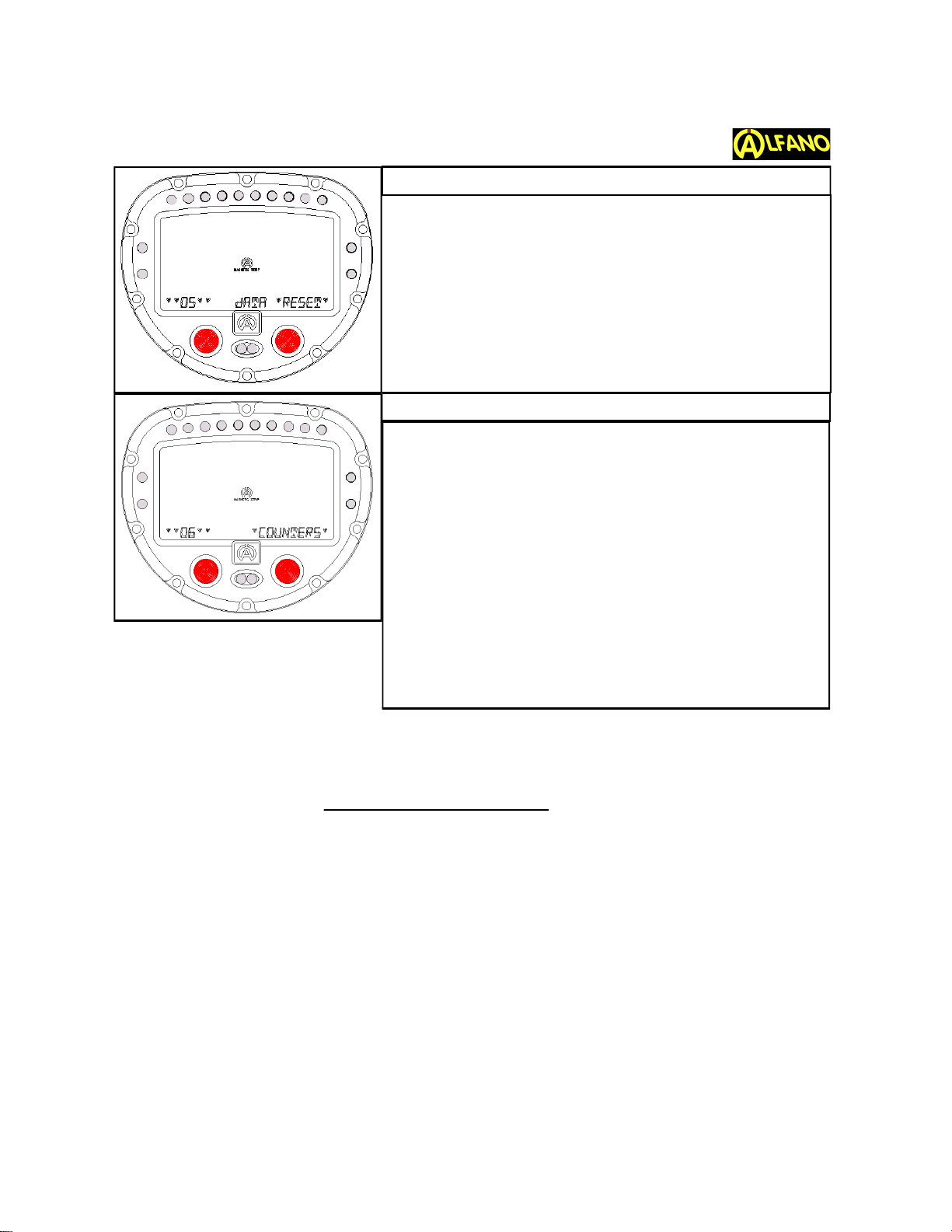
This screen will allow you to erase, by pressing the right
button, all your data except the counters and configuration
settings. (It will ask for a confirmation which will be input
with the right button)
Press the left button to pass to the next menu.
Tip:For some counters your vehicle must be in motion
(speed needed)
Counters 1-2-3: (Time) Accumulate your engine’s running
time in Start Mode (motion required).
Counters 4-5-6: (RPM Time) Accumulate your engine’s
running time.
Counters 7-8: (Miles) Accumulate distance traveled (in
motion)
Pressing the right button will bring you to the 1st counter.
Pressing the left button will switch from counter “OFF”,
“ON” or “RESET”.
Press the right button to pass to the next counter (until
you reach a counter on which you want to record).
Press the left button to pass to the next menu.
Please download EGT, SPEED, G-Force Sensors Installation Guides
from our web Site:www.Alfano-usa.com
Toll Free:1-877-462-7296 7
DIFFERENT DATA COUNTERS
TO CLEAR RECORDED DATA
www.Alfano-usa.com

Press the right button to choose the number of strips or
beacons that are on the track.
(most tracks have less than 3 strips).
Press the left button to pass to the next menu.
Press the right button to choose on which strip or beacon
you want to start timing.
Press the left button to pass to the next menu.
8
NUMBER of MAGNETIC STRIPS or BEACONS
STARTING MAGNETIC STRIP or BEACON
DIFFERENTIAL w/BEST ,LAST or TARGETED LAP
CONFIGURATION MENUS (10-28) :TO ACCES CONFIGURATION
MENUS; AT STOP MODE HOLD THE LEFT BUTTON 3 sec
Tip: Prior to this configuration go to Menu 22 and choose
between “Celcius” or “Fahrenheit”.
Press the right button to choose your low temperature tar-
get for Temp 1 (wait for arrows up or down), press the left
button to set .
LOW / HIGH TEMPERATURE ALARM
Press the right button to choose if you want to compare
your current lap time to “best lap” time, “previous” lap
time or a “targeted” lap time.
Press left button to set.
In the case of a targeted lap time, you will need to wait for
the arrows up or down in order to set a reference lap time,
using the right button.
Wait for “EXIT”to be on, press left button to set.
Press the left button to pass to the next menu.
www.Alfano-usa.com
Toll Free:1 (877) 462-7296

Then that will bring you to your high temperature target for
Temp 1. Using the right button you will now set the high
Temp target for Temp 1.
Left button sets and brings you to low temperature setting
for Temp 2. Repeat same steps
Press the left button to pass to the next menu.
Tip: During practice you should have your 1st alarm LED
on until you pass your low temp then both LEDS flash
when you reach your max. temp.
Press the right button to choose the number of strokes
(Tip: for karts 2 cycle ignition or 4 cycle Briggs & Honda's
always use x 1)
Press the left button to pass to the next menu.
By pressing the right button, this feature allows the driver
a delay, giving him time, while driving, to watch the RPM
peak. He can choose between 0.4 and 4.4.
With increments of 0.4 .
At 0.4 there is no delay, you will be on dynamic mode.
By increasing the increments it allows him greater time to
see his peak data.
Press the left button to pass to the next menu.
Press the right button to choose the first LED (wait for
arrows up and down), choose the desired RPM, press the
left button to set.This brings you to the next LED .
Repeat same steps for each LED .
Press the left button to pass to the next menu.
Toll Free:1 (877) 462-7296
www.Alfano-usa.com
9
LOW / HIGH TEMPERATURE ALARM (Continue)
ENGINE CYCLE for RPM READING
DISPLAY TIME DELAY
SHIFT LIGHTS

**Prior to this configuration, go to Menu 23 and choose
either metric (cm) or Imperial (inches) measurements.
Press the right button to start speed configuration and
press again the right button to choose if you are using a
sensor or not.
Press the left button to set and pass to the next menu.
If you have chosen without sensor, pressing the right but-
ton will allow you to enter the tire’s size (wheel circumfer-
ence) wait for the arrows up and down,and set with left
button.Next set the number of teeth on small sprocket
using right button and with arrows up and down, set
again with left button.
Finally, using the right button set the gear size of the rear
axle (number of teeth), and left button sets & passes to
next menu.
If you are using a speed sensor, you will be using the
"ON" sensor menu.
Tip: when sensors face magnets, 2 green LEDS from shift
light are on.
Use right button to set sensor "ON"
Press the left button to enable entering of data
Press the right button to enter the tire size (wheel circum-
ference) (wait arrows up or down).
Press the left button to set and pass to the next menu.
Toll Free:1 (877) 462-7296 10
SPEED
SPEED
SPEED w/SPEED SENSOR (For Vehicle w/Clutch)
SPEED WITHOUT SENSOR (For Direct Drive)
www.Alfano-usa.com
Tabla de contenidos
Otros manuales de Instrumento de medición de Alfano


Manuales populares de Instrumento de medición de otras marcas


Endress+Hauser
Endress+Hauser Proline Promag 50 Especificaciones técnicas

Siemens
Siemens SITRANS F Coriolis FCT030 Manual de lista de piezas

KLINGER
KLINGER CMF V Series Manual de usuario

EXFO
EXFO FTB-2 Manual de operación y mantenimiento

Keysight
Keysight M8290A Manual de usuario

ADTEK
ADTEK MW-5 Manual de usuario