
aikron Mini LCD Manual de usuario

Driven by Innovation
Mini LCD
DIGITAL READOUTS
Operation Manual
(Version 2.0)

Softkey Indication
ABS
INC
MM
INCH
SDM
1/2
+COMP.
45°
x
Y
a
z
ABS/INC Conversion
Metric/Imperial
Conversion
SDM Coordinate
Value Half
Set
Enter
Exit
Radius/Diameter
Conversion
Axis Summing
System Parameter
Setting
Taper Measuring
Grid Hole Function
Bolt Hole Function
Vectoring Function
EDM Function
Sleep
REF Function
Compensation
Softkey Indication

ZERO ZERO ZERO
C
ENT
Value Zero Button
Function Button
Return
Button
Direction Button
Enter Button
Keypad Layout
Keypad Layout

Content
Content
1.1 DRO Setting 1
1.2 Axis Setting 2
1.3 Axis Summing 3
1.4 Data Clear 3
1.5 Keypad Test 4
1.6 RPM Setting 4
1. System Parameter Setting
2. Fundamental Function
2.1 Zero,Value Recovery 6
2.2 Imperial and Metric Conversion 6
2.3 Coordinate Inputting 6
2.4 1/2 Function 6
2.5 ABS and INC Conversion 6
2.6 Power-off Memory 7
2.7 REF Function 7
2.8 100 sets of SDM Coordinates 9
2.9 Compensation Function 10
3. Special Function
3.1 Grid Hole Function 15
3.2 Bolt Hole Function 16
3.3 Radius and Diameter Conversion 17
3.4 Vectoring Function 17
3.5 Taper Measuring Function 18
3.6 EDM Function 19
4. Appendix
4.1 Parameter 21
4.2 Dimension 22
4.3 Troubleshooting 23

1.1 DRO Setting
DRO setting includes:
·Machine Type
·Number of Axis
·Decimal digits under inch mode
·Value Recovery
·Brightness
·Background
·Dynamic Displaying
·Language
·Buzzer
. Machine Type:
Press set button to switch.(Milling,Lathe,Grinder,EDM)
2. Number of Axis:
Press set button to set the number of axis to be displayed.
3. Decimal Digits:
Press set button to set the decimal digits under inch mode.
. Value Recovery:
Press set button to enable or disable value recovery.
5. Brightness:
Press set button to adjust the brightness of the screen.
. Background:
Press set button to switch background.(Day or Night)
. Buzzer:
Press set button to enable or disable the buzzer.
. Dynamic Display:
Press set button to switch the dynamic displaying.(Dynamic Preposition
or OFF)
. Language:
Press set button to switch the language.
Page 1
1. System Parameter Setting
DRO Setting
Axis Setting
Axis Summing
Data Claer
Keypad Test
Brightness
Milling
3
5
ON
20
Machine
NO. of Axis
Decimal
Value Recovery

1.2 Axis Setting
Axis setting includes:
·Axis Selection
·Encoder Selection
·Resolution Setting
·Direction Setting
·Thread Pitch
·Decimal Digits
·Port Mapping
1. Axis Selection:
Press set button to switch the axis which shall be set.
2. Encoder Selection:
Press set button to switch the encoder type for the corresponding axis.
·Linear Scale:Connect linear scale to measure the linear length.
·1-Rotary Encod:Connect with rotary encoder to measure the degree,
displaying as degree.
·2-Rotary Encod:Connect with rotary encoder to measure the degree,
displaying as degree/minute/second
·3-Rotary Encod:Connect with rotary encoder,basing the thread pitch,
to measure the linear length.
3. Resolution Setting:
·When the encoder type has been set as linear scale.Here we could switch
the resolution to the target one.
(Range:0.1,0.2,0.5,1.0,2.0,2.5,5.0,10,20,25,50,100μm)
·When the encoder type has been set as 1-Rotary Encod,2-Rotary
Encod,3-Rotary Encod,press numerical button and set button to
input the corresponding resolution.
. Direction Setting:
Press set button to set.
(0 indicates positive direction,1 indicates negative direction)
Page 2
Thread Pitch
X
Linear Scale
5.0
0
NA
Axis
Encoder
Resolution
Direction
1. System Parameter Setting
5. Decimal Digits:
Press set utton to set the ecimal igits uner metric moe.
6. Port Mapping:
Press set utton to change the alue isplaying on another axis
For examplewhen the encoer has een connecte with axis
portyou coul set here to isplay the alue on axis.
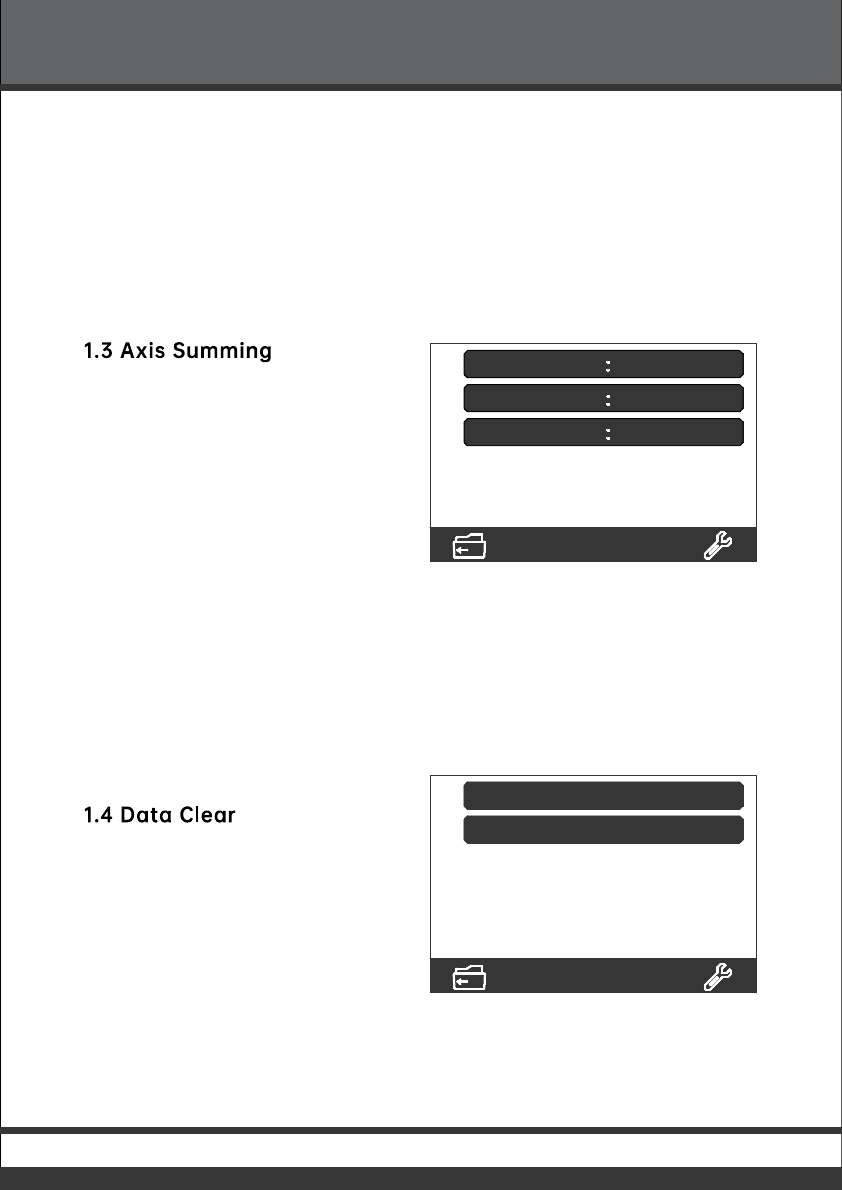
1.3 Axis Summing
Axis summing inclues:
·Axis Selection
·Summing Selection
·Switch ON or OFF
1. Axis Selection:
Press set utton to switch the axis which shall e set.
2. Axis Summing:
Press set utton to select the axis which shall e summe.
3. Switch ON or OFF:
Press set utton to enale or isale.
1.4 Data Clear
Data clear inclues:
·SDM Clear
·Factory Reset
1. SDM Clear:
Clear all memorie SDM coorinates.
2. Factory Reset:
Clear all ata memorie in DRO.
Page 3
1. System Parameter Setting
NA
OFF
Axis
Axis Summing
Switch
SDM Clear
Factory Reset
ersion:2.

Operation:
eetteiteanpreteetttoneOireiniitiarrot
teataearretenitioorataearreOteOi
itearin
1.5 Keypad Test
Operation:
Oneentertintionreteeaniattontotetitore
tentettononreenianeooritetproetettonon
reenireainitotane
1.6 RPM Setting (Optional)
eenororteoeaenororrotarenoer
ettinine:
·ipa
·enoreetion
·ettinorreotionorotar
enoerorneroanet
·eeteroaterear
·eeteroinion
Page 4
tarttetet
ipa O
enor aenor
Ooanet
eetO
eetO
1. System Parameter Setting

1. RPM Display:
Press set button to enable or isable the RPM isplayin.
2. Sensor Selection:
Press set button to sitch the sensor.all Sensor or Rotary ncoer
hen the sensor has been set as rotary encoerpress numeric an set
button to input the resolution.hen the sensor has been set as hall
sensorpress numeric to input the number of manets.
3. Teeth Number of Master Gear:
Press numeric to input the ear number.
4. Teeth Number of Pinion:
Press numeric to input the ear number.
Page 5
1. System Parameter Setting

2.1 Zero,Value Recovery
·Zero
ressing the zero button,operator could zero the value on windows.
·Value Recovery
When the value displayed on windows has been zeroed wrongly,
press zero button again could get back the former value.
Note: When the zero function has been switched off in DRO Setting,the value
could not be get back.
2.2 Imperial and Metric Conversion
ress the MM/INCH button to switch the displaying under imperial or metric
unit.
2.3 Coordinate Inputting
ress the ais button,and press the numeric button to input the value.Once
input,press ENT to confirm.
2.4 2 Function
ress the ais button and 1/2 button to half the value for corresponding ais.
2.5 ABS and INC Conversion
he DRO gets two sets of standard coordinate system,namely ABSAbsolute
and INC Relative Coordinate.ser could set the zero point of workpiece in ABS
coordinate,then switch to INC coordinate for machining.Zeroing at any position
in INC coordinate would not affect the length value from zero point to current
point in ABS coordinate.he process in ABS would change according to the
machining status.ser could switch the coordinate back to ABS for checking.
ress ABSINC button to switch.
Page 6
2. Fundamental Function
Tabla de contenidos
Manuales populares de Instrumento de medición de otras marcas


Endress+Hauser
Endress+Hauser Proline Promag 50 Especificaciones técnicas

Siemens
Siemens SITRANS F Coriolis FCT030 Manual de lista de piezas

KLINGER
KLINGER CMF V Series Manual de usuario

EXFO
EXFO FTB-2 Manual de operación y mantenimiento

Keysight
Keysight M8290A Manual de usuario

ADTEK
ADTEK MW-5 Manual de usuario