
Aerpro AERA10D Manual de usuario

AERA10D
Copyright © 2022
10" MULTIMEDIA RECEIVER
MODEL NUMBER: AERA10D
INSTALLATION GUIDE
aerpro.com

Installation of this product requires technical skill
and experience. It is recommended to have it
professionally installed by an authorized
Aerpro/Connects2 Dealer.
Read entire instructions thoroughly before starting.
Disconnect the vehicle's negative battery cable
before making any wire connections.
Protect all vehicle surfaces with tape or plastic
Do not install components in any location that will
hinder vehicle operation, such as steering wheel,
gearshift, air bags, hazard switch.
All wiring should be secured away from sharp
edges and moving parts.
PRECAUTIONS
AGREEMENT: End user agrees to use this product in compliance with the instructions and terms of use and with all
State and Federal laws. AERPRO provides instructions and safety warnings with respect to this product and disclaims
all liability for any use not in conjunction with those instructions or other misuse of its product. If you do not agree,
please discontinue use and contact AERPRO. This product is intended for off-road use and passenger use only.
TECHNICAL ASSISTANCE:
If you need assistance setting up or using your Aerpro product now or in the future, call Aerpro
Support. Australia. Mon-Fri 9am – 5pm AEST
TEL: 03 – 8587 8898 FAX: 03 – 8587 8866
Visit aerpro.com for
User Guide | Install Guides | Updates | Tech Tips

CONTENTS
Contents.........................................................3
Parts List........................................................4
Hardware Guide.............................................5
Pre-Assembly...................................................6
Display Assembly.............................................7
Mounting Options..........................................7
Double DIN Dash Kit Mounting.......................8
Double DIN Sub-Dash Kit Mounting...............10
Double DIN Factory Bracket Mounting............12
Single DIN Dash Kit Mounting........................14
Final Assembly...............................................16
Wiring & Connections....................................17
Dimensions....................................................21
Troubleshooting..............................................22
Upgrades/Options.........................................23
INSTALLATION GUIDE

4
Parts List
QTY DESCRIPTION
1 Touch Panel Display
1 Radio Module
Mounting Brackets / Hardware
1 Plastic Dash Mounting Bracket
1 Display Mounting Clamp
1 Metal Mounting Bracket
1 Horizontal Display Angle Plate
1 Rubber Boot
4 M4 X 6 Screw
4 M4 X 10 Screw
4 M4 X 12 Screw
2 M4 X 14 Screw
2 M4 x 18 Screw
6 M5 x 10 Screw
6 #10 x 3/8 Screw
2 Backstrap
Cables / Harnesses
1 8 Pin Display Power Harness - 18in
1 LVDS Display Video Cable - 18in
1 16 Pin Power / Speaker Harness
1 24 Pin AV / Rear Camera Harness
1 10 Pin Multi Camera Harness
1 6 Pin SWI / IR Harness
1 4 Pin Mic / Camera Audio Harness
1 External Microphone
1 GPS Antenna & Mounting Plate
5
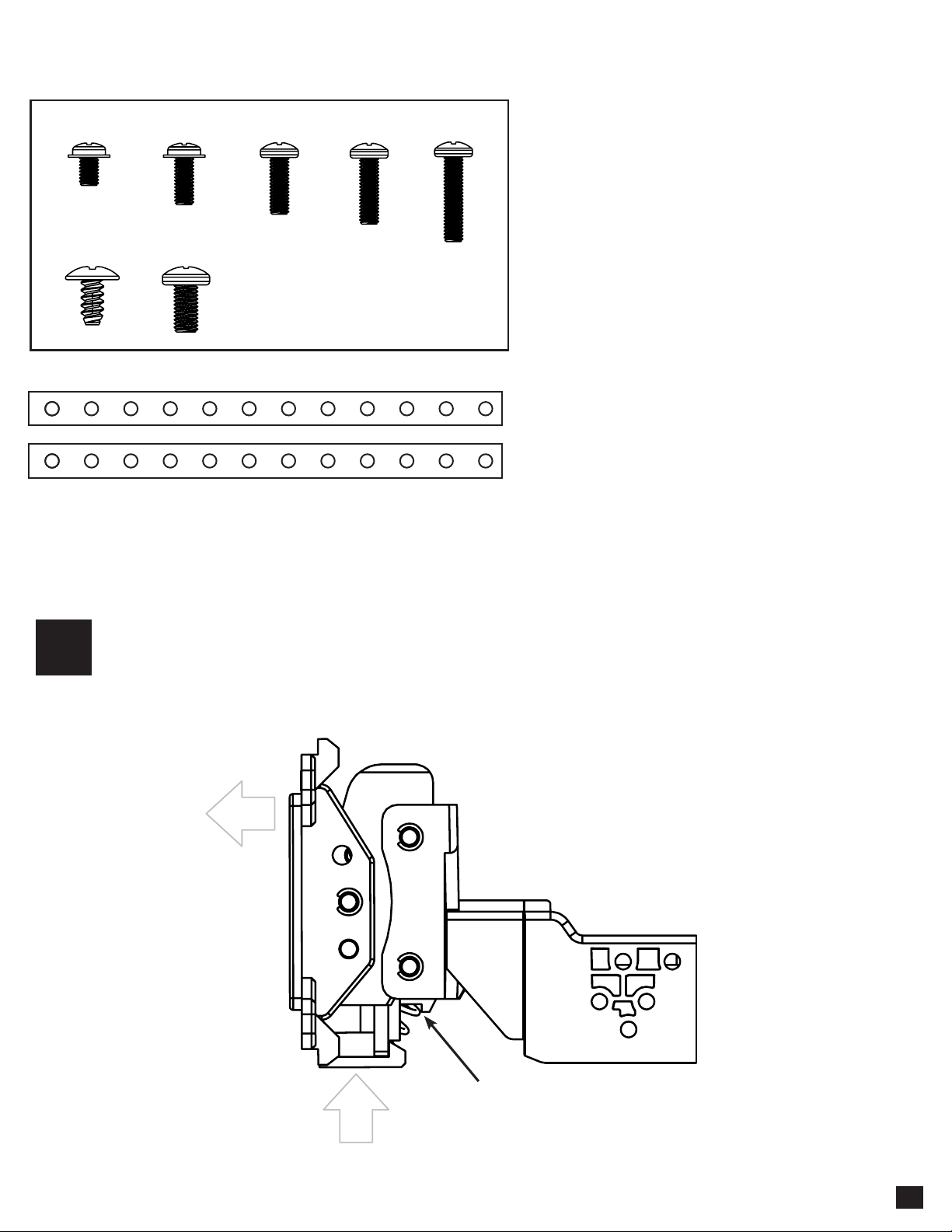
M4 X 6 M4 X 10 M4 X 12 M4 X 14 M4 X 18
#10 X 3/8 M5 X 10
NOTE: Depending on the
installation, not all screws
will be used.
Hardware Guide
Note: The 2 Backstrap (SE-1003) can be used in some applications to add additional support or used in custom installations.
The backstrap may mount to the sides of the radio chassis using the provided screws in the existing mounting locations or can
be mounted directly to the Plastic Dash Mounting Bracket.
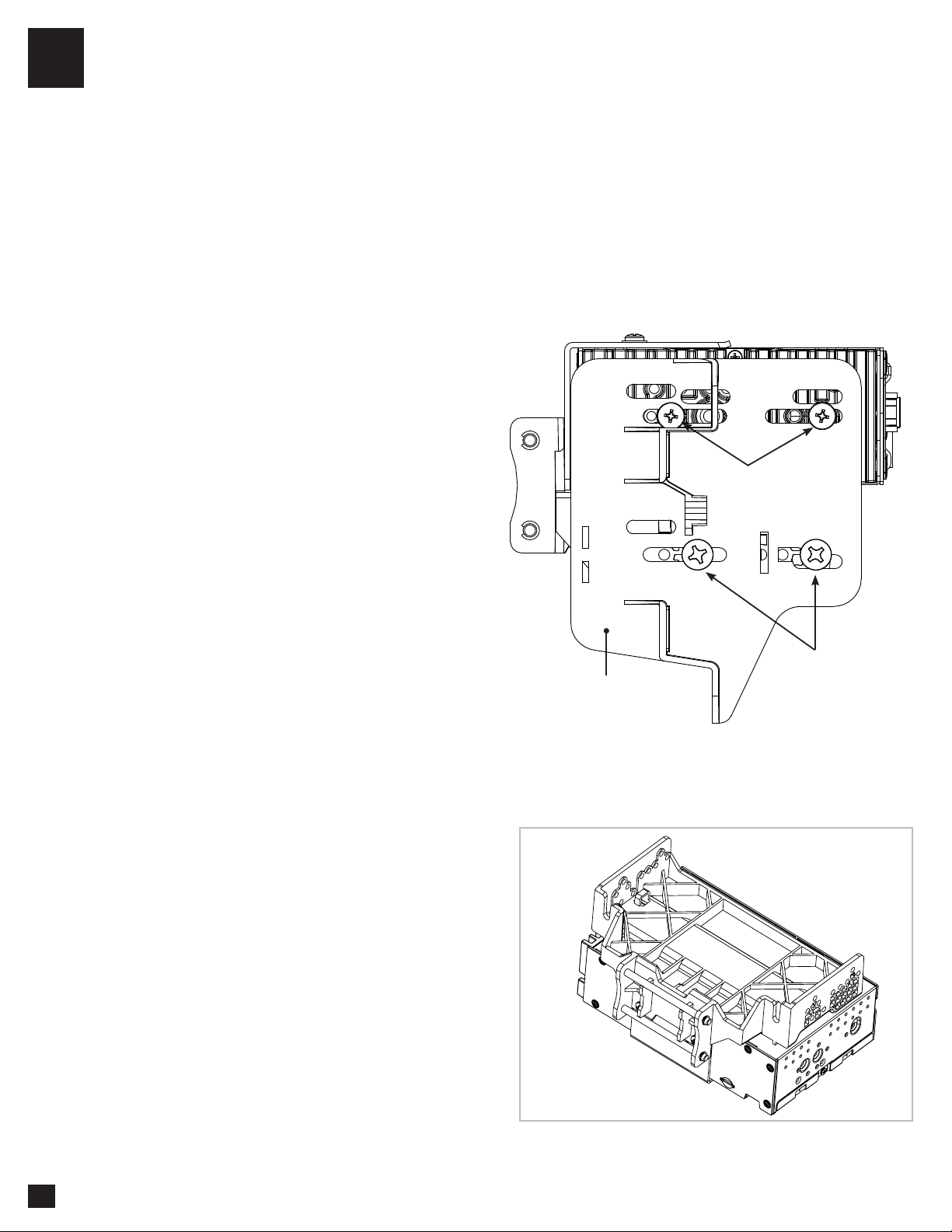
Remove the clamp assembly from the plastic mounting bracket by pushing up from
compression spring side (1) and swing out to unhook top (2).
1
1
2
Compression Spring

6
Single DIN Applications: For Single DIN
installations, the Plastic Dash Mounting
Bracket will be mounted in the dash kit
the dash kit and the Radio Module will be
mounted remotely. Before beginning the
installation, determine where the Radio
Module will be installed and make sure
the Display Cables are long enough.
Longer, 1.5 Metre cables are available
(SE-1501 & SE-1502).
Plastic Dash
Mounting Bracket
Single DIN ISO Dash Kit
(Not Included)
Double DIN Applications: Attach the Metal
Bracket to the Plastic Dash Mounting Bracket
using M4 X 6 screws. Attach metal bracket and
plastic dash mounting bracket assembly to the
Radio Module using M4 X 6 screws.
2
M4 X 6
M4 X 6
Metal
Bracket
Radio
Module
Plastic Dash
Mounting Bracket
Optional
Cable Channel
Pre-Assembly

7
4A
4B
4C
4D
The display can be installed Flat or with a Horizontal Angle towards the driver. For flat mounting,
attach the Clamp Assembly (1) to the display using M4 X 14 screws (FIG. A). If a horizontal angle
is desired, insert the Angle Plate (2) in between the clamp and display and replace 2 of the M4 X
14 screws with longer M4 X 18 screws on the thicker side of the angle plate (FIG. B). Center the
bracket on the back of the display as a starting point, and if needed you can adjust up or down.
FIG. A FIG. B
2
1 1
3
TOP
M4 X 12
(4X)
M4 X 18
(2X)(4X)
M4 X 14
(2X)X)
No Horizontal Angle With Horizontal Angle
Display Assembly
Multiple Mounting Options
AERA10D can be configured for different mounting applications:
See Aerpro website for TECH TIPS on vehicle specific installations.
Using a Double DIN Dash Kit (PAGE 8)
Using a Double DIN Sub-Dash Kit (PAGE 10)
Using a Double DIN Factory Radio Mounting Brackets (PAGE 12)
Using a Single DIN ISO Mountable Dash Kit, relocating Radio Module (PAGE 14)
Custom Mounting Applications.
TOP
Always ensure TOP indicator on the Clamp Assembly is facing UP.

8
Using a Double DIN Dash Kit:
Radio chassis mounts to the brackets attached to the kit main frame
4A
1
2
HOOK BOTTOM
FIRST, THEN TOP
#10 X 3/8
Coarse Thread Screw
M5 X 10
AFTERMARKET
DASH KIT
(NOT INCLUDED)
NOTE: BOOTAND DASH KIT NOT SHOWN
FIG. D
FIG. C
Display Adjustment & Mounting:
1. Install the dash kit side brackets to the main frame.
2. Making sure to use all 8 screws, loosely attach the radio module & mounting bracket assembly to the side
kit brackets (FIG. C).
a. (4x) #10 X 3/8 screws for the plastic mounting bracket locations
b. (4x) M5 X 10 or (4x) M4 X 10 screws for the radio module locations (use any combination of screws
to locate the radio in the best position)
3. Attach the display to the bracket assembly by
hooking bottom spring hook and then pushing up and
hooking top hooks. (FIG. D)

1
2
NOTE: BOOTAND DASH KIT NOT SHOWN
4A
FIG. E
FIG. G
FIG. F
9
4. Determine the desired position of the display:
a. Display can be vertical or tilted up (FIG. E)
b. Display can slide up or down (Page 7)
c. Display can be tilted horizontally (Page 7 – FIG. B)
Note: There are multiple mounting holes on
the mounting bracket to allow adjusting the
mounting depth. You may drill additional holes
in the mounting bracket and/or the dash kit
brackets to align the display in the best position
and ensure you can use all 8 mounting screws.
5. Once in the desired position, tighten screws
to the radio chassis (top) and mounting bracket
assembly (bottom).
Note: If the display prevents the factory dash
panel(s) from being installed last, do not push
the display all the way up against the dash
kit. Leave enough bottom gap as the display's
bottom edge rotates towards the dash kit.
6. Remove the display from the bracket
assembly by pushing up from compression
spring side (1) and swing out to unhook top (2).
(FIG. F)
Note: If there is a depth issue with the radio
module in the top position, move it to the
bottom location by inverting the mounting
bracket assembly. (FIG. G)
VERTICAL TILT: Use Hole A for no vertical
tilt or Hole B for 8 degrees of vertical tilt.
Insert a M5 X 10 on each side of the clamp
assembly at desired tilt.
A
M5 X 10
M5 X 10
Compression Spring
PROCEED TO STEP 5
on Page 16
B
Using a Double DIN Dash Kit:
Radio chassis mounts to the kit brackets in the sub-dash, not to the kit main frame
4B
#10 X 3/8
Coarse Thread Screw
M5 X 10
AFTERMARKET
DASH KIT
(NOT INCLUDED)
FIG. H
FIG. I
Display Adjustment & Mounting:
1. Use all 8 kit mounting screws to attach the radio module & plastic mounting bracket assembly to the kit
brackets at the front most location (not to exceed the front of the kit bracket). (FIG. H)
a. (4x) #10 X 3/8 screws for the bottom locations
b. (4x) M5 X 10 or (4x) M4 X 10 screws for the radio module locations (use any combination of screws to
locate the radio in the best position)
Note: There are multiple mounting holes on the
plastic mounting bracket to allow adjustment of the
mounting depth. You may drill additional holes in
the mounting bracket and/or the dash kit brackets to
align the display in the best position and ensure you
can use all 8 mounting screws.
2. Install the assembly (from Step 1) into the vehicle
(using factory screws/bolts).
3. Install the dash kit main frame and any factory
panels that would affect the display installation.
Note: If there is a depth issue with the radio
module in the top position, move it to the bottom
location by inverting the mounting bracket
assembly. (FIG. I)
10
Otros manuales para AERA10D
2
Tabla de contenidos
Otros manuales de Receptor de Aerpro


