ADWA AD 131 Manual de usuario

1
AD 131 and AD 132
pH/mV/Temperature
Waterproof Meters
USER MANUAL
www.adwainstruments.com
56
MANAD132 09/14
ADWA HUNGARY Kft.
Alsókikötõ sor 11, 6726 Szeged, Hungary
Tel. +36 62 317 878
Fax +36 62 550 610
www.adwainstruments.com

2
Dear Customer,
Thank you for choosing an Adwa product.
Please read carefully this manual before starting operations.
This instrument is in compliance with the EMC directive 2004/
108/EC and its standards, and Low Voltage Directive 2006/95/
EC and its standards for electrical equipments.
For additional technical information, please e-mail us at
WARRANTY
Adwa warrants this product to be free of defects in material
and workmanship as stated in the operating manual. If repair
or adjustment is necessary and has not been the result of
abuse, misuse or improper handling within the warranty
period, please contact your dealer or the nearest Adwa Office
for the RGA (Return Goods Authorization) number to put on
the outside of your package. Warranted service will be made
without charge. The meter is warranted for a period of 2 years,
while probes are warranted for 6 months. The warranty
period commences from the original date of sale. Warranty is
only valid when the product is used under normal conditions
and in accordance with the instruction manual. The warranty
is void if the instrument is repaired or serviced by unauthorized
personnel, not used in accordance to the instructions, or if
non-Adwa accessories such as buffer solutions, probes, etc.
are used in conjunction with the meter. Adwa will not be held
responsible for any accident whether directly or indirectly,
caused by the use of this instrument.
55

3
TABLE OF CONTENTS
Introduction ................................................................ 4
Technical Data .......................................................... 6
Front and Top Panels ................................................ 8
Operational Guide .................................................... 10
pH Calibration ......................................................... 16
Relative mV Calibration .......................................... 25
Good Laboratory Practice (GLP) ........................... 26
Setup ........................................................................ 31
Log-on-demand ........................................................ 34
Hold Function .......................................................... 39
Printing (AD132 only) ............................................. 40
Battery Replacement .............................................. 44
Temperature Calibration (for technical personnel only) 45
mV Calibration (for technical personnel only) .................. 47
PC Interface (AD132 only) .................................... 49
pH Electrode Conditioning & Maintenance ........... 50
Troubleshooting Guide ............................................. 52
Electrodes, Probes and Solutions ............................ 54
54
ELECTRODES, PROBES AND SOLUTIONS
AD1230B pH electrode with Epoxy body, tip protection
bottle, BNC connector with protection
sleeve and 1 m cable
AD3230B ORP electrode with Epoxy body, tip
protection bottle, BNC connector with
protection sleeve and 1 m cable
AD7662 Stainless steel temperature probe with 1 m
cable.
AD70004P pH 4.01 buffer solution, 20 ml sachet, 25 pcs.
AD7004 pH 4.01 buffer solution, 230 ml bottle
AD70007P pH 7.01 buffer solution, 20 ml sachet, 25 pcs.
AD7007 pH 7.01 buffer solution, 230 ml bottle
AD70010P pH 10.01 buffer solution, 20 ml sachet, 25 pcs.
AD7010 pH 10.01 buffer solution, 230 ml bottle
AD7061 Electrode cleaning solution, 230 ml bottle
AD70300 Electrode storage solution, 230 ml bottle
AD70000P Electrode rinsing solution, 20 ml sachet,
25 pcs.
AD7000 Electrode rinsing solution, 230 ml bottle
AD9551 Serial communication cable, 5 to 9 pins

4
INTRODUCTION
AD131 and AD132 are heavy-duty portable waterproof
meters for pH, ORP (Oxidation Reduction Potential) and
temperature measurements, designed to provide laboratory
results and accuracy even under harsh industrial conditions.
Main features include:
• 7 memorized buffers for pH calibration (pH 1.68, 4.01,
6.86, 7.01, 9.18, 10.01 and 12.45)
• Messages on the LCD to make the calibration easy
and accurate
• pH readings with manual or automatic temperature
compensation
• Calibration time-out alarm
• Log-on-demand
• HOLD feature to freeze stable reading on the LCD
• GLP feature to view last calibration data for pH and
relative mV
• PC interface (AD132 only)
53
SYMPTOMS
The meter does
not work with
temperature
probe.
The meter fails to
calibrate or gives
faulty readings.
Explicit warnings
are displayed
during pH
calibration.
At start-up the
meter displays all
LCD perma-
nently.
“Prn Eror” error
message dis-
played.
“Err xx” error
message dis-
played.
PROBLEM
Out of order
temperature probe.
Broken or out of
order pH electrode.
Dirty/broken pH
electrode, contami-
nated reference or
buffers.
One of the keys is
blocked.
Printer error.
Internal error.
SOLUTION
Replace the probe.
Replace the
electrode.
Follow displayed
instructions.
Check the
keyboard or
contact the
vendor.
Turn the meter off
and then turn it
on. If the error
persist, contact
your dealer.
Turn the meter off
and then turn it
on. If the error
persist, contact
your dealer.

5
Both models are supplied complete with:
•AD1230B pH electrode with double ceramic junction,
BNC connector and 1 m cable
•AD7662 stainless steel temperature probe, 1 m cable
• 1.5V AA alkaline batteries (4 pcs)
• User manual
• Connection to an external serial printer (AD132 only)
with the following specification:
• at least 16 characters/line
• baud rate 9600
• 9-pin RS232 input
52
TROUBLESHOOTING GUIDE
SYMPTOMS
Slow response/
excessive drift.
Readings
fluctuate up and
down (noise).
Only blinking
dashes during
pH measure-
ments.
Blinking reading
during measure-
ments.
Out of range in
the mV scale.
PROBLEM
Dirty pH electrode.
Clogged/dirty
junction. Low
electrolyte level
(for refillable
electrodes only).
Out of range in the
pH scale.
Reading out of
range or electrode
not connected.
Dry membrane/
junction.
SOLUTION
Soak in AD7000
solution for 30
minutes and then
clean the electrode.
Clean the electrode.
Refill with fresh
solution (for
refillable electrodes
only).
Make sure the pH
sample is in the
specified range.
Calibrate. Check
electrolyte level
and general state
of the electrode.
Check sample or
connect electrode.
Soak in AD70300
storage solution
for 1 h.

6
TECHNICAL DATA
Range -2.00 to 16.00 pH
±2000 mV
-20.0 to 120.0 °C (-4.0 to 248.0 °F)
Resolution 0.01 pH
0.1 mV (±999.9 mV) / 1 mV (outside)
0.1 °C (0.1 °F)
Accuracy ±0.01 pH
(@25 °C/77 °F) ±0.2 mV up to ±699.9 mV
±0.5 mV up to ±999.9 mV
±2 mV (outside)
±0.4 °C (±0.7 °F) excluding probe error
Relative mV Offset ± 2000 mV
pH Calibration Up to 5-point calibration,
with 7 standard buffers
(pH 1.68, 4.01, 6.86, 7.01, 9.18, 10.01, 12.45)
Temperature Manual or automatic,
Compensation -20.0 to120.0 °C (-4.0 to 248.0 °F)
pH Electrode AD1230B
Temperature Probe AD7662
Log-on-demand 500 samples
Printer (AD132 only) External serial printer
51
PERIODIC MAINTENANCE
Inspect electrode and cable. The cable used for
connection to the instrument must be intact and there
must be no points of broken insulation on the cable or
cracks on the electrode stem or bulb. Connectors must
be perfectly clean and dry. If any scratches or cracks
are present, replace the electrode. Rinse off any salt
deposits with water.
CLEANING PROCEDURE
Soak in AD7061 general cleaning solution for approximately
30 minutes.
IMPORTANT: After performing any of the cleaning
procedures, rinse the electrode thoroughly with AD7000,
refill the reference chamber with fresh electrolyte and
soak the electrode in AD70300 storage solution for at
least 1 hour before taking measurements.

7
PC Interface (AD132 only) RS232 port
Input Impedance 1012 Ohm
Environment 0 to 50 °C (32 to 122 °F)
RH max. 100% non-condensing
Power Supply 4 x 1.5 V AA, alkaline battery
Battery Life Approx. 300 hours of continuous use
Auto-off User selectable: 5 minutes or disabled
Dimensions 188 x 96 x 70 mm
Weight 460 g
50
pH ELECTRODE CONDITIONING &
MAINTENANCE
PREPARATION PROCEDURE
Remove the pH electrode protective cap. DO NOT BE
ALARMED IF SALT DEPOSITS ARE PRESENT.
This is normal with electrodes and they will disappear
when rinsed with water.
During transport, tiny bubbles of air may form inside the
glass bulb affecting proper functioning of the electrode.
These bubbles can be removed by “shaking down” the
electrode as you would do with a glass thermometer.
If the bulb and/or junction are dry, soak the electrode in
AD70300 storage solution for at least one hour.
STORAGE PROCEDURE
To minimize clogging and assure a quick response time,
the glass bulb and the junction of the pH electrode should
be kept moist and not allowed to dry out.
Replace the solution in the protective cap with a few
drops of AD70300 storage solution .
NEVER STORE THE ELECTRODE IN DISTILLED
OR DEIONIZED WATER.

8
FRONT AND TOP PANELS
49
PC INTERFACE (AD132 only)
Data can be transferred from the instrument to the PC
using the ADSW10 Windows®compatible software
(optional).
ADSW10 also offers graphing and on-line help feature.
Data can be exported to the most popular spreadsheet
programs for further analysis.
To connect your instrument to a PC, use the AD9551
optional Adwa cable. Make sure that the instrument is
switched off and plug the cable to the instrument RS232
socket and to a serial port of your PC.
If not using the AD9551 cable, communication between
instrument and PC may be not possible, due to different
RS232 connector configuration.
conditions or contact your dealer if calibration
can not be performed.
• To return to normal measurement mode, press
CAL at any moment during calibration.
• If the calibration procedure is ended after the
600.0 mV point is confirmed, the meter returns
to normal measurement mode and stores a 2-
point calibration data.

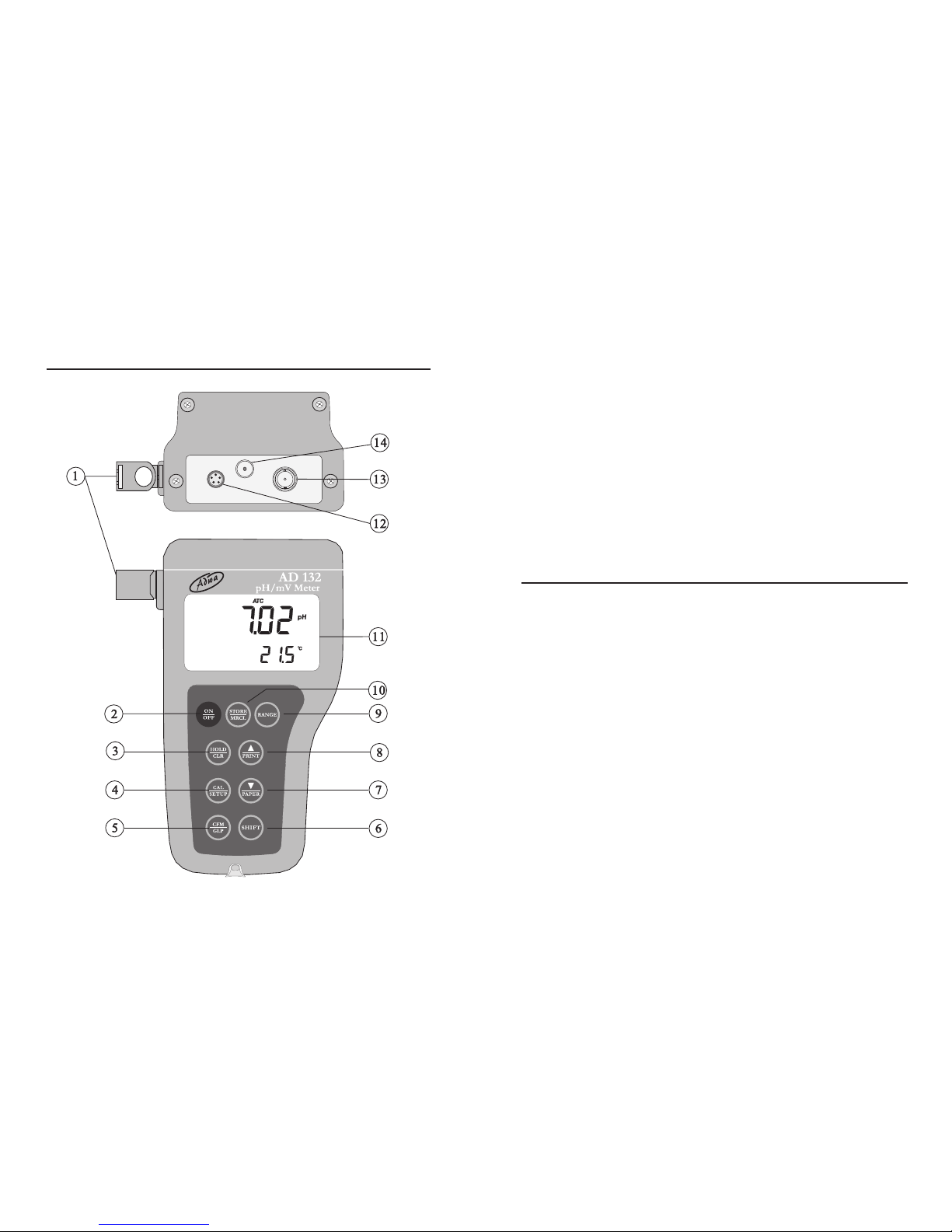
9
1. Holders for probes
2. ON/OFF key, to turn the instrument ON and OFF
3. HOLD/CLR key, to freeze stable reading on the
LCD and clear calibration or logged data
4. CAL/SETUP key, to enter/exit calibration mode or
enter/exit SETUP mode
5. CFM/GLP key, to confirm value and display GLP
information
6. SHIFT key, to activate the key second function.
Press first SHIFT and then the selected key. The
SHIFT tag is displayed until the second key is pressed
7. DOWN arrow/PAPER (PAPER for AD132 only)
to manually decrease the value of temperature or
other parameters, or to pull out printer paper
8. UP arrow/PRINT (PRINT for AD132 only) key, to
manually increase the value of temperature or other
parameters, to obtain a printout or cancel printing
9. RANGE key, to select measurement range or switch
focused data
10. STORE/MRCL key, to store measured data and
enter/exit the logged data viewing mode
11. Liquid Crystal Display (LCD)
12. RS232 connector (AD132 only)
13. BNC connector for pH or ORP electrodes
14. Temperature probe socket
48
• Attach a mV simulator with an accuracy of ±0.1 mV
to the BNC connector on the rear panel.
• With the instrument off, press and hold the CFM &
STORE keys, then power on the instrument. The CAL
tag lights up and the secondary LCD shows 0.0 mV.
• Set the simulator to 0.0 mV. When the reading is stable
and close to the selected calibration point, the CFM
tag starts blinking.
• Press CFM to confirm and the secondary LCD will
display the second expected value (600.0 mV).
• Set the simulator to 600.0 mV. When the reading is
stable and close to the selected calibration point, the
CFM tag starts blinking.
• Press CFM to confirm. The secondary LCD will
display the third expected value (1800 mV).
• Set the simulator to 1800.0 mV. When the reading is
stable and close to the selected calibration point, the
CFM tag starts blinking.
• Press CFM to confirm. The instrument returns to
measurement mode.
Notes:
• If the reading is not close to the selected point,
the WRONG tag will blink. Verify the calibration

10
OPERATIONAL GUIDE
• The meter is supplied complete with four 1.5V AA
alkaline batteries. Remove the rear cover, unwrap the
batteries and install them while paying attention to the
correct polarity (see “Battery Replacement” section).
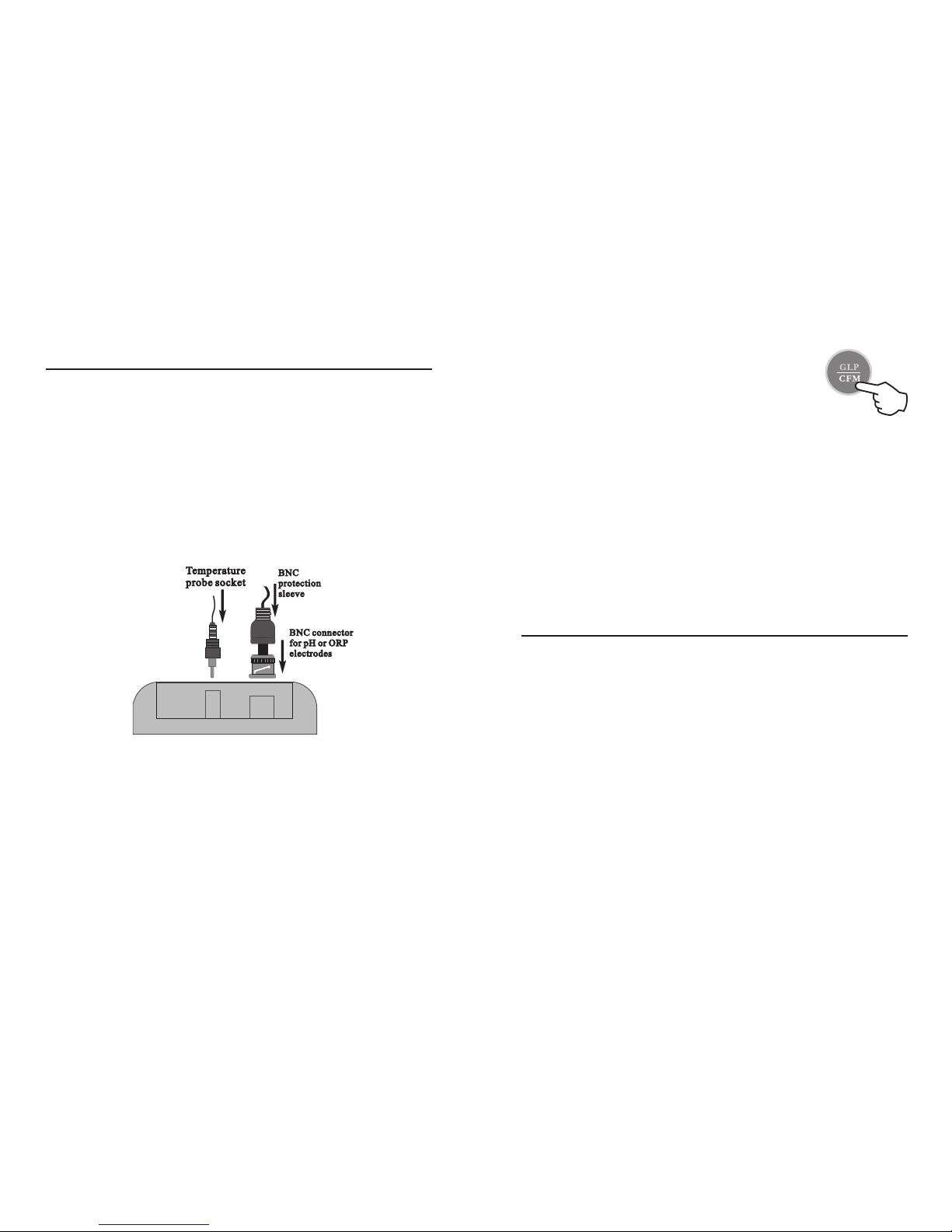
• Connect pH electrode and temperature probe to the
BNC and temperature sockets on the top of the
instrument. Slide the BNC protection sleeve to
completely cover the BNC connector.
• The temperature probe is used in conjunction with the
pH electrode to utilize the meter’s ATC capability, but
it can also be used independently to take temperature
measurements. If the probe is disconnected, the
temperature can be set manually using the arrow keys.
47
• Press CFM to confirm. The instrument
returns to normal measurement mode.
Notes:
• If the reading is not close to the selected
calibration point, the WRONG tag will blink.
Change the temperature probe and restart
calibration.
• Press CAL at any time to quit the procedure.
mV CALIBRATION (for technical personnel only)
The instruments are factory calibrated for mV range.
Adwa’s ORP electrodes are interchangeable and no mV
calibration is needed when they are replaced.
If measurements are not accurate, a mV recalibration
should be performed.
For an accurate recalibration, contact your dealer or the
nearest Adwa Customer Service Center, or follow the
instructions below.
A two or three-point procedure can be performed at 0.0,
600.0 and 1800 mV.
Este manual sirve para los siguientes modelos
1
Tabla de contenidos
Manuales populares de Multímetro de otras marcas

Gossen MetraWatt
Gossen MetraWatt METRAmax 6 Manual de usuario

PeakTech
PeakTech 4000 Manual de uso y cuidado

YOKOGAWA
YOKOGAWA 90050B Manual de usuario

Gossen MetraWatt
Gossen MetraWatt METRALINE DMM16 Manual de usuario

Fluke
Fluke 8846A Manual de operación y mantenimiento

Tempo Communications
Tempo Communications MM200 Manual de usuario