
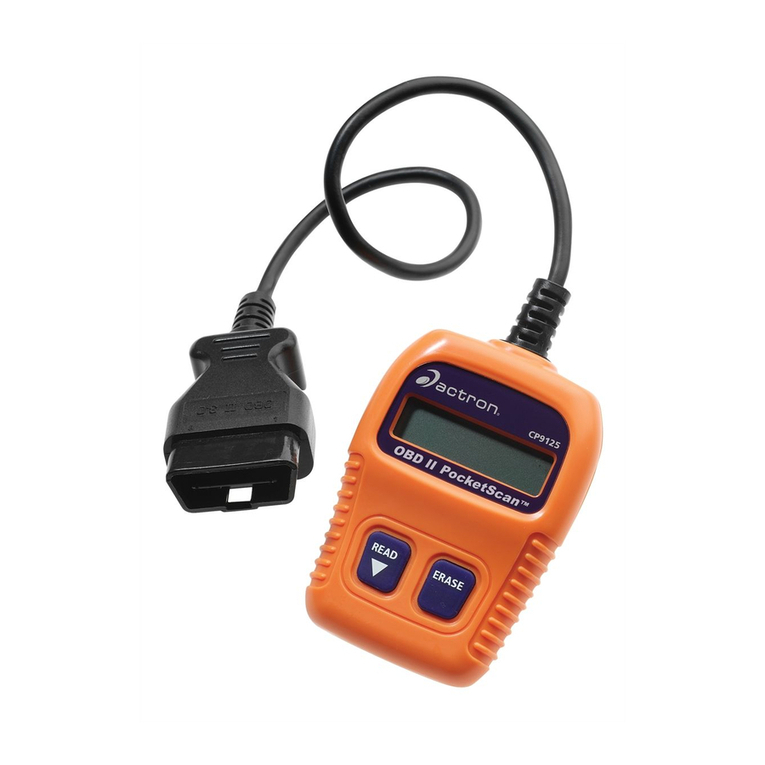
Actron OBD II PocketScan Code Reader CP9125 Manual de usuario

CP9125
OBD II PocketScan
Code Reader
For use with OBD II Compliant Vehicles
1
2
3
4
LCD Display - Is a Single Line Display with 8 characters.
ERASE Key - Used to Erase Trouble Codes and I/M
Monitor status rom Vehicles Computer Modules and
scroll up through screens. (I/M Monitors are currently
used for state emissions tests.)
READ/Scroll Down Key - Used to view Read Codes, MIL
Status, I/M Readiness Status and Scroll down through
screens.
OBD II Connector - Used to communicate with OBD II
compliant vehicles.
1
2
3
4
0002-002-2666

Safety Precautions
For sa ety, read, understand and ollow all sa ety messages
and instructions in manual be ore operating the PocketScanTM
Code Reader.
Always re er to and ollow sa ety messages and test
procedures provided by manu acturer o vehicle and
PocketScanTM Code Reader.
Signal Words Used:
In icates a possible hazar ous situation
which, if not avoi e , will result in eath or
serious injury to operator or bystan ers.
In icates a possible hazar ous situation
which, if not avoi e , coul result in eath
or serious injury to operator or bystan ers.
In icates a possible hazar ous situation
which, if not avoi e , may result in
mo erate or minor injury to operator or
bystan ers.
In icates a con ition which, if not avoi e ,
may result in amage to test equipment or
vehicle.
Important Safety Messages
Always wear ANSI approved eye protection.
Always operate vehicle in a well-ventilated area.
Always keep people, tools and test equipment away rom all
moving or hot engine parts.
Always make sure vehicle is in PARK (automatic
transmission) or Neutral (manual transmission) and parking
brake is set.
Always block drive wheels and never leave vehicle
unattended while testing.
Always keep a ire extinguisher suitable or gasoline/
electrical/chemical ires readily available.
Never lay tools on vehicle battery.
!
WARNING
!
CAUTION
!
DANGER
IMPORTANT
2

3
Always use caution when working around ignition coil,
distributor cap, ignition wires, and spark plugs. Components
can produce a High Voltage while engine is running.
Battery acid is caustic. I contacted, rinse with water or
neutralize with a mild base (i.e. baking soda). I in eyes,
lush with water and call a physician immediately.
Never smoke or have open lames near vehicle. Vapors
rom gasoline and battery during charge are explosive.
Never use the PocketScanTM Code Reader i internal
circuitry has been exposed to moisture. Internal shorts
could cause a ire and damage.
Always turn ignition key OFF when connecting or
disconnecting electrical components, unless otherwise
instructed.
Some vehicles are equipped with sa ety air bags. Follow
vehicle service manual cautions when working around air
bag components or wiring. Note, air bag can still open
several minutes a ter ignition key is o .
Always ollow vehicle manu acturers warnings, cautions and
service procedures.

4
PocketScanTM Code Reader Features
Read Codes:
Reading Diagnostic Trouble Codes allows the PocketScanTM
Code Reader to read the codes rom the vehicles computer
modules.
Diagnostic Trouble Co es:
Diagnostic Trouble Codes are
used to help determine the cause
o a problem or problems with a
vehicle. Diagnostic Trouble Codes are set when a ault is
present or a su icient amount o time.
Pen ing Co es: Pending
Codes are also re erred to as
continuous monitor codes and
maturing codes. Pending
Codes occurs when the code
has not occurred a speci ic
number o times (depending on
vehicle,) causing the code to mature.
P0443
P0452 ,
9
:
9
:

5
MIL Conditions:
MIL (Malfunction Indicator Lamp) Status displays the
state o the vehicles computer module(s).
MIL ON: Indicates that the
Mal unction Indicator Lamp on
vehicle should be ON indicating
a possible emissions problem.
√ I the MIL Status is ON and the MIL is not illuminated with
the engine running, then a problem exists in the MIL
circuit.
MIL OFF: Indicates the
Mal unction Indicator Lamp
should be o and there should
be no emission problems.
√Some manu acturers will turn the MIL o i a certain
number o drive cycles occur without the same ault being
detected.
√Diagnostic Trouble Codes related to a MIL are erased
rom the computers memory a ter 40 warm-up cycles i
the same ault is not detected.
MIL ON
MIL OFF
9
:
9
:

Monitors Expanded Name
Misfire Misfire Monitor
Fuel Fuel System Monitor
Comp Comprehensive Components Monitor
Catlyst Catalyst Monitor
Htd Cat Heated Catalyst Monitor
Evap Evaporative System Monitor
Sec Air Secondary Air System Monitor
A/C Air Conditioning Refrigerant Monitor
O2 Snsr Oxygen Sensor Monitor
O2 Htr Oxygen Sensor Heater Monitor
EGR Exhaust Gas Recirculation
Status Description
Ready Vehicle was driven enough under proper conditions to
complete the monitor.
Inc (Incomplete) - Vehicle was not driven enough under
proper conditions to complete the monitor.
Inspection / Maintenance Monitors (I/M Monitors):
The I/M Monitors (Inspection / Maintenance) unction displays
a SNAPSHOT o the operations or the Emission System.
√ A ter a speci ic amount o drive time (each monitor has
speci ic driving conditions and time required), the
computers monitors will decide i the vehicles emission
system is working correctly.
√Some states MAY NOT require all monitors listed to be
Ready to pass the emissions test. Check with state
testing site or exact requirements. All states will ail a
vehicle that has the MIL Light lit at time o test.
Monitors Viewe :
Monitor Status:
Monitors may be cleare by:
− Using the erase codes unction.
− Disconnected or discharged battery (on some vehicles.)
− Computer module losing power (on some vehicles.)
6

Reading Diagnostic Trouble Codes and Data
Avoi Cooling Fan! Fan may turn on
uring test.
1.Turn Ignition Key to the Off Position.
2. Locate an Plug in Data Link
Connector (DLC.)
NOTE: The data link connector
should be located under
the dashboard on the
driverside o the vehicle.
I the data link connector is not located under the
dashboard as stated, a label describing the location o
the data link connector should be there.
3. Observe Display toggles between
Pocket an Scan.
NOTE: For a correct reading or
Diagnostic Trouble Codes and I/M Monitor Status,
ignition key must be in the ON position and Engine does
not require starting.
To get a correct reading or MIL Status, Engine must be
started.
4. Start Engine.
5. Press READ/Scroll Down Key
an Release.
O
F
F
O
N
!
WARNING
Pocket
7

NOTE: I diagnostic trouble codes (DTCs) are already being
displayed rom a previous read operation, press and hold
READ/Scroll Down key or 3 seconds and release.
6.Observe a Moving * on Display.
NOTE: I a No Link message
displays, cycle ignition key to
the OFF position or 10
seconds, then back ON and repeat Reading Diagnostic
Data.
7. View Co es on Display
NOTE: I there are no codes present,
the tool will display 0
Codes and proceed to
display MIL Status when READ/Scroll Down is
pressed.
To View Codes press and
release READ/Scroll
Down key.
I the code is a Pending
Code a , will be displayed.
*
No Link
P0443
P0452 ,
0 Codes9
3 Codes9
9
:
9
:
8

MIL ON 9
:
8. View MIL Status
Press and release
READ/Scroll Down
key.
9. View I/M Monitors that are
Incomplete.
Press and release
READ/Scroll Down
key.
NOTE: I there are no more I/M
Monitors that are Incomplete,
the tool will then display Ready
Monitors when READ/Scroll Down key is pressed.
10. View I/M Monitors that are Rea y.
Press and release
READ/Scroll Down
key.
NOTE: Pressing the ERASE key will scroll up to review
Diagnostic Trouble Codes and Data.
NOTE: Holding READ /Scroll Down key or 3 seconds
will read Diagnostic Trouble Codes and Data again.
Monitrs9
:
5 Ready
O2 Htr
2 Inc
Misfire
9
:
9
:
9
:
9
:
9

Erasing Diagnostic Trouble Codes and Data
Erasing allows the PocketScanTM Code Reader to delete the codes
and I/M Monitor status rom the vehicles computer modules.
Only Erase Diagnostic Data after checking
system completely an writing own results.
Avoi Cooling Fan! Fan may turn on
uring test.
1.Turn Ignition Key to the Off Position.
2. Locate an Plug in Data Link
Connector (DLC.)
NOTE: The data link connector
should be located under
the dashboard on the
driverside o the vehicle.
I the data link connector is not located under the
dashboard as stated, a label describing the location o
the data link connector should be there.
3. Observe Display toggles between
Pocket an Scan.
4.Turn Ignition Key to the ON Position
leaving Engine Off.
NOTE: Make sure that the Ignition Key is
ON and NOT in the Accessory
Position.
IMPORTANT
!
WARNING
O
F
F
O
N
O
F
F
O
N
Scan
10
Otros manuales para OBD II PocketScan Code Reader CP9125
3
Este manual sirve para los siguientes modelos
1
Tabla de contenidos
Otros manuales de Accesorios para automóviles de Actron

Actron
Actron CP9087 Manual de usuario
Actron
Actron OBD II PocketScan Code Reader CP9125 Manual de usuario

Actron
Actron Compression Tester CP7821 Manual de usuario

Actron
Actron SCANTOOL CP9110 Manual de usuario

Actron
Actron 2513 Manual de usuario

Actron
Actron Global OBD II Scan Tool 9620 Manual de usuario


