
Acrosser Technology AND-DNV3N2FL Manual de usuario

AND-DNV3N2FL
User Manual
Acrosser Technology Co., Ltd.
www.acrosser.com
AND-DNV3N2FL
Networking Desktop
Intel®Denverton®SoC
4GbE Copper (2-pair bypass)
2GbE Copper (or Fibber)

AND-DNV3N2FL
2Acrosser Technology Co., Ltd.
To read this User Manual on your smart phone, you will have to install an
APP that can read PDF le format rst. Please nd the APP you prefer from
the APP Market.
Ver: 100-001
Date: Apr. 23, 2019
Disclaimer
For the purpose of improving reliability, design and function, the information in this document
is subject to change without prior notice and does not represent a commitment on the part of
Acrosser Technology Co., Ltd.
In no event will Acrosser Technology Co., Ltd. be liable for direct, indirect, special, incidental, or
consequential damages arising out of the use or inability to use the product or documentation,
even if advised of the possibility of such damages.
Copyright
This document contains proprietary information protected by copyright. All rights are reserved.
No part of this manual may be reproduced by any mechanical, electronic, or other means in
any form without prior written permission of Acrosser Technology Co., Ltd.
Trademarks
The product names appear in this manual are for identication purpose only. The trademarks
and product names or brand names appear in this manual are the property of their respective
owners.
Purpose
This document is intended to provide the information about the features and use of the product.
Audience
The intended audiences are technical personnel, not for general audiences.

AND-DNV3N2FL
3www.acrosser.com
Table of Contents
1. System Introduction ...................................................................... 5
1.1. Specications ............................................................................................................. 5
1.2. Package Contents ...................................................................................................... 7
1.3. System Dissection...................................................................................................... 8
1.3.1. Dimensions ..................................................................................................... 8
1.3.2. Front I/O Panel.............................................................................................. 10
1.3.3. Rear I/O Panel ...............................................................................................11
2. Components Assembly ............................................................... 12
2.1. System Disassemble................................................................................................ 12
2.2. SIM / DIMM Installation ............................................................................................ 14
2.3. HDD Installation........................................................................................................ 15
2.4. System Assemble..................................................................................................... 17
2.5. Antenna Installation.................................................................................................. 18
3. BIOS Settings ............................................................................... 19
3.1. Main Setup ............................................................................................................... 19
3.2. Advanced Setup ....................................................................................................... 20
3.2.1. Advanced Setup: Trusted Computing ........................................................... 21
3.2.2. Advanced Setup: Serial Port Console Redirection........................................ 22
3.2.3. Advanced Setup: USB Conguration ............................................................ 23
3.2.4. Advanced Setup: SDIO Conguration........................................................... 24
3.2.5. Advanced Setup: SIO Conguration ............................................................. 25
3.2.6. Advanced Setup: Hardware Monitor ............................................................. 25
3.2.7. Advanced Setup: LAN Bypass Conguration................................................ 26
3.2.8. Advanced Setup: Power Management.......................................................... 27
3.2.9. Advanced Setup: Digital IO Port Conguration ............................................. 28
3.3. Security Setup .......................................................................................................... 29
3.4. Boot Setup................................................................................................................ 30
3.5. Save & Exit Setup..................................................................................................... 31
3.6. IntelRCSetup ............................................................................................................ 32
3.6.1. IntelRCSetup: Power Conguration .............................................................. 32
3.6.2. IntelRCSetup: Server ME Conguration ....................................................... 33
3.6.3. IntelRCSetup: North Bridge Chipset Conguration ....................................... 34
3.6.4. IntelRCSetup: South Bridge Chipset Conguration ...................................... 34

AND-DNV3N2FL
4Acrosser Technology Co., Ltd.
4. Software Installation and Programming Guide ........................ 35
4.1. Introduction............................................................................................................... 35
4.1.1. Environment .................................................................................................. 35
4.1.2. GPIO ............................................................................................................. 35
4.1.3. Watchdog ...................................................................................................... 35
4.1.4. LAN Bypass Subsystem................................................................................ 35
4.2. File Descriptions....................................................................................................... 36
4.2.1. GPIO/Watchdog/LAN Bypass Subsystem Module........................................ 36
4.3. API List and Descriptions ......................................................................................... 36
4.3.1. GPIO ............................................................................................................. 36
4.3.2. Watchdog ...................................................................................................... 37
4.3.3. LAN Bypass Subsystem................................................................................ 37
4.3.4. Notes............................................................................................................. 38
5. FAQ ............................................................................................... 39
Q 1. Where is the serial number located on my system?................................................. 39
Q 2. Why does the system booting take so long? ............................................................ 39

AND-DNV3N2FL
5www.acrosser.com
1. System Introduction
The AND-DNV3N2FL series is a fanless version of AND-DNV3N2, a small form
factor network appliance. They both equipped with the latest Intel microserver SoC
Atom C3558 (4 core).
AND-DNV3N2/ AND-DNV3N2FL series provides a more exible system expansion
versatility with 6x or 4x GbE copper LANs (with 2-pair bypass), optional 2x 1G ber
networks (SFP). Furthermore, in the system design, there is a 2.5-inch HDD/SSD
and two Mini PCIe slots to support latest WLAN function (IEEE 802.11 a/b/g/n/ac)
and 4G LTE feature as well.
1.1. Specifications
(Specications are subject to change without notice.)
System
Thermal Solution • Fanless Design
CPU • Intel®Denverton®C3558 4 cores, 2.2GHz
Memory • 2x SO-DIMM DDR4-2400
BIOS • AMI UEFI BIOS
Storage
HDD • 1x 2.5” Internal HDD Bay, SATA 6.0Gb/s
Communication and I/O
Ethernet • Intel®X553 (Marvell 88E1543) (via LAN [3:6]) (Copper)
• AND-DNV3N2FL-04PC: Intel®i211-AT, LAN[1:2]
(Copper)
• AND-DNV3N2FL-04PF: Intel®i210-AT, LAN[1:2] (Fiber)
LAN bypass (2-pair) • LAN bypass by LAN[3:4, 5:6]
USB • 2x USB 3.0
Serial Port • 1x Serial Console (RJ45)
LED • Ethernet Link LED x12 (LAN)
• Storage Active Link LED
• Power LED
• Status LED
• LAN Bypass LED x2

AND-DNV3N2FL
6Acrosser Technology Co., Ltd.
Other Features
Watchdog Timer • Software programmable 0~255 Seconds, 0=disable
timer.
Battery • for RTC
Hardware Monitoring • CPU Temp.
• System Temp.
• VCORE
• VMEM
Security & Mgmt. • On-board TPM 2.0
Power Input • 12VDC, 40W Adapter
Software
OS Support • Linux Kernel 4.8 & above, (64-bit)
Mechanical & Environment
Dimension • 220(L) x 105(W) x 60(H) mm
Operating Temperature • 0 ~ 40°C (32 ~ 104°F)
Storage Temperature • -20 ~ 80°C (-4 ~ 176°F)
Relative Humidity • 10 to 80%, non-condensing
Anti-Vibration • IEC 60068-2-64, 5~500Hz, 3GRMS
Anti-Shock • 10 G peak acceleration (11 m sec. duration), operation
Certication • CE, FCC Class A, RoHS 2
Drop Test • ISTA-2A 2006


AND-DNV3N2FL
8Acrosser Technology Co., Ltd.
1.3. System Dissection
1.3.1. Dimensions
(Unit: mm)
AND-DNV3N2FL-04PC

AND-DNV3N2FL
10 Acrosser Technology Co., Ltd.
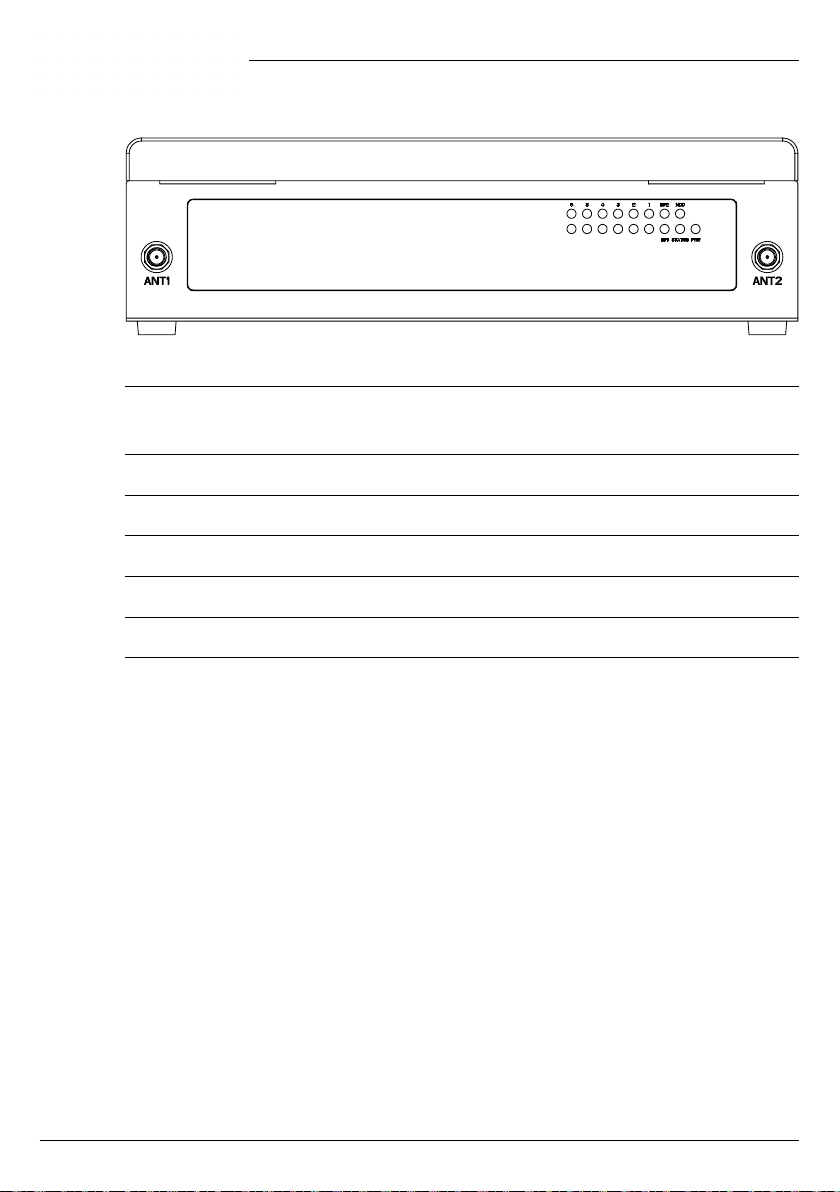
1.3.2. Front I/O Panel
ANT1, ANT2 SMA Antenna Hole
Reserved for optional Wi-Fi / BT, 4G LTE antenna.
LED1~6 LAN1~6 Link/Active LED
BP1, BP2 LAN Bypass LED
HDD Storage Active LED
STATUS Status LED
PWR Power LED
Tabla de contenidos
Otros manuales de De oficina de Acrosser Technology

Acrosser Technology
Acrosser Technology AR-ES6050FLD Manual de lista de piezas

Acrosser Technology
Acrosser Technology AR-B1622 Manual de usuario

Acrosser Technology
Acrosser Technology AR-R8601 Manual de usuario

Acrosser Technology
Acrosser Technology AR-ES5432FL Manual de usuario

Acrosser Technology
Acrosser Technology AND-APL1N1FL Series Manual de usuario

Acrosser Technology
Acrosser Technology AR-B5630 Manual de usuario

Acrosser Technology
Acrosser Technology AR-ES0892FL Manual de usuario

Acrosser Technology
Acrosser Technology AIV-TGH7E Series Manual de usuario


