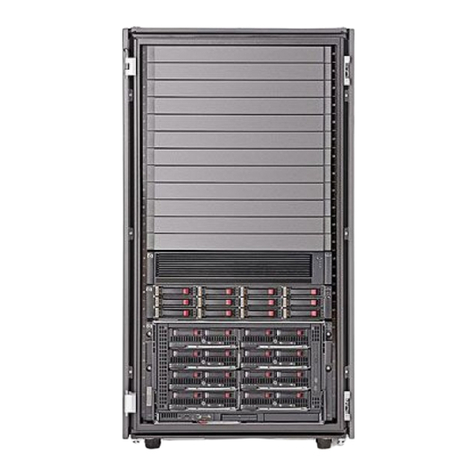
Acnodes DAS-208SA Manual de usuario

DAS-208SA Disk Array User Guide
DAS-208SA Disk Array
User Guide
For Serial-ATA to Ultra320 RAID Subsystem
v. 1.0

2
DAS-208SA Disk Array User Guide
The information in this guide may be changed without notice. We assume no
responsibility for any errors which may appear in this guide. Microsoft,
Windows and Windows logo are trademarks of Microsoft Corporation.
Copyright 2004. All rights reserved. No Part of the contents in this guide may
be transmitted or reproduced in any form or by any means without the written
permission of the manufacturer. Printed in Taiwan.
The revision date for this guide is Apr. 30, 2004
Version 1.0
FCC Statement
This equipment has been tested and found to comply with the limits for a Class
A digital device, pursuant to Part 15 of the FCC Rules. These limits are
designed to provide reasonable protection against harmful interference in a
residential installation.
This equipment generates and can radiate radio frequency energy and, if not
installed and used according to the instructions, may cause harmful
interference to radio communications. However, there is no guarantee that
interference will not occur in a particular installation. If this equipment does
cause harmful interference to radio or television reception, which is found by
turning the equipment off and on, the user is encouraged to try to correct the
interference by one or more of the following measures:
--Reorient or relocate the receiving antenna
--Increase the separation between the equipment and device
--Connect the equipment to an outlet other than the receiver
--Consult a dealer or an experienced radio/TV technician for assistance
CE Mark Warning
This is a Class A product. In a domestic environment, this product may cause
radio interference in which case the user may be required to take adequate
measures.

3
DAS-208SA Disk Array User Guide
Chapter 1 General Information
This chapter provides general information of the DAS-208SA Disk Array.
The following topics are covered in this chapter:
◆ Introduction
◆ Key Features & Benefits
◆ Unpacking Your SA-2081 Disk Array
◆ Components of DAS-208SA Disk Array
1.1 Introduction
The DAS-208SA is a Serial ATA to Ultra320 SCSI RAID (Redundant Array of
Independent Disks) Disk Array. By implementing sophisticated RAID
technology and unique cache algorithm, this disk array provides the best
protection for the data stored on the array.
And thanks to today’s powerful disk technology, one RAID system can now
provide the capacity more than 1TB in a large cabinet. This offers a wealth of
significant advantages that would be attractive to almost any serious PC users.
Equipped with eight half-height 3.5” disk drives in hot-swappable canisters, the
DAS-208SA Disk Array provides mass data capacity and easy installation for
the individual customers. In addition, this RAID system has dual host channels
and high availability software that ensures 24 hours a day, seven days a week
of nonstop service capability.
Throughout this manual, the DAS-208SA Disk Array may be referred to as
DAS-208SA,or simply as Disk Array.

4
DAS-208SA Disk Array User Guide
1.2 Key Features and Benefits
Advanced LCD display panel
Four easy-to-use push buttons on front panel (▲(up), ▼(down) ,,
ENTER, ESC)
Selectable multiple RAID levels (Level 0,1, 3,5,10, 30, 50, JBOD)
2 Ultra 320 SCSI channels
15 driver bays 1” disk drive
Intel 80321 IO processor
Up to 1GB cache memory
3U compact tower design for more capacity
Cable-less design for better reliability
Swappable design for faster and easier maintenance
Multiple alter design for easier management
1.3 Unpacking Your DAS-208SA
Before removing your DAS-208SA from the shipping carton, you should
virtually inspect the physical condition of the container. The package of
DAS-208SA should appear in good condition when you first received it. If any
damaged found, do not remove the components. Contact the place of
purchase for further instructions.
If the shipping container appears to be in good condition, unpack it and verify
that the DAS-208SA and accessories are all there and in good condition.
Your DAS-208SA package should contain the following items:

5
DAS-208SA Disk Array User Guide
If any item is missing or damaged, please contact the place of purchase for
assistance. Retain the shipping container and packing material for reuse.
Before you begin to use your DAS-208SA, read section 1.4
Components of the DAS-208SA to learn more about the major
components or your RAID Disk Array.
Items Quantity
DAS-208SA unit 1
Drive Canister 8
Ultra320 SCSI Cable 1
Power Cord 2
RS-232 Cable 1
User Menu CD 1
Spare screws 40
Note

6
DAS-208SA Disk Array User Guide
1.4 Components of the DAS-208SA
This section describes the major components of the DAS-208SA, including its
front panel, LED display panel and rear panel. Read this section before you
start to use your RAID Disk Array Subsystem.
1.4.1 The Front Panel
Please refer to Figure 1-1 for the front panel of DAS-208SA Disk Array in the
following page.
1.4.2 LCD Display Panel and Control Buttons
The control panel of the DAS-208SA consists of a LCD display panel and 4
control buttons. This is where you will check the configuration and status of the
disk array. Figure1-2 shows the general information, such as RAID status,
thermograph, and fan temperature of the Disk Array. Meanwhile, control
buttons allow you to use Up (▲) and Down (▼) arrow keys to go through the
information on the LCM display screen. The ENTER button is used to enter the
option you have selected and the ESC button can take you back to the
previous menu. Please refer to Table 1-1 for detailed information of each status.

7
DAS-208SA Disk Array User Guide
For the status of each hard disk in Disk Array, please refer to Table 1-2.
Meanwhile, for fans and power error messages, alarm and indicators shown
on the LCD, please refer Table 1-3.
Table 1-1
Items Status Description
DAS-208SA Disk Array Indicates the model name of the
product
Installed Memory 128 Mbytes Indicates the capacity of the memory
CPU Type: 80321 4 Ultra320 Indicates the CPU model and
interface
Firmware Version v. 1.0 Indicates the version of the firmware
Serial Number: xxxxxxxxxxxxx Indicates the serial number of the
RAID controller
FAN1 RPM*Indicates the speed of Fan 1
FAN2 RPM*Indicates the speed of Fan 2
Temp 1 Indicates the temperature of the
upper part of the backplane.
Temp 2 Indicates the temperature of the
central part of the backplane.
Temp 3 Indicates the temperature of the
bottom part of the backplane.
ZzZZZzzz Indicates the random display when
parity checking
z A single “z” appearing at the right end
of the LCD panel (eg. 11112222z )
indicates that memory is not enough
during read & write.
*Please note that RPM under 2200 will be considered fan failure; replace
the fan immediately for better performance.

8
DAS-208SA Disk Array User Guide
Table 1-2
Hard Disk Status Letter shown on LCD
JBOD J
Disk Offline X
Disk Rebuilding A
Disk Removed R
Spare Disk S
Disk Initializing I
RAID Set 1 1
RAID Set 2 2
RAID Set 3 3
RAID Set 4 4
Read/Write W
Table 1-3
Item Error messages shown on LCD
LCD show Fan module#1 fail “Fan1 Failed”
LCD show Fan module#2 fail “Fan2 Failed”
LCD show power module#1 fail “PW1 Malfunction”
LCD show power module#2 fail “PW2 Malfunction”

9
DAS-208SA Disk Array User Guide
1.4.3 The Rear Panel
The rear panel of DAS-208SA is shown below.
Refer to Table 1-4 for detailed description of each part on the rear panel of
DAS-208SA.
Table 1-4
Part Description
Modem port This is where you can connect your disk array to a
modem.
Console port This is a RS-232 serial port, allowing you to connect to a
terminal or a PC. You may configure this disk array, and
upgrade the firmware and RAID.
Primary and
Secondary Channels
DAS-208SA has two host channels—primary and
secondary—to allow you to connect to SCSI devices.
Fan There are 2 fans located at the rear of the system unit.
They are designed to provide good airflow and heat
dissipation.
Power The disk array comes with 2 hot-swappable power

10
DAS-208SA Disk Array User Guide
supplies located at the rear of the subsystem. If two of
the power supplies are in use and one fails to function,
an audible alarm will warn you of the power failure.
Power Cord Slot These are where you connect power cords to power
socket.
Tabla de contenidos
Manuales populares de Sistema de matriz de discos de otras marcas

Fujitsu
Fujitsu ETERNUS DX60 S2 Manual de usuario

Accom
Accom WSD/2XTREME Manual de usuario

HP
HP Compaq Presario,Presario 4400 Instrucciones de uso

ATTO Technology
ATTO Technology Diamond Storage Array V-Class Manual de usuario

National Instruments
National Instruments RMX-8268 Manual de usuario

Overland Tandberg
Overland Tandberg SnapServer DX1 Manual de usuario