ABB 2RCA035147 Manual de usuario

—
REF42plus HMI Cutting Tool
Operating Guide

2
Copyright
This document and parts thereof must not be
reproduced or copied without written permission
from ABB, and the contents thereof must not be
imparted to a third party, nor used for any
unauthorized purpose.
The software or hardware described in this
document is furnished under a license and may be
used, copied, or disclosed only in accordance with
the terms of such license.
Trademarks
ABB is a registered trademark of ABB Group.
All other brand or product names mentioned in
this document may be trademarks or registered
trademarks of their respective holders.
Warranty
The warranty conditions are defined in the
transaction related Terms and Conditions of the
Contract. Improper use, neglecting the necessary
maintenance or use outside the defined
application area will result in the warranty to
expire. The equipment can be opened by
authorized personnel only. If this practice is
not followed, the warranty expires.
Disclaimer
The data, examples and diagrams in this manual
are included solely for the concept or product
description and are not to be deemed as a
statement of guaranteed properties. All persons
responsible for applying the equipment
addressed in this manual must satisfy themselves
that each intended application is suitable and
acceptable, including that any applicable safety
or other operational requirements are complied
with. In particular, any risks in applications where
a system failure and/or product failure would
create a risk for harm to property or persons
(including but not limited to personal injuries
or death) shall be the sole responsibility of the
person or entity applying the equipment, and
those so responsible are hereby requested to
ensure that all measures are taken to exclude or
mitigate such risks. This product and its
accessories shall be assembled and used by
trained professionals only.
This document has been carefully checked by
ABB but deviations cannot be completely ruled
out. In case any errors are detected, the reader
is kindly requested to notify the manufacturer.
Other than under explicit contractual
commitments, in no event shall ABB be
responsible or liable for any loss or damage
resulting from the use of this manual or the
application of the equipment.
Conformity
This product is in conformity with the
following standards or normative documents:
DIN EN 60745-1, DIN EN 292 Part 1 and 2,
EN 294, EN 349, EN 60204-1, EN 28662-1,
EN 50081-1, EN 50082-2, EN 60529 in accordance
with the regulations of directives 98/37/EEC,
89/335/EEC.

3
—
Table of contents
04 1. Panel cut-out dimensions
05 2. Cutting order
06 3. Cutting tool overview
07 – 08 4. Assembling the cutting tool
09 5. Preparations
10 – 12 6. Operating the cutting tool on
a horizontal edge (up/down)
13 7. Operating the cutting tool on
a vertical edge
14 7.1 Vertical cut Alternative A
(left/left)
15– 16 7.2 Vertical cut Alternative B
(left/right)
17 7.3 Vertical cut Alternative C
(right/right)
18 – 19 8. Finalizing your work
20– 21 9. Finishing your work

4
—
1. Panel cut-out dimensions
Horizontal center line remains the same for existing and
for the new HMI cut-out.
Minimum clearance required around the existing cut-out
without offcut gatherer: 10 mm (Y1 = Y2 = X1 = X2) as
illustrated.
Note! Minimum clearance required around the existing
cut-out with offcut gatherer is: 20 mm on both sides (X1, X2)
and top (Y1) and 50 mm on the bottom (Y2).
If offcut gatherer is not used, protect the personnel and
the switchgear panel from flying offcuts.
The old v4 HMI The new v5 HMI
Panel cut-out
206 ± 1
121 ± 1
241 ± 1
140.5 ± 0.5
Panel cut-out
241 ±1
206 ±1
121 ± 1
140.5 ±0.5
X1 X2
Y1Y2

5
—
2. Cutting order
The cutting order illustrated here is from the HMI front. There are three different cutting order alternatives (A, B, C)
depending on the space availability on the panel. Horizontal up/down cut-out is possible only as shown in the pictures
as the cutting head makes parallel cut-outs.
X1 X2Y1
Y2
10
11
12
13
6
1 2 3 4 5
7
8
9
X1 X2
Y1
Y2
6
1 2 3 4 5
7
8
9
10
11
12
13
X2
X1 Y1
Y2
10
11
12
13
6
7
8
9
1 2 3 4 5
Alternative A: For vertical cut-out
wherein extension is possible only on
the left side.
A
B
C
Alternative C: For vertical cut-out
wherein extension is possible only on
the right side.
Alternative B: For vertical cut-out
wherein extension is possible on
both sides.
Horizontal up/down cutting
Vertical right cutting
Vertical left cutting
Horizontal up/down cutting
Vertical right cutting
Vertical left cutting

6
—
3. Cutting tool overview
A file (hand tool) is needed for finishing the work before
a new HMI installation.
Note! The file is not included in the cutting tool kit.
1Cutting head REF 542plus
2Offcut gatherer
3Feed rod
4Die
5Coil springs (4 pcs)
6Punch
7Power unit
8Vent lever
9Operating switch
10 Battery
11 Battery charger

7
—
4. Assembling the cutting tool
The cutting tool kit contains 4 pcs of coil springs.
Ensure that the die and the punch have the same
marking ”REF 542plus” on the same side. This shows
that the parts are correctly positioned.
Install the coil springs (4 pcs) between the die
and the punch.
Press the die and the punch firmly together.

8
Insert the feed rod through the die and
the punch assembly.
Add offcut gatherer by using screws (4 pcs).
Tighten the feed rod to the power unit.
After assembling the cutting head, insert the battery
to the power unit. The battery can be inserted from
either side.

9
—
5. Preparations
For your safety, keep your hands on the power unit,
never on the cutting head.
Beware of the sharp edges! Use safety gloves,
protective glasses, hearing protectors and a hard hat.
Start by removing the existing HMI.
Refer to safety instructions before starting any operations
with the cutting tool.
The cutting can be performed from the front or the back of
the panel door. It is recommended to make the cut-out from
the front side of the door panel to avoid sharp edges and
ensuring smooth installation of the new HMI.
The guidelines in this document are also based on making
the cut-out from the front. The low-voltage compartment
must be de-energized during installation.
Ensure that there is enough space to operate the
cutting tool in all intended directions. Check the space
required by the replacement HMI and for the wiring.
The cutting tool operation needs space around the
cut-out, as shown in section 1.

10
—
6. Operating the cutting tool on a horizontal
edge (up/down)
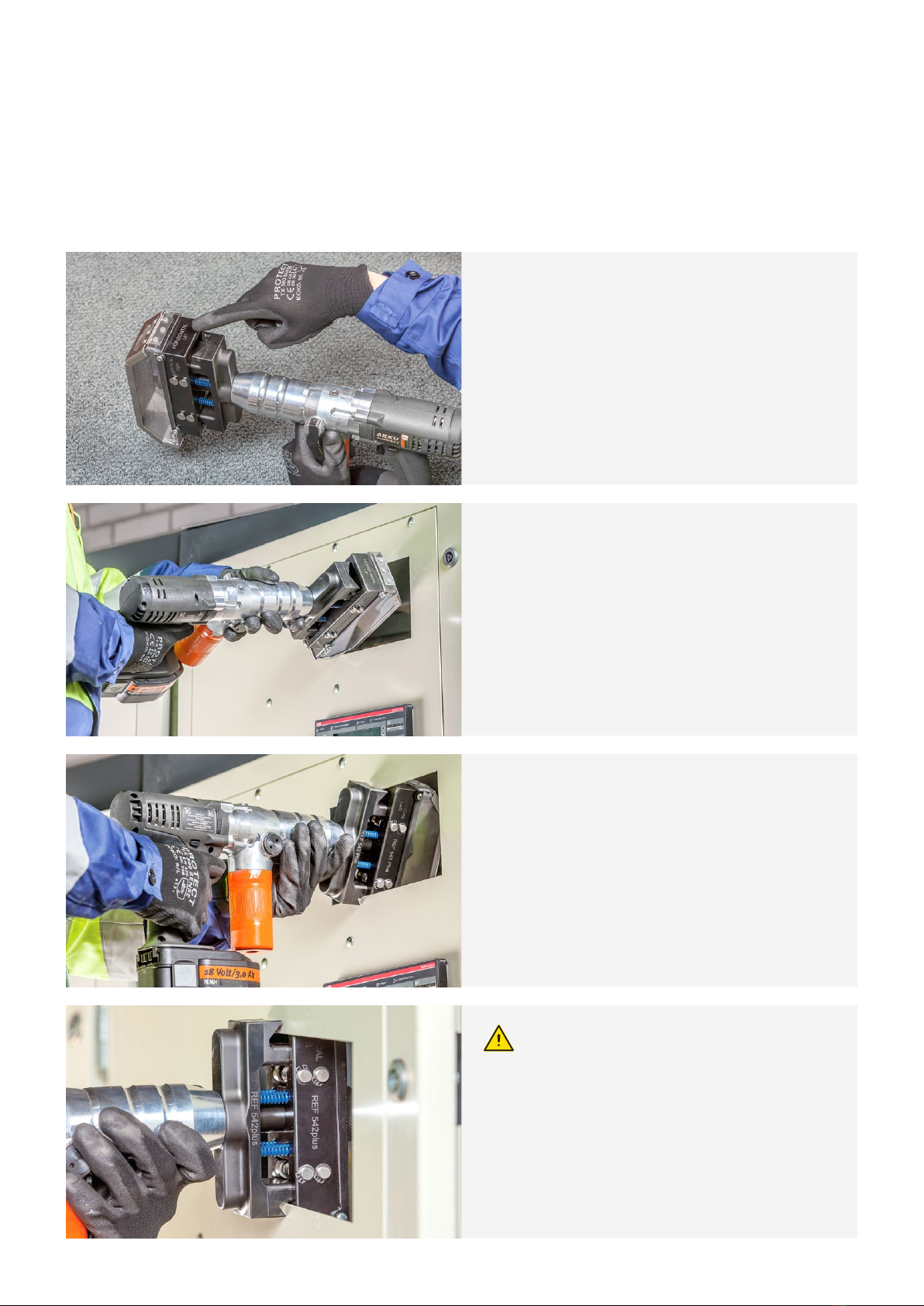
To set the cutting head for horizontal guiding: turn the
cutting head to the “HORIZONTAL UP” position so that
“HORIZONTAL UP” marking is visible at the top.
Use the “HORIZONTAL UP” position with cuttings (1-5)
as shown in the section 2.
The cutting tool cuts horizontally from the top and
the bottom at the same time.
Ensure that the cutting head is set in the correct
position, facing “HORIZONTAL UP” at the top.
To cut horizontally, swing the cutting head and place
the cutting head guiding against the bottom and the
left side of the opening.
Place the cutting head exactly on the cut-out
edge so that it is resting against the bottom.
Tabla de contenidos
Otros manuales de Cortador de ABB
Manuales populares de Cortador de otras marcas

Milwaukee
Milwaukee HEAVY DUTY M12 FCOT Manual de usuario

Makita
Makita DCS552 Manual de usuario

SignWarehouse.com
SignWarehouse.com Bobcat BA-60 Manual de usuario

Makita
Makita 4112HS Manual de usuario

GEISMAR STUMEC
GEISMAR STUMEC MTZ 350S Manual de usuario

Hitachi
Hitachi CM 4SB2 Guía de solución de problemas