4B Binswitch BS1V3FC Manual de usuario

www.go4b.com/usa
Binswitch
CAPACITANCE POINT LEVEL SWITCH
INSTALLATION INSTRUCTIONS
OPERATION MANUAL
Part No’s. BS1V3FC, BS1V4FC, BS1V6FC
APPROVED
Class II Div. 1
CUS
®


CUSTOMER SAFETY RESPONSIBILITIES Page 4 - 5
PRODUCT OVERVIEW Page 6
SPECIFICATIONS Page 6
DIMENSIONS Page 6
INSTALLATION Page 7
STANDARD WIRING DIAGRAM Page 8
SENSOR CALIBRATION Page 8
TESTING AND COMMISSIONING Page 9
TROUBLESHOOTING GUIDE Page 9
PARTS & ACCESSORIES Page 10
PRODUCT WARRANTY Page 11
TABLE OF CONTENTS

PAGE 4
Dear 4B Customer:
Congratulations on your purchase. 4B appreciates your business and is pleased you
have chosen our products to meet your needs.
Please read in its entirety and understand the literature accompanying the product before
you place the product into service. Please read the safety precautions carefully before
operating the product. With each product you purchase from 4B, there are some basic
but important safety considerations you must follow to be sure your purchase is permitted
to perform its design function and operate properly and safely, giving you many years
of reliable service. Please read and understand the Customer Safety Responsibilities
listed below. Failure to follow this safety directive and the Operation Manuals and other
material furnished or referenced, may result in serious injury or death.
SAFETY NOTICE TO OUR CUSTOMERS
A. In order to maximize efciency and safety, selecting the right equipment for each
operation is vital. The proper installation of the equipment, and regular maintenance
and inspection is equally important in continuing the proper operation and safety
of the product. The proper installation and maintenance of all our products is the
responsibility of the user unless you have asked 4B to perform these tasks.
B. All installation and wiring must be in accordance with Local and National Electrical
Codes and other standards applicable to your industry. (Please see the article
“Hazard Monitoring Equipment Selection, Installation and Maintenance” at www.
go4b.com.) The installation of the wiring should be undertaken by an experienced
and qualied professional electrician. Failure to correctly wire any product and/or
machinery can result in the product or machine failing to operate as intended, and can
defeat its design function.
C. Periodic inspection by a qualied person will help assure your 4B product is
performing properly. 4B recommends a documented inspection at least annually and
more frequently under high use conditions.
D. Please see the last page of this manual for all warranty information regarding this
product.
CUSTOMER SAFETY RESPONSIBILITIES
1. READ ALL LITERATURE PROVIDED WITH YOUR PRODUCT
Please read all user, instruction and safety manuals to ensure that you understand your
product operation and are able to safely and effectively use this product.
2. YOU BEST UNDERSTAND YOUR NEEDS
Every customer and operation is unique, and only you best know the specic needs
and capabilities of your operation. Please call the 24-hour hotline at 309-698-5611 for
assistance with any questions about the performance of products purchased from 4B.
4B is happy to discuss product performance with you at any time.

PAGE 5
3. SELECT A QUALIFIED AND COMPETENT INSTALLER
Correct installation of the product is important for safety and performance. If you have
not asked 4B to perform the installation of the unit on your behalf, it is critical for the
safety of your operation and those who may perform work on your operation that you
select a qualied and competent electrical installer to undertake the installation. The
product must be installed properly to perform its designed functions. The installer should
be qualied, trained, and competent to perform the installation in accordance with Local
and National Electrical Codes, all relevant OSHA Regulations, as well as any of your
own standards and preventive maintenance requirements, and other product installation
information supplied with the product. You should be prepared to provide the installer
with all necessary installation information to assist in the installation.
4. ESTABLISH AND FOLLOW A REGULAR MAINTENANCE AND INSPECTION
SCHEDULE FOR YOUR 4B PRODUCTS
You should develop a proper maintenance and inspection program to conrm that your
system is in good working order at all times. You will be in the best position to determine
the appropriate frequency for inspection. Many different factors known to the user will
assist you in deciding the frequency of inspection. These factors may include but are not
limited to weather conditions; construction work at the facility; hours of operation; animal
or insect infestation; and the real-world experience of knowing how your employees
perform their jobs. The personnel or person you select to install, operate, maintain,
inspect or perform any work whatsoever, should be trained and qualied to perform these
important functions. Complete and accurate records of the maintenance and inspection
process should be created and retained by you at all times.
5. RETAIN AND REFER TO THE OPERATION MANUAL FOR 4B’S SUGGESTED
MAINTENANCE AND INSPECTION RECOMMENDATIONS
As all operations are different, please understand that your specic operation may require
additional adjustments in the maintenance and inspection process essential to permit
the monitoring device to perform its intended function. Retain the Operation Manual
and other important maintenance and service documents provided by 4B and have
them readily available for people servicing your 4B equipment. Should you have any
questions, please call the free 24-hour hotline number (309-698-5611).
6. SERVICE REQUEST
If you have questions or comments about the operation of your unit or require the unit to
be serviced please contact the 4B location who supplied the product or send your request
via fax (309-698-5615) or call us via our 24-hour hotline number in the USA (309-698-
5611). Please have available product part numbers, serial numbers, and approximate
date of installation. In order to assist you, after the product has been placed into service,
complete the online product registration section which is accessed via our website
www.go4b.com/usa.

PRODUCT OVERVIEW
The Binswitch Sensor detects level or plug situations for bulk granular solids or liquids in tanks, bins, or
silos and can be used as a plug or choke detector in chutes, conveyors and elevator legs. A two color LED
shows material present or absent.
All models have a polycarbonate housing that is corrosion and abrasion resistant, dust-tight, and waterproof.
SPECIFICATIONS
Model Power Supply - 12 VDC (BS1V3FC) / 24 VDC (BS1V4FC) / 110 to 240 VAC (BS1V6FC)
Supply Tolerance - -15% to +10%
Power Consumption - 30 mA
Fuse - 5 amp maximum
Operating Temperature - -13°F (-25°C) to 158°F (70°C)
Sensing Range - 1” (25 mm) typical
Output - Voltage free relay: 1 pole normally open, 1 pole normally closed
Contact Rating - 3 amp, 240 VAC, non-inductive
Fail Safe - Relay reverts to de-energized state on power failure
Calibration Control - Screw potentiometer (Bin must be empty when calibrating)
LED Indication - Red on - material absent , Red off - material present
Cable - 6 ft. (2 m) - 5 x 20 AWG conductors
Enclosure - Nylon
Weight - 10.5 ounces
Protection - IP67 - NEMA 6 and 6P (dust tight and water resistant)
Approvals -
CSA Class II Division 1 Groups E, F and G (USA & Canada)
GOST-R (Russia)
ATEX & CE Versions Available (Europe)
DIMENSIONS
PAGE 6
6-1/8”
155 mm
1-3/16”
30 mm
M30 x 1.5 x 10 mm Threads
LED
Calibration
Control
Screw
6 ft. (2 mm) Cable
5 x 20 AWG Conductors
6.2 mm Overall Jacket Diameter

INSTALLATION
The Binswitch may be mounted horizontally or vertically. 4B offers two mounts, SMP or the BMPG36
(see illustrations below). If the Binswitch must be located in the path of an abrasive material, use in
conjunction with the Binswitch Abrasion Shield (BAS). It is important that the Binswitch is not located in
the direct ow path of any abrasive material.
Three alternative mounting methods are available for the Binswitch, see Fig. A, B and C below:
PAGE 7
Fig. A -
Cut and drill holes as shown and
attach mounting plate (SMP)
using six 5/16” x 3/4” (M8 x 20)
bolts, nuts and washers or use
existing mounting plate. Slide
Binswitch into position and
secure by tightening mounting
plate adaptor (BMPA).
DO NOT OVERTIGHTEN
Fig. B -
Cut holes as shown and attach
mounting gland (BMPG36) using
locknut. Slide binswitch into
position and secure using clamp.
DO NOT OVERTIGHTEN
Fig. C -
Cut and drill holes as shown and
attach mounting plate (SMP)
using six 5/16” x 3/4” (M8 x 20)
bolts, nuts and washers or use
existing mounting plate. Slide
Binswitch into abrasion shield
(BAS) and tighten BAS into
mounting plate (BMPA).
DO NOT OVERTIGHTEN
Minimum Projection
3/8” (10 mm)
Minimum Projection
3/8” (10 mm)
Wall / Casing
Wall / Casing
7” (178 mm)
7” (178 mm)
5-15/16”
(150 mm)
5-15/16”
(150 mm)
Mounting Plate (SMP)
Binswitch
Binswitch
Binswitch
3/4” NPT Conduit
Adaptor (A34NPT)
3/4” NPT Conduit
Adaptor (A34NPT)
3/4” NPT Conduit
Adaptor (A34NPT)
Mounting Plate Adaptor (BMPA)
1-1/4” Thread
Minimum Projection
3/8” (10 mm)
Wall / Casing
Mounting Gland (BMPG36)
Locknut
2”
(50 mm)
Binswitch Abrasion Shield (BAS)
1-1/4” Thread

STANDARD WIRING DIAGRAM
All wiring must be In accordance with local and national electrical codes and should be undertaken by
an experienced and qualied electrician.
Always use dust/liquid tight exible metal conduit with approved ttings to protect the sensor cables.
Use rigid metal conduit to protect the cables from the sensors to the control unit. Conduit systems can
channel water due to ingress and condensation directly to sensors and sensor connections which over
time will adversely affect the performance of the system. As such, the installation of low point conduit
drains is recommended for all sensors.
SENSOR CALIBRATION
1. The unit must be installed before calibration takes place, connect the Binswitch to power and a
suitable control unit
2. Check that no material is around the tip of the Binswitch
3. Carefully turn the calibration control screw fully counterclockwise until red LED is “ON”. This will set
the sensor sensitivity to zero.
4. With no material around the tip of the Binswitch, rotate the control screw clockwise until the LED
goes “OFF”. Then slowly rotate the control screw counterclockwise until the LED goes “ON”.
Finally, to set the sensor sensitivity to the optimum setting, turn the control screw ten degrees
counterclockwise.
5. Start the process to cover the Binswitch with material and check that the red LED goes “OFF” and
that the Binswitch shuts down the equipment as required.
6. Remove the material from the Binswitch and check that the red LED comes “ON” and that the
Binswitch operates the equipment as required.
7. The Binswitch is now set and ready for use.
PAGE 8
WARNING
If the material being monitored creates dust, you may need to re-calibrate the sensor. Dust build up
on the Binswitch will affect the initial calibration. Do NOT remove the Binswitch and clean off the
dust. To adjust the sensor to the dust build up, turn the control screw slowly counterclockwise until
the LED turns “ON”.
Always check that the Binswitch detects material after the sensitivity has been adjusted.
NOTE
The total sensitivity setting of the control screw is four full rotations (clockwise and counterclockwise).
To prevent damage to the control screw, the screw will continue to rotate after four full rotations.
Turning the control screw counterclockwise decreases the sensor sensitivity, turning clockwise
increases the sensitivity.
Brown (Live or +VDC)
Black 3 / Orange Trace
Black 1
Black 2 / Red Trace
Blue (Neutral or 0VDC)
Contacts Shown in
De-Energized Condition

WARNING
If the system does not immediately shutdown as expected or alarm as required, then remove the
machine from service until the problem has been diagnosed and corrected.
TESTING AND COMMISSIONING
1. Check that the unit is correctly installed (see standard wiring diagram).
2. After going through the sensor calibration steps, the red LED should be “ON”.
3. Introduce material to the Binswitch. If calibrated correctly, the Binswitch will activate when material
has been detected. Machinery shut down will depend on your specic monitoring setup. 4B
recommends an instant shutdown when maximum ll level or a plug condition has been detected.
PAGE 9
TROUBLESHOOTING GUIDE
FAULT REMEDY
Unexpected Operation Re-calibrate sensor, if problem continues contact 4B.
False / Inconsistent Readings
1. Check that sensor is not in the direct ow of material, and
remove from ow if necessary.
2. If sensor is coated in dust, re-calibrate by following calibration
Instructions.
Sensor Not Detecting Material
1. If monitoring different types of materials, calibrate the sensor
Sensitivity to the lightest material being monitored.
2. Re-calibrate sensor, if problem continues contact 4B.

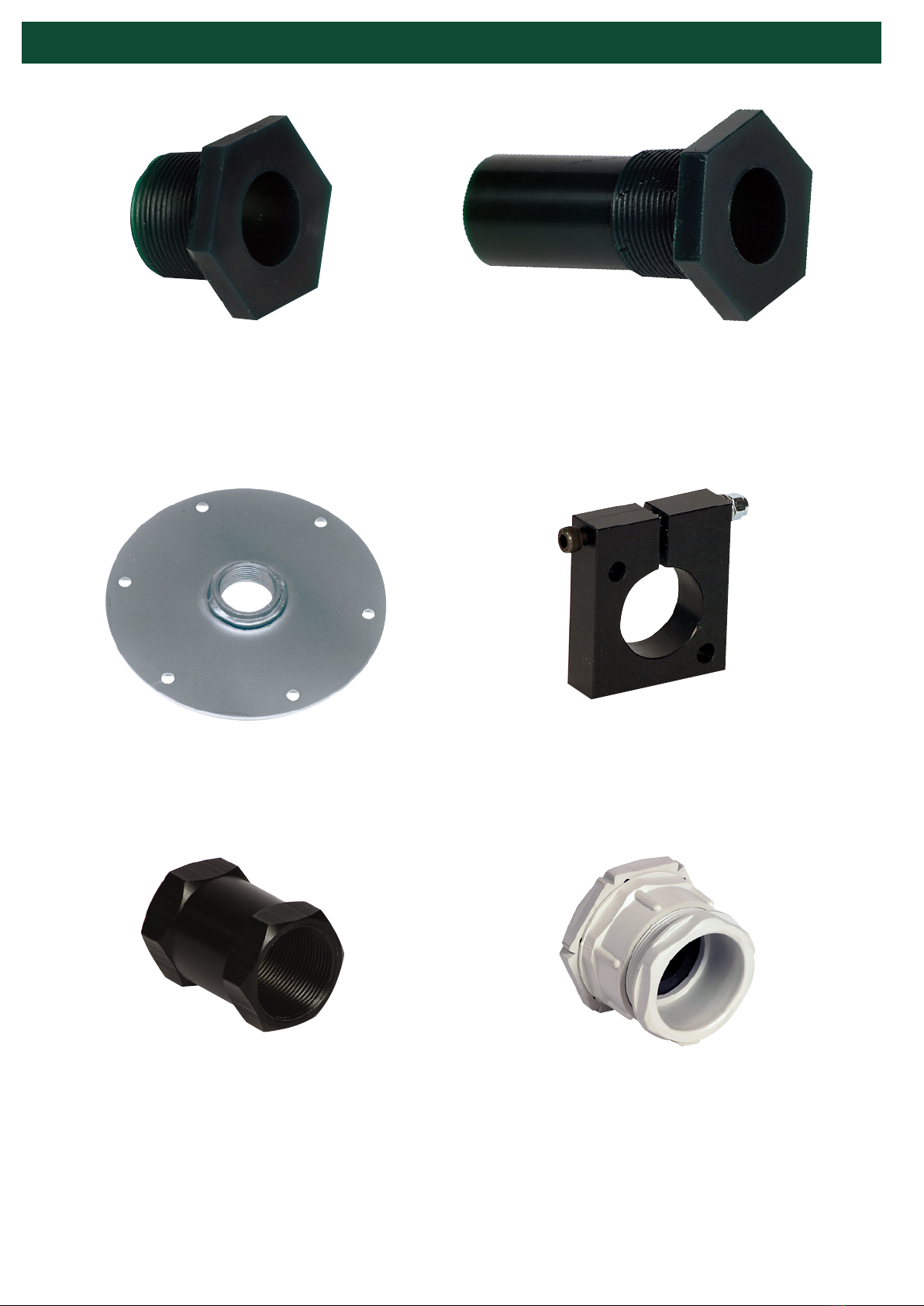
PARTS & ACCESSORIES
PAGE 10
SMP MOUNTING PLATE
Zinc plated steel with 1-1/4” NPT
coupling (available in stainless steel)
BMPG36 GLAND MOUNT
Plastic gland mount
BSM3 CLAMP MOUNT
HDP clamp style mount
A34NPT CONDUIT ADAPTER
Anodized aluminum 30 mm to
3/4” NPT conduit adapter
BMPA MOUNT
Urethane compression t-
ting mount with 1-1/4” NPT
external thread
BAS ABRASION SHIELD
Urethane abrasion shield/
mount for high-abrasion or
liquid applications
Este manual sirve para los siguientes modelos
2
Tabla de contenidos
Otros manuales de Cambiar de 4B