
ZoneVu FUSION-AUDIT-ZVK Manual de usuario

FUSION-AUDIT-ZVK INSTALLATION GUIDE
FUSION-AUDIT-ZVK
FUSION-AUDIT-ZVK Installation Guide
Issue 01

Contents
INTRODUCTION ......................................................................................................................................................................................................... 3
FUSION-AUDIT-ZVK OVERVIEW .............................................................................................................................................................................. 4
INSTALLATION........................................................................................................................................................................................................... 5
CONFIGURATION MODE........................................................................................................................................................................................... 7
REGISTRY CONFIGURATION ................................................................................................................................................................................... 9
ZSC-1000PLUS CONFIGURATION.......................................................................................................................................................................... 10
USER CONFIGURATION.......................................................................................................................................................................................... 11
ZVK CONFIGURATION ............................................................................................................................................................................................ 12
LOGGED COMMANDS............................................................................................................................................................................................. 13
REQUIRED SOFTWARE .......................................................................................................................................................................................... 14
SERVICING AND SUPPORT.................................................................................................................................................................................... 15
WARRANTY.............................................................................................................................................................................................................. 16
MINIMUM SYSTEM REQUIREMENTS..................................................................................................................................................................... 18
APPENDIX A............................................................................................................................................................................................................. 19
MEYERTECH LIMITED


FusionAlarm Installation Guide Issue 01 Page 3 of 21
Introduction
Thank you for purchasing Meyertech’s FUSION-AUDIT-ZVK
software. Please read this user guide prior to using FUSION
Audit ZVK.
What is FUSION-AUDIT-ZVK?
FUSION-AUDIT-ZVK is a software application developed
by Meyertech, which will provide an auditable log of activities
on Meyertech ZVK keyboards, 3rd parties connected to
ZSC-250s, Internal events on the ZSC such as alarms,
alarm events, timed events and sequences without the
requirement of running FUSION.
FUSION-AUDIT-ZVK communicates with the CCTV
systems Site Controller to produce a log of operator
activity when using Meyertech’s Site mode and Classic mode.
The information in this manual is believed to be accurate and reliable. However,
Meyertech Limited assumes no responsibility or liability for its use, or for any
infringement of patents or other rights of third parties, which may result from its
use. No license is granted by implication or otherwise under any patent or other
rights of Meyertech. All specifications are subject to change without prior notice.
MEYERTECH LIMITED are committed to continuous product development and
therefore reserve the right to change specifications without notice.
©2005-6 ALL RIGHTS RESERVED.
KEY FEATURES
•
Command auditing of the Meyertech
keyboards, 3rd Party connections, Alarms,
A
larm Events, Timed Events and
Sequences
• FusionAudit compatible
• Fusion compatible
• Will operate as a background process on
your Management PC or Fusion WS
The features described in this manual refer to :
Version 1.0.0.0 of the FUSION-AUDIT-ZVK Application
Meyertech, the Meyertech logo, Security with Vision, FUSION, the FUSION logo, ZoneVu, the ZoneVu logo are either registered trademarks
or trademarks of Meyertech limited incorporated in the United Kingdom and/or other countries.
MEYERTECH LIMITED
FUSION-AUDIT-ZVK Installation Guide Issue 01 Page 4 of 21
FUSION-AUDIT-ZVK Overview
Workstation RS232 serial ports
Access is required to a dedicated serial port, through which the application communicates with the Meyertech Site Controller.
See installation diagram overleaf.
Operating Mode
FUSION-AUDIT-ZVK is an application that operates in the background on your PC or Workstation.
Once the application is configured and running no user input is required.
IMPORTANT !
Logging of keyboard activity will only occu
r
whilst the Fusion Command Audit application i
s
running.
MEYERTECH LIMITED
FUSION-AUDIT-ZVK

FUSION-AUDIT-ZVK Installation Guide Issue 01 Page 5 of 21
Installation
ZSC-1000
ZoneVu
FUSION-WS
Fusion Audit ZVK
and Fusion Audit
ZVK-77
ZVK-77
RS232
Basic Installation - No Fusion Workstations
ZSC-1000
ZoneVu
FUSION-WS
FUSION
ZVK-77
ZVK-77
RS232
Advanced Installation - Fusion Workstations
ZSC-250
ZoneVu FUSION-WS
FUSION
Fusion Audit ZVK
FUSION-WS
FUSION-AUDIT-ZVK
FusionAudit
Ethernet
PC2ZVK
PC2ZVK
RS232
RS232
RS232
MEYERTECH LIMITED
FUSION-AUDIT-ZVK Installation Guide Issue 01 Page 6 of 21
Background Mode
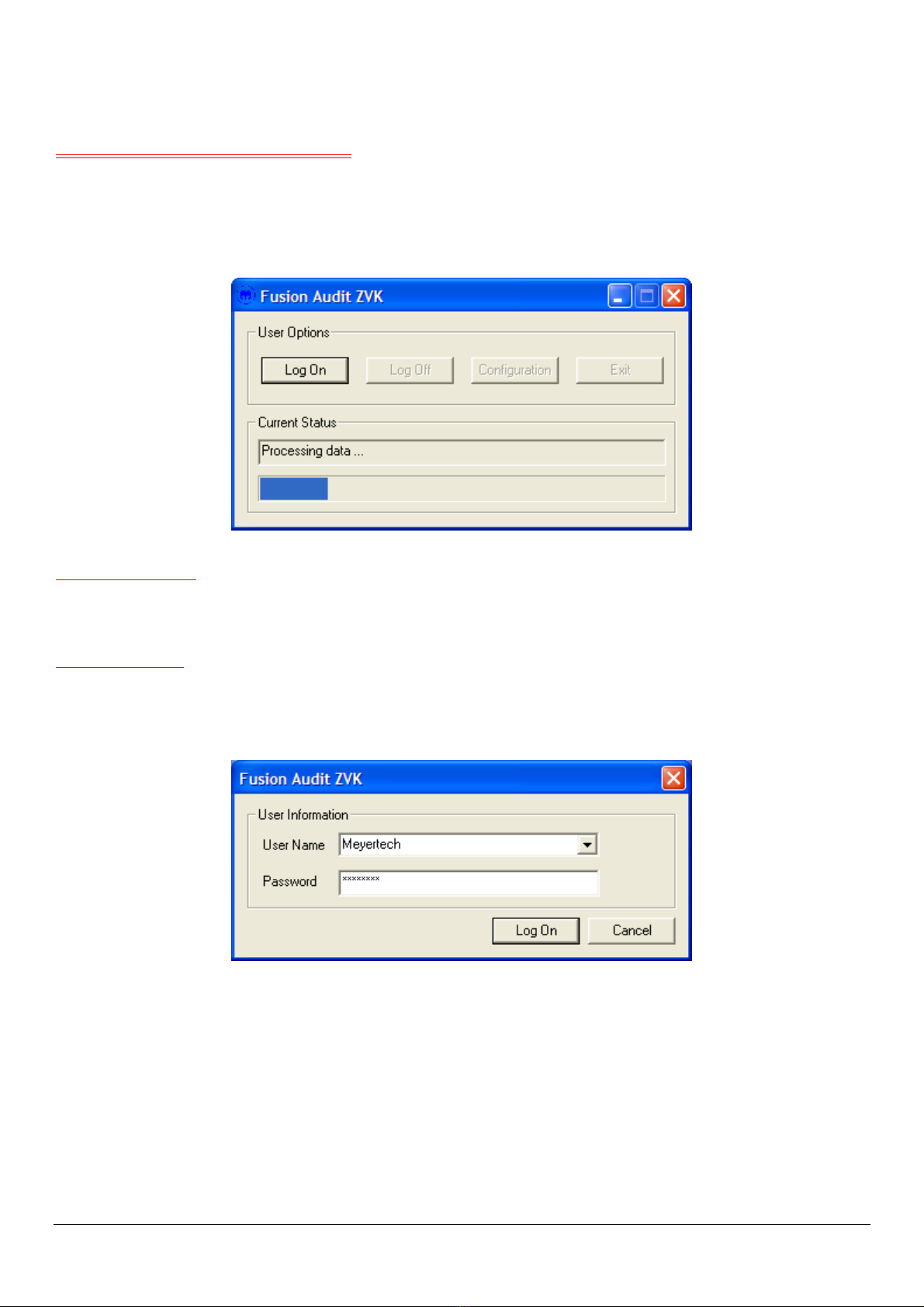
In this mode, the application is generating a log of all the relevant operator commands.
The commands are stored in a file that is understood by FusionAudit. FusionAudit, running independently will import and
truncate this log to produce the audit log.
Current Status
This dialog will report the current status of the connection between FUSION-AUDIT-ZVK and the Meyertech ZoneVu CCTV
system.
User Options
Before any user options can be selected, the operator must Log On. Log On is restricted to Manager and Engineer level
user accounts.
Log On – Use this button to display the Log On dialog.
FUSION-AUDIT-ZVK
Log Off – Use this button to Log Off and return FUSION-AUDIT-ZVK to its background operating mode.
Configuration – Use this button to display the configuration dialog (see next section).
Exit – Use this button to exit the application. Once the application is closed, keyboard activity will no longer be logged.
MEYERTECH LIMITED

FUSION-AUDIT-ZVK Installation Guide Issue 01 Page 7 of 21
Configuration Mode
Configuration mode is selected from background mode, by logging on then selecting the configuration option.
Only those operators of the correct login priority will be allowed to access the configuration.
Workstation
This number identifies the FUSION-AUDIT-ZVK application as a virtual workstation. It should therefore be different to any
other Fusion Workstations on the CCTV system. See the Registry Configuration section for further details.
Comm Port
A free serial communications port must be dedicated for use by FUSION-AUDIT-ZVK. See the Registry Configuration section
for further details.
User Configuration
This section is reserved for future development.
MEYERTECH LIMITED
FUSION-AUDIT-ZVK

FUSION-AUDIT-ZVK Installation Guide Issue 01 Page 8 of 21
MAC Address Barring
This section allows the user to specify which MAC addresses should not be audited by FUSION-AUDIT-ZVK. This is done
via the MAC Address Barring dialog.
This screen lists the available MAC addresses on the system. For each of the available MAC addresses there is a tick box
which the user can use to specify whether the selected MAC address is audited.
Once changes have been made the user can either save the changes and exit the dialog or exit without saving.
MEYERTECH LIMITED
FUSION-AUDIT-ZVK
FUSION-AUDIT-ZVK Installation Guide Issue 01 Page 9 of 21
Registry Configuration
The two registry entries that need to be configured for FUSION-AUDIT-ZVK can be modified by using the registry editor. The
registry editor can be launched by selecting the Start Menu in Windows and then clicking “Run…”
From the run prompt, type “Regedit.exe” to launch the registry editor.
The registry values that may need to be modified can be found under the following registry key:
HKEY_CURRENT_USER\Software\Meyertech\FUSION-AUDIT-ZVK
The registry values within this key are as follows:
Registry Key Description Default setting
Communications\Port Communications port 1
Workstation\Number Workstation number to use for Audit files 1
WARNING !
Editing the registry can cause problems to th
e
system. These steps must only be completed b
y
a competent computer user.
MEYERTECH LIMITED
FUSION-AUDIT-ZVK
Tabla de contenidos
Otros manuales de Hardware de red de ZoneVu


Manuales populares de Hardware de red de otras marcas

Matrix Switch Corporation
Matrix Switch Corporation MSC-HD161DEL Manual de usuario

B&B Electronics
B&B Electronics ZXT9-IO-222R2 Manual de usuario

Yudor
Yudor YDS-16 Manual de usuario

D-Link
D-Link ShareCenter DNS-320L Manual de usuario

Samsung
Samsung ES1642dc Instrucciones de uso

Honeywell Home
Honeywell Home LTEM-PV Instrucciones de montaje


